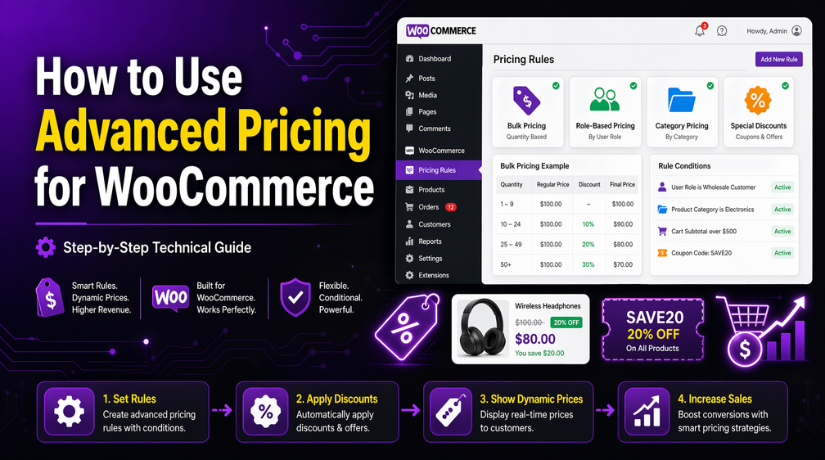
How to Use Advanced Pricing for WooCommerce (Complete Guide)
Table of Contents
- Introduction
- What Is Advanced Pricing in WooCommerce?
- Why Use Advanced Pricing in WooCommerce?
- Understanding Types of Advanced Pricing You Can Use in WooCommerce Stores
- Important Things You Should Prepare Before Setting Up Advanced Pricing for WooCommerce
- How to Use Advanced Pricing for WooCommerce (Step By Step Guide)
- Common Problems That Store Owners Often Face With Advanced Pricing in WooCommerce
- Best Practices That Help You Use Advanced Pricing in WooCommerce More Effectively
- Conclusion
Introduction
Running a WooCommerce store is not only about adding products and waiting for sales. You also need smart pricing that matches customer needs and buying habits. That is where Advanced Pricing for WooCommerce becomes very useful for store owners. It helps you create better offers without changing every product price by hand. You can set pricing based on quantity, user type, cart value, or special offers. This gives your store more control and gives buyers better reasons to order.
Many online stores now use WooCommerce dynamic pricing to stay more flexible. A fixed price does not work well for every customer or sale plan. Some buyers want bulk deals, while others expect member discounts or holiday offers. Smart pricing lets you respond to those needs in a simple way. It also helps you build better marketing campaigns for your products. When pricing feels fair and useful, customers are more likely to complete orders.
Store owners also use advanced pricing to improve customer retention over time. A good deal often brings buyers back for future purchases. It can also increase the total value of each shopping cart. For example, customers may buy more items to unlock a discount. This is one reason many businesses depend on strong WooCommerce pricing rules. These rules help store owners plan offers clearly and manage discounts with less manual work. Smart pricing is not only about lower prices. It is about using the right price at the right time.
What Is Advanced Pricing in WooCommerce?
Advanced pricing in WooCommerce means setting flexible pricing conditions for products. Instead of showing one fixed price to every buyer, you create rules. These rules decide when a customer gets a different price or discount. The price can change based on many conditions inside your store. This can include quantity, product type, customer role, or cart amount. In simple words, advanced pricing gives more pricing options than basic sales pricing.
Regular pricing is much more limited than advanced pricing options. In normal WooCommerce settings, you usually enter a standard price and sale price. That works well for simple discounts, but not for complex offers. If you want different prices for different situations, built-in pricing feels too basic. It does not fully support many real store needs. This is why many sellers look for better pricing tools. They want more freedom without doing everything manually each day.
With advanced pricing, you can build offers that match shopping behavior better. You can reward buyers who order more units from one product. You can show lower prices to wholesale buyers or members. You can also create offers for selected products or product groups. This is where terms like WooCommerce bulk pricing and WooCommerce tiered pricing become important. Bulk pricing gives discounts when buyers choose larger quantities. Tiered pricing changes the price step by step as order quantity grows. Both methods help encourage bigger purchases in a natural way.
Why Use Advanced Pricing in WooCommerce?
Offer Better Discounts Based on Product Quantity
Many customers buy more when they get a better price. This is why stores use WooCommerce bulk pricing to increase order size. A quantity-based offer gives shoppers a clear reason to add more items. It also helps the store sell more units in one order. This pricing method works well for daily-use, repeat-use, and wholesale products.
Create Special Prices for Different Customer Types
Not every customer should always see the same price. Some stores serve retail buyers, wholesale buyers, and members together. In such cases, WooCommerce price customization becomes very useful. It helps store owners create separate pricing for each user type. This makes the shopping experience more relevant and more professional.
Run Seasonal and Limited-Time Promotions Easily
Online stores often launch offers during holidays, festivals, and special campaigns. Managing these offers manually takes extra time and effort. With WooCommerce dynamic pricing, you can set rules for short-term promotions. This keeps the pricing process simple and more organized. It also helps avoid pricing mistakes after the offer ends.
Reward Loyal and Returning Customers
Returning customers are valuable for every online store. Giving them better pricing can improve trust and repeat sales. This is where WooCommerce special pricing helps a lot. You can create offers only for selected users or user groups. This makes loyal buyers feel valued and encourages them to purchase again.
Increase the Average Order Value of Your Store
Advanced pricing can help customers spend more in one purchase. Buyers often add more products when they see a discount goal. For example, they may increase quantity to unlock a better rate. This is a common use of WooCommerce tiered pricing and smart discount planning. It improves cart value without forcing customers to buy.
Make Pricing Rules Easier to Manage Across the Store
Handling discounts manually becomes difficult as your product range grows. A smart pricing setup helps control offers in a better way. With clear WooCommerce pricing rules, store owners can manage discounts with less effort. This saves time and reduces errors on product pages. It also keeps the pricing strategy consistent across the full store.
Support Better Marketing and Sales Campaigns
Pricing is an important part of every sales campaign. A good pricing offer can attract more clicks and more conversions. Using Advanced Pricing for WooCommerce helps turn normal offers into smart campaigns. It gives you more freedom to match pricing with your goals. This helps improve both customer response and store performance.
Use Flexible Discount Logic Without Manual Rework
Basic pricing options are often too limited for growing stores. Advanced pricing gives more control over how offers should work. Many stores use a WooCommerce discount rules plugin to build these rules easily. This removes repeated manual editing and makes pricing more flexible. It also helps non-technical users manage discount settings with confidence.
Understanding Types of Advanced Pricing You Can Use in WooCommerce Stores
When store owners start using Advanced Pricing for WooCommerce, they soon see many useful pricing options. Each pricing type solves a different sales need inside the store. Some rules help increase quantity. Some help target special users. Some support short-term offers and campaign planning. This is why understanding each pricing type is very important. Once you know how each one works, creating better offers becomes much easier. It also helps you build smarter WooCommerce pricing rules without confusion.
Quantity-Based Pricing That Gives Buyers Better Value When They Purchase More Units
Quantity-based pricing is one of the most common discount methods. It lowers the price when customers buy more of one product. This method works very well for stores selling repeat-use items. It also works well for wholesale, office, grocery, and daily-use products. The goal is simple. Encourage larger orders by giving better value. This is a strong example of WooCommerce bulk pricing in real use.
For example, a store can sell one item for full price. If the customer buys three units, the store gives a small discount. If the customer buys five or more, the discount becomes bigger. This setup pushes customers to increase quantity before checkout. It also improves total order value in a natural way. Buyers feel rewarded instead of pushed.
Role-Based Pricing That Shows Different Prices to Retail, Member, and Wholesale Users
Role-based pricing is useful when a store serves more than one customer type. Not every buyer needs to see the same product price. A retail customer may pay the regular rate. A wholesaler may get a lower rate. A member may receive an exclusive offer after login. This is where WooCommerce price customization becomes very useful for growing stores.
This pricing type works by checking the customer role first. Then it shows the price linked to that role. Many B2B and membership stores use this approach every day. It helps manage different buyer groups from one WooCommerce store. That saves time and keeps store management simple.
Product-Specific Pricing That Applies Custom Discounts Only to Selected Products
Sometimes store owners do not want discounts across the full store. They only want special offers on chosen products. Product-specific pricing makes that possible. It lets you create pricing rules for individual items only. This method is useful when you want to push slow-moving stock, highlight new arrivals, or promote top-selling products.
For example, a store may offer a discount only on selected T-shirts. Other clothing items keep their normal prices. This gives the owner more control over promotions and stock movement. It also avoids unnecessary discounts on products that already sell well.
Category-Based Pricing That Lets You Apply One Discount Rule to a Full Product Group
Category-based pricing is helpful when many products need the same offer. Instead of editing items one by one, the store applies one rule to a full category. This saves time and keeps pricing more consistent. It is a smart choice for stores with large product collections.
For example, a store may want to discount all winter items. Instead of updating every jacket, hoodie, and sweater alone, the owner can target the full winter category. The same method can work for beauty, fitness, books, or electronics groups. This makes pricing setup much faster and easier to manage.
Cart-Based Pricing That Rewards Customers Based on Cart Total or Items Added
Cart-based pricing focuses on what happens inside the shopping cart. Instead of giving discounts on one product, it checks the full order. The discount may depend on cart value, item count, or selected combinations. This type is very useful for increasing average order value.
For example, a store may offer a discount when the cart passes a set amount. It may also offer a deal when shoppers add three different items. This encourages buyers to spend a little more before checkout. It feels like a reward, not a pressure tactic.
Customer-Specific Pricing That Creates Personalized Offers for Selected Users
Customer-specific pricing is made for highly targeted offers. It allows store owners to set pricing for selected individual users. This works well when you want to reward loyal buyers, special clients, or business partners. It also helps when you manage negotiated pricing for repeat customers.
For example, one customer may get a lower price on selected products. Another customer may get a private discount for a bulk order deal. These offers are not visible to every visitor. They are only shown to the users linked with the rule. This creates a more personal shopping experience.
Time-Based or Scheduled Pricing That Runs Offers Only During Selected Dates and Hours
Time-based pricing is used for limited-time offers. It allows discounts to start and stop on selected dates or times. This is very useful for festivals, weekend sales, flash deals, and holiday promotions. Store owners can plan offers in advance and let rules work automatically.
For example, a store may run a special price during a weekend sale. Another store may offer a holiday discount for one full week. Once the end date arrives, the pricing returns to normal. This saves manual work and prevents old promotions from staying active too long.
Important Things You Should Prepare Before Setting Up Advanced Pricing for WooCommerce
Before you apply Advanced Pricing for WooCommerce, you need a proper setup. Smart pricing works best when your store already has a clear base. If the store is not ready, pricing rules may confuse buyers. They may also create errors during cart and checkout steps. A little planning helps you avoid those problems early. It also makes your pricing system easier to manage later.
Make Sure Your WooCommerce Store Is Working Properly Before Adding Pricing Rules
Your WooCommerce store should already be active and working well. Product pages should load correctly and cart functions should work. Checkout should also run without errors before adding new pricing logic. This step is very important for smooth rule testing later. If basic store functions already have problems, pricing issues become harder to track.
A stable store gives you a safer place to test discounts. It also helps you check whether new pricing rules work properly. This is useful when you start using WooCommerce dynamic pricing tools. If something goes wrong, you can quickly see whether pricing caused it. That saves time and avoids confusion during setup.


Add and Organize Your Products Clearly Before You Build Any Pricing Strategy
You should add your products before creating advanced pricing rules. Product names, prices, categories, and stock data should be clear. This makes rule creation much easier and much cleaner. When product data is messy, pricing conditions can become difficult to manage. A simple product structure supports better pricing control.
For example, quantity discounts work better when products are grouped properly. Category discounts also depend on a clean category structure. This matters a lot if you plan to use WooCommerce bulk pricing or product group offers. If products are not sorted well, the wrong items may get discounts. Good product setup helps prevent that problem.
Create a Clear Pricing Plan Before You Start Using Advanced Rules in the Store
Do not begin with random discount ideas. First decide what you want pricing to achieve in your store. You may want bigger orders, more repeat buyers, or better wholesale support. You may also want to clear old stock or run short campaigns. A clear goal makes each pricing rule easier to build.
For example, if you want customers to buy more units, quantity pricing makes sense. If you want different prices for user roles, role-based pricing helps more. If your goal is order growth, cart-based rules may work better. A clear plan helps you build strong WooCommerce pricing rules without wasting time. It also keeps your pricing strategy focused and easy to review later.
Take a Full Backup Before You Change Pricing Settings or Install New Pricing Tools
A full backup is always a smart step before major store changes. Advanced pricing tools can affect prices, cart totals, and checkout behavior. If a plugin conflicts with your theme or another addon, you need recovery options. A backup helps you restore the store if something breaks. This protects both your sales flow and your store data.
Backups are even more important when you install a new pricing plugin. Some store owners directly test rules on live websites without safety steps. That can lead to wrong prices showing to real customers. A backup gives you peace of mind before you begin. It also makes testing more comfortable and more professional.
Choose the Right Pricing Plugin If Your Store Needs More Than Basic Sale Pricing
This is one of the most important preparation steps. WooCommerce can handle basic sale pricing, but not all advanced rules. If you need role pricing, quantity deals, or user-specific offers, a plugin often becomes necessary. The right tool can save time and reduce manual work. It also gives you more control over your pricing setup.
Many store owners use a WooCommerce discount rules plugin for this reason. These plugins help create flexible rule conditions without custom code. They often support WooCommerce tiered pricing, cart discounts, and role-based pricing. Some also support WooCommerce special pricing for selected products or users. Choosing the right plugin early makes the full setup smoother.
How to Use Advanced Pricing for WooCommerce (Step By Step Guide)
Setting up Advanced Pricing for WooCommerce becomes easier when you follow clear steps. You should not start with many discount rules at once. Begin with one simple setup and test it properly. This helps you understand how the pricing works. It also reduces the chance of pricing mistakes. A step-by-step method keeps your store safe, clean, and easier to manage.
Step 1: Choose the Right Advanced Pricing Plugin for Your WooCommerce Store
- First, decide what kind of discount you need.
- You may need quantity discounts, role pricing, or cart discounts.
- Choose a plugin that supports WooCommerce dynamic pricing.
- Check if it supports WooCommerce bulk pricing.
- Check if it supports WooCommerce tiered pricing.
- See whether it allows WooCommerce special pricing.
- Make sure it supports WooCommerce price customization.
- Read the plugin features before installing it.
- Check that it works with your WooCommerce version.
- Make sure it also works with your theme and other plugins.
Step 2: Open the Pricing Settings and Understand the Rule Options Clearly
- Install and activate the plugin first.
- Open the plugin settings from your WordPress dashboard.
- Find the section where discount rules are added.
- Read the options slowly and carefully.
- Check how to choose products or categories.
- Check how to add discount type.
- Look for settings like quantity, role, or cart value.
- Learn where active and inactive rules are shown.
- Understand the basic options before making a rule.
Step 3: Create Your First Pricing Rule Using a Simple and Clear Discount Condition
- Click on Add New Rule or a similar button.
- Start with one simple rule only.
- Choose the product or category you want to discount.
- Select the discount type.
- Add the discount amount or percentage.
- Set the condition, like quantity or cart total.
- Add role or date condition if needed.
- Review the rule once before saving it.
- Save the rule and turn it on.
- This is how you start building WooCommerce pricing rules.
Step 4: Test the Pricing Rule Properly Before Making It Part of Your Live Store
- Open the product page and check the price.
- Add the product to the cart.
- See whether the discount is working correctly.
- Test the same product without meeting the condition.
- Make sure the discount does not show in the wrong case.
- Check the cart page and checkout page too.
- Test different quantities if needed.
- Test different user roles if needed.
- Fix the rule if something looks wrong.
- Test again before using it on the live store.
Why This Simple Step-by-Step Method Works Better
This method keeps the setup easy and clear. It helps you learn the process without confusion. It also helps you avoid pricing mistakes. That is why this step-by-step method is a smart way to use Advanced Pricing for WooCommerce.
Common Problems That Store Owners Often Face With Advanced Pricing in WooCommerce
Advanced pricing gives more control, but it can also bring some issues. Most of these problems are easy to understand. They usually happen because of rule settings, plugin conflicts, or caching. The good part is that most of them can be fixed without much trouble.
Discounts Not Showing Properly on the Product Page or Cart Page
This is one of the most common pricing problems. The rule may be saved, but the discount does not appear. In many cases, the selected condition is not fully correct. The product may also be outside the chosen rule scope. Some plugins also show discounts only in the cart. So always check where the plugin displays the price change.
Theme or Plugin Conflicts That Affect Pricing Display and Discount Logic
Some themes and plugins change how product prices are shown. Because of this, advanced pricing may not display correctly. The price may look normal on the product page, but wrong in the cart. This often happens when the store uses many addons together. A conflict check can help you find the real cause quickly.
Wrong Rule Priority That Stops the Correct Discount From Applying
Many stores use more than one discount rule at the same time. In that case, rule priority becomes very important. One rule may run first and block the second rule. This can stop the expected discount from appearing. It can also apply for a smaller offer instead of the right one. Always review the rule order when discounts behave strangely.
Cache Showing Old Prices Even After New Pricing Rules Are Saved
Caching can keep old prices visible after a new rule is active. This can confuse store owners during testing. It can also confuse buyers if they still see the old rate. Clear your cache after editing any pricing setup. Do the same for browser cache and cache plugins. This small step solves many pricing display issues.
Pricing Not Updating Correctly During Cart or Checkout Steps
Sometimes the discount works on the product page only. Then it fails during cart or checkout. This usually means a rule condition is not fully matching. It can also happen because another plugin changes totals later. Stores using taxes, coupons, or shipping tools should test carefully. The full customer journey should always be checked.
Best Practices That Help You Use Advanced Pricing in WooCommerce More Effectively
Good pricing is not only about adding discounts. It is also about keeping rules clear and useful. A strong pricing setup should help both the store and the customer. The following practices can make your pricing system much easier to manage.
Keep Your Pricing Rules Simple So They Are Easy to Manage
Simple rules are easier to understand and easier to control. They are also easier to test and update later. If one rule needs too many conditions, break it into smaller rules. This keeps the setup cleaner and more accurate. Simple pricing also reduces mistakes during busy sales periods.
Avoid Too Many Overlapping Discounts Across the Same Products
Too many discounts on the same products can create confusion. One rule may cancel another without warning. It can also create the wrong final price. Try to keep each product under a clear pricing plan. This helps your WooCommerce discount rules plugin work more smoothly. It also makes future editing easier.
Always Test Every New Rule Before You Show It to Real Customers
Even a small rule should be tested before going live. Do not assume the pricing is correct just because it is saved. Test the product page, cart page, and checkout page. Also test different quantities and user roles when needed. This habit protects your store from avoidable pricing errors.
Show Your Offers Clearly So Buyers Understand the Benefit Quickly
Customers should understand the discount without extra effort. If the pricing is not clear, some buyers may leave the cart. Show the offer in a simple and helpful way. For example, tell them they save more when they buy more. This works very well for WooCommerce tiered pricing and quantity offers. Clear offers usually bring better results.
Track the Performance of Your Pricing Campaigns Over Time
Every pricing rule should support a business goal. That goal may be more sales, more units, or larger orders. So check how the rule performs after launch. Look at order value, product sales, and customer response. This helps you improve future WooCommerce dynamic pricing plans. It also shows which offers really work.
Use Price Customization Only When It Adds Real Value to the Buyer
Personal pricing can be very useful in the right case. But it should be used with a clear reason. Give special prices to wholesale buyers, members, or loyal clients. This makes WooCommerce price customization feel fair and useful. When used carefully, it builds trust and supports repeat orders.
Conclusion
Using Advanced Pricing for WooCommerce can help your store sell in a smarter way. It gives you better control over discounts, customer offers, and pricing strategy. You can create quantity discounts, role-based pricing, cart offers, and time-based deals with less manual work. This makes your store more flexible and more useful for different buyers. It can also improve conversions, raise order value, and support repeat purchases. The best results come when you keep your pricing rules simple, test them properly, and use them with a clear goal. When done right, WooCommerce dynamic pricing becomes more than a discount method. It becomes a strong tool for store growth.
Need help setting up Advanced Pricing for WooCommerce the right way? WooHelpDesk can help you create smart pricing rules, fix pricing issues, and improve your WooCommerce store for better sales. Whether you need WooCommerce bulk pricing, WooCommerce tiered pricing, or full WooCommerce price customization, our team is here to support you. Contact WooHelpDesk today and make your store pricing easier, cleaner, and more effective.



