Clock Widgets and Online Timers Worth Running in Your Browser
If you spend time carefully picking Chrome themes, adjusting accent colors, and hunting for the background that feels just right, you already understand that your browser is more than a tool. It is a space. And like any well-considered space, it benefits from pieces that do more than function, pieces that feel right too. That is where ambient browser tools come in, specifically the kind that tell time beautifully, track the sun’s movement, or hold you accountable to a focused stretch of work without any friction.
Key Takeaway: Chrome theme enthusiasts often stop at the background and color palette, but pairing your setup with thoughtful time display tools extends that visual intention throughout the day. A word clock offers poetry in place of digits, a sunrise widget mirrors the sky outside, an analog clock brings a familiar face to the tab, and a no-install timer supports focused work without opening a new app.
Why Your Browser Setup Deserves More Than a Background
Most Chrome theme users start with the wallpaper and maybe a color scheme, and then stop. That is understandable. Those two choices already do a lot. But there is more to a considered browser environment than what sits behind your tabs.
Think about how often you glance at the time while working. Or how often you need a 25-minute stretch of focused effort. Or how the light outside your window shifts from pink to gold in the morning. All of these moments pass through your browser already, just without any acknowledgment. Ambient web tools do not demand your attention. They sit in a tab or a window corner and simply reflect something true about the moment you are in. When they match your theme aesthetically, that effect gets even stronger.
The best part is that none of these tools require installation, accounts, or permissions. They are just web pages that do one thing really well.
The Word Clock: Time as Typography
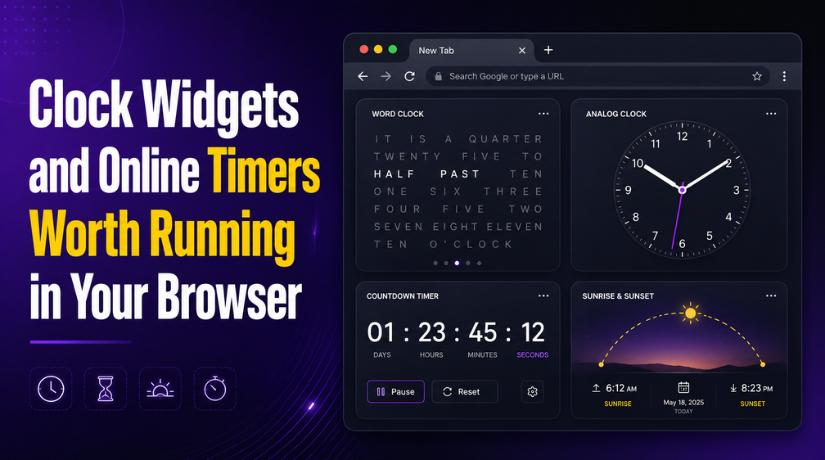
Of all the ways to display the current time, a word clock is the one most likely to make someone pause. Instead of digits or hands, it spells out the time in prose, something like IT IS HALF PAST THREE in a grid of illuminated letters. It is the kind of display that belongs in a design museum, but you can run it in a browser tab right now for free.
For Chrome theme users drawn to minimal or nature-inspired aesthetics, this format slots in beautifully. It carries the visual weight of typography rather than numbers, which means it does not feel clinical or rushed. Time becomes language, and language feels slower, more considered. If your current theme is a pale forest scene or a clean monochrome layout, a word clock in a side window reinforces that mood without competing with it.
Beyond aesthetics, there is something genuinely pleasant about reading the time rather than scanning it. You notice it differently. There is no urgency baked into spelled-out words the way there is in digital countdown numbers. It is a small design choice with a surprisingly large effect on how you experience your day.
Sunrise and Sunset Living in Your Browser
Some Chrome themes are built around a specific quality of light. The soft amber of golden hour, the pale blue of pre-dawn, the burning orange of dusk over water. If your browser background reflects any of those moments, a sunrise widget is a natural companion.
This widget shows the current sunrise and sunset times for your location, often with a visual arc that shows where you are in the day’s light cycle. It is not flashy. It is the kind of thing you glance at once in the morning and once in the afternoon, just to feel oriented. But that orientation has real value, especially for people who work indoors and lose track of the light.
There is solid research into how natural light cues affect mood and focus. Many people who work long hours at a screen find that simply knowing when sunset is coming helps them feel less untethered from the world outside. The widget does not change anything about your workflow, but it gives you a quiet signal that the day is moving, even when you are not.
For themes built around landscape photography or time-of-day aesthetics, this tool is not just compatible, it is almost necessary. Your background shows the sky at a particular hour. The widget tells you when that hour actually arrives.
An Analog Clock That Fits Without Asking
Not everyone wants to read the time as a sentence. Some people prefer the spatial clarity of a clock face, the intuitive way hands show not just the current time but also the shape of the hour, how much of the morning is left, how close you are to the end of the day.


Ananalog clock widget widget is for those users. It is clean, customizable in some versions, and works in any browser window without setup. For Chrome theme users who lean toward classic or vintage aesthetics, it reinforces the visual language of their setup rather than breaking it. A well-designed clock face on a warm wood-grain theme or a retro serif background just makes sense.
There is also something psychologically useful about the analog format that digital clocks lack. Because hands move continuously rather than jumping between numbers, an analog clock shows time as something fluid. That perception of smooth movement can actually reduce a sense of pressure during work, which is worth something.
A Timer That Stays Out of Your Way
Focus timers have become a cottage industry of apps, subscriptions, and browser extensions. Most of them are overkill. If you need to set a 25-minute block of focused work, you do not need an account or a productivity philosophy, you need a timer.
A dedicated online timer handles this without ceremony. You set the time, you start it, and when it ends it alerts you. No sign-in, no configuration, no suggestions to upgrade. It sits in a tab while you work in another, and it does its job.
For Chrome theme users, this matters because a cluttered productivity app would undermine the whole aesthetic effort. An ambient timer that simply counts down, without notifications, ads, or unnecessary features, fits the same philosophy that drives careful theme selection. Less noise. More intention.
Those who practice time-blocking or any rhythm of focused work and rest will find this tool pairs naturally with the rest of their setup. It is the functional counterpart to the decorative ones.
Understanding What Chrome Themes Can and Cannot Do
If you are building out a browser environment that reflects your aesthetic preferences, it helps to understand what is actually possible within Chrome’s theming system. The official theme extension reference covers what properties can be adjusted, from toolbar colors to tab strip treatments, and is useful reading for anyone who goes beyond pre-built themes into something more personal.
Knowing the limits of what Chrome exposes through theming helps you understand where ambient tools fill the gap. Chrome themes control the interface frame, but they do not touch the content area of tabs or browser windows. That is exactly where widgets like the ones covered in this article live. The two systems complement each other rather than overlap.
Making Your Browser Feel Like It Was Meant for You
Putting this all together, what you are really building is a browser that reflects the same level of thought you would put into a physical workspace. You pick a chair because it supports you well and looks right in the room. You choose a desk lamp for both its light quality and its shape. The tools you surround yourself with carry meaning, even the ones that seem purely functional.
A word clock in a side tab, a sunrise arc showing the day’s progress, a clean clock face matching your theme’s visual register, a timer waiting to help you focus. None of these are transformative on their own. But together they shift the browser from a neutral utility into something that actually fits the way you work and the way you like things to look.
The setup effort is zero. The cost is zero. The only thing required is a willingness to treat your browser environment with the same care you bring to every other part of your setup.