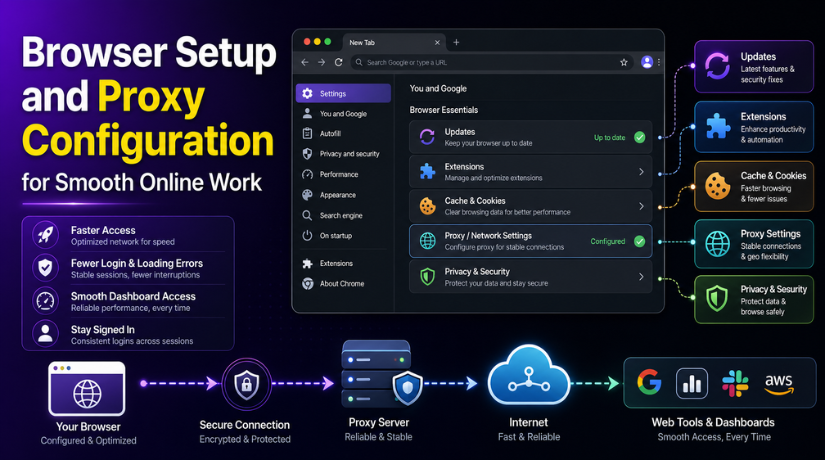
Browser Setup and Proxy Configuration for Smooth Online Work
Introduction
Modern businesses depend on web-based tools every day. Teams use browsers to open dashboards, manage tickets, update websites, check emails, process orders, and support customers. When the browser works well, daily tasks feel smooth. When it is not set correctly, simple work can become slow and stressful.
A poor browser setup may cause many small problems. Pages may load slowly. Login sessions may fail again and again. Some admin tools may not open correctly. Certain websites may show access errors. In many cases, these issues are not caused by the website itself. They can come from browser settings, cache problems, extension conflicts, or network setup.
Why Proper Browser Configuration Matters
Proper browser configuration helps users work faster and safer. It reduces technical delays and supports better access to online tools. It also helps teams avoid repeated problems during daily work.
Wrong browser settings can create many issues, such as:
- Slow page loading
- Login errors
- Dashboard access problems
- Broken website functions
- Blocked scripts or cookies
- Problems with admin tools
These issues can affect business productivity. A support team may lose time checking errors that are only caused by browser settings. A website owner may think the site is broken when the real issue is cache, cookies, or network configuration.
That is why every business should keep browser settings clean, updated, and secure.
Helpful Guide for Microsoft Edge Manual Setup
Microsoft Edge is one browser many professionals use for daily work. It includes useful options for privacy, security, extensions, cookies, and proxy settings. Some users may also need to configure manual network settings inside the browser.
For users who need help with manual Edge setup, this guide can be useful: https://stableproxy.com/en/p/manual/edge
This type of guide can help users understand basic setup steps. It can also support teams that need clear browser configuration for stable online access. When settings are configured correctly, users can access business tools with fewer interruptions.
Key Benefits of a Stable Browser Setup
A stable browser setup gives teams better control over their online work. It helps them access important tools without repeated errors. It also keeps browser behavior more consistent across different platforms.
For example, a support team may use ticketing software, CRM tools, WordPress dashboards, analytics reports, and payment portals. If browser settings are not clean and updated, these tools may not perform properly.
A proper browser setup offers several benefits:
- Faster access to online tools
- Fewer technical delays
- Better privacy and security control
- Smoother use of admin dashboards
- Fewer login and loading errors
- Better performance with web-based platforms
First, it improves access speed. Users can open pages faster and complete tasks without delay. Second, it reduces avoidable errors. Many browser issues come from old cache files, blocked cookies, or unsupported extensions. Third, it improves security. Updated browsers offer better protection against unsafe pages and risky scripts.
Common Areas Users Should Check
Users should regularly check a few important browser areas. These checks can prevent many common problems before they affect daily work.
Browser Updates
The browser should always be updated to the latest version. Old versions may not support modern websites properly. They may also miss important security improvements.


Extension Settings
Extensions should be reviewed often. Too many extensions can slow the browser. Some extensions may also block scripts, forms, popups, or login pages.
Cache and Cookies
Cache and cookies should be cleared when websites show loading or login problems. Old saved files can stop updated pages from loading correctly.
Proxy or Network Settings
Proxy and network settings should be checked carefully. Wrong proxy settings can stop websites from loading. They can also create access errors on business platforms.
Privacy and Security Options
Privacy and security settings should be balanced. Strong settings are helpful. However, overly strict settings may block required website functions.
Why Browser Setup Matters for WordPress Users
For WordPress users, browser setup is even more important. Website owners, developers, and support teams often work inside admin dashboards. They may edit pages, install plugins, check orders, or review support tickets.
A browser issue can make these tasks harder. It may look like a website problem, even when the real issue is local browser configuration. For example, cache can show an old page version. A blocked cookie can stop login sessions. A browser extension can break page builders or checkout screens.
A clean browser setup helps WordPress users manage websites with fewer problems. It also helps support teams test issues more clearly.
Conclusion
A clean and stable browser setup supports faster, safer, and smoother online work. It helps teams avoid common access problems and daily delays. Businesses should review browser settings whenever they face repeated loading, login, or dashboard issues.
Correct browser configuration can improve productivity. It can also make web-based work easier for teams, website owners, and support users. A properly configured browser is a simple but important part of smooth online business operations.