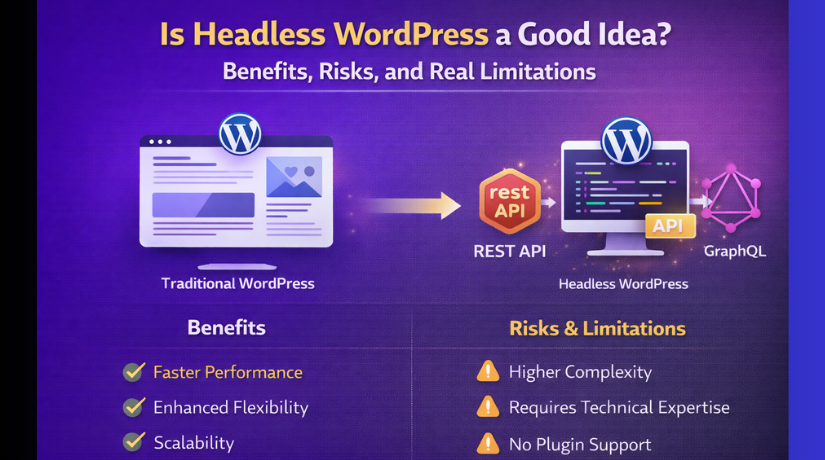
Is Headless WordPress a Good Idea? Benefits, Risks, and Real Limitations
Table of Contents
- Introduction: Why This Headless WordPress Question Matters Right Now
- What Headless WordPress Really Means in a Real Website Setup
- The Benefits That Make Headless WordPress Feel So Attractive
- Headless WordPress Pros and Cons in One Clear Snapshot
- Real Limitations and Drawbacks People Hit After Launch
- Common Mistakes That Make Headless WordPress Fail
- Headless WordPress SEO Issues You Must Plan For
- Headless WordPress Use Cases Where It Makes Sense
- Decision Framework to Know If Headless WordPress Fits
- Conclusion
Introduction: Why This Headless WordPress Question Matters Right Now
Many WordPress site owners want faster pages and cleaner designs. They also want more control over the user experience. Headless WordPress sounds like a modern answer to both. But it also adds new parts you must manage daily. That is why people ask if headless WordPress is worth it. The choice can affect cost, SEO, updates, and long-term support. If your site drives leads, speed can directly impact revenue. If your site publishes often, workflow speed also matters. If your team is small, complexity can become a real problem. A smart decision starts with understanding what “headless” really changes.
What Headless WordPress Really Means in a Real Website Setup
Traditional WordPress Keeps Content and Design in One System
In a normal setup, WordPress powers both the admin and frontend. Your theme controls how pages look for visitors on browsers. Plugins often add features directly to the same frontend output. Editors preview content easily before publishing it live. Most WordPress tools expect this full, connected workflow.
Headless WordPress Splits Content From the Frontend Display
In a headless setup, WordPress becomes the content manager only. Your frontend is built with a separate system or framework. WordPress stores posts, pages, and media in the dashboard. The frontend pulls that content and shows it to visitors. This pull happens using an API, like a request system. The frontend asks for content, then displays it in layouts. This is why many people ask, should I use headless WordPress. The answer depends on your goals and your resources.
Here is the simple difference you should remember:
- Traditional WordPress: One system for content, design, and display.
- Headless WordPress: WordPress for content, separate app for display.
- Traditional WordPress: Plugins and themes usually work without extra builds.
- Headless WordPress: Many features need custom frontend development work.
The Benefits That Make Headless WordPress Feel So Attractive
- Faster User Experience When You Build It the Right Way
Headless builds can feel faster for real visitors. You control caching, routing, and page rendering more tightly. You can reduce heavy theme code and unused frontend files. This can improve load times on mobile connections in the USA. A faster site can reduce bounces and increase signups. But speed only happens when the build is planned well.
- Frontend Freedom for Better Design and Custom Features
Headless lets you design without theme limits and shortcuts. You can build page sections as reusable frontend components. You can match brand design systems with consistent layouts everywhere. This helps when your marketing team needs flexible landing pages. It also helps when you want app-like browsing experiences.
- One Content Hub for Many Channels
WordPress can act like one central content library. That content can power your website, app, and other channels. You can publish once and show content in many places. This is helpful for brands with many platforms and audiences. These are common headless WordPress use cases for large teams.
- Separation Can Help, But It Is Not a Magic Shield
Headless separates the public frontend from the WordPress admin area. This can reduce direct exposure of some WordPress paths. But you still must secure WordPress and user access properly. Updates, logins, and permissions still matter every month.
Headless WordPress Pros and Cons in One Clear Snapshot
Headless WordPress can feel like a big upgrade at first. It gives you more freedom on the frontend side. But it also adds real work behind the scenes. This section gives a clear snapshot you can trust. It helps you decide without guessing or overthinking.
Pros: Why Headless WordPress Can Be a Smart Choice
1) You get stronger control over speed and performance
Headless setups can load pages faster with the right build. You can use modern caching and smarter page delivery methods. You can also reduce heavy theme files and extra frontend scripts. This often improves mobile speed for USA traffic. Faster pages can mean better engagement and more conversions.
2) You can build any design without theme limits
Traditional themes can block custom layout ideas very quickly. Headless removes that limit because you control the frontend fully. You can create clean, modern layouts with reusable components. You can match your brand design across every page easily. This is helpful for marketing pages and product landing pages.
3) One WordPress backend can power many platforms
WordPress can act like a central content hub for your business. The same content can show on a website and mobile app. You can also use it for screens, email apps, or other tools. This is one of the most useful headless WordPress use cases. It saves time when you manage content on many channels.
4) You can scale large sites with better flexibility
Large sites often need strict structure and stable components. Headless makes it easier to build a long-term frontend system. Developers can reuse the same parts across many sections. This can reduce errors and keep pages consistent. It also helps when many teams work on one website.
Cons: Where Headless WordPress Can Create Real Problems
1) Development cost and time usually increase
Headless needs a separate frontend build and setup work. You also need more planning before you start development. Testing takes longer because there are more moving parts. Many owners feel shocked by the final timeline. This is one of the biggest headless WordPress drawbacks.
2) Your content editing workflow may feel harder
In normal WordPress, editors can preview content very easily. In headless, previews often need extra setup and tools. Layout changes may not show inside the WordPress editor. Editors may need training to avoid publishing mistakes. These are common headless WordPress limitations for content teams.
3) Many plugins will not work like they do normally
Many WordPress plugins expect classic theme output. They add features directly on the frontend using shortcodes or hooks. In headless, those features may not show automatically. You may need custom development to recreate the same results. This makes plugin-heavy sites a risky fit for headless.
4) SEO setup becomes a frontend responsibility
In traditional WordPress, SEO plugins handle many important tasks. In headless, the frontend must create metadata and structured data. You must also handle canonicals, sitemaps, and internal linking carefully. If you miss these, rankings can drop after launch. These are common headless WordPress SEO issues to plan early.
5) Long-term maintenance becomes more complex
Headless means two systems need updates and monitoring. WordPress needs updates, security, and user control like always. The frontend also needs upgrades, testing, and dependency fixes. If a frontend build breaks, your site can go down. This is why many ask, should I use headless WordPress. The real answer depends on your support resources.
Real Limitations and Drawbacks People Hit After Launch
Headless sites can look great on launch day. Problems often show up during daily editing and updates. Many teams feel the change after the first content sprint. These are the headless WordPress limitations people report most often. Knowing them early helps you plan with fewer surprises.
1) Editing and Preview Workflow Often Feels Harder Than Expected
In classic WordPress, previews are simple and quick to trust. You write, preview, and publish with the same theme output. Headless changes that because the frontend is outside WordPress. Your editor may not match the real visitor layout anymore. This makes some teams slow down after switching to headless.
Common workflow pain points include:
- Preview links fail when the frontend requires login tokens.
- Draft pages do not show the correct layout or components.
- Reusable blocks may look fine in admin, but break live.
- Editors need extra steps to confirm every change is safe.
If you publish content daily, this matters a lot. If your team is small, it matters even more. These are real headless WordPress drawbacks, not small complaints. Many businesses ignore workflow until the site is already live.
2) Plugin and Theme Features May Not Carry Over Cleanly
Many WordPress plugins assume a normal theme-based website. They add scripts, shortcodes, templates, and front-end UI features. In headless, your frontend does not use theme templates. It pulls content and renders it using the new app. That means many plugin features do not appear automatically.
This becomes a problem with tools like these:
- Page builders that output complex frontend markup.
- Shortcode-based plugins that render forms and tables.
- SEO plugins that inject meta and schema automatically.
- Popup, chat, and tracking plugins tied to theme hooks.
You can still use some plugins on the backend side. But you may need custom frontend work for output features. That is a key part of headless WordPress limitations. It is also why headless WordPress pros and cons must be reviewed first.
3) You Maintain More Systems, Not Just One Website
Headless usually means two projects running side by side. WordPress is one project and the frontend is another. Each has updates, bugs, and security checks over time. Your team must track both systems and keep them stable. This adds real effort each month, even after launch.
Here is what often increases after moving headless:
- More deployments for frontend changes and fixes.
- More testing for every plugin update and new release.
- More monitoring for API errors and frontend build failures.
- More support tickets when content appears broken on pages.
This is a major reason people ask, should I use headless WordPress. If you do not have steady developer support, it can be tough. A headless build is not “set and forget” like many expect.
4) Costs and Timelines Often Increase More Than You Expect
Many site owners budget headless like a normal WordPress rebuild. That budget often fails because headless needs extra build steps. You must connect content models, frontend layouts, and preview tools. You also need more QA because issues can hide in data flows. A small content change can break a component on the frontend.


These cost drivers appear in many headless projects:
- Custom templates must be rebuilt as frontend components.
- SEO handling needs custom setup, not quick plugin toggles.
- Redirect planning becomes critical during migration work.
- Content formatting rules must be defined and enforced early.
This is one of the biggest headless WordPress drawbacks for businesses. It does not mean headless is always wrong. It means the planning must be more serious and detailed.
Common Mistakes That Make Headless WordPress Fail
Headless fails more from planning mistakes than technical limits. Many teams choose it because it sounds modern and fast. They do not match the tech choice to the real business need. Avoiding these mistakes can save months of frustration later.
Mistake 1: Choosing Headless for a Simple Website
If your site is a basic brochure or simple blog, headless is often overkill. A well-optimized theme site can be fast and easy to manage. Headless adds extra layers you may not need for this case. In many simple cases, headless WordPress worth it becomes hard to justify.
Mistake 2: Ignoring the Editor Experience and Preview Needs
Editors need confidence before they publish important content. If previews are slow or unreliable, publishing slows down. Teams may start avoiding updates because they fear breaking pages. This becomes one of the biggest headless WordPress limitations in practice. Plan preview and staging from day one, not later.
Mistake 3: Underestimating SEO Rebuild Work
Many teams think SEO plugins will handle everything automatically. In headless, the frontend must handle SEO output correctly. Metadata, canonicals, schema, and sitemaps need careful setup. If you miss these parts, rankings can drop after launch. These headless WordPress SEO issues are preventable with planning.
Mistake 4: Underestimating Long-Term Maintenance Needs
Headless requires ongoing support for two codebases and tools. Your frontend stack will also update over time. WordPress updates will still happen like normal. If you cannot support both, problems will pile up quickly. This mistake turns headless WordPress drawbacks into real business pain.
Headless WordPress SEO Issues You Must Plan For
SEO is often the biggest hidden risk with headless builds. Many teams focus on speed and design during development. Then they notice traffic drops after the launch week. These headless WordPress SEO issues usually happen due to missing basics. The good news is most problems are preventable with planning.
Rendering and Crawlability Basics You Must Understand
Google needs to see your content in a reliable way. With headless, your frontend decides how pages are built. If your site depends only on browser-side rendering, crawlers may struggle. Some pages may load slowly or show empty sections at first. That can reduce indexing and ranking over time.
You should avoid these common crawl problems:
- Pages load with blank content before scripts run fully.
- Important text appears only after user actions or scroll.
- Pagination and category pages do not show real item links.
- Product details load late and look incomplete to crawlers.
A safer approach is to deliver content at page load time. Many teams use server-based rendering for key pages. Others generate pages ahead of time and serve them quickly. This keeps the page content visible for search bots fast.
Metadata, Canonicals, and Structured Data Need Rebuilding
In normal WordPress, SEO plugins handle many important pieces. In headless, the frontend must output those pieces correctly. If your frontend misses them, SEO performance can drop quickly. This is why headless WordPress limitations often include SEO complexity.
Key items you must recreate in the frontend:
- Title tags that match your page intent and keyword focus.
- Meta descriptions that support click-through from Google results.
- Canonical tags to prevent duplicate content issues.
- Open Graph tags for clean social sharing previews.
- Structured data for articles, products, and business details.
Structured data is often missed in headless projects. It is not visible to users, but it matters for Google. If you run WooCommerce, product schema also becomes critical. Your frontend must output pricing, availability, and review data correctly.
Redirects, Sitemaps, and Internal Linking Need Extra Attention
Many headless projects include a rebuild or migration step. That often changes URL paths or page structures. If old URLs do not redirect correctly, rankings can drop fast. You can also lose backlinks value if redirects are missing. This makes a strong redirect plan non-negotiable.
Common technical SEO mistakes during headless launches:
- Old blog URLs return 404 instead of redirecting cleanly.
- Sitemaps do not include all important indexable pages.
- Robots rules block staging paths but leak into production.
- Internal links point to old URLs after the content migration.
Internal linking is also a real challenge with headless builds. In classic WordPress, menus and links often update automatically. In headless, linking logic may live in the frontend code. You must ensure each page links to related content properly. This helps crawlers discover and rank your pages faster.
Headless WordPress Use Cases Where It Makes Sense
Headless is not a universal upgrade for every WordPress site. It works best when your needs go beyond normal themes. It also works best when you have developer support long term. These headless WordPress use cases are the most realistic and proven.
High-Traffic Marketing Sites That Need Speed Control
Some sites compete heavily on page speed and conversion rates. Marketing teams may need custom landing page layouts and testing. Headless can help when you must control every frontend detail. You can optimize loading, tracking, and page behavior carefully. This can improve lead flow and reduce bounce rates.
This use case fits well when you have:
- Many paid traffic landing pages and strong conversion goals.
- A need for strict layout control and consistent brand styling.
- A plan for ongoing A/B testing and performance updates.
Multi-Platform Content Publishing From One CMS
Some brands publish content for more than just a website. They may have a mobile app, partner feeds, and digital displays. WordPress can store content once for all channels. The headless frontend can display it anywhere needed.
This use case fits well when you need:
- One writing workflow for web, app, and other channels.
- Shared content types like articles, guides, FAQs, and videos.
- Content reuse across many platforms without duplicating work.
Large Brands With Strong Dev Teams and Design Systems
Bigger teams often use shared components and strict design rules. Headless can support a design system very well. Developers can build reusable blocks for many pages and campaigns. This reduces layout drift and keeps branding consistent.
It also helps when:
- Multiple teams publish content with the same layouts.
- Your site has many templates and custom content types.
- You need performance and scaling built into the frontend layer.
Select WooCommerce Scenarios With Very Custom Shopping Needs
WooCommerce can work with headless, but it is not simple. It can make sense when you need a fully custom buying flow. Some brands want app-like product browsing and custom checkout steps. Headless can support that if planned properly.
This works best when:
- You need a custom product UI beyond standard WooCommerce themes.
- Your checkout flow needs custom steps and logic.
- You have developers for long-term support and testing.
Decision Framework to Know If Headless WordPress Fits
Choosing headless is not about hype or trends today. It is about fit, budget, and long-term support needs. Many owners ask, should I use headless WordPress for my site. A good answer comes from a simple, honest checklist. Use the points below and decide based on your reality. This avoids regret after your site is already live.
A Quick Checklist That Gives a Clear Answer
Use headless WordPress when most answers are “Yes”:
- You need a custom frontend beyond normal themes and builders.
- You have a developer team for long-term updates and fixes.
- Your site must be fast across many devices and locations.
- You want one CMS powering web, app, and other channels.
- You can plan SEO output in the frontend from day one.
- You can test releases before they reach live visitors.
Headless may not fit when most answers are “No”:
- You rely heavily on plugins, shortcodes, and theme features.
- Your editors need simple previews with no extra steps.
- You want quick site changes without developer involvement.
- Your budget is tight for build and ongoing maintenance.
- Your site is small and has simple content needs.
If your site fits the first list, headless can work well. If it fits the second list, stay traditional and optimize. This is where headless WordPress worth it becomes a clear question. The value depends on your needs, not the technology name.
Conclusion
Headless WordPress can be powerful when you need custom results. It is not always the best choice for every site. Review the headless WordPress pros and cons with your real needs. If you need custom UX and have support, headless can fit. If you want simplicity, optimize classic WordPress first. If you need expert help, WooHelpDesk can guide your best path.



