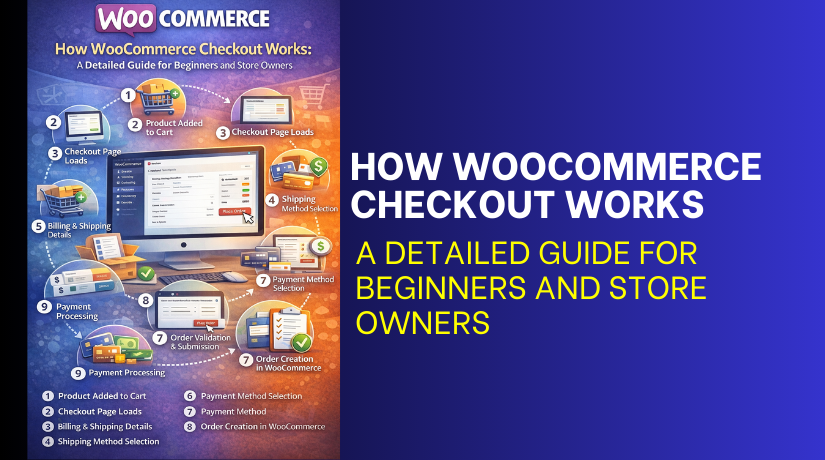
How WooCommerce Checkout Works: A Detailed Guide for Beginners and Store Owners
Table of Contents
- What Is the WooCommerce Checkout Page?
- How the WooCommerce Checkout Process Works (Step-by-Step)
- Conclusion
What Is the WooCommerce Checkout Page?
It is the final step of buying online. It is where customers enter details and pay safely. The WooCommerce checkout page collects billing and shipping information. It also shows the full order summary before payment. This page is part of the WooCommerce checkout system in every store. It connects the cart with payment and order creation. It also confirms the final total with taxes and shipping. A smooth checkout helps customers finish orders without stress. A slow checkout can increase cart abandon rates quickly. That is why store owners improve the checkout experience first. The WooCommerce checkout is not only a form page. It is a complete flow that guides buyers step by step. It checks the cart items and calculates totals. It validates required fields before creating an order. It also connects to payment gateways for secure payments. It can support guest checkout or account checkout. It can also apply coupons, taxes, and shipping rules. When the checkout works well, customers trust the store more. When it fails, customers leave and may never return.
The WooCommerce checkout system uses settings from your store. It uses location rules to show tax and shipping options. It uses enabled payment methods to show payment choices. It also follows product rules, like shipping classes and weight. It can show different fields based on shipping need. If a product is virtual, shipping fields can hide. If all products need shipping, shipping fields will display. The checkout can also support order notes and delivery options. Many stores also add custom fields for business orders. The goal stays the same for every store. Make checkout simple, clear, and fast for buyers.
How the WooCommerce Checkout Process Works (Step-by-Step)
Product Added to Cart
The customer opens a product page and clicks Add to cart. WooCommerce saves that product in the cart. It saves the product name, price, and quantity. If the product has options, those details save too. This starts the WooCommerce checkout process.
Review Cart Before Checkout
The customer opens the cart page and checks items. They can increase quantity or remove items easily. WooCommerce updates totals after every change. The customer can also apply a coupon code here. After checking details, they click Proceed to checkout.
Proceeding to the Checkout Page
WooCommerce loads the WooCommerce checkout page after the click. The page shows order details and the total amount. It also shows shipping options if shipping is needed. It shows payment methods you enabled in settings. This page is the main part of the WooCommerce checkout system.
Entering Billing Information
The customer fills billing details in the checkout form. They enter name, email, phone, and billing address. WooCommerce uses these details for order emails and invoices. Required fields must be filled before continuing. This helps WooCommerce create a correct order record.
Entering Shipping Information
If the order needs shipping, WooCommerce shows shipping fields. The customer enters the shipping name and address details. They can also use the same address as billing. WooCommerce uses this address to calculate shipping options. This step is part of the WooCommerce checkout process.
Selecting a Shipping Method


WooCommerce shows available shipping methods on the checkout. The options depend on the shipping address and cart rules. The customer selects one shipping method from the list. WooCommerce updates the shipping cost in the order total. This happens inside the WooCommerce checkout page.
Choosing a Payment Method
WooCommerce shows payment methods you have enabled. The customer selects one payment option to pay. Some methods open extra fields like card details. WooCommerce prepares payment using the selected gateway system. This is how the WooCommerce checkout system handles payments.
Reviewing Order Details
The checkout page shows the final order summary. The customer checks products, shipping, tax, and total amount. They also confirm discounts if a coupon is applied. This review avoids mistakes before placing the order. It makes the WooCommerce checkout safer and clearer.
Placing the Order
The customer clicks the Place order button to finish. WooCommerce validates required fields before submitting the order. If something is missing, it shows an error message. If everything is correct, WooCommerce creates the order. This completes the main WooCommerce checkout process.
Order Confirmation and Thank You Page
After placing the order, WooCommerce shows the confirmation page. This page is also called the Thank You page. It shows the order number and order details. It also confirms payment status based on the gateway. WooCommerce also sends an order email to the customer.
Conclusion
Now you clearly understand what is WooCommerce checkout and why it matters for sales. The WooCommerce checkout page is the final step before a customer becomes a paid order. It collects billing details, shipping details, and the selected payment method. The full WooCommerce checkout process works step by step to avoid confusion. The WooCommerce checkout system checks required fields and validates the order data. It also calculates shipping, applies coupons, and adds taxes if needed.
After payment, it creates the order in WooCommerce automatically. It then reduces stock and sends order emails to the customer. A clean checkout builds trust and improves conversions. A slow checkout increases cart abandonment and support requests. Keep the checkout simple and remove fields that are not needed. Also test your checkout after updates, new plugins, or theme changes. A stable and fast checkout helps your store grow every month.



