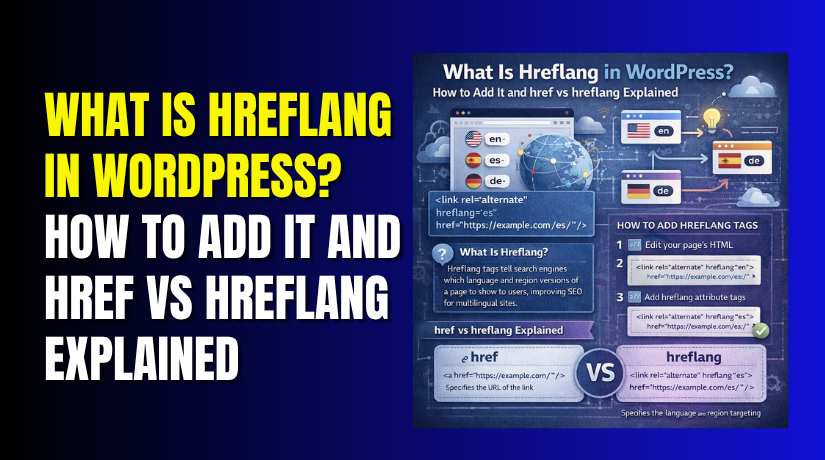
What Is Hreflang in WordPress? How to Add It and href vs hreflang Explained
Table of Contents
- Why Hreflang Matters for WordPress Websites Today
- What Hreflang Means on a WordPress Website
- What Hreflang Actually Does for Search Engines
- When WordPress Websites Usually Need Hreflang
- Is Hreflang Always Required or Only Needed Sometimes
- Where Hreflang Is Added on a WordPress Website
- How to Add Hreflang in WordPress Step by Step
- Common Hreflang Mistakes WordPress Users Should Avoid
- Understanding href vs hreflang in a Simple and Practical Way
- Best Practices for a Clean and Safe Hreflang Setup in WordPress
- Conclusion
Why Hreflang Matters for WordPress Websites Today
Many WordPress websites serve users from different countries and languages. A business may target users in the USA, Canada, or Spain. An online store may also create pages for different regions. In these cases, search engines may show the wrong page version. That can confuse users and hurt page relevance.
This is where hreflang becomes useful on a WordPress website. It helps search engines understand which page version fits each audience. If your site has similar pages for different languages or regions, this setup can matter a lot. That is why many site owners ask what is hreflang in WordPress and why it matters for SEO.
In this guide, you will learn:
- what hreflang means in WordPress
- why search engines use it
- when it becomes important
- how it is different from a normal link attribute
This topic sounds technical at first. Still, the idea is simple once explained clearly.
What Hreflang Means on a WordPress Website
Hreflang is an HTML attribute used for language and region targeting. It tells search engines which version of a page should appear. This is useful when similar content exists in more than one form.
For example, a website may have:
- one page for English users in the USA
- another page for English users in the UK
- a separate page for Spanish readers
In such cases, WordPress hreflang tags help search engines understand those page relationships. They do not change what users see on the page. Instead, they work in the background for search engines.
If you are wondering is hreflang necessary, the answer depends on your website structure. It is usually helpful when multiple language or regional versions exist. If your website only serves one language and one location, you may not need it.
WordPress does not always handle this automatically. Some sites need plugins or manual setup. That is why many users also search for how to add hreflang tags in WordPress when managing multilingual or region-based content.
What Hreflang Actually Does for Search Engines
Hreflang helps search engines understand page language and regional targeting. It connects alternate versions of the same content correctly. This matters when your website has similar pages for different users.
For example, one page may target users in the USA. Another page may target users in the UK. Both pages may use English, but the audience is different. In this case, WordPress hreflang tags help search engines read that difference.
Hreflang does not work like a ranking boost by itself. It does not push your page to the top instantly. Instead, it improves targeting and relevance in search results. That means users are more likely to land on the correct page version.
This is why people often ask what is hreflang in WordPress and why it matters. The real value comes from better page matching, not direct ranking growth.
When WordPress Websites Usually Need Hreflang
Not every WordPress website needs hreflang. It becomes useful only in certain setups.
You usually need it when your site has:
- pages in more than one language
- pages for different countries using the same language
- localized service pages for separate regions
- translated product or category pages
- country-based landing pages with similar content
A multilingual site is the most common example. A WooCommerce store with regional pages also benefits from it. In these cases, search engines may choose the wrong version without hreflang support.
Is Hreflang Always Required or Only Needed Sometimes
Many site owners ask, is hreflang necessary for every site. The answer is no. It is not required for all WordPress websites.
You may not need it if your website has:
- one language only
- one country target only
- no alternate version of the same page
You may need it if your site serves multiple audiences. That is when hreflang becomes useful and practical. If you later expand your website, you may also need to learn how to add hreflang tags in WordPress correctly. Proper setup helps search engines understand your pages and show the right version to the right users.
Where Hreflang Is Added on a WordPress Website
Before learning how to add hreflang tags in WordPress, it helps to know where they go. Hreflang is usually added in the head section of a page. Search engines read this code to understand language and region targeting.
On WordPress websites, hreflang is often added in these places:
- inside the <head> section of each matching page
- through an SEO or multilingual plugin
- through theme header customization
- through XML sitemaps in some advanced setups
Most site owners use a plugin because it saves time. Manual setup is also possible, but it needs care. Wrong tags can confuse search engines instead of helping them. That is why WordPress hreflang tags should always be checked after setup.
How to Add Hreflang in WordPress Step by Step
Adding hreflang becomes easier when done in a clear order.
Step 1: Identify the alternate versions of each page
Start by listing pages that have language or regional alternatives. Each version should serve the same topic or purpose. For example, one page may target US users, while another targets UK users.
Step 2: Choose the correct language or region code
Each page needs a proper code. A few common examples are:
- en for English
- en-us for English in the United States
- en-gb for English in the United Kingdom
- es for Spanish
These codes tell search engines which page fits each audience.
Step 3: Add the hreflang annotations in the right place
After matching pages and codes, add the hreflang tags. These tags usually go inside the page header. Some plugins handle this automatically. Manual setup may be needed on custom websites.
Step 4: Make sure each page points to the other versions
Each page should reference its alternate versions clearly. This helps search engines confirm the relationship between them. If one version links to another, the other should link back too.
Step 5: Add an x-default page if needed


Some websites use a default page for users without a clear match. This is called an x-default version. It can help when no language or region version fits exactly.
Step 6: Test the setup carefully
After setup, review everything closely. Check page URLs, code values, and missing return tags. Even small errors can weaken the setup.
If you are still asking what is hreflang in WordPress, think of it as a guide for search engines. It helps them show the right page to the right audience.
Common Hreflang Mistakes WordPress Users Should Avoid
Adding hreflang can help search engines understand your page versions better. Still, small errors can create confusion instead of clear signals. That is why WordPress hreflang tags must be added carefully and checked often.
Below are the most common mistakes people make during setup.
Using the Wrong Language or Region Codes
Each hreflang tag needs a valid language or region value. If the code is wrong, search engines may not understand it correctly. A page meant for US users should not use a UK code by mistake. This is a common problem on multilingual sites.
Linking to the Wrong Alternate Page
Each hreflang tag should point to the matching version of that page. It should not point to a different service page or random URL. For example, a US product page should connect only to its real alternate version. Wrong page matching weakens the whole setup.
Forgetting Return Tags Between Alternate Pages
Hreflang works best when alternate pages reference each other properly. If Page A points to Page B, then Page B should point back. Missing return tags can make the relationship look incomplete. This is one reason many users struggle with how to add hreflang tags in WordPress correctly.
Using Hreflang on Pages That Are Not Real Alternatives
Not every page needs hreflang. It should only connect pages with the same main purpose. If two pages cover different topics, they should not be linked with hreflang. This is why many site owners ask, is hreflang necessary for every page. The answer is no.
Ignoring Canonical and Hreflang Conflicts
Canonical tags and hreflang tags should support each other, not conflict. If the canonical points elsewhere incorrectly, search engines may ignore your hreflang signals. Both elements need to be reviewed together.
Adding Broken or Incomplete URLs
A hreflang tag must use the correct page URL. Broken links, missing paths, or wrong URLs can stop the setup from working. If you are learning what is hreflang in WordPress, remember this simple rule. Accurate tags help search engines trust your page relationships.
Understanding href vs hreflang in a Simple and Practical Way
Many WordPress users confuse href vs hreflang because both appear in code. Their names also look similar at first glance. Still, they do two very different jobs on a website.
The href attribute tells a browser where a link should go. It is the actual destination URL of a link. When a user clicks that link, the browser follows the href value.
The hreflang attribute does something else entirely. It tells search engines the language or regional version of a page. It helps search engines understand which alternate page fits a specific audience.
Here is the difference in a simple way:
| Attribute | Main Purpose | Used For |
| href | sends users to a URL | normal links |
| hreflang | signals language or region targeting | alternate page versions |
So, if someone asks what is hreflang in WordPress, the answer is simple. It is not a normal link path like href. It is a search signal for alternate page targeting.
Best Practices for a Clean and Safe Hreflang Setup in WordPress
A good setup should stay clear, accurate, and easy to maintain. Small mistakes can reduce the value of your tags.
Follow these best practices:
- use hreflang only when true alternate versions exist
- choose correct language and region codes
- connect each page to its real alternate versions
- keep URLs correct and complete
- recheck tags after migrations or URL changes
- test the setup after plugin or theme updates
These steps matter when learning how to add hreflang tags in WordPress the right way. Clean implementation helps search engines trust your structure.
Conclusion
Hreflang helps search engines show the correct page version to users. It becomes useful when your website serves more than one audience. That may include different languages or different country versions.
If your site has only one language and one target region, then is hreflang necessary may be an easy question. In many such cases, the answer is no. But if your website has alternate versions, hreflang becomes important.
Understanding WordPress hreflang tags and using them correctly can improve page targeting in search. It also helps reduce confusion for both search engines and visitors.
If you need help setting up hreflang correctly on your site, contact WooHelpDesk. Our team can help you review tags, fix setup issues, and improve your WordPress technical SEO safely.