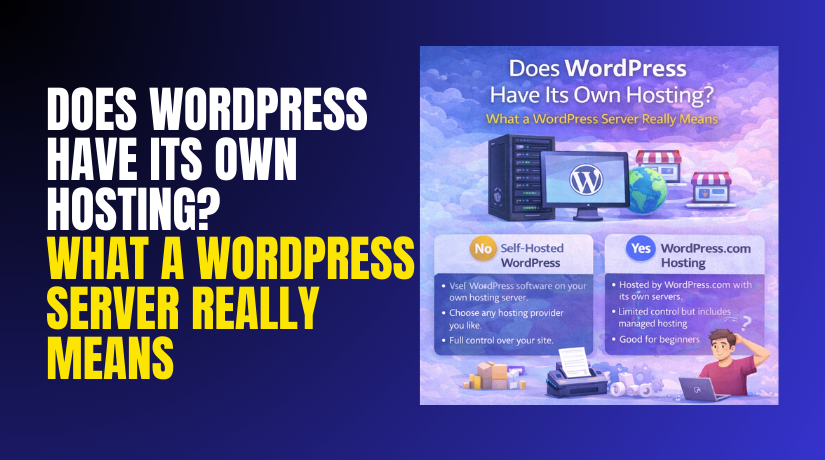
Does WordPress Have Its Own Hosting? What a WordPress Server Really Means
Table of Contents
- Introduction
- Quick Answer: Does WordPress Have Its Own Hosting?
- Why People Think WordPress Hosts Websites
- WordPress.com vs WordPress.org Hosting
- Do I Need Hosting for WordPress? (And When You Don’t)
- What Is a WordPress Server? (Simple Meaning + Real Meaning)
- Why the Term “WordPress Server” Is Used Often
- WordPress Server Requirements (What Your Hosting Must Support)
- Core Requirements That Power WordPress
- Performance Requirements That Improve Speed
- Stability and Safety Requirements You Should Not Skip
- A Quick Way to Judge If Your Host Is “WordPress Ready”
- Choosing the Right Hosting Setup for WordPress
- Managed WordPress Hosting (Best for most business sites)
- VPS or Cloud Hosting (For growing and busy sites)
- Dedicated Hosting (For large business needs)
- Common Myths About WordPress Hosting
- Conclusion
Introduction
Many beginners ask one common question about WordPress hosting. They build a site and assume WordPress stores everything. This confusion is normal and very common today. You may also see ads for “WordPress hosting” everywhere. That makes the question feel even more real. So, does wordpress have its own hosting in reality? The answer depends on which WordPress you use. Some options include hosting, and some do not. In this guide, you will get a clear answer. You will also learn what hosting actually means.
Quick Answer: Does WordPress Have Its Own Hosting?
Here is the simple truth in plain language. WordPress itself is not one single hosting company. WordPress is a website tool used on servers. A server is where your website files live. Hosting is the service that provides that server.
So, does wordpress host your website by default? Not always. It depends on whether you use WordPress.com or WordPress.org. These two are connected, but they work differently.
- com is a hosted service with plans.
- org is free software you install anywhere.
If you use WordPress.com, hosting is included with your plan. In that case, WordPress can host the site for you. If you use WordPress.org, you must choose a hosting provider. That is why many users ask, do i need hosting for wordpress. If you use WordPress.org, the answer is yes.
Think of it like this example. WordPress is like a store design kit. Hosting is the land where your store sits. Without land, the store cannot open online.
Why People Think WordPress Hosts Websites
This confusion happens for a few clear reasons. The biggest reason is the name “WordPress” itself. People hear one name and assume one product. But WordPress comes in two main forms. That is why wordpress.com vs wordpress.org hosting matters so much.
Here are the most common reasons people get confused:
- They start with WordPress.com and call it “WordPress.”
- They hear “WordPress hosting” and assume WordPress owns servers.
- They see WordPress in the dashboard and think it hosts everything.
- They buy a domain and believe hosting is included always.
Also, many hosting companies use WordPress in their marketing. They say “WordPress hosting” to show it works well. This does not mean WordPress owns that hosting. It means the hosting is built for WordPress sites. In the next parts, you will learn what is a wordpress server and why it matters.
WordPress.com vs WordPress.org Hosting
This is the most important difference many beginners must understand. Both use the WordPress name and core idea. But the hosting setup is not the same. That is why wordpress.com vs wordpress.org hosting is a key topic. When you pick the wrong option, your site goals can suffer. So, you should learn how each one works clearly.
WordPress.com (Hosted Platform)
WordPress.com is a complete hosted website platform. It gives you a ready setup with hosting included. You create an account, choose a plan, and start building. You do not need to buy separate hosting first. That is why many users feel WordPress hosts their site. In this case, does wordpress host your website can be true. WordPress.com provides hosting as part of its service.
WordPress.com is best when you want speed and simplicity. It reduces technical work and saves setup time. You can focus on writing, design, and pages.
Here is what you usually get with WordPress.com hosting:
- Hosting included with your selected plan.
- Basic security handled by the platform team.
- Updates managed without your manual work.
- A guided setup with themes and site tools.
- Support options based on your plan level.
However, WordPress.com can have limits based on the plan. Some plans restrict advanced design and plugin options. That matters if you want full control later. For many business owners, flexibility becomes important over time.
WordPress.org (Self-Hosted WordPress)
WordPress.org is not a hosting service or platform. It is free WordPress software you install on hosting. You download WordPress and add it to a server. That server comes from a hosting provider you choose. This option gives full control and more freedom. It is also the reason people ask, is wordpress self hosted. When you use WordPress.org, it usually means self-hosted.
With WordPress.org, you control almost everything on your site. You can install any plugins you trust. You can use any theme and edit code if needed. You can also tune speed and caching settings better. This makes WordPress.org a strong fit for businesses.
Here is what “self-hosted” usually means in real life:
- You choose your hosting provider and plan.
- You install WordPress on that hosting account.
- You manage updates, backups, and basic security.
- You control plugins, themes, and custom changes.
- You can move hosts later without rebuilding everything.
So, does wordpress have its own hosting in this setup? No, not here. WordPress.org does not include hosting in the software. You bring your own hosting and connect WordPress to it.
Do I Need Hosting for WordPress? (And When You Don’t)
This question has a simple and useful answer. Yes, you need hosting if you use WordPress.org. That is why many users search do I need hosting for wordpress online. Hosting is where your site lives and loads from. Without hosting, WordPress.org cannot work on the internet.
You may not need separate hosting in one case only. If you use WordPress.com, hosting is already included. You simply choose a plan and start building. That is the easiest route for beginners.
Use this quick checklist to decide:
- If you use WordPress.com, hosting comes with your plan.
- If you use WordPress.org, you must buy hosting separately.
- If you want full control, choose WordPress.org hosting.
- If you want quick setup, choose WordPress.com first.
What Is a WordPress Server? (Simple Meaning + Real Meaning)
Many users hear this term and feel confused quickly. So, let’s keep it clear and practical first. A server is a computer that runs your website. It stores files, loads pages, and serves visitors online. When someone visits your site, the server sends the page. That is the simple meaning behind what is a wordpress server.
Now let’s explain the “real meaning” in website terms. A WordPress site is not just one file. It needs a working environment to run smoothly. That environment is what people call a WordPress server. It is not a special server owned by WordPress. It is a server setup built to run WordPress well.
A WordPress-friendly server usually includes these main parts:
- Web server software like Apache or Nginx.
- PHP to process WordPress pages and actions.
- Database like MySQL or MariaDB for site data.
- Storage for uploads, themes, and plugin files.
- Caching support to speed up repeat visits.
When hosting companies sell WordPress plans, they tune settings. They may add caching, security rules, and helpful tools. That is why the term wordpress hosting server is common online. It means the host built servers for WordPress performance.
Why the Term “WordPress Server” Is Used Often
People use this term because it sounds simple and direct. They want to say, “This server runs WordPress correctly.” It also helps separate WordPress hosting from generic hosting. But the server is still just hosting infrastructure. WordPress does not ship a server you download. Instead, hosting providers create the right setup.
A “WordPress server” usually means the host supports:
- PHP versions that WordPress needs to run.
- Database access with good speed and stability.
- HTTPS support for safe browsing and checkout.
- File access for themes, plugins, and uploads.
- Strong uptime and fast response under traffic.
In short, what is a wordpress server really means “a server built to run WordPress.” It is about compatibility, speed, and stability.
WordPress Server Requirements (What Your Hosting Must Support)
Now let’s focus on what hosting must provide. These are the basics your host must support for WordPress. If the server setup is weak, your site can break. You may also face slow load times and errors. That is why wordpress server requirements matter for every website.


A WordPress site needs a few core requirements to work. Most good hosts meet them without extra effort. Still, you should know what to check before buying. This avoids trouble later, especially for business sites.
Core Requirements That Power WordPress
These are the most important server items WordPress needs:
- PHP support with a modern, secure version.
- MySQL or MariaDB database support for site data.
- HTTPS and SSL support for safe site browsing.
- Enough memory to run plugins without crashes.
- File permission support for updates and uploads.
These points sound technical, but the goal is simple. Your site should run smoothly and stay stable. When a server meets these needs, WordPress works better.
Performance Requirements That Improve Speed
A site can “work” but still feel slow and weak. Speed affects user trust and search rankings often. For USA visitors, fast delivery matters even more. Many users leave if pages load too slowly. A better wordpress hosting server improves speed through smart tools.
Look for these performance features in hosting:
- Server-side caching for faster page delivery.
- Object cache support for database-heavy pages.
- CDN support to serve content from nearby locations.
- SSD storage for faster file and database access.
- Good traffic handling during spikes and promotions.
These features help blogs and stores run faster. They also reduce downtime during heavy traffic periods.
Stability and Safety Requirements You Should Not Skip
WordPress sites need protection from common threats. Security is not only for large websites today. Small sites get targeted by bots very often. A reliable server setup reduces these risks early. That is also part of wordpress server requirements.
Check for these safety basics:
- Daily backups with easy restore options.
- Firewall protection against common attack patterns.
- Malware scanning to detect harmful files quickly.
- Account isolation to reduce shared hosting risks.
- Update support for PHP and server software versions.
These features keep your site safer long-term. They also reduce panic during unexpected issues.
A Quick Way to Judge If Your Host Is “WordPress Ready”
You do not need to be a server expert. You can ask simple questions before choosing hosting. You can also check the host plan details quickly. A good provider will answer clearly without vague words.
Use this short checklist before buying:
- Do they mention WordPress support and optimized setup?
- Do they meet modern wordpress server requirements clearly?
- Do they offer backups, SSL, and caching features?
- Do they have support that understands WordPress issues?
When these answers are “yes,” you are in a safer place.
Choosing the Right Hosting Setup for WordPress
Your hosting choice affects speed, safety, and daily site work. Visitors expect fast pages and smooth browsing. A weak host can cause slow loads and frequent errors. If is wordpress self hosted in your setup, hosting matters more. That is common with WordPress.org websites and business sites.
Below are the most common hosting options for WordPress sites. Each option fits a different budget and site goal. Think about traffic, store features, and your support needs.
Shared Hosting (Good for small sites)
Shared hosting means many sites use one server together. It costs less and works for simple blogs. It can struggle when traffic grows or plugins increase.
Best fit for:
- New blogs with low traffic and basic pages.
- Small local sites with limited features and updates.
Managed WordPress Hosting (Best for most business sites)
Managed hosting is built for WordPress from the start. The provider handles many technical tasks for you. This is why many call it a wordpress hosting server solution.
Most managed plans include:
- Auto updates for core WordPress and key tools.
- Strong caching and speed tuning for faster loading.
- Better support for WordPress errors and fixes.
VPS or Cloud Hosting (For growing and busy sites)
VPS and cloud hosting give more resources and control. They work well for stores and service sites. You can scale up when traffic increases quickly.
Best fit for:
- WooCommerce stores with many products and active shoppers.
- Membership sites with frequent logins and user dashboards.
Dedicated Hosting (For large business needs)
Dedicated hosting gives one server only for your site. It is powerful but costs more than other options. It fits large sites with very high traffic or custom needs.
Quick decision tip
If you want easy setup, compare wordpress.com vs wordpress.org hosting first. WordPress.com includes hosting in most plans. WordPress.org is usually self-hosted with your chosen provider. In both cases, choose stable support and strong speed tools. This helps your site stay fast.
Common Myths About WordPress Hosting
Many online posts create confusion with bold hosting claims. These myths waste time and cause wrong buying decisions. Let’s clear them up using simple and direct facts.
- Myth: WordPress owns the servers for every WordPress site.
Truth: WordPress.org is software, not a hosting provider. - Myth: If I install WordPress, hosting is included automatically.
Truth: Do I need hosting for wordpress depends on your version.
org needs hosting from a provider you choose. - Myth: WordPress.com and WordPress.org are basically identical.
Truth: wordpress.com vs wordpress.org hosting is a real difference.
com bundles hosting, while WordPress.org is self-hosted. - Myth: Any server works the same for WordPress performance.
Truth: A wordpress hosting server tuned for WordPress loads faster.
Better caching and resources improve stability during traffic spikes.
Conclusion
So, does wordpress have its own hosting in a single simple way? Not exactly. WordPress.com offers hosting as part of its service plans. WordPress.org does not host anything by itself. It needs a hosting provider and a proper setup. That is why many users ask, does wordpress host your website. The answer depends on your WordPress type.
Also, what is a wordpress server really means a ready environment. It is a server setup that runs WordPress smoothly. It supports needed tools like PHP and a database.
Need help choosing the right setup or fixing hosting issues? Visit WooHelpDesk for WordPress support guides and clear fixes. You can also reach out to get expert help fast.



