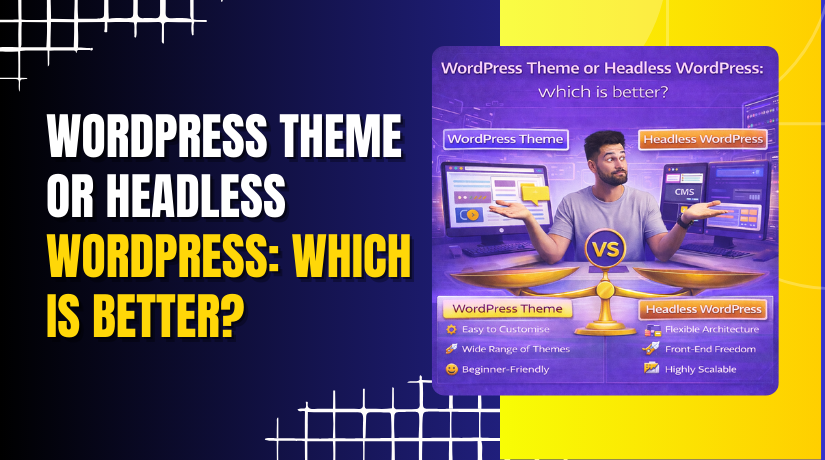
WordPress theme or headless WordPress: which is better?
Table of Contents
- Introduction: Why This Comparison Matters Today
- Quick Basics: Theme-Based WordPress vs Headless WordPress
- Decide Faster Using Real Needs, Not Trends
- Theme-Based WordPress: Where It Wins
- Headless WordPress: Where It Wins
- Quick Comparison Setup: How To Judge Both Options
- Direct Comparison: Theme-Based vs Headless Across Key Factors
- Honest Limitations: What You Give Up in Each Approach
- Practical Recommendations: What I Would Choose in Common Scenarios
- Final Verdict
Introduction: Why This Comparison Matters Today
Choosing your WordPress setup shapes your site’s future growth. Many USA businesses start fast, then hit limits later. That is why this choice matters early. Some owners want a quick website with simple updates. Others need more control over speed and design. The answer depends on your goals, skills, and budget. A theme-based site can feel easier and faster to launch. A headless build can feel cleaner and more flexible long term. But headless also adds more moving parts to manage. This guide helps you decide without stress or confusion. We will compare real needs, not hype or trends. You will see where each option works best. You will also see where each option can fail badly.
Here are common reasons people compare these options:
- They want faster page loading for mobile visitors.
- They want better control over layout and user journeys.
- They want a setup that scales with business growth.
- They want fewer limits from plugins and page builders.
- They want a site that is easy to update daily.
Many people search for WordPress theme vs headless WordPress because both sound right. A theme feels simple and proven for most sites. Headless feels modern and powerful for custom builds. The best choice is the one that matches your plan.
Quick Basics: Theme-Based WordPress vs Headless WordPress
What a Theme-Based WordPress Site Is
A theme-based site is the standard WordPress setup most users know. WordPress manages your content and also shows it on pages. Your theme controls how pages look and how menus behave. You can change colors, fonts, and layouts from the dashboard. You can also use plugins to add features quickly. This setup works well for blogs and business websites. It also works well for many WooCommerce stores.
In simple words, the theme does the front-end job for you. WordPress runs the admin, content, and page output together. This is why many call it Traditional WordPress vs headless WordPress. Traditional WordPress means one system does most tasks.
Theme-based is usually a good fit when:
- You want to launch fast with less custom coding.
- You want easy editing and simple page previews.
- You want plugins to work with fewer extra steps.
What Headless WordPress Is
Headless WordPress separates content from the site design layer. WordPress stays as the backend for content editing. The front-end is built using another system or framework. That front-end pulls content using an API. Your pages are not rendered by a WordPress theme. Instead, your custom front-end displays the content.
This is why many compare WordPress headless vs theme-based site setups. In headless, WordPress becomes a content engine only. The “head” is the front-end you build and control. This can give more freedom for design and performance tuning. It can also support multiple channels from one backend. But it needs more planning and technical support.
Traditional vs Headless Explained Simply
Think of traditional WordPress like one full kitchen setup. It cooks and serves in the same place. Headless is like a central kitchen with many serving counters. WordPress cooks the content, but the front-end serves it. Traditional is simpler to manage for most teams. Headless can be stronger for complex user experiences. The tradeoff is added setup and ongoing work.
Decide Faster Using Real Needs, Not Trends
Your Decision Checklist First
Before choosing a build style, check your real needs. Many site owners pick based on hype and regret later. Use this checklist to stay clear and practical. Your best choice depends on your team, budget, and timeline. It also depends on how much control you truly need.
Start with your site purpose and daily workflow. A simple brochure site needs less complexity. A custom app style site needs more control. A fast blog needs clean pages and steady publishing. A store needs stable checkout and easy product management.
Ask these questions and note your answers:
- Do you need to launch in days, not months?
- Will non-technical staff update pages every week?
- Do you rely on many plugins for key features?
- Do you need advanced design beyond theme limits?
- Do you expect high traffic spikes from campaigns?
- Do you need content shown on apps or devices?
Now connect those answers to a clear direction. If you want easy setup and simple editing, stay theme-based. If you need custom front-end control, consider headless.
Theme-based WordPress is usually the right choice when:
- You want fast launch with predictable costs.
- You want simple editing, preview, and publishing control.
- You want plugin features without custom development needs.
- You want a smooth WooCommerce setup for most stores.
Headless WordPress is usually worth considering when:
- You need a custom UI that themes cannot support.
- You want content used across many digital channels.
- You need strong speed control for large traffic loads.
- You have a developer team for ongoing changes.
This is where WordPress theme limitations vs headless becomes a real issue. A theme gives speed and simplicity early on. Yet themes can block deeper layout control later. Headless removes many theme limits, but adds complexity.
If you are new to this topic, keep it simple. Headless WordPress for beginners can feel confusing at first. Many beginners do better with a strong theme foundation. They can upgrade later when needs grow.
Theme-Based WordPress: Where It Wins
Fast Launch and Simple Management
A theme-based site is quick to build and easy to run. You can choose a theme, set pages, and publish quickly. You can adjust layout using the customizer or a builder. You can also test changes using staging in many hosts. This makes it a strong option for small USA businesses.
Most owners like the daily ease of theme-based sites. Editors can log in and update content quickly. They can also preview pages before publishing changes. This workflow helps teams move faster without heavy support.
Plugin Ecosystem Advantage
Theme-based WordPress works well with the plugin ecosystem. Many plugins assume WordPress controls the front-end output. That means features often work right after installation. You can add forms, SEO tools, caching, and more quickly. You also avoid extra integration work in most cases.
This is why many people prefer Traditional WordPress vs headless WordPress. Traditional setups reduce extra steps for common tasks. You can focus on content and marketing instead of build issues.
Common plugin-driven features that work smoothly include:
- Contact forms and lead capture tools
- SEO settings like titles, meta, and sitemaps
- Security and login protection features
- Caching and image optimization tools
- Page builders for quick layout control
Straightforward Content Workflows
Theme-based WordPress keeps the content workflow simple and direct. Writers can see what pages look like while editing content. Marketing teams can publish posts without developer help. This matters for fast content growth and SEO goals. It also reduces risk during updates and site changes.
If your main goal is steady publishing and fast updates, themes shine. If your goal is deep front-end control, headless may fit better. The best choice comes from how you work every week.
Headless WordPress: Where It Wins
Better Control for Custom Design and Modern UX
Headless WordPress gives you stronger control over the front-end experience. You are not limited by a theme’s template structure. You can design each screen exactly as you want. You can build fast transitions and clean page layouts. You can also keep the UI consistent across the full site.
This is useful when your site feels more like a web app. It can also help when users need custom flows. Think of booking, pricing tools, or product finders. These features can feel smoother with a custom front-end.
Many people compare WordPress headless vs theme-based site builds for this reason. Theme-based sites can look great, but patterns repeat. Headless gives you more freedom to design unique user paths.
Headless often works well for:
- Sites needing advanced filters and custom search results
- Brands needing a strong design system across pages
- Sites needing interactive tools, not simple content pages
- Teams wanting full control over front-end performance
Multi-Channel Publishing From One Content System
Headless WordPress can send content to more than one destination. WordPress stays as the content hub for editors. That content can power a website, mobile app, or another platform. You keep one editorial workflow for many outputs. This can reduce repeated work for large content teams.
For example, a brand might publish a guide once in WordPress. The same guide can appear on the main website and in an app. It can also feed email content blocks or kiosk screens. This is hard to do with a theme-only setup.
Stronger Performance Options at Scale
Headless setups can be tuned for speed and stability. You can control how pages are built and served. You can reduce heavy theme code and extra front-end bloat. You can also use modern front-end caching strategies. This helps when you expect large traffic and many page views.
Still, headless is not “always faster” by default. Speed depends on how well the front-end is built. It also depends on hosting and caching choices. A poorly built headless site can be slow too. A well-tuned theme site can also be very fast.
This is why Traditional WordPress vs headless WordPress is not a simple win. Headless can scale well, but it needs skilled setup. Traditional can scale too, with the right theme and optimization.
Headless WordPress for Beginners: What To Know
If you are new, headless can feel hard at first. You may need developer help for normal site tasks. Simple plugin features may require custom building. Preview and layout changes may not be one-click anymore. That is why Headless WordPress for beginners should be approached carefully.
Beginners should consider headless only when:
- They have a developer ready for ongoing updates
- They need a custom UI that themes cannot deliver
- They want multi-channel content use from day one
Quick Comparison Setup: How To Judge Both Options
To compare fairly, focus on real outcomes, not labels. Think about your daily work, not only launch day. A theme-based site may launch faster and cheaper. A headless site may improve control and scale later. The right choice depends on what you value most.
Use these comparison factors as your guide:


- Build time and ongoing maintenance work
- Total cost across one to three years
- Editing and preview experience for your team
- Plugin needs and feature speed to launch
- SEO control, indexing, and page rendering plan
- Speed goals and performance monitoring needs
Many owners search WordPress theme vs headless WordPress because both seem right. The best answer comes from your priorities and resources.
Direct Comparison: Theme-Based vs Headless Across Key Factors
Development Time and Complexity
A theme-based site usually starts faster and stays simpler. You install WordPress, choose a theme, and configure pages. Most layout needs can be done without heavy custom code. Many teams can manage the site with basic training.
Headless WordPress takes more planning and more setup work. You must connect WordPress to a separate front-end system. You also need routes, templates, and data mapping handled carefully. Even small changes may require developer support.
Theme-based is better when you need quick progress with less risk. Headless is better when you want deep control and custom builds.
Cost Comparison
Theme-based sites often have a lower starting cost for most projects. You may pay for a premium theme and a few plugins. Hosting can stay simple for small and mid sites. Updates are also easier for non-technical teams.
Headless sites usually cost more to build and maintain long term. You pay for front-end development and ongoing updates. You may also need better hosting for the front-end layer. You may need extra tools for preview, search, and analytics.
A fair cost check should include:
- Initial build and design cost
- Monthly hosting and tooling cost
- Ongoing development and maintenance cost
- Time spent by staff on publishing and fixes
This is why WordPress headless vs theme-based site pricing can vary widely. A simple headless build may still cost more than a theme site.
Performance and Speed
Theme-based WordPress can be fast with the right setup. You can use good hosting, caching, and image optimization. You can also pick a lightweight theme and avoid heavy builders. Many USA business sites can reach strong speed scores this way.
Headless can also be very fast when built correctly. The front-end can be tuned for clean loading and caching. You can reduce theme bloat and reduce extra script load. You can serve pages through modern delivery setups for speed.
But headless does not guarantee speed by default. If the front-end is heavy, pages can still load slowly. If APIs are slow, content can feel delayed. Always measure results with real testing, not assumptions.
SEO and Indexing Control
Theme-based WordPress is usually easier for basic SEO tasks. SEO plugins work smoothly with themes and page templates. Sitemaps, metadata, and canonical tags are simpler to manage. Content teams can publish and update without special steps.
Headless SEO needs careful planning from the start. You must ensure pages can be indexed properly. You must also handle metadata, schema, and sitemaps correctly. Rendering choice matters too, since search engines need readable pages.
Headless can still be excellent for SEO with proper setup. It just needs more technical planning and consistent rules.
This is why Traditional WordPress vs headless WordPress often favors traditional for SEO ease. Yet headless can win when SEO needs custom control at scale.
Content Editing and Preview Experience
Theme-based sites are friendly for content teams and editors. Writers can edit content and preview the same page layout. Page builders also provide visual editing for many layouts. This can reduce back and forth with developers.
Headless content editing can be smooth, but preview is trickier. Your WordPress preview may not match the front-end output. Many headless builds need custom preview systems. Editors may need extra steps to confirm page layout changes.
If publishing speed is your main focus, theme-based is easier. If your team can handle new workflows, headless can work.
Plugin Compatibility and “Out of the Box” Features
Theme-based WordPress works well with the plugin ecosystem. Many plugins assume WordPress renders the front-end pages. That is why features can work without custom work. This includes forms, popups, SEO tools, and page design tools.
Headless changes how many plugins behave on the front-end. Some plugins still help in the backend only. Others may need custom integration for the front-end output. This can increase time and development needs.
If you rely on plugins for growth and marketing, theme-based is safer. If you want custom-built features, headless can make sense.
Security and Risk Surface
Theme-based WordPress has common security risks most owners know. Themes and plugins can add risk if not updated. Weak logins and poor hosting setup can cause problems. Good security plugins and best practices reduce those risks.
Headless can reduce some front-end risks because WordPress is not the front-end. That can lower exposure to some attacks on the public site. But headless adds new systems, APIs, and integrations. Each added layer can create new risks if unmanaged.
Security depends on maintenance, not the build label. You must keep updates, backups, and access control in place.
WooCommerce Considerations
WooCommerce works best with theme-based WordPress for most stores. Many store features depend on theme templates and plugin output. Checkout, cart, and product pages are easier to manage theme-based. Many payment and shipping plugins also expect WordPress rendering.
Headless WooCommerce can work, but it is more complex. You must build product pages, cart flows, and checkout logic carefully. You may need custom solutions for taxes, shipping, and account pages. This is better for teams that need custom shopping experiences.
For most small and mid USA stores, theme-based is the safer bet. For large brands needing custom UX, headless may be worth it.
Honest Limitations: What You Give Up in Each Approach
Theme-Based WordPress Limitations
A theme-based site can feel flexible at the start. Over time, some limits become more visible and frustrating. Your design options depend on the theme’s layout system. Many themes also add extra scripts that slow pages down. Page builders can make this worse if used without care. This is where WordPress theme limitations vs headless becomes a real concern.
Common theme-based limits include:
- Layout changes can break across devices and screen sizes.
- Heavy plugins can reduce speed and raise conflict risk.
- Deep custom features may need code or child themes.
- Some themes lock you into their design structure long term.
Theme-based still works for most websites in the USA market. You just need smart theme choices and clean plugin use.
Headless WordPress Limitations
Headless can remove theme limits, but adds other challenges. You must manage two systems, not one system. You may need developers for many normal tasks. Some WordPress plugin features will not work the same way. You may also need custom work for previews and forms. That is why Headless WordPress for beginners can feel overwhelming.
Common headless limits include:
- Extra setup time for routing, templates, and page rendering.
- More maintenance due to front-end and backend updates.
- Plugin features may need custom front-end development work.
- Preview and editor workflow can require special tooling.
Practical Recommendations: What I Would Choose in Common Scenarios
Use these quick picks to decide without overthinking. Each pick matches common business goals and workflows.
- Small business site with service pages: choose theme-based WordPress.
- Blog focused on steady publishing and SEO: choose theme-based WordPress.
- WooCommerce store with standard checkout needs: choose theme-based WordPress.
- High-traffic publisher with custom UI needs: choose headless WordPress.
- App-like tools with unique user flows: choose headless WordPress.
This approach keeps WordPress headless vs theme-based site decisions practical. It also reduces regret after launch.
Final Verdict
If you want speed, ease, and plugin power, choose a theme. If you want custom UX and long-term front-end control, consider headless. This is the simplest way to judge Traditional WordPress vs headless WordPress for real projects. Need help choosing the best option for your site goals? WooHelpDesk can help you plan, build, and optimize your WordPress setup for USA users.