Kajabi vs WordPress: Which Platform Is Better for Your Website?
Table of Contents
- Introduction
- What Kajabi and WordPress Are Best Known For
- Kajabi vs WordPress for Building a Website
- Feature Comparison That Matters Most for Website Owners
- WordPress vs Kajabi for SEO
- Kajabi vs WordPress Pricing
- Kajabi vs WordPress Pros and Cons
- Which Platform Is Better for Your Website?
- Conclusion
Introduction
Choosing the right platform can shape your website’s growth. Many users compare Kajabi vs WordPress because both help build websites, but they do not work the same way. One focuses on simplicity and built-in business tools. The other focuses on flexibility and deeper control. That is why this topic matters for business owners, creators, bloggers, and service providers across the USA.
This guide looks at the practical side of the decision. It explains how each platform works, who it fits best, and what kind of website experience you can expect. The goal is not to push one option for everyone. The goal is to help readers understand which is better, Kajabi or WordPress for their own website plans. A smart choice depends on your business model, content goals, budget, and how much control you want over your site.
This article stays focused on the real website decision. It does not go into unrelated tools or broad platform talk. Instead, it builds a clear Kajabi vs WordPress comparison around the things website owners care about most. That includes setup, website structure, built-in tools, and overall platform direction.
What Kajabi and WordPress Are Best Known For
Kajabi is best known as an all-in-one platform for online business owners. Its official platform centers around products, marketing, payments, and delivery in one connected system. This makes it attractive for creators who want fewer moving parts. It is often used for courses, memberships, coaching offers, and digital products. If someone wants quick setup with many tools already included, Kajabi feels easier from the start.
WordPress is best known as an open-source website platform with strong flexibility. It gives users the freedom to create many kinds of websites. These can include blogs, business sites, service pages, online stores, and custom content websites. Users can start with a theme, change the design, and expand features with plugins. That makes WordPress a strong option for people who want more control over how their website grows.
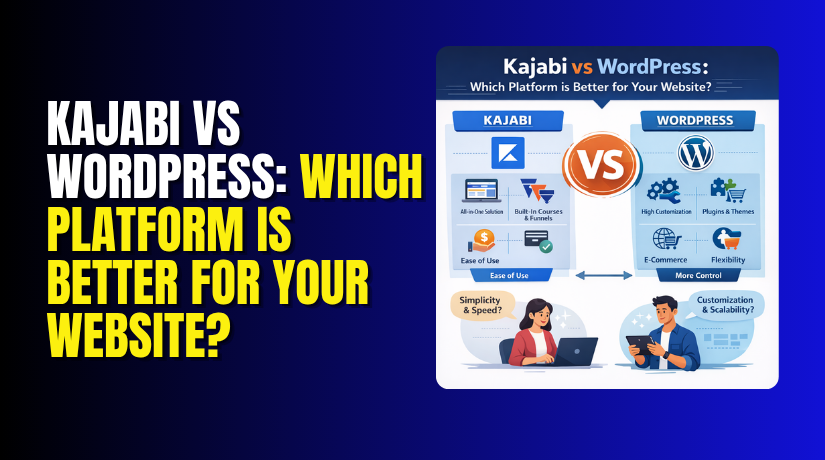
In simple terms, Kajabi is often chosen for convenience. WordPress is often chosen for freedom. That difference is the base of the full Kajabi vs WordPress for building a website discussion that follows.
Kajabi vs WordPress for Building a Website
When people compare Kajabi vs WordPress for building a website, they usually start with setup. This is where the platforms feel very different. Kajabi is built as one connected system. It includes the website area, landing pages, checkout, email tools, and automations in the same platform. That makes the starting process easier for users who want fewer technical steps and faster launch time.
WordPress takes a different path. It gives users a flexible foundation, then lets them shape the website with themes, blocks, and plugins. The official WordPress platform highlights flexible design tools, theme-based setup, and the ability to customize the site in many ways. This means WordPress may take more decisions at the beginning, but it gives much more freedom as the site grows.
For beginners, Kajabi often feels simpler. You do not need to connect many outside tools just to start building. For users who want a course site, coaching site, membership website, or digital product website, Kajabi can feel more direct from day one. Its system is designed around that business model.
WordPress fits a wider range of website goals. It can support blogs, company sites, service sites, online stores, portfolios, news sites, and custom projects. It also gives more control over layout, structure, and long-term website changes. That is a major reason many users still prefer WordPress when they want full design freedom.
Feature Comparison That Matters Most for Website Owners
A strong Kajabi vs WordPress comparison should focus on the features that affect real website work. Kajabi includes many business tools inside the platform. These include landing pages, email campaigns, automations, checkout, analytics, and digital product delivery. Kajabi also offers behavior-based automations that help users streamline tasks and customer journeys without adding many separate systems.
WordPress works differently. It starts with the core platform, then expands through themes and plugins. WordPress officially highlights that users can create many website types, make the site look better with themes, and extend it with plugins. This gives site owners more freedom to choose the exact tools they need.
So, when comparing Kajabi vs WordPress features, the real difference is simple:
- Kajabi gives more built-in tools from the start.
- WordPress gives more choices and deeper customization.
If convenience matters most, Kajabi may feel smoother. If flexibility matters most, WordPress usually gives more room to build.
WordPress vs Kajabi for SEO
SEO matters when your website depends on search traffic. This is why WordPress vs Kajabi for SEO is an important part of the full comparison. Both platforms support website visibility, but they do not offer the same level of control. WordPress is usually stronger for users who want to manage SEO in more detail. It is built to support themes, plugins, and many content structures, which gives site owners more room to optimize pages over time.
A major WordPress advantage is plugin support. Users can add SEO plugins that help with metadata, schema, XML sitemaps, redirects, content analysis, and other search-focused tasks. The WordPress plugin directory includes major SEO tools such as Yoast SEO, All in One SEO, Rank Math, SEOPress, and The SEO Framework. That wide plugin ecosystem gives website owners more options based on their goals and skill level.


Kajabi takes a simpler approach. It gives users an all-in-one system built around selling, marketing, checkout, and product delivery. That setup can work well for creators who want fewer technical choices. But its main strength is convenience, not the deep SEO flexibility that WordPress offers through its broader ecosystem. So when readers ask about which is better, Kajabi or WordPress, WordPress often has the edge for long-term SEO-focused growth.
Kajabi vs WordPress Pricing
Pricing also shapes the website decision. A useful Kajabi vs WordPress pricing review should look at how each platform handles cost. Kajabi uses a direct subscription model. Its pricing page currently shows three main plans: Basic at $179 per month, Growth at $239 per month, and Pro at $399 per month on monthly billing. Kajabi also offers lower annual equivalent pricing and states that there is no revenue sharing.
WordPress works differently. The software itself is open source, but the final cost depends on the setup. Users may pay for hosting, a premium theme, plugins, maintenance, design work, or support services. That means WordPress can start at a lower cost, but pricing is less fixed because every website can be built differently. WordPress presents itself as open source and designed to be extended with themes and plugins rather than sold as one bundled website plan.
In a practical Kajabi vs WordPress comparison, Kajabi gives predictable bundled pricing, while WordPress gives flexible costs and more setup freedom.
Kajabi vs WordPress Pros and Cons
A clear Kajabi vs WordPress pros and cons review helps readers make a smart choice. Both platforms are strong, but they solve website needs in different ways. Kajabi focuses on simplicity and built-in business tools. WordPress focuses on freedom, flexibility, and site control.
Kajabi has strong benefits for users who want one connected system. It brings together website tools, email, automations, payments, landing pages, and product delivery in one place. That setup saves time and reduces the need to manage many outside tools. It works well for creators, coaches, memberships, and digital product businesses.
Kajabi also has limits. Its biggest strength is convenience, but that can also mean less flexibility. Users do not get the same wide theme and plugin ecosystem that WordPress offers. Kajabi is also a subscription platform, so the monthly cost stays part of the long-term website budget.
WordPress has major strengths for website owners who want control. It supports flexible design tools, blocks, themes, and plugins. The platform also offers thousands of themes and a very large plugin directory. That gives users more ways to shape the website and expand it over time.
WordPress also has trade-offs. It usually needs more setup choices. Users may need to manage hosting, plugin selection, maintenance, and updates with more care. So, while WordPress offers more freedom, it often asks for more hands-on management too. That is an important part of any honest Kajabi vs WordPress comparison.
Which Platform Is Better for Your Website?
The answer depends on what kind of website you want. If your goal is to sell courses, coaching, memberships, or digital products with fewer setup steps, Kajabi may be the better fit. Its all-in-one system is built around that workflow.
If you want broader website control, stronger customization, and better long-term SEO flexibility, WordPress is usually the better choice. That is why many users asking which is better, Kajabi or WordPress often choose WordPress for business websites that need room to grow.
Conclusion
In this full Kajabi vs WordPress review, both platforms offer value. Kajabi is better for simplicity and built-in business tools. WordPress is better for flexibility, customization, and long-term website growth. For most website owners who want stronger control and wider SEO options, WordPress is often the better long-term choice.
If you need help building, fixing, improving, or managing your WordPress website, WooHelpDesk can help. Our team supports website owners with setup, customization, SEO improvements, troubleshooting, and ongoing WordPress support.