WordPress Categories vs Tags vs Taxonomies: What’s the Difference?
Table of Contents
- Why This Topic Confuses Many WordPress Users
- What Categories Mean in WordPress
- What Tags Mean in WordPress
- What Taxonomies Mean in WordPress
- Main Difference Between Categories, Tags, and Taxonomies
- Are Categories and Tags the Same in WordPress?
- How to Use Categories and Tags in WordPress the Right Way
- Category vs Tag WordPress SEO: Does It Matter?
- Conclusion
Why This Topic Confuses Many WordPress Users
Many WordPress users mix up categories, tags, and taxonomies. At first, they look very similar. All three help organize content inside a WordPress website. That is why many beginners use them without knowing the real difference. Later, this can create a messy blog structure and confusing archive pages.
A common question is: What is the difference between categories and tags in WordPress? The confusion usually starts because both are used on blog posts. Both also help group related content. But they do not do the same job.
Categories are used for broad topics. Tags are used for smaller details. Taxonomies are the full system behind both. Once you understand this structure, WordPress becomes easier to manage.
This topic also matters for content planning. A clear structure helps readers find related posts faster. It also makes your blog feel more organized and professional. For blog owners, editors, and business websites, this is very important.
In simple words, categories create the main path. Tags add extra labels. Taxonomies are the bigger grouping method in WordPress. When used correctly, they improve order, clarity, and user experience.
What Categories Mean in WordPress
Categories are the main way to group WordPress posts. They cover the broad subject of a post. Think of them as major sections of your blog. A website about WordPress may use categories like SEO, Plugins, Themes, or Security.
Categories help build your content structure. They tell readers what general topic a post belongs to. They also help WordPress create archive pages for each section.
Here are the main features of categories:
- Categories are broad topic groups
- Categories can have parent and child levels
- Categories help organize blog posts clearly
- Categories improve website navigation for readers
For example, you may create a parent category called “WordPress Errors.” Under that, you can add child categories like “Login Errors” or “Plugin Errors.” This makes your blog easier to browse.
You can assign a post to more than one category. Still, it is better to use them carefully. Too many categories can weaken your structure. Each post should fit into the most relevant section.
If you want a clean content system, start with categories first. They give your website a strong base. Before learning tags and taxonomies, you must understand categories well.
What Tags Mean in WordPress
Tags help describe the smaller details inside a WordPress post. They are not used for broad topics. Instead, they point to specific ideas, terms, or subjects mentioned in the content. If categories act like main folders, tags act like extra labels.
For example, a post may be placed in the category “WordPress SEO.” Then you may add tags like meta title, XML sitemap, image alt text, or schema markup. These tags explain what the post talks about in more detail.
This is why many users ask, Are categories and tags the same in WordPress? The answer is no. Tags are more specific. Categories are broader and more structured.
Tags also work differently from categories in another important way. They do not have parent and child levels. You cannot create a tag under another tag. Every tag stands on its own.
Here are the main features of tags:
- Tags describe specific points inside a post
- Tags do not have a hierarchy
- Tags help connect related posts across topics
- Tags are optional in WordPress posts
Used correctly, tags can improve content discovery. A reader may open one tag archive and find other posts with the same detail or subject. This can increase engagement and page views.
Still, tags should be used with care. Do not create too many tags. Do not add tags that are used only once. A long list of weak tags can make your site look disorganized.
What Taxonomies Mean in WordPress
To understand this topic fully, you must know what are taxonomies in WordPress. A taxonomy is the system WordPress uses to group content. It is the larger structure behind categories and tags.
In simple words, categories and tags are both taxonomies. They are the default taxonomies that come built into WordPress. This means WordPress already uses taxonomies to sort and organize your posts.
Taxonomies help websites keep content grouped in a meaningful way. They make archives possible. They also help users browse related content more easily.
There are two common types of taxonomies in WordPress:
- Categories – broad and hierarchical
- Tags – specific and non-hierarchical
WordPress can also support custom taxonomies. These are created when a site needs more control over content grouping. For example, a movie website may use taxonomies like genre, actor, or release year.
So, taxonomies are the full content grouping system. Categories and tags are just two parts of that system. Once you understand this, the full structure becomes much easier to follow.
Main Difference Between Categories, Tags, and Taxonomies
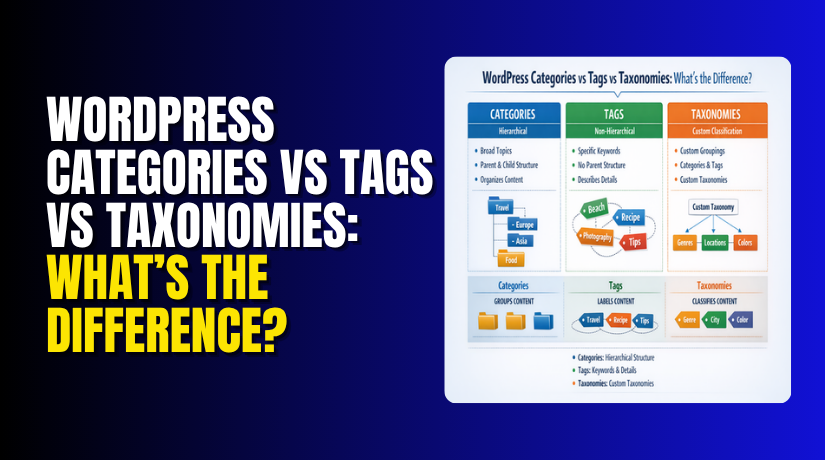
The main difference is simple once you break it down clearly. Categories organize posts into broad topic groups. Tags describe small details inside those posts. Taxonomies are the full system WordPress uses for content grouping.


This means categories and tags are both part of taxonomies. They are not separate from taxonomies. Instead, they work inside that larger structure. If you understand this one point, the topic becomes much easier.
A category gives the main subject of a post. A tag gives extra detail about that subject. A taxonomy gives the rule WordPress uses to organize both.
Here is a simple way to understand it:
| Element | What It Does | Structure | Best Use |
| Categories | Groups posts into main topics | Hierarchical | Main blog sections |
| Tags | Adds specific post details | Non-hierarchical | Related smaller topics |
| Taxonomies | Organizes content as a system | Can vary | Full content classification |
Categories are usually broader and fewer in number. Tags are usually narrower and more detailed. Taxonomies are not labels you add the same way. They are the full grouping method behind the scenes.
For example, a post about WooCommerce emails may fit into a category called “WooCommerce Errors.” It may also use tags like order emails, SMTP, admin notifications, and email settings. In this setup, category shows the broad topic. Tags show the exact areas covered.
This is why many users search for What is the difference between categories and tags in WordPress. The answer is not just about names. It is about the level of grouping each one provides.
Keep these points in mind:
- Categories group posts into broad blog sections
- Tags describe specific post topics or small details
- Taxonomies are the full WordPress grouping system
- Categories and tags are both default taxonomies
Are Categories and Tags the Same in WordPress?
Many beginners ask, Are categories and tags the same in WordPress. They are not the same, even though both organize posts. They serve different purposes and should not be used in the same way.
Categories help build the main structure of your blog. They work like major folders for your content. Tags work like extra labels that highlight specific details inside each post.
Another important difference is structure. Categories support parent and child levels. Tags do not support that kind of relationship. Categories are also more important for overall site organization.
So, categories and tags may look similar at first. But in practice, they do different jobs. Using both correctly helps create a cleaner and more useful WordPress website.
How to Use Categories and Tags in WordPress the Right Way
Knowing how to use categories and tags in WordPress can improve your blog structure. It also makes your content easier to browse. Categories should be planned first because they shape the main content path. Tags should be added later only when they truly support the topic.
Start by creating a small number of clear categories. These should match the main subjects on your website. For example, a WordPress support blog may use categories like Plugins, Themes, SEO, and Errors. This keeps your blog neat and easy to understand.
Then use tags for specific details inside each post. Tags should describe smaller points, not repeat category names. They should help connect related posts that share the same detail.
Follow these simple rules:
- Use categories for broad post grouping
- Use tags for specific post details
- Keep category names clear and simple
- Avoid creating too many one-time tags
- Do not use tags that repeat categories
Good structure helps both users and site owners. Readers can move through your content more easily. Editors can also manage posts in a more organized way.
Category vs Tag WordPress SEO: Does It Matter?
Many users also ask about Category vs tag WordPress SEO. The truth is simple. Categories and tags do not improve rankings by themselves. Their value comes from better content structure and easier navigation.
A clean setup helps visitors find related posts faster. It also helps search engines understand how your content is grouped. But poor use can create weak archive pages and repeated content.
For better SEO, keep this in mind:
- Use useful categories with real purpose
- Add tags only when they support navigation
- Avoid thin or unnecessary archive pages
- Keep your content grouping clean and relevant
Conclusion
The difference becomes clear when you look at each role. Categories cover broad topics. Tags cover smaller details. Taxonomies are the full content grouping system behind both.
If your goal is a clean and user-friendly WordPress blog, use categories first. Then use tags carefully where they add value. When you follow this simple method, your content stays organized, easy to browse, and easier to manage over time.
If you need help improving your WordPress blog structure, WooHelpDesk can help. Our team can review your categories, tags, archive pages, and overall content setup. We help website owners keep their WordPress sites clean, organized, and easier to manage. Visit WooHelpDesk to get expert WordPress support and make your website work better for users and search engines.