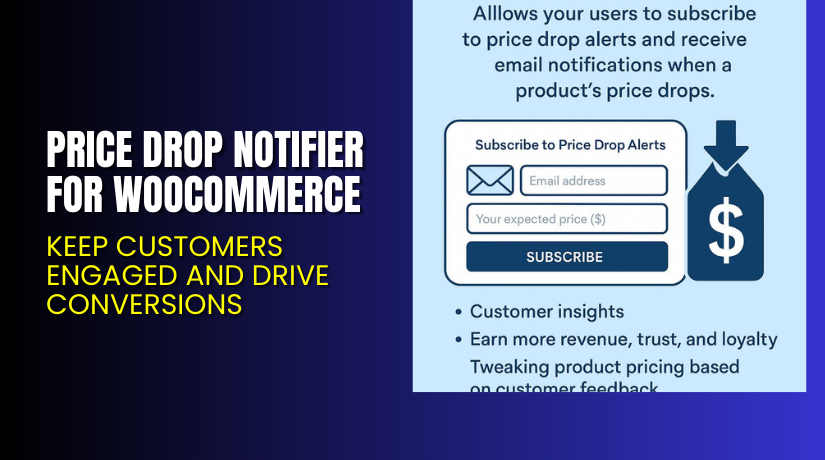
Price Drop Notifier for WooCommerce – Keep Customers Engaged and Drive Conversions
Table of Contents
- Overview: Price Drop Notifier for WooCommerce
- What Is Price Drop Notifier and How It Works
- Key Features of Price Drop Notifier
- How to Install & Configure Price Drop Notifier
- Pricing, Support & Services
- Pros & Cons of Using Price Drop Notifier
- Who Should Use This Plugin?
- Final Thoughts
- FAQ
Introduction
Running a WooCommerce store takes constant effort and smart tools. Store owners face daily challenges — low conversions, cart abandonment, and visitors leaving without buying. Many customers wait for discounts but never return because there’s no reminder system. This leads to missed sales opportunities and reduced store performance.
That’s where a reliable plugin like Price Drop Notifier for WooCommerce becomes essential. It keeps your customers updated when product prices fall, turning casual visitors into loyal buyers. Instead of losing potential customers, you can now re-engage them automatically.
With so many WooCommerce extensions available, it’s often confusing to find the right one. Some are complex, some expensive, and others fail to deliver results. This plugin offers a simple and effective solution that helps grow your business without technical stress.
In this article, we’ll explore the Price Drop Notifier for WooCommerce plugin, its key features, setup process, pricing, pros and cons, and who should use it. You’ll also find helpful links and insights based on hands-on testing.
👉 If you ever need help installing or troubleshooting any plugin or extension, please try our Installation & Troubleshooting Services.
What is Price Drop Notifier for WooCommerce?
Price Drop Notifier for WooCommerce is a marketing automation plugin that alerts users when a product’s price decreases. It allows customers to subscribe to price alerts for specific products and automatically notifies them by email when a discount is applied.
Developed by Flintop, this plugin helps WooCommerce store owners recover lost sales and boost engagement. It’s available in both Free and Premium versions, giving flexibility to all types of businesses.
This plugin integrates smoothly with your WooCommerce products, making it easy to manage notifications directly from your dashboard. Store owners can customize alert messages, track subscriber lists, and view notification reports.
With its simple design and powerful automation, it’s perfect for boosting repeat visits and conversions. Whether you manage a small online shop or a large e-commerce store, it ensures your customers never miss a deal.
Features of Price Drop Notifier for WooCommerce
| Feature | Description | Why It Matters |
| Custom Email Notifications | Sends personalized email alerts when product prices decrease. | Keeps customers informed and improves re-engagement. |
| Easy Integration | Works seamlessly with all WooCommerce products. | No coding needed, saving setup time for store owners. |
| Subscriber Management | Lets you track, export, or delete subscribers. | Helps maintain clean data and control over marketing contacts. |
| Admin Notifications | Alerts admin when a new user subscribes to a price alert. | Helps store owners stay updated on customer interest. |
| Customizable Templates | Modify email content and layout easily. | Matches your store’s branding and enhances user trust. |
| Multi-Product Subscription | Allows users to subscribe to multiple product alerts. | Increases repeat traffic and encourages cross-sales. |
How to Install and Configure Price Drop Notifier for WooCommerce
- Download the plugin from the link.
- Go to your WordPress Dashboard → Plugins → Add New → Upload Plugin.
- Upload the downloaded ZIP file and click Install Now.
- After installation, click Activate Plugin.
- Navigate to Settings → Price Drop Notifier.
- Configure your basic options like email templates, alert frequency, and design.
- Test the plugin by subscribing to a few products and checking the alerts.
💡 If you face any configuration or compatibility issues, you can try our Installation & Troubleshooting Services.
Price Drop Notifier for WooCommerce – Pricing & Plans
| 1 Year Plan | `2 Year Plan |
| $49 | $78.40 |
Subscription includes
|
Subscription includes
|
Buy Price Drop Notifier for WooCommerce Now
Purchase Here → Buy Price Drop Notifier Premium Now


💡 Your purchase supports the development team and helps me create more detailed tutorials and plugin reviews.
My Experience with Price Drop Notifier for WooCommerce
After testing this plugin on a live WooCommerce store, the results were impressive.
Pros
- Simple setup process — even beginners can install it easily.
- Works smoothly with major WooCommerce themes.
- Lightweight and doesn’t slow down the site.
- Customizable email templates for better engagement.
- Excellent support and regular updates from Flintop.
Cons
- Limited styling options in the free version.
- No SMS notifications available.
- Some advanced features require the premium plan.
Overall, the plugin delivers what it promises — automated alerts that improve sales and user retention.
Who Should Use This Plugin?
- WooCommerce store owners want to recover lost sales through price alerts.
- Agencies managing multiple client stores and seeking automated marketing tools.
- Beginners who need an easy-to-use, effective plugin without coding.
- Marketers who wish to grow their email list organically.
- Store owners promoting seasonal discounts and flash sales.
Useful Resources
- Official Plugin Page
- Official Plugin Support Page
- Developer Documentation
- WooHelpDesk Installation & Troubleshooting Services
Final Verdict
If you’re looking for a reliable way to re-engage shoppers and boost conversions, Price Drop Notifier for WooCommerce is worth trying. It provides excellent automation without heavy configuration or coding knowledge.
By installing this plugin, you give visitors a reason to return — automatically turning interest into sales. Whether you sell electronics, fashion, or home products, this tool can help maintain customer interest throughout price changes.
👉 Buy [Price Drop Notifier for WooCommerce] Premium Now
💡 Need help installing or fixing it? Try our Installation & Troubleshooting Services.
FAQ Section
Q1. Is Price Drop Notifier for WooCommerce compatible with all themes?
Yes, it works with most standard WooCommerce themes. Always test before going live.
Q2. Can I use both free and premium versions together?
No. You need to deactivate the free version before installing the premium one.
Q3. How do I get plugin support?
You can contact the official support team through the Flintop Support Page.



