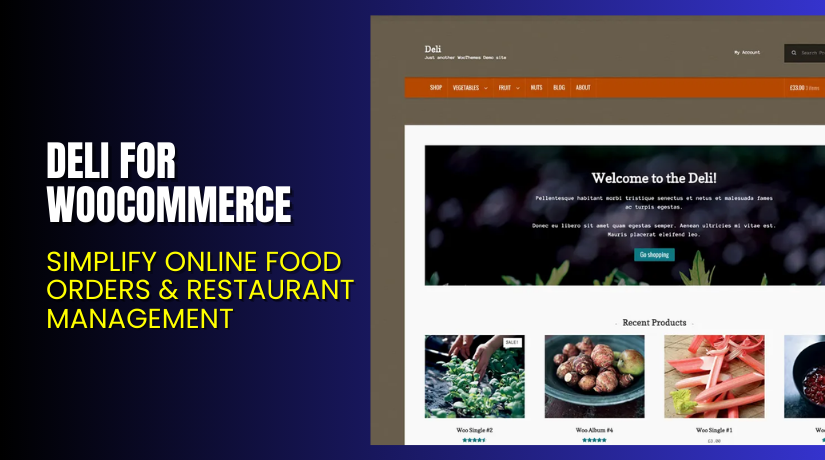
Deli for WooCommerce – Simplify Online Food Orders & Restaurant Management
Table of Contents
- Introduction
- What is Deli for WooCommerce?
- Features of Deli for WooCommerce
- How to Install and Configure Deli for WooCommerce
- Deli Theme – Pricing & Plans
- My Experience with Deli for WooCommerce
- Who Should Use This Theme?
- Final Verdict
- FAQ Section
Introduction
Running a WooCommerce store means managing dozens of extensions and themes. You may install one tool after another. Some promise great growth but deliver little. Others add complexity instead of simplifying your workflow.
When you spend too much time on integration, configuration, or debugging, your energy shifts away from selling. That distraction hurts your store’s performance and your bottom line. You deserve a simple solution that helps your business grow and keeps your focus on customers.
In this article, we’ll explore Deli for WooCommerce, its features, installation process, pros & cons, pricing, and how it stacks up against alternatives. Whether you’re setting up a new store or refining an existing one, you’ll learn how this theme/plugin can reduce hassle and boost clarity.
👉 If you ever need help installing or troubleshooting any plugin or extension, please try our Installation & Troubleshooting Services.
What is Deli for WooCommerce?
Deli for WooCommerce is a Storefront child theme developed by WooCommerce. It’s designed for stores that want a natural, handcrafted look with simple functionality. Deli inherits the reliability, performance, and flexibility of the Storefront framework but adds a unique visual touch.
The theme focuses on clean layouts and natural colors, making it ideal for shops selling organic food, handmade goods, or eco-friendly products. It’s lightweight, responsive, and fully compatible with all WooCommerce extensions. Deli helps your store look professional while staying easy to manage.
It’s developed and maintained by Automattic, the same team behind WordPress.com and WooCommerce. This ensures long-term support and compatibility with core WooCommerce updates.
Features of Deli for WooCommerce
| Feature | Description | Why It Matters |
| Natural Design | Uses organic colors, textures, and soft elements | Creates a warm, welcoming store atmosphere |
| Storefront Framework | Built on Storefront for full WooCommerce compatibility | Ensures stability and plugin support |
| Responsive Layout | Works perfectly on mobile, tablet, and desktop | Boosts user experience on all devices |
| Lightweight Code | Optimized for speed and clean performance | Improves loading time and SEO |
| Customization Ready | Supports WordPress Customizer and child theme edits | Easy to personalize without coding |
How to Install and Configure Deli for WooCommerce
- Download Deli for WooCommerce from the link.
- Go to your WordPress Dashboard → Appearance → Themes → Add New → Upload Theme.
- Upload the Deli ZIP file and click Install Now.
- Once installed, click Activate to enable the theme.
- Navigate to Appearance → Customize to adjust colors, typography, and layout.
- Preview your site and check for plugin or layout compatibility.
💡 If you face any configuration or compatibility issues, you can use our Installation & Troubleshooting Services.
Deli Theme – Pricing & Plans
Theme available for free on WooCommerce.
Subscription includes
- Free updates
- Free customer support
Buy Deli for WooCommerce Now
Purchase Here → Buy Deli for WooCommerce Now
💡 Your purchase supports WooCommerce’s development team and helps maintain the Storefront ecosystem. It also allows me to continue writing detailed reviews and setup guides for WooCommerce themes.
My Experience with Deli for WooCommerce
After testing Deli on a live WooCommerce store, I found it simple and efficient. The installation process was quick and smooth. The layout looked clean and easy to customize. The performance was excellent, even with multiple plugins active.


Pros
- Free theme built by WooCommerce.
- Fast, lightweight, and SEO-friendly.
- Beautiful natural design ideal for organic or handmade stores.
- Works perfectly with Storefront extensions.
- Reliable updates and official support.
Cons
- Limited built-in layout variations.
- No separate premium version for extra designs.
- Requires Storefront framework to function properly.
Overall, Deli performs better than most free WooCommerce themes available online.
Who Should Use This Theme?
- WooCommerce store owners who sell natural, handmade, or organic products.
- Agencies managing small to mid-sized eCommerce stores need a clean design.
- Beginners want a free theme with easy setup and minimal configuration.
- Developers who prefer lightweight child themes to build custom layouts.
Useful Resources
- Official Deli Theme Page
- Official Support Page
- Developer Documentation
- WooHelpDesk Installation & Troubleshooting Services
Final Verdict
If you’re searching for a free, elegant, and stable theme for WooCommerce, Deli for WooCommerce is worth trying. It provides an ideal foundation for natural-themed or handmade product stores.
The theme is responsive, well-coded, and easy to customize. You can rely on regular updates and official support from WooCommerce.
👉 Buy Deli for WooCommerce Now
💡 Need help installing or fixing it? Try our Installation & Troubleshooting Services.
FAQ Section
Q1. Is Deli for WooCommerce compatible with all themes?
Yes, it’s a Storefront child theme, compatible with all WooCommerce extensions.
Q2. Can I use both Storefront and Deli together?
Yes, but Deli should be active as the main theme since it inherits Storefront features.
Q3. How do I customize colors and fonts?
Go to Appearance → Customize → Colors/Fonts, and adjust settings live.
Q4. Is Deli mobile-friendly?
Yes, it’s fully responsive and optimized for all screen sizes.
Q5. How do I get official support?
Visit the WooCommerce Support Page for direct help from the developer team.



