Social Proof for WooCommerce – Boost Sales with Real-Time Customer Activity
Table of Contents
- Introduction
- What is Social Proof for WooCommerce?
- Key Features of Social Proof for WooCommerce
- How to Install and Configure Social Proof for WooCommerce?
- Pricing & Plans
- My Experience with Social Proof for WooCommerce
- Who Should Use This Plugin?
- Final Verdict
- FAQ
Introduction
Running a WooCommerce store is more than just listing products. It’s about building trust. Many new store visitors hesitate to make a purchase because they don’t see others buying. This hesitation causes cart abandonment and lost revenue.
But what if you could show real customer activity in real time? That’s the power of social proof. Displaying purchases, reviews, and product interest can create urgency and trust.
Social Proof for WooCommerce is a plugin that does exactly that. It helps store owners convert visitors into buyers. In this article, we’ll explore what the plugin does, how to install it, its pros and cons, pricing, and more.
Need help setting it up? Use our Installation & Troubleshooting Services.
What is Social Proof for WooCommerce?
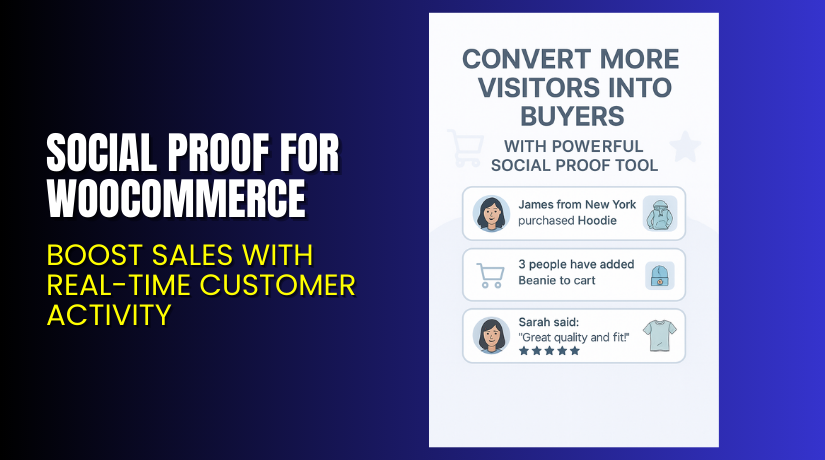
Social Proof for WooCommerce is a smart plugin developed by Meow Crew. It adds real-time social proof notifications to your WooCommerce store. These popups show when someone:
- Makes a purchase
- Adds a product to the cart
- Leaves a product review
These notifications help convince new visitors that others are actively engaging with your store. This creates FOMO (Fear of Missing Out) and boosts conversions.
The plugin stores all event data inside your own website. You don’t need third-party services or integrations. You also get complete control over how and where events are shown.
Official Plugin Page: Social Proof for WooCommerce
Support Documentation: View Documentation
Developer Contact: Meow Crew Support
Key Features of Social Proof for WooCommerce
| Feature | Description | Why It Matters |
| Real-time Events | Instantly shows popups for purchases, reviews, and cart activity. | Builds trust and drives conversions. |
| Three Notification Types | Purchases, cart adds, and reviews. | Covers the most engaging user actions. |
| Manual Event Creation | Add fake sales for promos or low-traffic stores. | Promotes specific products with ease. |
| Smart Targeting | Shows popups for products a user already viewed. | Increases relevance and click-through. |
| No External Integration | Stores data inside your website. | Keeps everything secure and fast. |
| Fully Customizable | Control look, content, timing, and visibility. | Matches your brand and user needs. |
| Mobile Friendly | Adjust settings for mobile or disable on phones. | Prevents annoyance on small screens. |
| Fake Data Options | Hide real names or create anonymous events. | Maintains privacy and flexibility. |
How to Install and Configure Social Proof for WooCommerce?
Follow these steps to set up the plugin:
- Purchase and download the plugin from the official Meow Crew page.
- In your WordPress dashboard, go to: Plugins → Add New → Upload Plugin.
- Upload the downloaded .zip file and click Install Now.
- Activate the plugin after installation.
- Navigate to WooCommerce → Social Proof Settings.
- Configure the popup settings:
- Choose event types: purchases, cart adds, reviews.
- Set popup display rules (time, frequency, pages).
- Adjust design: color, size, position, font.
- Enable or disable mobile popups.
- Optionally add manual (fake) events to promote products.
- Save changes and test it live on your store.
Need assistance? Try our WooHelpDesk Plugin Support.
Pricing & Plans
The plugin is priced at $79/year and includes:
- 1 year of updates and support
- Full access to all features
- 30-day money-back guarantee
| Plan | Price | Includes |
| Annual License | $79 / year | 1-year updates and support |
| Refund Policy | 30 days | Risk-free money-back guarantee |
Buy it today from the Official Plugin Page.
Buy Social Proof for WooCommerce Now
If your WooCommerce store lacks urgency or trust signals, this plugin can make a big difference. Visitors are more likely to buy when they see others doing the same.
Purchase here → Social Proof for WooCommerce
Your support helps the plugin developers and lets us keep building useful resources like this.


My Experience with Social Proof for WooCommerce
We tested this plugin on a fashion WooCommerce site. Here’s what stood out:
Pros
- Easy setup with no third-party account needed
- Fully customizable design and messaging
- Works great even on low-traffic stores using manual events
- Smart targeting feature is very effective
- Lightweight and fast
Cons
- No lifetime license available
- Requires manual setup for custom events
- Doesn’t pull external data automatically (e.g. other stores)
Overall, it’s a highly effective tool to increase engagement.
Who Should Use This Plugin?
This plugin is ideal for:
- Store owners wanting to boost buyer trust
- New WooCommerce stores with fewer reviews or sales
- High-traffic stores wanting to show real-time activity
- Marketers promoting new arrivals or limited stock
- Businesses running time-sensitive promotions
Useful Resources
- Official Plugin Page
- Official Documentation
- Support and Contact Page
- WooHelpDesk Plugin Installation Services
Final Verdict
Social proof is a proven psychological trigger. When customers see that others are buying or engaging with your store, they’re more likely to trust you.
Social Proof for WooCommerce is a complete solution to show that activity in real time. With flexible options, smart targeting, and no third-party requirements, it works great out of the box.
If you’re looking to improve conversions, reduce bounce rate, and boost engagement, this plugin is a smart choice.
Buy it now → Get Social Proof for WooCommerce
Need help installing or configuring it? Use our Installation & Troubleshooting Service.
FAQ
Q1. Can I use fake events for low-traffic stores?
Yes, you can manually create events to promote any product.
Q2. Is the plugin mobile-friendly?
Yes, and you can disable popups on mobile devices if needed.
Q3. Does it require third-party tools?
No. All data is stored locally in your own WordPress database.



