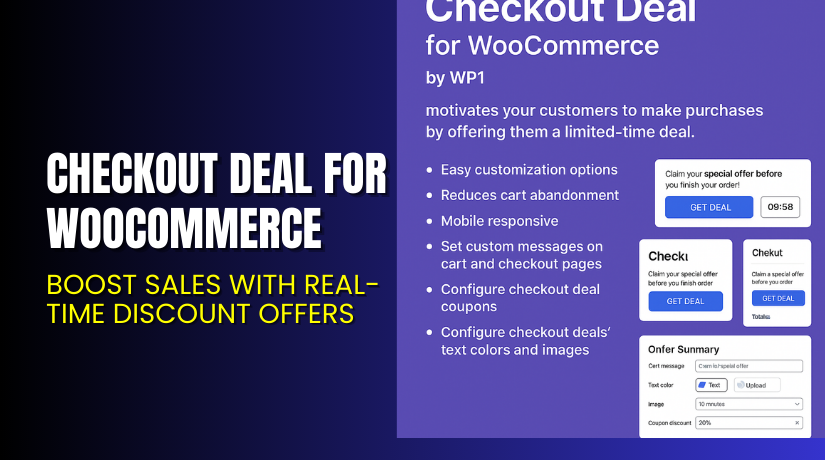
Checkout Deal for WooCommerce – Boost Sales with Real-Time Discount Offers
Table of Contents
- Introduction
- What is Checkout Deal for WooCommerce?
- Key Features of Checkout Deal for WooCommerce
- How to Install and Configure Checkout Deal Plugin
- Pricing & Plans
- My Experience with the Plugin
- Who Should Use This Plugin?
- Final Verdict
- FAQ
Introduction
Running a WooCommerce store can be rewarding but also challenging. One of the biggest hurdles? Cart abandonment.
Many customers browse, add items to their cart, but leave before completing their purchase. This often happens due to a lack of urgency or incentive. That’s where Checkout Deal for WooCommerce comes in.
This smart plugin allows you to offer time-sensitive deals during checkout. It creates a one-time-use coupon on the spot. The customer sees the deal, clicks “Get Deal,” and receives an automatic discount — just before they’re about to exit.
In this guide, you’ll learn how this plugin works, how to install it, what features it offers, and who should use it. We’ll also cover pricing and support options.
If you need assistance setting it up, try our Installation & Troubleshooting Services.
What is Checkout Deal for WooCommerce?
Checkout Deal for WooCommerce is a plugin by WP1 that offers real-time, limited-time coupons on the checkout or cart page. When a customer clicks the “Get Deal” button, the plugin creates a unique coupon and applies it to the cart automatically.
The coupon is valid for a short time — configured by the store admin. This sense of urgency encourages customers to complete their purchase immediately.
It’s a proven method to reduce cart abandonment and boost conversion rates.
Official Plugin Page: Checkout Deal for WooCommerce
Documentation: Checkout Deal Documentation
Support Contact: Support Page
Key Features of Checkout Deal for WooCommerce
| Feature | Description | Why It Matters |
| One-Time Coupon Creation | Creates a unique coupon on click | Prevents coupon misuse and builds urgency |
| Expiry Control | Admin sets how long the coupon stays valid | Limits delay in purchase decision |
| Cart & Checkout Messages | Show deal messages in strategic locations | Captures user attention at the right moment |
| Design Customization | Edit text color, background, and button style | Matches your store branding |
| Mobile Responsive | Works on all screen sizes | Ensures good experience for mobile users |
| Works with Standard WooCommerce Flows | Fully integrated with WooCommerce | No conflict with existing checkout process |
How to Install and Configure Checkout Deal Plugin
Installation is fast and easy. Here’s how to get started:
- Buy the Plugin
Visit Checkout Deal for WooCommerce and choose your license option. - Download the Plugin
After purchase, download the ZIP file from your WooCommerce account. - Install It in WordPress
- Go to Dashboard → Plugins → Add New
- Click “Upload Plugin” and select the ZIP file
- Install and activate the plugin
- Configure Deal Settings
- Go to WooCommerce → Settings → Checkout Deal
- Set the coupon discount percentage
- Define the coupon expiry time in minutes
- Customize button text, background color, visibility, and message text
- Test the Checkout Flow
- Add products to cart
- Go to the checkout page and click “Get Deal”
- Ensure the coupon is applied correctly
Need help? Use our Installation & Troubleshooting Services.
Pricing & Plans
Checkout Deal for WooCommerce is priced affordably for all store sizes:
| Plan | Price | Billing | Includes |
| 1-Year Plan | $29 | Billed annually | Plugin access, updates, support, money-back guarantee |
| 2-Year Plan | $46.40 | Billed every 2 years | Save 20%, includes everything from the 1-year plan |
- $2.42 per month (billed as $29 yearly)
- 30-day money-back guarantee
- Includes plugin updates and support
Buy Checkout Deal for WooCommerce Now
Want to reduce cart abandonment and increase sales?
Purchase Checkout Deal for WooCommerce
Your license includes:
- Plugin updates
- Customer support
- 30-day refund policy
Also, don’t forget: We can install it for you.
My Experience with the Plugin
After testing the plugin in a live store environment, here’s what I observed:
Pros:


- Easy to install and configure
- Lightweight and does not slow the checkout
- Encourages quick decision-making from customers
- Fully responsive on mobile and tablet
- Admin-friendly interface for deal customization
- Works with existing WooCommerce themes
Cons:
- No built-in analytics tracking
- Cannot set multiple coupon types (fixed, tiered, etc.)
- Limited A/B testing options
- Deal visibility may require theme adjustment in some cases
Who Should Use This Plugin?
This plugin is ideal for:
- Store owners struggling with cart abandonment
- Businesses running time-sensitive campaigns or flash sales
- WooCommerce stores selling high-margin items
- Digital product stores needing urgency on checkout
- Agencies looking to optimize checkout UX
It’s great for creating impulse buys and last-minute nudges that push customers to finish their orders.
Useful Resources
Here are the essential links to explore more:
These resources can help you get the plugin up and running quickly.
Final Verdict
If you’re losing sales at the checkout stage, Checkout Deal for WooCommerce is a quick and smart solution.
With real-time coupon creation and urgency-based messaging, it gives your customers one last reason to buy now, not later. And the best part — it’s fully automated and customizable.
At just $29/year, it offers great value with minimal setup required. Add it to your WooCommerce toolkit and watch your conversion rates improve.
Buy Checkout Deal Plugin Today
Need help getting started? Try our Installation & Troubleshooting Services.
FAQ
Q1. How long does the coupon last after clicking “Get Deal”?
The admin sets the coupon expiration time in minutes within the plugin settings.
Q2. Can I customize the design of the deal message?
Yes. You can change colors, text, and visibility from the settings panel.
Q3. Will this plugin slow down my checkout page?
No. The plugin is lightweight and optimized for fast performance.
Q4. Is it compatible with my WooCommerce theme?
Yes. It works with all standard WooCommerce themes. Always test before going live.
Q5. Can I use this with other coupon plugins?
Yes, but make sure other plugins don’t override the auto-generated coupon behavior.



