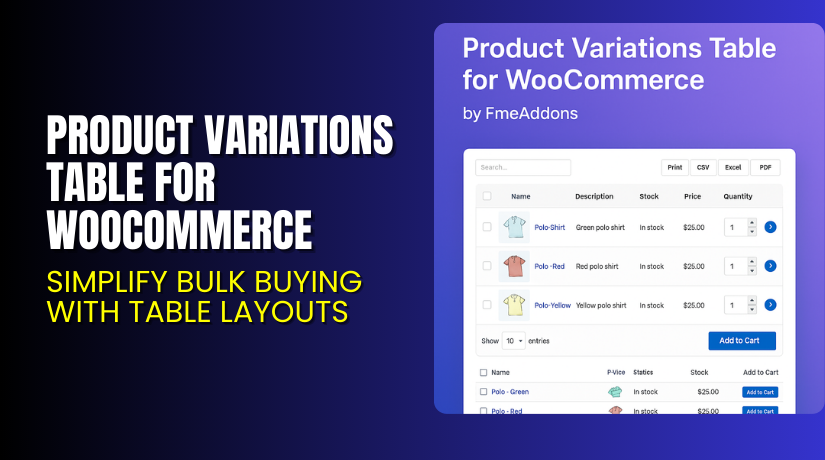
Product Variations Table for WooCommerce – Simplify Bulk Buying with Table Layouts
Table of Contents
- Introduction
- What is Product Variations Table for WooCommerce?
- Key Features of the Plugin
- How to Install and Configure the Plugin?
- Pricing & Plans
- My Experience with the Plugin
- Who Should Use This Plugin?
- Final Verdict
- FAQ
Introduction
Managing product variations in WooCommerce can be limiting when using the default dropdown layout. Shoppers often miss available variations or struggle to compare them easily — especially when buying in bulk.
That’s where the Product Variations Table for WooCommerce plugin by FME Addons can transform the way your store handles variations. It replaces dropdowns with a responsive, searchable table layout that helps customers quickly find, filter, and purchase variations.
Ideal for B2B, wholesale, and bulk purchase stores, this plugin gives more control to shoppers and simplifies the experience across devices.
In this article, we’ll explore what the plugin does, how to use it, pricing, and how it compares to alternatives.
Need setup help? Try our Installation & Troubleshooting Services.
What is Product Variations Table for WooCommerce?
Product Variations Table for WooCommerce lets you display product variations in a clean, customizable table instead of dropdowns. Shoppers can:
- View all variations at once
- Compare prices, stock, and SKUs
- Select quantities and add to cart in bulk
- Filter, search, print, or export data
The plugin is:
- Developed by FME Addons
- Compatible with WooCommerce 2.6.0+
- Compatible with WordPress 5.2+
- Current Version: 1.3.3
- Last Updated: September 2, 2025
Plugin Page: Product Variations Table – FME Addons
Documentation: Plugin User Guide
Support: FME Addons Support Portal
Key Features of the Plugin
| Feature | Description | Why It Matters |
| Replace Dropdown with Table | Use a variation table instead of the default dropdown | Improves product visibility and helps compare variations |
| Customizable Columns | Show SKU, stock, images, price, size, quantity, and more | Lets users see detailed info for each variation |
| Bulk Add-to-Cart | Add multiple variations to cart at once | Saves time, ideal for wholesale stores |
| Search and Filter Options | AJAX search bar with real-time filtering | Helps shoppers quickly find what they need |
| Table Export and Print | Customers can copy, print, or export variation tables | Great for offline review or procurement teams |
| Pagination and Layout Placement | Control where the table appears and how many variations to show | Offers layout flexibility |
| Variation Table by Role/Product | Show tables only for selected roles or products | Useful for wholesale user groups |
| Mobile Responsive Design | Fully responsive on phones and tablets | Ensures a smooth experience across all devices |
| Shortcode Support | Add variation tables anywhere using a simple shortcode | No coding knowledge required |
| Style and Color Customization | Adjust table colors and text appearance | Match table design with your store branding |
How to Install and Configure the Plugin?
Getting started is easy:
- Download the plugin from FME Addons.
- In your dashboard, go to Plugins → Add New → Upload Plugin.
- Upload the ZIP file and click Install Now.
- After activation, go to WooCommerce → Settings → Variation Table.
- Configure:
- Default columns (SKU, image, price, etc.)
- Table colors and font size
- Table position (before or after product description)
- User role and product/category-specific rules
- Use the provided shortcode if you want to manually insert the table on any page.
Need help setting it up? Use our Installation & Troubleshooting Services.
Pricing & Plans
| Plan | Price (USD) | Includes |
| Premium (Annual) | $49.00 | All features + updates + 1-year support |
| Installation Add-on | $35.00 | Complete setup and configuration help |
100% Money-Back Guarantee within 30 days of purchase.
Buy Product Variations Table Now
Purchase Here → Buy from FME Addons
Buying supports plugin development and gives you access to updates and support.
My Experience with the Plugin
We used this plugin on an office supplies store offering bulk purchases.


What Worked Well:
- The variation table replaced dropdowns perfectly
- Bulk add-to-cart saved time for repeat buyers
- Styling matched the theme easily
- Shortcodes helped display tables on custom pages
- Real-time AJAX search was fast and accurate
What Could Be Better:
- No support for simple products (variations only)
- Width/Depth fields missing from size options
- Translation options limited without external plugins
Who Should Use This Plugin?
This plugin is ideal for:
- B2B stores with many product variations
- Wholesale eCommerce businesses
- Sites selling variable products like apparel, parts, or kits
- Store owners who want to offer better data visibility
- Admins needing mobile-friendly variation displays
Useful Resources
- Plugin Overview – FME Addons
- Official Documentation – How to Set It Up
- Get Help – FME Support Portal
- Installation & Troubleshooting Help
Final Verdict
Product Variations Table for WooCommerce is a must-have plugin for stores that sell multiple versions of a product. Instead of forcing users to click through dropdowns, you can show all the info in a structured, user-friendly table.
This speeds up decision-making, reduces friction, and increases bulk orders — especially for B2B buyers.
With features like printing, exporting, role-specific views, and responsive design, this plugin adds serious functionality and improves conversion rates.
If your store depends on product variations, this plugin will simplify everything.
Buy the Plugin Now and enhance the shopping experience.
Need help installing it? Use our WooHelpDesk Services.
FAQ
Q1. Can customers select and order multiple variations at once?
Yes. The plugin supports bulk selection with checkboxes and add-to-cart in one click.
Q2. Can the variation table be exported?
Yes. Customers can export the table to PDF, CSV, or Excel — or print it.
Q3. Can I show the table only for specific users or products?
Yes. You can limit tables by user role, product, or category for targeted control.



