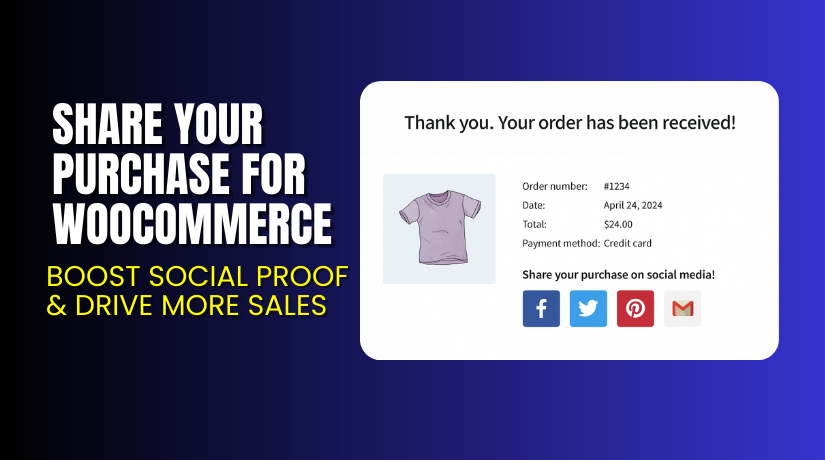
Share Your Purchase for WooCommerce – Boost Social Proof & Drive More Sales
Table of Contents
- Introduction
- What is Share Your Purchase for WooCommerce?
- Key Features of Share Your Purchase for WooCommerce
- How to Install and Configure Share Your Purchase
- Pricing & Plans
- My Experience with Share Your Purchase
- Who Should Use This Plugin?
- Final Verdict
- FAQ
Introduction
Running a WooCommerce store isn’t easy. Store owners juggle multiple extensions to grow their business. One challenge remains constant — how to increase visibility and drive organic traffic.
Word-of-mouth and social proof remain powerful tools. But how do you automate that in an eCommerce world?
That’s where Share Your Purchase for WooCommerce comes in. This plugin allows customers to share their purchases on social media right after checkout. It encourages visibility, trust, and possibly more conversions.
In this review, we’ll explore what this plugin does, its features, pricing, setup instructions, and more. If you’re looking for a way to turn your customers into your best marketers, this might be it.
If you ever need help installing or troubleshooting any plugin, try our Installation & Troubleshooting Services.
What is Share Your Purchase for WooCommerce?
Share Your Purchase is a simple but powerful marketing plugin for WooCommerce. It adds social sharing buttons on your store’s Thank You or Order Received page.
With one click, customers can share their purchase across different platforms. This helps increase your store’s visibility and generates organic traffic.
It’s developed by Enrique J. Ros and is available on WooCommerce Marketplace.
You can customize messages, hashtags, button labels, and colors. The plugin also supports WhatsApp (mobile only), email, and more.
Official Links:
Key Features of Share Your Purchase for WooCommerce
| Feature | Description | Why It Matters |
| Social Sharing Buttons | Add share buttons to the Order Received page | Encourages buyers to share their purchase immediately |
| Multiple Networks | Supports Facebook, Twitter, Pinterest, Tumblr, Gmail, WhatsApp | Reaches a broader audience |
| Custom Labels & Colors | Edit button text, call-to-action message, and button color | Aligns with your store branding |
| Twitter Customization | Add hashtags, @mentions, and custom messages | Improves engagement and tracking |
| Developer Friendly | Filter hooks available for custom networks | Extends functionality as per your needs |
| Translation Ready | Fully translatable and available in Spanish | Ideal for global audiences |
| HPOS Compatible | Works with High-Performance Order Storage | Future-proof and reliable |
| Mobile Responsive | WhatsApp sharing only on mobile | Optimized for mobile users |
How to Install and Configure Share Your Purchase
Setting up this plugin is easy and beginner-friendly. Follow these steps:
- Download the plugin from the official WooCommerce page.
- Go to your WordPress Dashboard → Plugins → Add New → Upload Plugin.
- Select the ZIP file and install it.
- Click on Activate.
- Go to WooCommerce → Settings → Share Your Purchase.
- Choose your preferred social networks (up to five).
- Customize button labels, colors, and messages.
- Test the settings on the Thank You page.
Need help configuring it? Use our Installation & Troubleshooting Services.
Pricing & Plans
The plugin is available as a premium extension through WooCommerce Marketplace.
| Plan | Price (USD) | Includes |
| 1-Year License | $29 | Plugin updates, customer support, 30-day money-back guarantee |
- No free version is available.
- Billed annually at $29.
- $2.42/month (billed once per year).
Buy it here → Share Your Purchase on WooCommerce
Buy Share Your Purchase for WooCommerce Now
Ready to turn your customers into brand ambassadors?
✅ Purchase here → Buy Share Your Purchase Now
Buying through the official site supports the developer and ensures you get updates and support. It also helps me continue writing these helpful tutorials.
My Experience with Share Your Purchase
After testing it on a live WooCommerce setup, here’s what I found.


Pros:
- Very easy to install and configure.
- Simple, clean design with good customization.
- Works well on both desktop and mobile.
- WhatsApp integration is great for mobile-first users.
- Lightweight, doesn’t slow down the store.
- Support is available directly via WooCommerce.
Cons:
- No free version to test before purchase.
- Only six social platforms supported by default.
- Customizing styles may need some CSS for advanced users.
Who Should Use This Plugin?
This plugin is ideal for:
- WooCommerce store owners who want to grow traffic organically.
- Digital marketers looking to increase social proof.
- Agencies managing stores for clients.
- Beginner store owners needing easy-to-use tools.
- Niche product stores where recommendations drive most sales.
Useful Resources
Here are helpful links for exploring more about this plugin:
- Official Plugin Page
- Plugin Documentation
- Official Support Page
- Developer’s Website
- WooHelpDesk Installation & Troubleshooting Services
Final Verdict
If you’re looking for a low-cost, high-impact WooCommerce plugin to increase visibility, Share Your Purchase for WooCommerce is worth trying.
It’s lightweight, easy to configure, and does exactly what it promises. It turns your customers into a marketing asset by letting them share what they bought. This helps you build trust and drive traffic at the same time.
Get started now and add social power to your store.
Buy Share Your Purchase for WooCommerce Now
Need help installing it? Use our Installation & Troubleshooting Services.
FAQ
Q1. Is Share Your Purchase compatible with all WooCommerce themes?
Yes, it works with most standard WooCommerce themes. Always test before going live.
Q2. Can I customize which social platforms appear?
Yes, you can select up to five from the list: Facebook, Twitter, Pinterest, Tumblr, Gmail, WhatsApp.
Q3. Does it support mobile users?
Yes. WhatsApp buttons appear only on mobile devices for better usability.
Q4. Can I get a refund if I don’t like it?
Yes, there’s a 30-day money-back guarantee via WooCommerce.
Q5. Where can I get support or help?
Visit the official support page or use our WooHelpDesk Service.



