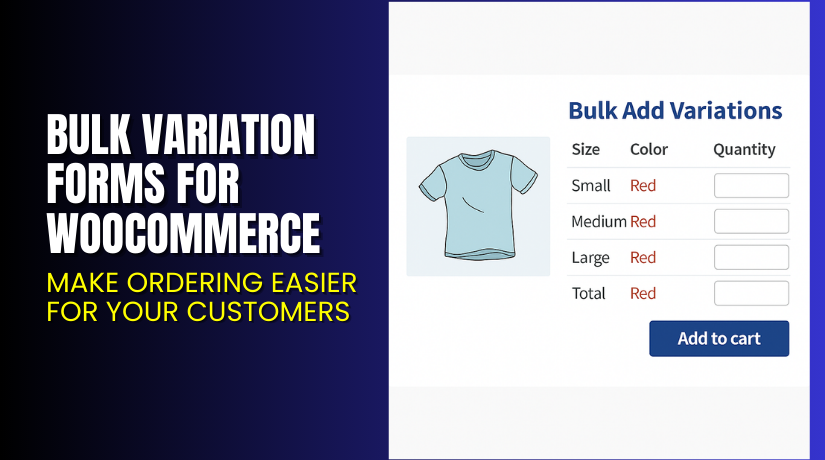
Bulk Variation Forms for WooCommerce – Make Ordering Easier for Your Customers
Table of Contents
- Introduction
- What is Bulk Variation Forms for WooCommerce?
- Key Features of Bulk Variation Forms
- How to Install and Configure Bulk Variation Forms?
- Pricing & Plans
- My Experience with Bulk Variation Forms
- Who Should Use This Plugin?
- Final Verdict
- FAQ
Introduction
If you sell variable products in WooCommerce, you know the default interface is limiting. Customers have to select one variation at a time, add it to the cart, and repeat the process. This can frustrate users—especially wholesale or B2B clients who need to buy multiple variations in bulk.
That’s where Bulk Variation Forms for WooCommerce helps. It adds a simple form layout to your product page, allowing users to select quantities for multiple variations and add them all at once.
This plugin is perfect for wholesale stores, food suppliers, apparel brands, or any business selling multi-option products.
In this article, we’ll explore how the plugin works, its main features, pricing, pros and cons, and how to install it easily.
Need help with plugin installation or issues? Try our Installation & Troubleshooting Services
What is Bulk Variation Forms for WooCommerce?
Bulk Variation Forms for WooCommerce is a plugin by Element Stark. It allows your customers to select multiple variations of a product from a single, easy-to-use form.
Instead of selecting size and color one by one, the plugin displays all available combinations in a grid or table format. Customers can quickly choose quantities for each variation and add them to the cart with one click.
It works best for products that use two variation attributes, such as:
- Size and color
- Length and width
- Weight and packaging type
This plugin is ideal for improving the bulk purchase experience on your WooCommerce store.
Plugin Page: View Plugin Details
Support: Get Help Here
Documentation: Read Official Docs
Key Features of Bulk Variation Forms
| Feature | Description | Why It Matters |
| Bulk Variation Table | Shows multiple product variations in a grid | Speeds up ordering process |
| One-Click Add to Cart | Add several variations with one button | Saves time for users |
| Easy Configuration | Works with products having two attributes | Simple for store owners |
| Theme Compatibility | Works with most WooCommerce themes | Easy to integrate |
| Use Cases Flexibility | Ideal for wholesale and B2B stores | Improves user satisfaction |
Common Use Cases
- Clothing stores offering sizes and colors
- Food suppliers with different can sizes
- Cable stores with length and connector types
- Any store with variable product combinations
Customers love not having to reload the page for each variation. Bulk orders are faster, easier, and more accurate.
How to Install and Configure Bulk Variation Forms?
Follow these steps to get started:
- Go to Element Stark’s plugin page and purchase the plugin.
- Download the plugin ZIP file.
- Log into your WordPress dashboard.
- Go to Plugins → Add New → Upload Plugin.
- Upload the ZIP file and click Install Now.
- Click Activate Plugin.
- Edit the variable product in WooCommerce.
- Enable the bulk variation form option for that product.
- Save changes and test the product on the front end.
You can customize how the form looks using simple CSS or work with a developer for advanced styling.
Want help setting it up? Use our Installation & Troubleshooting Services
Pricing & Plans
| Plan | Price | Includes |
| 1-Year License | $49/year | All features, support, and updates |
- Billed annually
- Equivalent monthly cost: $4.09
- No free version available
- All features included in one plan
Buy Now: Get Bulk Variation Forms for WooCommerce
This license includes updates and customer support for one year.
My Experience with Bulk Variation Forms
I tested this plugin on a WooCommerce store selling wholesale food products. It worked flawlessly.
Pros


- Quick to install and configure
- Smooth user experience for customers
- Works great with variable products
- Saves time for bulk buyers
- Improves overall checkout speed
Cons
- Limited to two variation attributes
- No free version for testing
- Styling may require custom CSS for some themes
Despite a few minor limitations, the plugin adds real value to stores handling large orders or multiple product variations.
Who Should Use This Plugin?
Bulk Variation Forms is ideal for:
- Wholesale stores
- B2B product catalogs
- Clothing brands with size/color variations
- Electronics stores offering size and cable types
- Food suppliers with volume-based packaging
Not suitable for:
- Stores selling simple or single-variation products
- Users looking for free tools
Useful Resources
Keep these resources bookmarked for setup, configuration, or troubleshooting support.
Final Verdict
If your WooCommerce store sells products with two variations, Bulk Variation Forms is a must-have plugin. It makes ordering faster, especially for customers who need to buy multiple options at once.
The plugin is simple, reliable, and works well out of the box. It reduces friction in the buying process, which often leads to increased sales and better user satisfaction.
It’s best suited for stores that handle bulk orders or manage a product catalog with many variable combinations.
Get started here: Buy Bulk Variation Forms for WooCommerce
Need help configuring it? Use our Installation & Troubleshooting Services
FAQ
Q1. Does this plugin support more than two attributes?
No, it is designed for products with two variation attributes only.
Q2. Will this plugin work with my current WooCommerce theme?
Yes, it supports most modern WooCommerce-compatible themes.
Q3. Can users add multiple variations at once?
Yes, users can select quantities and add all selected variations in one click.
Q4. Is there a free version to try?
No, only a premium version is available.
Q5. Is support included in the purchase?
Yes, one year of updates and support is included with your license.



