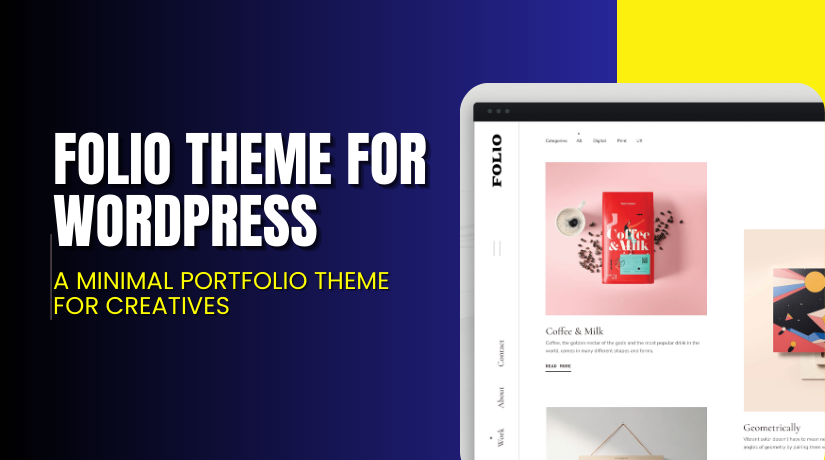
Folio Theme for WordPress – A Minimal Portfolio Theme for Creatives
Table of Contents
- Introduction
- What is Folio Theme?
- Key Features of Folio Theme
- How to Install and Configure Folio Theme
- Pricing & Plans
- My Experience with Folio Theme
- Who Should Use This Theme?
- Final Verdict
- FAQ
Introduction
Running a WordPress portfolio site should be easy. But many themes are either too bloated or too basic. Creatives, photographers, and designers often struggle with cluttered layouts and limited customization.
If you’re facing issues with slow themes or poor portfolio presentation, you’re not alone. Many users waste time trying to fix layout bugs or tweak third-party themes that aren’t built for their niche.
Enter Folio Theme by Press75 — a clean, minimal, and responsive portfolio theme made specifically for creatives. It’s built to help you showcase your work with style and simplicity.
In this article, we’ll explore the Folio Theme’s features, how to install and customize it, its pricing, pros and cons, and the ideal users for it.
Need help installing the theme or fixing any bugs? Try our Folio Theme Installation & Troubleshooting Services.
What is Folio Theme?
Folio Theme is a responsive portfolio WordPress theme by Press75. It’s designed for creatives who want to showcase their work without distractions. The theme features a full-width gallery layout, support for videos and images, and a modern grid design.
It’s ideal for photographers, artists, filmmakers, and agencies. The theme focuses on content display and visual storytelling rather than complex design elements.
Folio supports multiple media types including images, galleries, and videos. It also includes built-in pages for contact, about, and custom menus.
Unlike generic themes, Folio is lightweight and built for speed. It’s mobile responsive and retina-ready, meaning your portfolio looks great on all devices.
- Official Theme Page: View Folio Theme
- Support Page: Press75 Support
- Documentation: Folio Theme Docs
Key Features of Folio Theme
| Feature | Description | Why It Matters |
| Responsive Design | Automatically adjusts layout for all devices | Looks great on mobile, tablet, and desktop |
| Media Support | Supports images, galleries, and videos | Great for all types of visual portfolios |
| Minimal Layout | Clean and distraction-free interface | Keeps focus on your work |
| Fullscreen Display | Featured projects take center stage | Helps build strong visual impact |
| Theme Customizer | Live preview customization with WordPress Customizer | No coding skills required to make changes |
| Built-in Page Templates | Includes about, contact, and custom page templates | Saves time and ensures layout consistency |
| Easy Navigation | Simple and clear menu structure | Improves user experience |
| One-Click Install | Easy setup using default WordPress import tools | Gets your site running fast |
| Theme Updates | Ongoing updates and improvements included with license | Keeps your site secure and compatible |
How to Install and Configure Folio Theme
You can install the Folio Theme in just a few steps:
- Purchase the theme from the official theme page.
- Download the theme ZIP file from your account.
- Log into your WordPress dashboard.
- Go to Appearance → Themes → Add New → Upload Theme.
- Upload the ZIP file and click Install Now.
- After installation, click Activate.
- Go to Appearance → Customize to start configuring your theme.
- Set up your homepage, menus, gallery, and other basic settings.
- Import demo content (if available) for a head start.
- Test your site on desktop and mobile for responsiveness.
If you face issues during installation or configuration, try our Folio Theme Installation & Troubleshooting Services.
Pricing & Plans
| Plan | Price | Includes |
| Standard | $69 | One-time purchase, all theme files, updates, support |
- One-time payment of $69.00
- No monthly or yearly subscription required
- Includes theme files, updates, and support from Press75
You can buy the theme directly at: Buy Folio Theme Now
Buy Folio Theme Now
✅ Purchase Here → Buy Folio Theme Premium Now
Your purchase supports the developer and helps us produce more helpful tutorials and walkthroughs.
My Experience with Folio Theme
I installed Folio on a client’s portfolio site and tested it for two weeks. Here’s what I learned:


Pros
- Very clean and minimal layout
- No distractions from the showcased work
- Easy to use and customize with WordPress tools
- Fast performance and optimized for SEO
- Good documentation with step-by-step setup help
- Works great with both videos and images
- One-time payment model (no recurring cost)
Cons
- Not suitable for eCommerce or blogs
- Limited advanced design options out of the box
- Requires manual CSS for deeper styling control
Who Should Use This Theme?
The Folio Theme is ideal for:
- Freelancers who need a modern portfolio site
- Photographers and videographers showcasing galleries or reels
- Creative agencies and studios
- Designers who want a full-screen layout
- Anyone needing a minimalist, easy-to-use theme
Useful Resources
- Official Theme Page (Press75)
- Theme Documentation
- Press75 Support
- Folio Theme Installation & Troubleshooting Services
Final Verdict
If you’re looking for a minimal, stylish, and media-friendly WordPress theme, Folio by Press75 is a smart choice. It’s ideal for creatives who want their work to take center stage. With support for photos and videos, a simple layout, and great performance, it does exactly what a portfolio theme should do — without overcomplicating things.
Its pricing is fair, and the setup is smooth. You also get direct support from the developer and access to updates.
Use the link below to buy and launch your new portfolio site in minutes.
Need help with setup or fixing layout bugs? Use our Installation & Troubleshooting Services.
FAQ
Q1. Is Folio Theme mobile responsive?
Yes, it adapts automatically to all screen sizes including phones and tablets.
Q2. Can I use Folio Theme for blogs or WooCommerce?
No, this theme is optimized for portfolios, not for blogging or eCommerce.
Q3. What media types can I showcase with Folio?
You can add images, image galleries, and videos to your portfolio layout.
Q4. Is support included in the $69 price?
Yes, support and updates are included after purchase from Press75.



