
Setting Up Chained Products for WooCommerce
Table of Contents
- Introduction to Chained Products for WooCommerce
- Why Product Bundles Are Important
- What Problems Chained Products Solves
- Detailed Features and Use Cases of Chained Products for WooCommerce
- Real-Life Use Cases Across Industries
- Major Benefits for WooCommerce Store Owners
- Easy Setup Process for Chained Products for WooCommerce
- Conclusion
Introduction to Chained Products for WooCommerce
Selling products online is not just about offering single items anymore. To boost sales and enhance customer satisfaction, numerous WooCommerce store proprietors are now packaging products together. This is where Chained Products for WooCommerce becomes relevant.
This powerful plugin helps you create ready-made product bundles with ease. Instead of customers picking items manually, they get a complete package when they buy a main product. It saves time for the shopper and boosts your store’s revenue.
With Chained Products for WooCommerce, you can link many products to one main item. When the main product is purchased by a customer, all linked products are automatically included. No extra clicks, no confusion.
Why Product Bundles Are Important
Every WooCommerce store can benefit from product bundling as a strategy. It offers more value to customers and moves inventory faster. When people see extra products included, they feel they are getting a better deal.
Below are several reasons that explain the effectiveness of bundling:
- Increases average order value.
- Helps promote slow-moving items.
- Encourages quicker buying decisions.
- Improves customer satisfaction and loyalty.
Bundles generate a feeling of urgency and worth as well. When customers feel they are getting more value for their money, conversions happen more quickly.
What Problems Chained Products Solves
Setting up manual bundles in WooCommerce can be confusing and time-consuming. Customers might also get confused if they have too many choices. Chained Products fixes this by creating pre-configured bundles.
You decide what products go together. It suffices for customers to add the primary product to their cart. They get all the linked items automatically, without making extra choices.
This speeds up the shopping process, simplifies it, and makes it more pleasant for your customers.
Detailed Features and Use Cases of Chained Products for WooCommerce
The Chained Products for WooCommerce plugin is packed with smart features. It helps store owners create bundles, combos, BOGO deals, and much more. Every feature is designed to make bundling simple and fast.
Let’s take a closer look at what this plugin offers.
Flexible Product Bundling
Chained Products allows you to link many products to a single main item. You can chain different types of products together, including:
- Simple products
- Variable products
- Virtual and downloadable products
- Subscription products
You can add as many items as you want. It is possible to define distinct amounts for every linked product. This makes it easy to create both small bundles and large kits.
Automatic Addition to Cart
Customers who put the primary product in their cart will automatically receive all linked products. They do not need to select each item manually. Everything is ready for them.
This smooth shopping experience saves time and increases checkout success.
Individual or Bundle Pricing
The plugin gives you two pricing options:
- Set one fixed price for the main product bundle.
- Let each chained product have its own price.
If you choose individual pricing, customers see the price of each item. This increases the value perception and builds trust.
It is very useful for bundles like shaving kits, fitness packs, or tech sets.
Smart Inventory Management
Inventory is tracked at the individual product level, not the bundle level. If one chained item is out of stock, the main product cannot be bought.
This avoids shipping problems and customer complaints.
It also saves time for your customer support team by reducing order issues.
Easy Buy One Get One (BOGO) Offers
You can create BOGO deals easily using this plugin. For example:
- Buy one T-shirt, get another free.
- Buy a printer, get two free packs of paper.
You can chain one or multiple products to the main product for such offers.
This makes promotions exciting and boosts repeat sales.
Reuse Bundles and Nesting
Chained Products lets you reuse existing bundles. You can even chain a product that already has other chained products.
This is helpful when selling products like laptops with bags and accessories together.
Nested bundles create bigger offers without extra setup work.
Fast Performance and Display Options
Your WooCommerce store will not be slowed down by the lightweight plugin.
It also gives you control over how chained products appear:
- Show or hide linked products in the cart or checkout.
- Use shortcodes like [chained_products] to customize display.
Visibility can be adjusted according to what is most sensible for your business.
Real-Life Use Cases Across Industries
This plugin can be adapted to various industries and is versatile. Here are some examples:
- Electronics: Bundle laptops with a mouse, cleaning kit, and warranty.
- Fashion: Sell suits with ties and cufflinks.
- Furniture: Create bedroom sets with beds, mattresses, and side tables.
- Sports: Bundle bicycles with helmets and gear.
- Beauty and Health: Offer skincare kits with cleansers and moisturizers.
- Food and Beverage: Sell breakfast combos with juice, cereals, and bread.
- Pets: Bundle travel kits with carriers, bowls, and leashes.
- IT and Digital Products: Sell plugin bundles or theme packages.
Each bundle helps deliver more value to customers while increasing your store’s profits.
Major Benefits for WooCommerce Store Owners
Chained Products for WooCommerce brings strong benefits for online store owners. It is designed to help boost conversions, improve the shopping experience, and simplify order management. Let’s look at how it significantly impacts WooCommerce stores.
Increases Conversions and Average Order Value
Creating pre-configured bundles makes it easier for customers to shop. Buyers obtain everything they need with a single click, rather than having to make several decisions. This simple buying process encourages faster purchases and helps increase overall sales.
Customers are more inclined to finalize their purchase when they perceive greater value for their expenditure. Bundling products together also raises the average order value. Instead of selling just one item, you sell multiple related items in a single sale.
Here’s why it works:
- Customers save time and effort.
- Bundles feel like better deals compared to buying items separately.
- People enjoy receiving more items for a single price.
Simplifies the Shopping Experience
Too many choices can confuse customers and delay their buying decision. Chained Products solves this by offering ready-made packages with everything included. Customers only need to select the main product, and they automatically get all linked items.
This setup makes shopping quicker and more enjoyable. It also removes the fear of missing out on important accessories or complementary products. For example, when buying a laptop, customers automatically receive a wireless mouse, a laptop bag, and a warranty extension.


When shopping is simple and stress-free, customers are happier and sales increase.
Powerful for Promotions and Marketing
Bundling products helps create exciting promotions and attractive marketing campaigns. You can easily set up Buy One Get One (BOGO) offers, seasonal bundles, and special combo discounts. Customers perceive greater value, prompting them to make quicker purchasing decisions.
Chained Products naturally supports upselling and cross-selling. Without being pushy, it introduces customers to additional items they might need. Smart promotions like “Buy a sofa set, get a coffee table free” are proven to increase store revenue.
Better Inventory and Order Management
Managing stock levels becomes easier with Chained Products. Each linked product tracks its own inventory automatically. If one of the chained products is out of stock, the whole bundle will no longer be available for purchase.
This system helps avoid overselling problems and keeps customers informed. It also cuts down the quantity of customer complaints and support tickets, thus saving your team precious time.
Easy Setup Process for Chained Products for WooCommerce
Setting up Chained Products for WooCommerce is very simple and user-friendly. You can create product bundles, BOGO offers, and product kits in just a few easy steps. Follow this complete setup guide to configure it correctly on your store.
Step 1: Install and Activate the Plugin
First, purchase the Chained Products plugin from the official WooCommerce store.
To install and activate:
- Download the plugin file after purchase.
- Access your WordPress admin dashboard by logging in.
- Navigate to Plugins > Add New.
- Press Upload Plugin and choose the ZIP file you downloaded.
- Click on Install Now and wait until the upload is finished.
- Click Activate Plugin to enable Chained Products on your site.
Now the plugin is active and ready for you to create bundles.
Step 2: Create or Edit a Main Product
Next, create a new product that will act as the main product for the bundle.
Here’s how:
- Go to Products > Add New.
- Add a Product Title (for example: “Laptop Bundle with Accessories”).
- Write a short and clear product description.
- Set a main product price and upload product images.
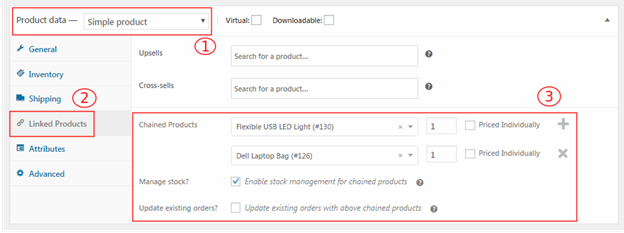
This main product is what customers will add to their cart. The linked (chained) products will be automatically added when they purchase it.
Step 3: Add Chained Products to the Main Product
Once you have created the main product, it’s time to link additional items.
Follow these steps:
- Scroll down until you reach the Product Data section.
- Click on the Chained Products tab (a new tab appears after activation).
- Look for the items you wish to connect.
- Select each product and add it.
- Set quantity for each chained product if needed.
Example:
When you are selling a Laptop Bundle, you can link:
- 1 Wireless Mouse
- 1 Laptop Sleeve
- 2 USB Cables
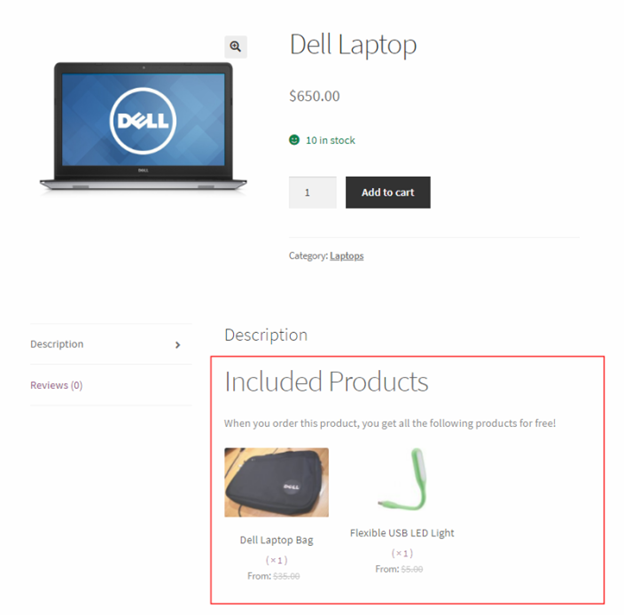
This creates a powerful pre-configured product bundle that boosts customer value.
Step 4: Choose Pricing Method for the Bundle
After linking the products, you need to set how the pricing will work.
Two simple options:
- Fixed Main Product Price: One price covers all bundled products.
- Individual Chained Product Prices: Each product is priced separately in the cart.
If you want a simple checkout and easy promotions, use a fixed price.
If you want customers to see individual product values, use individual prices.
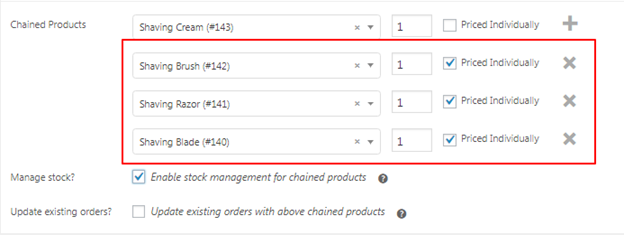
Select the method based on your store strategy.
Step 5: Set Inventory Management Rules
Managing stock is important to avoid customer complaints.
Here’s what Chained Products does:
- Monitors stock for every chained product separately.
- If a chained product is out of stock, the main product becomes unavailable.
Tips to manage it better:
- Monitor stock levels regularly.
- Enable backorders if needed for specific chained items.
This keeps your bundle offers reliable and smooth.
Step 6: Customize Display Settings (Optional)
You have full control over how bundles appear across your store.
Display settings you can adjust:
- Show or hide chained products at cart and checkout.
- Use the shortcode [chained_products] to display linked products on the product page.
- Customize product descriptions to highlight bundled items.
Smart display improves user experience and keeps your cart clean.
Step 7: Save and Publish the Bundle
After setting everything:
- Click Save or Publish if it’s a new product.
- If you edited an existing product, click Update.
Your bundled product is now live. When customers add the main product to their cart, all chained products are automatically added too, making the shopping experience simple and rewarding.
Conclusion
The Chained Products for WooCommerce plugin offers a straightforward but effective means of increasing sales and enhancing the shopping experience. It allows you to create flexible product bundles, BOGO offers, and ready-to-sell kits without any hassle. With a smooth setup process and strong features, it is a must-have plugin for any WooCommerce store.
WooHelpDesk is available to assist you with the setup of your WordPress or WooCommerce website.Contact our expert team at +1 888 602 0119 (US & Canada) for fast and professional support. Let’s build a better store together!



