
How to Set Up Price by Formula Calculator for WooCommerce
Table of Contents
- Introduction
- What Is the Price by Formula Calculator for WooCommerce?
- Who Should Use This Plugin?
- Why This Plugin Matters
- What the Plugin Can Do (Features Breakdown)
- Setup Guide – How to Configure the Plugin
- Who Should Use This Plugin?
- Real-World Use Case Examples
- Why It’s Better Than Other Pricing Plugins
- Conclusion
Introduction
Running a WooCommerce store often means selling more than just simple items. What if your clients must purchase items based on weight, volume, area, or length? Or maybe you offer custom services that don’t fit fixed pricing? That’s where the Price by Formula Calculator for WooCommerce comes in.
This plugin is made for store owners who sell products or services that require custom pricing. It helps you create a smart, flexible pricing system based on customer input. Whether you sell fabric by the meter, tiles by square foot, or offer custom service quotes, this tool makes it possible.
What Is the Price by Formula Calculator for WooCommerce?
It’s a WooCommerce pricing calculator plugin that uses custom math formulas to set prices. Your product page can have up to 16 different input fields. These can include text boxes, dropdowns, checkboxes, and more.
You set formulas using basic math like:
- Addition (+)
- Subtraction (−)
- Multiplication (×)
- Division (÷)
When customers enter values, the price updates automatically. The plugin uses the formula you created to show the right price. It’s fast, smart, and fits perfectly into your store.
Who Should Use This Plugin?
This plugin is ideal for anyone who:
- Sells items in custom sizes (fabric, flooring, cables)
- Offers services that need quote-based pricing
- Wants to sell by weight, volume, or length
- Needs dynamic pricing based on user input
It’s also great if you manage:
- A hardware or tile store
- A car detailing or rental service
- A store selling customized goods
Why This Plugin Matters
Simple price is all that is handled by most pricing software. But you have complete control thanks to this plugin. It turns WooCommerce into a custom pricing engine. You’ll enhance the shopping experience, cut down on mistakes, and save time.
It also helps boost conversions by showing users exactly what they’re paying for. The result? More trust, fewer cart abandons, and better customer satisfaction.
What the Plugin Can Do (Features Breakdown)
WooCommerce’s Price by Formula Calculator provides strong and adaptable pricing capabilities. It’s designed for store owners who need more than basic pricing. This plugin allows you complete control if you sell goods or services that are customized in size.
Let’s break down everything it can do.
Custom Product Fields (Up to 16 Types)
This plugin lets you collect any kind of user input. You can create product options using up to 16 different field types.
Here are some common field types:
- Text input
- Dropdown/select boxes
- Radio buttons
- Checkboxes
- Multi-select fields
You can add labels to each field so customers know what to enter. Fields can also be made mandatory or optional. Fields can be arranged with separators to improve form layout.
This flexibility helps you build detailed product forms. The layout remains clear and easy to use whether you require one field or ten.
Formula-Based Pricing Logic
This is the heart of the plugin. You can use basic math operators to build your own formulas:
- + for addition
- − for subtraction
- × for multiplication
- ÷ for division
You can use these formulas to calculate price, measurements, or anything else. The nicest aspect is that you can use a single rule to construct several formulas.
Need complex logic? The plugin supports conditional formulas too. You can:
- Modify the formula according on user input.
- Use “AND” and “OR” logic
- Add an “ELSE” fallback formula
This means your pricing can adapt to different scenarios. Apply a discount, for instance, if a specific requirement is fulfilled.
Measurement-Based Pricing Options
With this plugin, you can charge based on:
- Length (e.g., cables, fabric, piping)
- Area (e.g., flooring, wallpaper)
- Volume (e.g., liquids, powders)
- Weight (e.g., meat, produce)
It’s the ideal WooCommerce measuring price calculator because of this. You don’t need separate tools for each type of measurement. Everything is built into one easy-to-use plugin.
You can also combine fields. For example, use length × width × height to calculate volume.
Rule Application Across Products
Setting up pricing for every product can take time. This plugin solves that problem.
Once you create a pricing rule, you can:
- Apply it to multiple products
- Apply it to entire categories
- Duplicate the rule to reuse with changes
This saves a lot of time when adding new products. Every time, you don’t have to start from scratch.
Real-Time Price Calculation
Customers see the final price as soon as they enter values. Everything is calculated in real time by the plugin. They feel more secure about their purchase as a result.
You can also display:
- Total measurements
- Detailed pricing results
This live feedback improves the shopping experience. It also reduces confusion and support requests.
Cart, Checkout, and Order Integration
The plugin doesn’t just work on the product page. It follows the client during the entire process.
Here’s what it shows:
- Input details in the cart
- Calculated prices at checkout
- Full breakdown in the order confirmation
There’s also a “View Detail” button for more info. This lets customers see a full summary in a popup.
Import, Export, and Preview Features
You can easily:
- Export pricing rules as a CSV file
- Import them into another site
- Preview rules before publishing
These features are helpful when managing large stores. You can also test your rules before going live.
User Interface & Customization Options
You can control how everything looks on the front end. Customize:
- Colors and fonts
- Header and background styles
- Result section layout
You can also:
- The default WooCommerce quantity field can be hidden.
- Disable AJAX add-to-cart for calculator products
This makes your product pages clean and user-friendly.
This plugin is more than just a calculator. It’s a full-featured WooCommerce custom pricing formula tool that works for any type of product or service.
Setup Guide – How to Configure the Plugin
It’s simple to set up the Price by Formula Calculator for WooCommerce. You don’t have to employ a developer or create code. Simply adhere to this easy, step-by-step instruction.


Step 1: Install and Activate the Plugin
The plugin file must first be downloaded from your WooCommerce account.
Now do the following:
- Go to your WordPress dashboard.
- Click Plugins > Add New.
- Click the Upload Plugin button.
- Upload the .zip file you downloaded.
- Click Install Now and then Activate.
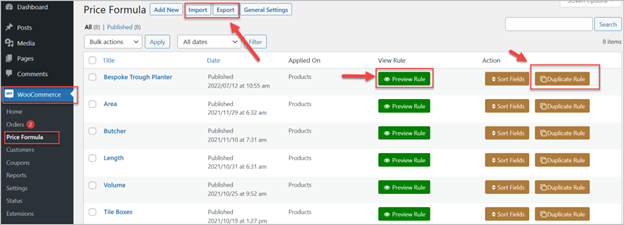
Once activated, the plugin will appear under WooCommerce > Price Formula.
Step 2: Create a New Pricing Rule
This is where your pricing logic begins.
- Go to WooCommerce > Price Formula.
- Click the “Add New” button.
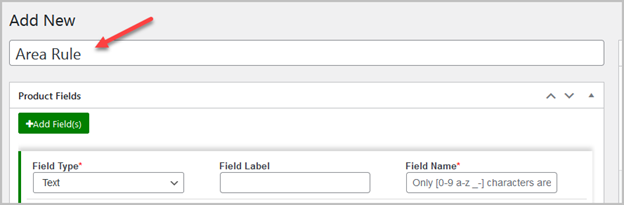
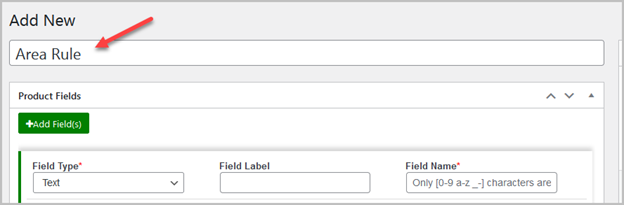
- Give your rule a clear name.

A rule has three main sections:
- Product Fields
- Configure Formula
- Applied On
Step 3: Add Product Fields
Fields are where customers enter their values. You can add up to 16 fields.
To add a field:
- Click “Add Field(s)”.
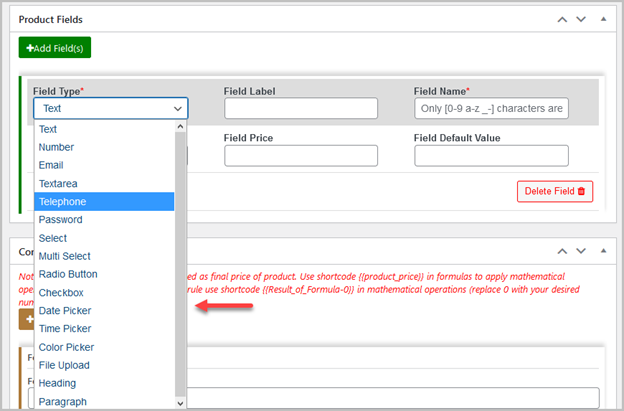
- Choose a field type (text, radio, dropdown, etc.).
- Set a field label (shown on the product page).
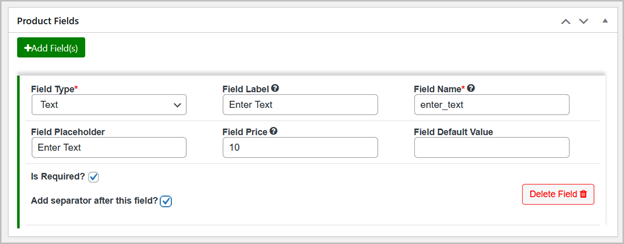
- Give it a field name (used in the formula).
- Optionally, add a price for the field.
You can also:
- Mark fields as required
- Add separators between fields
Repeat to add more fields.
Step 4: Add Your Custom Formula
It’s time to develop your price strategy now.
- Click “Add Formula”.
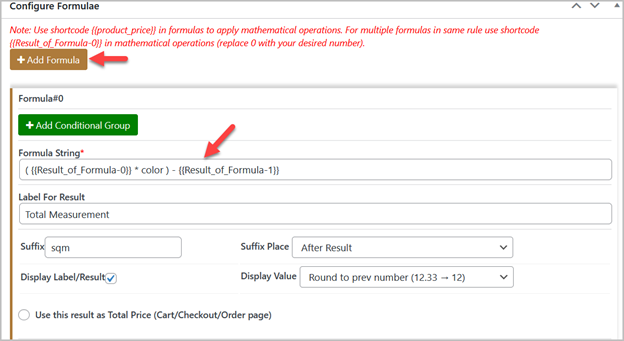
- Use basic math: +, -, *, /.
- You can add more than one formula.
- Set a suffix to display (like “sq ft” or “lbs”).
- Choose whether to show the result on the product page.
You can also add conditional formulas using:
- “AND” logic (all conditions must be true)
- “OR” logic (only one condition must be true)
- “ELSE” (fallback option if others fail)
This lets you build smart pricing systems.
Step 5: Apply Rule to Products or Categories
Under the Applied On tab:
- Choose one or more products
- Or apply it to a full category
To save and make the rule active, click Publish.
Step 6: Customize Form and Settings
Go to WooCommerce > Settings > Product Price by Formula.
Here you can:
- Change form colors, text, and fonts
- Enable or disable the View Detail popup as needed.
- The default product quantity field should be hidden.
- Disable AJAX add-to-cart if needed
Now your pricing calculator is live and working. Customers will see real-time prices based on their inputs. It’s that easy.
Who Should Use This Plugin?
For WooCommerce stores that sell items of varying sizes, this plugin is perfect. It’s also perfect for services that don’t fit flat-rate pricing.
If your business needs custom pricing, this plugin can help. It’s built to support different measurement types and flexible billing methods.
You should consider this plugin if you sell:
- Flooring, wallpaper, curtains (by area)
- Fabric, wire, or rope (by length)
- Meat, produce, or raw materials (by weight)
- Paint, chemicals, or liquids (by volume)
- Services like rentals, custom quotes, or monthly plans
Additionally, it is effective for any store that want to:
- Show live price updates
- Offer multiple product options
- Create unique pricing rules
Real-World Use Case Examples
Here are some instances of how this plugin is used by stores:
- Room Wallpaper Calculator: Price changes based on height and width of walls.
- Polymer Panel by Length: Customer enters size; price updates in real-time.
- Butcher Shop: Customers select meat type and weight to get the final price.
- Car Detailing Service: Different packages and services have their own formula.
- Monthly Billing Plans: Custom quote formulas for different service durations.
Each of these examples uses the plugin’s fields and formulas differently. That’s the power of flexible pricing.
Why It’s Better Than Other Pricing Plugins
Other plugins offer fixed or limited pricing options. This one gives you full control.
- You build your own pricing logic.
- You apply rules across products and categories.
- Customers see prices instantly.
It is powerful when used and easy to set up. That’s what makes this plugin a standout solution for WooCommerce custom pricing formula needs.
Conclusion
The Price by Formula Calculator for WooCommerce makes pricing easy and smart. You have complete control over how you market personalized goods. Whether you sell by area, weight, length, or volume, this plugin fits your needs.
Real-time price updates make shopping more enjoyable. Consumers are able to see exactly what they are purchasing. In addition to increasing revenue, this fosters trust.
If you want a flexible, powerful pricing tool, this is the best choice. Setup is simple, and you can manage everything without coding skills.
Need help setting it up? Our team at WooHelpDesk is ready to assist you!
For fast WooCommerce and WordPress support, call us at +1 888 602 0119 (US & Canada)
Let’s make your WooCommerce store smarter and more profitable today!



