
How to Set up eBay Integration for WooCommerce to Sync Products & Orders
Table of Contents
- Introduction and Plugin Overview
- Core Features and Automation Capabilities
- Setup and Configuration of eBay Integration for WooCommerce
- Plugin Pricing and Plans
- Customer Support and Assistance
- Final Thoughts
Introduction and Plugin Overview
Selling on multiple platforms is now common for online stores. WooCommerce users often look to expand their reach by selling on eBay. But managing both platforms manually takes a lot of time. It also increases the chance of mistakes like wrong stock levels or pricing. That’s where the WooCommerce eBay integration plugin comes in.
Sellers can link their WooCommerce store to eBay with the help of this CedCommerce plugin. It provides a straightforward method of managing orders, inventory, and products all from one location. Sellers no longer need to switch between two dashboards. With this plugin, everything can be handled directly from WooCommerce.
For store owners who wish to automate processes, the WooCommerce eBay connector is perfect. It syncs orders and items between the two platforms, saving hours of manual work. The plugin also supports importing existing eBay listings into WooCommerce. This feature is great for those already selling on eBay and planning to build or manage a WooCommerce store.
Here are some things the plugin helps with:
- Sync product inventory in real time.
- Automatically upload new WooCommerce products to eBay.
- Update pricing and stock levels without manual changes.
- Fulfill eBay orders directly from WooCommerce.
- Create custom templates for product listings.
The plugin is built by CedCommerce, a Platinum WooExpert and a Silver eBay Partner. This adds trust and quality assurance to the integration. Sellers can be confident in the support and updates offered.
For WooCommerce users planning to grow through eBay, this plugin offers a smart, time-saving solution. It helps sellers scale faster and with fewer errors. This blog will now explore its features, setup, and support in detail.
Core Features and Automation Capabilities
The WooCommerce eBay integration plugin is packed with features to save time. It helps WooCommerce store owners list and manage products on eBay. Everything is done from one place, with no need to switch tabs. The plugin also reduces errors by syncing data in real time.
Real-Time Inventory and Order Sync
Keeping stock accurate across platforms is important. With this plugin, stock levels are updated in near real time. eBay modifies the stock when a product sells on WooCommerce. The same happens if the product sells on eBay.
This feature helps avoid:
- Overselling out-of-stock items
- Customer complaints due to stock mismatch
- Time spent updating stock manually
Order sync is also automatic. When someone places an order on eBay, it appears in WooCommerce. This enables retailers to control eBay and WooCommerce orders from a single dashboard.
Auto-Upload WooCommerce Products to eBay
Products don’t need to be listed twice. WooCommerce products can be automatically uploaded to eBay via the plugin. A product may show up on eBay as soon as it is added to WooCommerce.
You can also group products using custom templates. This saves time and keeps your listings consistent.
Import eBay Listings into WooCommerce
Already selling on eBay? No need to start over. The plugin imports your existing eBay listings into WooCommerce. This includes product descriptions, categories, images, and item details.
Once imported, you can:
- Manage products from WooCommerce
- Use them in your WooCommerce catalog
- Fulfill orders directly through WooCommerce
Bulk Actions for Listings
Managing large product catalogs is easier with bulk tools. The plugin supports several bulk actions:
- Upload products to eBay
- Relist ended products
- Update product info or stock levels
- End listings that are no longer available
Bulk features save hours of manual work. They’re useful for businesses with many SKUs.
Custom Product and Description Templates
eBay listing description templates are provided by the plugin. HTML and CSS can be used to improve the appearance of your product pages. These templates also support shortcodes to auto-fill product details.
This helps you:
- Create consistent, branded listings
- Save time on repeated design work
- Make listings more appealing to buyers
You can also create shipping templates. Choose flat or calculated shipping methods. You can set rules based on product weight, zip code, or destination.
Return Policy Management
You can set up custom return policies. eBay often requires a return policy for certain categories. With this plugin, you can choose:
- Whether or not to accept returns
- Return time window
- Refund type
- Who pays return shipping
- Restocking fees
Having return options in place improves buyer trust and meets eBay’s listing rules.
Automatic Sync for Stock, Price, and Orders
Automation is where this plugin stands out. You can schedule syncing tasks or enable real-time updates. Syncing options include:
- Price updates from WooCommerce to eBay
- Instant stock adjustments when items sell
- Order imports from eBay into WooCommerce
- Linking products with matching SKUs automatically
You don’t have to be concerned about delayed listings or missed updates with this configuration.
Setup and Configuration of eBay Integration for WooCommerce
Getting started with the WooCommerce eBay integration plugin is simple. Once installed, sellers can quickly connect their eBay store and begin listing products. The plugin is designed for easy use, even for beginners.
Connecting Your eBay Seller Account
Once the plugin has been installed, navigate to the WooCommerce menu. You’ll find the CedCommerce option listed there. Click on it to access the plugin settings.
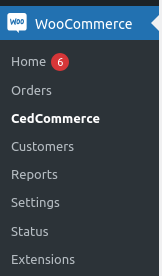
To link your seller account on eBay:
- Select your region on eBay from the list.
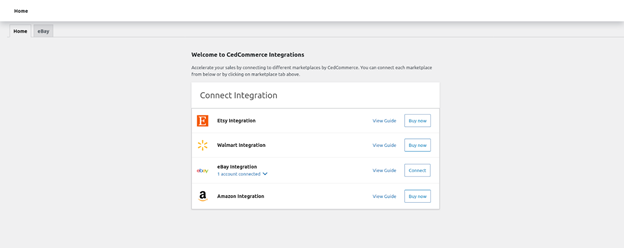
- Click the Connect button
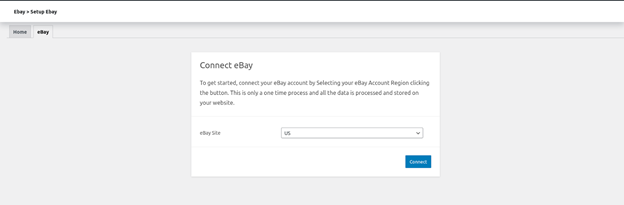
- Login to eBay and approve access
- You’ll be redirected back to WooCommerce
This one-time step links your store with your eBay seller account.
General Plugin Settings
The plugin includes multiple general settings to control syncing behavior. These help you customize how the integration works.
Important settings include:


- Stock limit control – Set max stock quantity shown on eBay
- Price markup – Add fixed or percentage-based markup for eBay prices
- Skip SKU errors – Ignore missing SKUs on simple products
- Sync toggle – Turn on/off real-time syncing for stock and prices
- VAT setup – Useful for UK-based sellers (optional)
These settings offer full control over how your listings behave.
Creating Shipping Templates
Shipping setup is a key part of selling on eBay. Custom shipping templates can be made with the plugin.
You can set:
- Shipping method (Flat or Calculated)
- Item weight and dimensions
- Zip code for shipping origin
- Domestic and international shipping carriers
- Shipping cost and handling fees
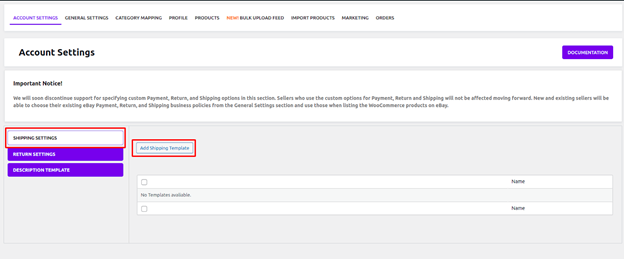
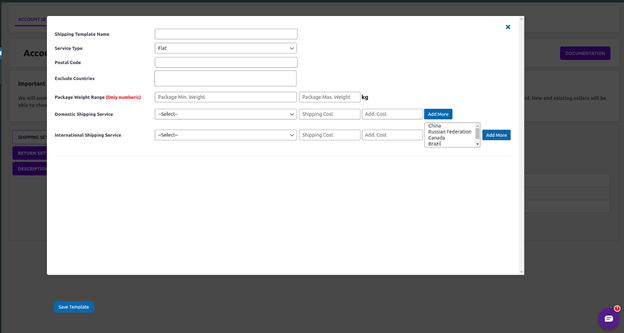
This setup ensures every product has accurate shipping information. Templates can also help prevent upload errors on eBay.
Note: Some international locations may not be supported by eBay. Avoid selecting restricted countries in the shipping settings.
Return Policy Setup
A return policy is required in many eBay categories. The plugin lets you configure this easily.
You can choose:
- Whether or not you accept returns
- How much time customers have to return things
- Who pays return shipping costs
- Restocking fee percentage
- Refund type (Money back or replacement)

You can also enter a short description explaining your return policy.
Mapping Categories Between Platforms
Before uploading products, map your WooCommerce categories to eBay categories. This is required to list items properly on eBay.
Steps to follow:
- Click Refresh Categories to pull eBay category options
- Match each WooCommerce category with its eBay equivalent
- Optionally choose secondary and store-specific eBay categories
Each mapping creates a listing profile. These profiles help manage products that fall under the same category.
Creating and Managing Listing Profiles
Profiles group similar products and store required listing data. These include item condition, specifics, brand, and variation details.
For each profile, you can:
- Set product-level details like color, size, etc.
- Map WooCommerce attributes to eBay fields
- Enable features like Best Offer
- Apply markup pricing
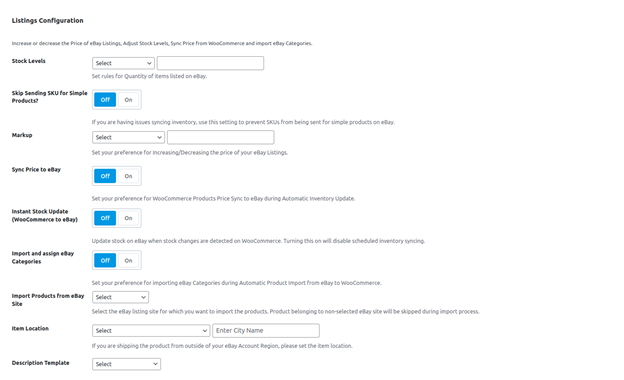
This saves time and ensures eBay’s listing rules are met.
Custom Description Templates
Make your listings look professional with custom HTML and CSS templates. You can:
- Add your own design using HTML
- Apply custom styles using CSS
- Use shortcodes to auto-fill product info
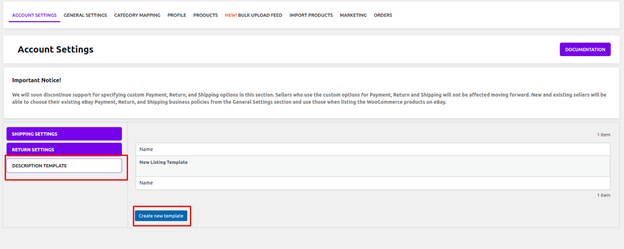
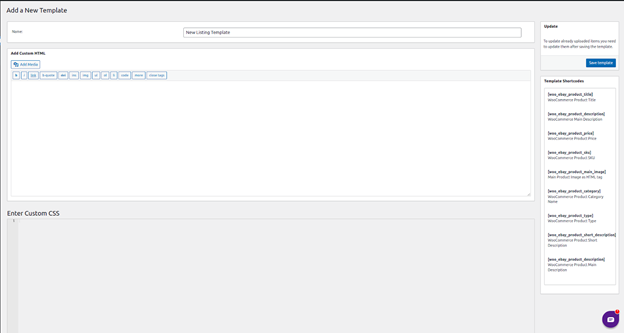
Once saved, you can apply templates to all your eBay listings.
Plugin Pricing and Plans
The WooCommerce eBay integration plugin is a premium tool. Although it is not a free plugin, it is quite valuable. It’s built for sellers who need reliable syncing between WooCommerce and eBay.
There are two primary price plans available to you:
- Annual Plan – $329 per year (billed once yearly)
- 2-Year Plan – $526.40 (20% discount included)
This cost includes:
- Plugin updates
- New feature releases
- Full customer support
- A 30-day money-back guarantee
Although there’s no WooCommerce eBay integration free version, the plugin provides serious automation power. It replaces hours of manual work each week.
Customer Support and Assistance
Support is handled by CedCommerce, the plugin developer. CedCommerce is an official Platinum WooExpert and an eBay Silver Solution Provider.
Here’s what support includes:
- 24/7 help via email
- Onboarding calls with setup guidance
- Demo sessions upon request
- In-depth documentation with clear steps
- Help with error messages or setup issues
For support, users can email the CedCommerce WooCommerce team or book a free call. This is useful for new sellers or anyone needing help during setup.
Final Thoughts
This plugin is a wise choice if you wish to extend your WooCommerce store to eBay. It saves time, avoids listing errors, and automates daily tasks.
Use this plugin if:
- You sell goods on eBay and WooCommerce.
- You want to sync inventory, orders, and pricing automatically
- You’re ready to grow your multichannel business
The WooCommerce eBay connector is reliable, secure, and designed for scale. For serious merchants, it’s a long-term solution with robust support and feature updates.
Need help setting up the plugin or fixing a WooCommerce issue?
WooHelpDesk offers expert support for WooCommerce and WordPress-related problems. Whether it’s installation, speed, or sync issues, we’ve got your back.
📞 Call us at +1 888 602 0119 (US & Canada) to get expert help today.



