Lottery for WooCommerce: The Best Plugin for Contests and Lucky Draws
Table of Contents
- Introduction & Plugin Overview
- Key Features of Lottery for WooCommerce
- Business Benefits for WooCommerce Store Owners
- How to Set Up Lottery for WooCommerce
- Final Tips
- Conclusion
Introduction & Plugin Overview
Why Lotteries and Contests Work for Online Stores
Running a lottery or contest can be a smart strategy. It adds fun to shopping. Customers enjoy the thrill of winning. This builds excitement and keeps them coming back. It also helps you reach new users without heavy advertising.
People love chances to win, especially when entry is simple. That’s why lotteries, raffles, and giveaways work well for eCommerce. You give something small, and in return, get more visits, more sales, and better brand engagement.
What Is Lottery for WooCommerce?
Lottery for WooCommerce is a plugin that lets you run lotteries in your WooCommerce store. It’s simple to use, even if you’re not technical.
This plugin helps you create different types of lucky draw events. You can offer free or paid tickets. Customers can join by answering a question or just by buying a ticket. You can set a winner manually or let the system pick it.
It also supports multiple prize types. From coupons to real products or store credit, you’re in control.
What Can You Run with It?
With this plugin, you can create more than just lotteries. It supports:
- Raffles
- Giveaways
- Competitions
- Contests
- Lucky draws
You can run a quick giveaway or a full contest with custom rules. It’s flexible for any kind of store.
This plugin is often called a WooCommerce raffle extension or WooCommerce contest plugin because it covers so many styles of promotion.
If you want to turn visits into excitement, this plugin makes it easy. You don’t need coding. You just set it up once and let it run.
It’s a smart add-on to make your WooCommerce store more engaging and fun.
Key Features of Lottery for WooCommerce
Automatic & Manual Ticket Options
The plugin offers two ways to create tickets. You can let the system generate them automatically. Or, you can allow customers to choose their own ticket numbers.
For automatic tickets, numbers can be random, sequential, or shuffled. This is great if you want quick setup with no input from the user.
If you allow manual selection, customers can pick the tickets they like. They can choose formats like “A1, A2, B1…” and more. This gives users control and adds a personal touch.
Instant Win Prizes
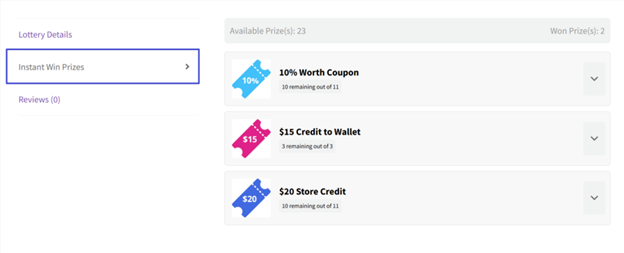
This feature lets customers win prizes instantly. You assign prizes to specific ticket numbers. If a customer buys that ticket, they win right away.
Instant prizes can be:
- Coupons
- Store credit
- Wallet balance
- Physical gifts
You can show instant prizes on the product page. Winners get notified by email. This makes the process exciting and fast.
Question & Answer Entry
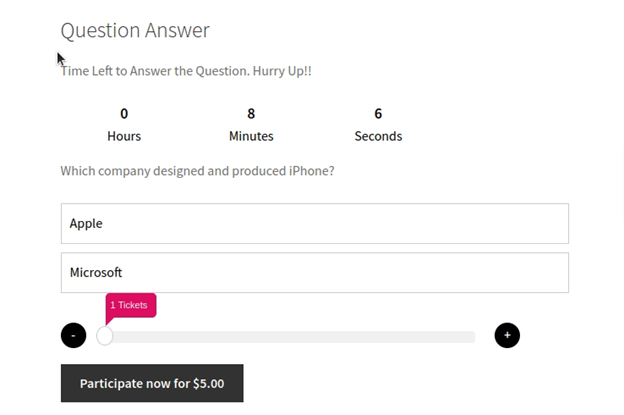
You can add a question before users buy a ticket. This makes the lottery more like a contest. Users must give the right answer to enter.
It helps turn the lottery into a game of skill, not chance. This can help with legal rules in some regions.
You can also:
- Set a time limit for answering
- Allow multiple tries
- Show answers in dropdown format
If the answer is wrong, you can block the ticket purchase. This gives you full control over the entry process.
Lucky Dip Feature
This is a quick-select option for users. It lets the system pick random tickets for them. It’s fast, fun, and user-friendly.
Customers can either add tickets right away or preview them first. They can refresh the selection until they’re happy with it.
Predefined Ticket Bundles
You can create bundle offers for tickets. This means customers get discounts when buying more tickets.
Example: Buy 5 tickets for $20 instead of $25.
You can set fixed or percentage-based discounts. You can also show discount tags next to the offer. This feature boosts sales and makes bulk buying attractive.
Manual or Automatic Winner Selection
Choose how winners are selected. You can let the system pick automatically when the lottery ends. Or, you can select winners manually.
Manual selection is helpful for contests or competitions. It lets you review entries before choosing a winner.
Countdown Timers & Progress Bars
Create urgency using countdown timers. Show how much time is left before the lottery closes.
Use a progress bar to display ticket sales. This helps users feel involved and pushes them to act quickly.
Guest User Control
Control who can enter your lottery. You can:
- Allow guest users
- Force login
- Block guests entirely
This gives you flexibility based on your store policy.
Lottery Dashboards
Both admin and customers get dashboards. Admins can track sales, entries, and winners. Customers can view their tickets, wins, and entry history.
Business Benefits for WooCommerce Store Owners
Running a lottery or contest is more than just fun. It can also be a smart business move. The Lottery for WooCommerce plugin gives store owners tools to grow faster, attract customers, and increase revenue.
Attract New Customers
People love the chance to win something. A lottery brings in visitors who may not have known your store before. Once they visit, they might explore and buy other products too.
A giveaway can go viral if promoted well. This helps grow your store’s reach without big ad costs.
Turn Visitors into Buyers
Lotteries aren’t just about free stuff. When users buy tickets, they become paying customers. This reduces the gap between browsing and purchasing.
Also, users who win may return to shop again. That’s how a WooCommerce competition plugin creates long-term value.
Increase Repeat Purchases
You can run contests often to keep customers engaged. Offer store credit or coupons as prizes. This encourages winners to come back and use their rewards.
It’s an easy way to keep users active and buying again.


Build an Email List
Require users to enter their email before joining. This helps you build a strong email list for future marketing.
Emails can later promote sales, new products, or other lotteries. It’s a simple method with long-term gains.
Stand Out from Competitors
Most stores just offer discounts. A lottery makes your store different. It adds excitement and gives people a reason to talk about you.
It positions your brand as fun, unique, and engaging. This builds loyalty and trust over time.
How to Set Up Lottery for WooCommerce
Setting up the Lottery for WooCommerce plugin is easy. You don’t need coding skills. Just follow these simple steps to create your first online lottery.
Step 1: Install the Plugin
To begin, install the plugin on your WooCommerce store:
- Download the .zip file from your WooCommerce account.
- In WordPress, go to Plugins → Add New.
- Click Upload Plugin, choose the file, and click Install Now.
- After installation, click Activate.
The plugin is now ready to use.
Step 2: Configure General Settings
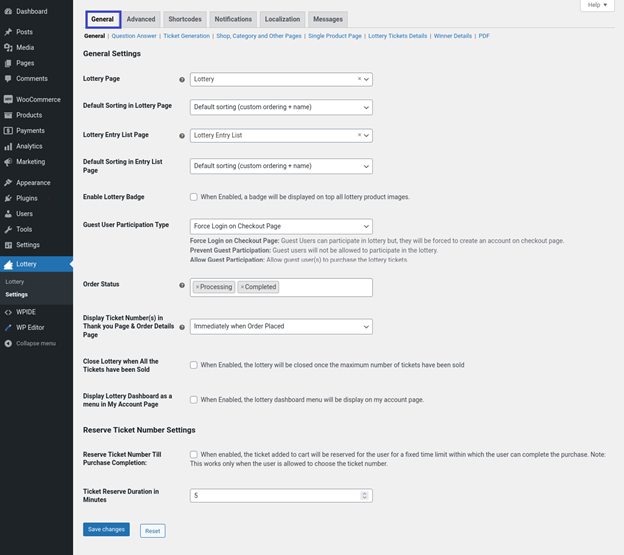
Once activated, the plugin adds default pages:
- A Lottery Page (shows active lotteries)
- A Lottery Entry List Page (shows past and ongoing entries)
You can change these pages in:
WooCommerce → Settings → Lottery
Other key settings to configure:
- Allow or block guest users
- Show or hide countdown timers
- Display lottery badges on product images
- Choose how lotteries are sorted and displayed
- Customize labels, colors, and messages
This helps you match the design with your brand.
Step 3: Set Up Cron Jobs
Cron jobs control when lotteries start and end.
You have two options:
WP Cron (Basic)
- Uses site activity to trigger events.
- May delay actions if traffic is low.
Server Cron (Recommended)
- Runs based on time, not site visits.
- More accurate for high-volume or timed lotteries.
To add Server Cron:
- Login to your hosting control panel (e.g., cPanel).
- Go to Cron Jobs.
- Add these two commands:
wget -q -O – http://yourdomain.com/?lty_lottery_cron=update
wget -q -O – http://yourdomain.com/?lty_lottery_cron=relist
This will manage automatic starts, ends, and relisting.
Step 4: Create a Lottery Product
To launch a lottery, add a product in WooCommerce:
- Go to Products → Add New
- Enter a product name and description
- Select Lottery from the Product Type dropdown
Fill in the required fields:
- Start and End Date
- Ticket Price
- Minimum and Maximum Tickets
- Number of Winners
- Max Tickets Per Order
- Ticket Generation Type
(Automatic or User Chooses)
You can also enable:
- Countdown timers
- Progress bars
- Ticket quantity sliders
Step 5: Add Optional Features
Enhance your lottery with extra options:
- Instant Win Prizes
Assign rewards to specific ticket numbers. - Question & Answer
Ask users a question before they can buy tickets.
Great for contests that require skill.

- Lucky Dip
Let customers pick random tickets instantly. - Predefined Bundles
Offer discounts for buying multiple tickets.
Example: Buy 5 tickets, get 20% off.
These features make the lottery more fun and rewarding.
Step 6: Publish and Promote
Once everything is ready:
- Click Publish on the product page
- Share your lottery on your homepage, emails, and social media
- Highlight the prize, deadline, and how to enter
Your WooCommerce lottery is now live and ready to drive engagement.
Final Tips
Launching a lottery is just the start. To get the most value, use these simple tips. They will help you drive more traffic, get better results, and make your store stand out.
Keep It Simple for Users
Don’t overcomplicate the process. Make it easy to join. Use clear instructions and short steps. Avoid too many rules or confusing conditions.
The easier it is, the more users will join.
Promote Your Lottery Everywhere
Promotion is key. Share your lottery on:
- Social media (Facebook, Instagram, Twitter)
- Email newsletters
- Your homepage or product pages
- Blog posts or landing pages
Use eye-catching images and clear calls to action. Highlight what users can win and how to enter.
Show Winners Publicly
When your lottery ends, announce the winners. Share their names (or initials) and the prize. This builds trust and encourages others to join next time.
You can also use testimonials or reviews from winners.
Run Lotteries Regularly
One-time giveaways are great, but ongoing contests work even better. Plan monthly or seasonal events. This keeps your store fun and brings customers back.
You can use automatic or manual relist options in the plugin.
Conclusion
Lottery for WooCommerce is a powerful way to boost store engagement. It helps you run lotteries, contests, raffles, and giveaways with ease. You don’t need coding skills or complex tools to use it. The plugin is flexible, beginner-friendly, and fits all types of stores. Whether you sell physical or digital products, it adds fun and value. You can attract new visitors, grow your email list, and increase sales. Start your first lottery today and see the results.
Need help getting started? Contact the WooHelpDesk team anytime. We’re here to guide you and make setup easier.



