How to Set Up Local Pickup Plus Plugin for WooCommerce
Table of Contents
- Introduction
- What is Local Pickup Plus for WooCommerce?
- Why Use Local Pickup Plus for WooCommerce?
- Who Should Use This Plugin?
- Key Features & Benefits of Local Pickup Plus for WooCommerce
- How to Set Up and Configure Local Pickup Plus for WooCommerce
- Why Choose Local Pickup Plus for WooCommerce?
- Conclusion
Introduction
Customers want quick and easy ways to receive their orders. Many prefer local pickup instead of waiting for shipping. The default WooCommerce local pickup method has limitations. It works only for single-location stores and lacks advanced features.
Local Pickup Plus for WooCommerce solves these problems. It allows store owners to offer multiple pickup locations, scheduled pickups, and stock control. Businesses can manage pickup orders efficiently and improve customer satisfaction.
If you run a physical store, or warehouse, or have multiple locations, this plugin is perfect. It ensures a seamless and organized pickup process for both store owners and customers.
What is Local Pickup Plus for WooCommerce?
Local Pickup Plus for WooCommerce is an advanced order pickup solution. It improves the basic WooCommerce local pickup method with more control and flexibility.
With this plugin, store owners can:
- Set up multiple pickup locations for customer convenience.
- Allow customers to schedule pickup times based on business hours.
- Restrict which products are available at certain locations.
- Apply tax and pricing adjustments for pickup orders.
This plugin makes order fulfillment easier and helps businesses provide a better shopping experience.
Why Use Local Pickup Plus for WooCommerce?
-
Offer Multiple Pickup Locations
Businesses with more than one pickup location need an organized system. This plugin lets you:
- Set up multiple pickup locations for customers to choose from.
- Allow or restrict certain products at specific pickup locations.
- Let customers pick up different items from different locations in one order.
Customers can select the most convenient pickup point during checkout. If a location doesn’t have a product, it will not be shown as an option.
-
Schedule Pickup Dates and Times
Managing customer pickups can be challenging without proper scheduling. This plugin lets businesses:
- Define business hours and holidays for pickups.
- Allow customers to schedule a pickup date and time.
- Set a limit on the number of pickups per time slot.
This helps avoid overcrowding and ensures a smooth pickup process.
-
Improve Customer Experience
A simple and fast pickup process boosts customer satisfaction. This plugin makes pickups:
- Efficient with real-time availability at checkout.
- Flexible with scheduled pickup appointments.
- Organized with pickup details in order emails.
For businesses offering curbside pickup, this plugin ensures a contactless and seamless experience.
Who Should Use This Plugin?
Local Pickup Plus for WooCommerce is ideal for:
- Retail stores offering local pickup options.
- Multi-location businesses needing pickup organization.
- Restaurants providing scheduled or curbside pickup.
- Warehouses and fulfillment centers managing stock across locations.
If you offer local pickup, this plugin is a must-have. It makes order fulfillment easier, faster, and more customer-friendly.
Key Features & Benefits of Local Pickup Plus for WooCommerce
The default WooCommerce local pickup method has many limitations. It does not support multiple locations, scheduling, or product-specific pickup. This makes order fulfillment difficult for growing businesses.
Local Pickup Plus for WooCommerce provides a complete solution for managing store pickups. It helps businesses organize pickup locations, schedule appointments, and control stock availability. Customers get a seamless and efficient pickup experience.
Let’s explore the key features of this plugin in detail.
-
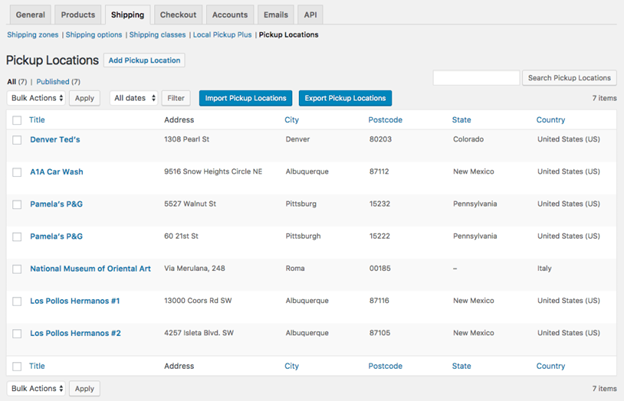
Offer Multiple Pickup Locations
Many businesses operate from more than one location. The standard WooCommerce pickup method only supports a single pickup point. This plugin allows store owners to set up multiple pickup locations.
How It Works:
- Customers choose a pickup location at checkout.
- Store owners define which products are available at each location.
- Businesses can allow customers to pick up items from different locations in one order.
If a product is unavailable at a location, that option is automatically hidden. This ensures customers only see valid pickup choices.
Benefits:
- Increases customer convenience by offering nearby pickup options.
- Helps businesses manage multiple stores, warehouses, or distribution centers.
- Reduces confusion by showing only relevant pickup locations.
-
Pickup Scheduling & Appointments
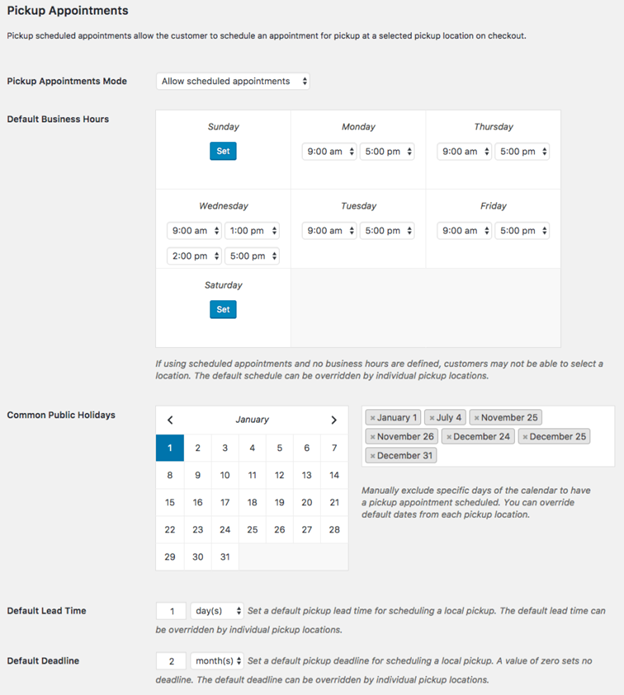
Managing customer pickups without a schedule can be chaotic. Customers may arrive at the same time, causing delays and long wait times. Local Pickup Plus for WooCommerce solves this by allowing scheduled pickups.
How It Works:
- Store owners set business hours and holidays for each pickup location.
- Customers can choose a pickup date and time during checkout.
- Businesses can limit the number of pickups per time slot.
Benefits:
- Prevents overcrowding and long wait times.
- Ensures businesses have enough time to prepare orders.
- Improves the overall pickup experience for customers.
-
Control Product Availability by Location
Not all locations stock the same products. Some pickup locations may only carry specific items. This plugin allows store owners to assign products to specific locations.
How It Works:
- Each pickup location has its own product availability settings.
- Customers only see pickup locations where the product is in stock.
- If an unavailable product is in the cart, that location is hidden.
Benefits:
- Ensures customers only select valid pickup locations.
- Helps businesses manage stock efficiently across multiple locations.
- Reduces errors and confusion during the pickup process.

-
Google Maps Geocoding for Pickup Locations
Finding the nearest pickup location can be frustrating for customers. Local Pickup Plus for WooCommerce solves this by sorting locations by distance.
How It Works:
- Store owners enable Google Maps Geocoding in the plugin settings.
- Customers see pickup locations sorted by proximity.
- The plugin uses customer location data to suggest the best option.
Benefits:
- Helps customers quickly find the nearest pickup location.
- Reduces order placement time by offering smart location sorting.
- Improves the overall user experience during checkout.
-
Pickup Location Notifications
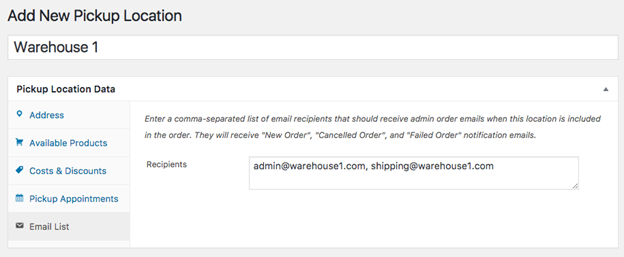
Managing multiple pickup locations requires proper communication. Businesses need to notify the right team members when an order is placed. This plugin automates pickup notifications.
How It Works:
- Store owners assign email recipients to each pickup location.
- Whenever a customer places a pickup order, the right team is notified.
- Notifications ensure smooth processing of pickup orders.
Benefits:
- Keeps store managers and warehouse teams updated.
- Ensures pickup orders are processed on time.
- Reduces miscommunication and missed orders.
-
Pricing Adjustments & Tax Settings
Some businesses charge extra for local pickup, while others offer discounts. Tax rates may also differ based on pickup location. This plugin allows custom pricing and tax settings.
How It Works:
- Store owners can add a fee or discount for local pickup.
- Pickup orders can be taxed based on the pickup location instead of the customer’s address.
- These settings can be customized for each pickup location.
Benefits:
- Helps businesses control pricing for pickup orders.
- Ensures taxes are calculated correctly based on location.
- Provides more flexibility in pricing strategy.
-
Curbside Pickup Support
Many businesses now offer curbside pickup for convenience and safety. This plugin allows stores to manage curbside pickup orders efficiently.
How It Works:
- Store owners enable curbside pickup settings in the plugin.
- Customers select curbside pickup and get pickup instructions.
- Businesses can limit the number of curbside pickups per time slot.
Benefits:
- Allows contactless order collection.
- Improves safety and convenience for customers.
- Reduces in-store traffic and waiting time.
-
Bulk Import & Export of Pickup Locations
Managing multiple pickup locations manually can be time-consuming. Local Pickup Plus for WooCommerce allows store owners to bulk import and export locations using CSV files.
How It Works:


- Store owners download a CSV template.
- They add or update multiple pickup locations at once.
- The file is uploaded back into the WooCommerce settings.
Benefits:
- Saves time when managing multiple locations.
- Ensures accurate and quick location updates.
- Helps businesses scale without manual data entry.
-
Compatibility with Other WooCommerce Plugins
Many stores use other WooCommerce extensions to manage their operations. Local Pickup Plus for WooCommerce is fully compatible with several popular plugins.
Compatible Plugins:
- WooCommerce Print Invoices & Packing Lists – Adds pickup details to invoices.
- WooCommerce Customer / Order CSV Export – Exports pickup order data.
- Shipping and Tax Calculation Plugins – Works seamlessly with shipping tax settings.
Benefits:
- Enhances order management and fulfillment processes.
- Provides a seamless experience across multiple WooCommerce tools.
- Ensures compatibility with most shipping and tax extensions.
How to Set Up and Configure Local Pickup Plus for WooCommerce
Setting up Local Pickup Plus for WooCommerce is simple and quick. The plugin allows businesses to manage multiple pickup locations, schedule pickups, and control stock availability. Proper setup ensures a smooth order fulfillment process.
In this guide, we will walk through the installation, configuration, and key settings to get the plugin working efficiently.
-
Install and Activate Local Pickup Plus for WooCommerce
To start using the plugin, you need to install and activate it in WooCommerce.
Steps to Install:
- Purchase and download the plugin from the WooCommerce marketplace.
- Go to WordPress Dashboard → Plugins → Add New.
- Click Upload Plugin and select the downloaded ZIP file.
- Click Install Now, then click Activate after installation.
Once activated, you can configure pickup settings under WooCommerce → Settings → Shipping → Local Pickup Plus.

-
Add and Manage Pickup Locations
Adding multiple pickup locations helps customers choose the most convenient option.
Steps to Add a Pickup Location:
- Go to WooCommerce → Settings → Shipping → Pickup Locations.
- Click Add Pickup Location.
- Enter the name, address, and contact details of the location.
- Define the business hours, holidays, and available products.
- Assign an email notification list for that location.
- Click Save Changes.
Bulk Import & Export Pickup Locations:
- Click Import Pickup Locations to upload a CSV file.
- Click Export Pickup Locations to download a list of existing locations.
-
Configure Pickup Scheduling & Appointments
Scheduling pickups helps organize orders and avoid long wait times.
Steps to Enable Pickup Appointments:
- Go to WooCommerce → Settings → Shipping → Local Pickup Plus.
- Enable Pickup Appointments Mode.
- Set business hours and holidays for pickup locations.
- Define the lead time (time required before pickup).
- Set a pickup deadline (latest time customers can pick up orders).
- Choose the number of pickups allowed per time slot.
- Click Save Changes.
-
Set Up Pickup Location Stock Management
Not all locations carry the same products. This plugin lets businesses assign specific products to pickup locations.
Steps to Assign Products to Locations:
- Go to WooCommerce → Settings → Shipping → Pickup Locations.
- Select a location and click Edit.
- Under Available Products, choose which products can be picked up.
- Click Save Changes.
Now, customers will only see locations where the product is available.
-
Enable Google Maps Geocoding for Pickup Locations
Google Maps integration sorts pickup locations by distance from the customer.
Steps to Enable Geocoding:
- Go to the Google API Console and create a new project.
- Enable the Geocoding API.
- Generate an API Key and copy it.
- Go to WooCommerce → Settings → Shipping → Local Pickup Plus.
- Paste the Google API Key in the Geocoding settings.
- Click Save Changes.
Now, pickup locations will be sorted automatically based on customer location.
-
Configure Pricing Adjustments & Tax Settings
Some businesses charge an extra fee or offer a discount for local pickups. This plugin allows store owners to adjust pricing and tax settings.
Steps to Adjust Pickup Pricing & Tax:
- Go to WooCommerce → Settings → Shipping → Local Pickup Plus.
- Under Default Price Adjustment, enter a fee or discount.
- Check the box for Pickup Location Tax if taxes should apply based on pickup location.
- Click Save Changes.
-
Manage Pickup Orders in WooCommerce
Once the plugin is set up, businesses can easily manage pickup orders.
Steps to View and Manage Pickup Orders:
- Go to WooCommerce → Orders.
- Find orders labeled as Local Pickup.
- Click an order to view pickup details and location.
- If needed, manually change the pickup location.
- Notify customers when orders are ready for pickup.
-
Set Up Pickup Location Notifications
Businesses need to inform store managers or employees about pickup orders. This plugin sends automated email notifications when an order is placed.
Steps to Enable Notifications:
- Go to WooCommerce → Settings → Shipping → Pickup Locations.
- Select a pickup location and click Edit.
- Under Email Notifications, enter recipient email addresses.
- Click Save Changes.
Why Choose Local Pickup Plus for WooCommerce?
Offering local pickup is a great way to improve customer experience. It reduces shipping costs and allows faster order fulfillment. However, WooCommerce’s default local pickup option is very basic.
Local Pickup Plus for WooCommerce provides advanced features that make pickups more flexible. It supports multiple locations, scheduled pickups, and stock control. Businesses can easily manage pickup orders and improve workflow.
Let’s explore why this plugin is the best choice for WooCommerce stores.
-
More Flexible Than Default WooCommerce Pickup
The standard WooCommerce pickup method lacks advanced customization options. It supports only one pickup location and does not allow scheduling.
With this plugin, store owners can:
- Offer multiple pickup locations to customers.
- Enable scheduled pickups with business hours and holidays.
- Restrict which products are available at each pickup location.
This makes the pickup process smoother and more efficient.
-
Best for Businesses with Multiple Locations
Businesses with several stores or warehouses need a reliable pickup system. This plugin allows them to:
- Assign specific products to different pickup locations.
- Sort locations by customer proximity using Google Maps Geocoding.
- Send pickup notifications to store managers or employees.
This ensures that each location is managed efficiently.
-
Reduces Shipping Costs and Increases Sales
Customers prefer free or low-cost pickup options over expensive shipping. Offering local pickup can:
- Reduce shipping costs and increase profit margins.
- Attract local customers who prefer in-store pickup.
- Encourage repeat purchases with an easy pickup process.
A well-managed pickup system boosts customer satisfaction and business growth.
-
Seamless Integration with WooCommerce
This plugin works flawlessly with WooCommerce and other extensions. It is compatible with:
- WooCommerce Print Invoices & Packing Lists.
- WooCommerce Customer / Order CSV Export.
- Shipping and tax calculation plugins.
This ensures a smooth experience for both customers and store owners.
Conclusion
Local Pickup Plus for WooCommerce is the best solution for businesses offering local pickup. It provides more control, flexibility, and automation. The plugin helps businesses save time, reduce costs, and improve customer experience.
If you want to offer a hassle-free pickup option, this plugin is a must-have. Get started today and make order pickups easy for your customers!
Still, facing issues with Local Pickup Plus for WooCommerce? Visit WooHelpDesk for expert support and troubleshooting!



