WZone Plugin for WordPress: What It Is and How It Works?
Table of Contents
- Introduction
- What is the WZone Plugin?
- What are the Key Features, Pros and Cons of the WZone Plugin?
- How the WZone Plugin Works?
- Final Verdict
Introduction
Imagine building an e-commerce store filled with products, but you never have to handle inventory, manage shipping, or deal with customer returns. Every time a customer buys through your site, you earn a commission—and someone else fulfills the order.
This is the promise of affiliate marketing combined with Amazon’s massive product catalog. And the WZone plugin makes it possible directly within your WooCommerce store.
WZone is a premium WordPress plugin that transforms your WooCommerce site into a fully functional Amazon affiliate store. With over 36,000 sales on CodeCanyon, it has become one of the most popular solutions for importing Amazon products into WooCommerce.
The plugin solves a fundamental challenge: how to create content-rich affiliate sites that look and feel like real e-commerce stores rather than simple link directories. When customers browse your site, they see product images, descriptions, prices, and reviews—just like any other online store. But at checkout, they’re redirected to Amazon to complete their purchase, and you earn commissions on qualifying sales.
This guide explains everything you need to know about WZone. You’ll learn what the plugin offers, its key features with honest pros and cons, and exactly how it works to import and manage Amazon products in your WooCommerce store.
By the end, you’ll understand whether WZone is the right tool for your affiliate marketing goals.
What is the WZone Plugin?
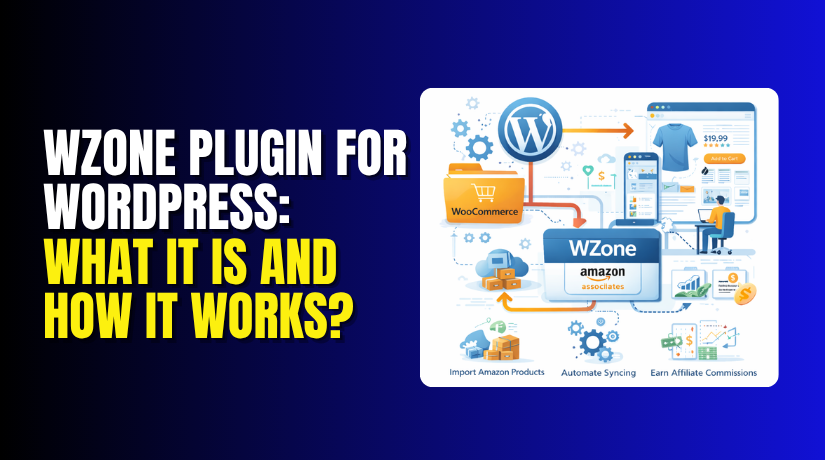
WZone (also known as WooCommerce Amazon Affiliates) is a premium WordPress plugin developed by AA-Team that allows you to import products from Amazon directly into your WooCommerce store. It’s designed specifically for affiliate marketers who want to create content-rich sites that leverage Amazon’s massive product catalog.
The plugin bridges the gap between Amazon’s product database and your WooCommerce store. Instead of manually creating product pages for every item you want to promote, WZone automates the entire process. You search for products, import them with one click, and they appear in your store with all relevant details—images, prices, descriptions, and variations.
When customers browse your site, they experience a familiar e-commerce environment. They can view product details, read descriptions, and add items to a cart. But at checkout, they’re seamlessly redirected to Amazon to complete the purchase, with your affiliate ID attached to the transaction.
WZone is not a simple link cloaking plugin or a basic Amazon feed reader. It’s a comprehensive e-commerce integration that creates actual WooCommerce products in your database. This means you can:
- Categorize products like any other WooCommerce store
- Apply your theme’s design to product pages
- Use SEO plugins to optimize individual products
- Create collections and featured product displays
- Add your own content alongside imported data
Key Specifications
- Developer: AA-Team
- Platform: WordPress + WooCommerce
- Current Version: 15.1.0 (as of March 2026)
- Total Sales: 36,000+ on CodeCanyon
- Recent Update: Amazon Creators API Integration
- Pricing: Premium plugin with lifetime license options
What are the Key Features, Pros and Cons of the WZone Plugin?
Key Features of WZone
- Multiple Import Methods: WZone offers several ways to bring products into your store. The Direct Import Chrome extension lets you browse Amazon and import products with one click—no API keys required.
- PA API and Creators API Integration: For users with approved API access, WZone integrates with Amazon’s Product Advertising API 5.0. The latest version 15.1.0 adds support for the new Amazon Creators API, providing an additional modern method to interact with Amazon product data.
- Automatic Product Synchronization: Prices, availability, and product details change constantly on Amazon. WZone automatically syncs your imported products to keep them current. You can schedule syncs daily, weekly, or monthly, and choose which elements to update—prices, titles, descriptions, and reviews.
- Variation Handling: Products with options like size, color, or style are properly imported as variable WooCommerce products. This ensures customers can select the specific variant they want before being redirected to Amazon.
- Image Management: WZone can use Amazon’s remote images, meaning product photos load directly from Amazon’s CDN for faster performance and reduced server load. Alternatively, you can import images to your own server.
- Multiple Checkout Options: You can choose between direct checkout (sending customers immediately to Amazon) or an on-site cart that allows customers to add multiple products before redirecting. The on-site cart supports Amazon’s 90-day tracking cookie, meaning you earn commissions on anything the customer buys during that window.
- Amazon Associates Reports Module: Version 15.0.0 introduced a built-in reporting dashboard showing clicks, ordered items, shipped items, revenue, and earnings directly within your WordPress admin. You can filter by today, yesterday, last 7 days, or custom date ranges.
- Dropshipping Features: WZone includes dropshipping functionality that lets you add custom markup to Amazon prices, effectively creating your own retail prices. The plugin calculates your profit automatically and displays it in order details. You can also round prices for marketing appeal (e.g., $17.31 becomes $17.99).
- Multiple Amazon Marketplace Support: The plugin works with Amazon US, UK, Germany, France, Japan, Canada, China, India, Italy, Spain, Mexico, Brazil, Australia, UAE, Netherlands, Singapore, and Saudi Arabia . Geotargeting automatically redirects customers to their local Amazon site when applicable.
- eBay Add-On: A separate add-on allows importing products from eBay into your WooCommerce store, giving you another affiliate revenue stream.
- SEO Optimization: WZone generates SEO-friendly titles, meta descriptions, and URLs using configurable format tags. This helps your product pages rank in search engines.
Pros of WZone
- Comprehensive Feature Set:WZone is arguably the most feature-complete Amazon affiliate plugin available. It handles everything from initial import to ongoing synchronization and performance tracking. The dropshipping capabilities and eBay integration extend its value beyond basic affiliation.
- No API Keys Required for Basic Import: The Direct Import Chrome extension is a game-changer for new affiliates stuck in Amazon’s “three sales” catch-22. With over 10,000 users, this feature alone makes WZone accessible to beginners.
- Automatic Updates Keep Products Current: Product synchronization ensures your store doesn’t show outdated prices or unavailable items. This is critical for maintaining customer trust and avoiding frustrating dead ends.
- Powerful Reporting: The built-in Associates Reports module provides insights that would otherwise require logging into Amazon’s dashboard. Having this data alongside your WordPress admin streamlines workflow.
- Flexible Checkout Options: The on-site cart with 90-day cookies can significantly increase earnings by capturing commissions on entire shopping sessions, not just individual products.
- Active Development: AA-Team continues to update WZone with major new features, most recently the Creators API integration in March 2026. This suggests long-term viability.
- Multi-Location Support: For affiliates targeting international audiences, supporting 16+ Amazon marketplaces with geotargeting is invaluable.
- Dropshipping Potential: While Amazon has specific requirements for dropshipping, WZone’s markup and profit tracking features make it viable for sellers who want to operate as retailers rather than pure affiliates.
Cons of WZone
- Mixed User Reviews:User experiences vary dramatically. Some users report making money and being “very impressed” with the plugin’s capabilities and professional support. Others describe it as “not working” with “terrible support” and warn potential buyers away.
- Complex Setup: Multiple users note that WZone has a learning curve. One reviewer advises: “do not give up if you’re struggling” because once configured correctly, it can generate income.
- Issues with Variable Products: Several users report problems with products that have variations like size or color. One detailed review explains that for clothing items, variations often fail to pass selections to Amazon, resulting in an empty shopping cart and lost commissions.
- Support Quality Concerns: Multiple users complain about slow or unhelpful support responses. One reviewer opened a ticket in November 2018 and by January 2019 was still waiting for resolution.
- Performance Impact with Large Catalogs: One user with over 4,000 products reported that daily sync processes were “destroying my server” until they disabled the cron jobs. Large sites need to carefully manage sync frequency and server resources.
- Plugin Conflicts: A user reported that WZone disabled functionality in their WooCommerce Advanced Bulk Edit plugin, though the developer suggested this was an isolated issue.
- Amazon PA API Requirements: Even with the Direct Import workaround, to access full features like automatic synchronization and bulk imports, you eventually need PA API keys—which require generating three sales within 30 days.
- Chrome Extension Future: The developer notes that “the chrome extension will become unavailable soon, so you will need a pair of valid PA API keys in order to import products”. This removes the primary workaround for new affiliates.
- No Free Version: Unlike many WordPress plugins, WZone offers no free trial or lite version. The official “lite version” on WordPress.org was closed in 2022 due to security issues.
- Amazon Policy Compliance Risk: WZone’s direct checkout and dropshipping features must be used carefully to comply with Amazon’s operating agreement. The developer includes warnings about policy requirements.
How the WZone Plugin Works?
Understanding how WZone operates helps you set realistic expectations and configure it properly for your affiliate store.
Step 1: Installation and Setup
Purchase and Download: You purchase WZone from CodeCanyon. After purchase, you receive a license key and download link. The plugin requires WooCommerce to be installed and activated first.
Upload the plugin zip file through WordPress → Plugins → Add New → Upload Plugin. Activate the plugin and enter your license key when prompted.
Initial Configuration. WZone adds its own menu to your WordPress admin. The initial setup involves:
- Selecting which Amazon marketplaces you’ll use
- Entering your Amazon Associate IDs for each locale
- Configuring your preferred checkout method (direct or on-site cart)
- Setting synchronization preferences
- Enabling optional features like geotargeting, reviews, and cross-selling
Step 2: Importing Products
WZone offers multiple methods to import products, accommodating different user needs and Amazon’s API restrictions.
Method A: Direct Import Chrome Extension (No API Keys)
This method is designed for new affiliates who don’t yet have PA API access:
- Install the WZone Direct Import Chrome extension from the Chrome Web Store
- Browse any Amazon website normally
- When you find a product you want to feature, click the extension button
- Select import options (simple or variable product, number of images, attributes)
- The product appears in your WooCommerce store within seconds
Method B: PA API Import (Requires API Keys)
For affiliates with approved PA API access:
- Configure your Amazon Access and Secret Keys in WZone settings
- Use the Insane Importer to search by keyword, category, or ASIN
- Select multiple products to import in bulk
- Configure import settings (price rules, image count, variation handling)
- WZone pulls product data directly from Amazon’s API
The PA API method enables automatic synchronization and larger-scale imports.
Method C: Amazon Creators API (New in Version 15.1.0)


- The latest update adds integration with Amazon’s new Creators API, providing an additional data source for product imports and improved compatibility with Amazon’s evolving ecosystem.
Step 3: What Gets Imported
When you import a product, WZone brings in:
- Product Title – With SEO-friendly formatting options
- Description – Amazon’s product description
- Images – Either as remote links (loading from Amazon’s CDN) or imported to your server
- Price – Current Amazon price
- Variations – Size, color, style options (for applicable products)
- Reviews – Optional import of Amazon customer reviews
- Cross-sells – “Frequently Bought Together” recommendations
- Accessories – Related/accessory products
- Prime Status – “Prime ready” icon for eligible products
- Shipping Availability – Information about shipping restrictions
Step 4: Product Synchronization
Once products are imported, WZone keeps them current through automated synchronization:
- Price Updates – If Amazon’s price changes, your site reflects the new price
- Availability Checks – Out-of-stock products can be flagged or removed
- Title/Description Updates – Optional synchronization of product details
- Review Updates – New Amazon reviews can be imported
Step 5: Customer Experience
When visitors browse your site, they experience a normal WooCommerce store:
- Product Pages – Display all imported information with your theme’s design
- Search – Customers can search your product catalog
- Categories – Products organized in your chosen categories
- Cart – Customers add items to a local cart
Step 6: Checkout and Commission Tracking
This is where WZone differs from a standard e-commerce store:
- Direct Checkout Option: When customers proceed to checkout, they’re immediately redirected to Amazon with your affiliate ID attached. The product is automatically added to their Amazon cart, and they complete purchase on Amazon.
- On-Site Cart Option: Customers can add multiple products from your site to a local cart . When they’re ready to checkout, they’re redirected to Amazon with all selected products added to their Amazon cart simultaneously. This allows you to earn commissions on multiple items from a single session.
- 90-Day Cookie: When customers click through to Amazon, a tracking cookie is placed that lasts 90 days. If they purchase anything from Amazon during that period (not just the original product), you earn commissions.
Note: To maintain PA API access, your links cannot be direct links to Amazon. You must either use the “Add to Cart” option or activate the 90-day cookie feature.
Step 7: Earnings Tracking
WZone’s Amazon Associates Reports module displays your performance directly in WordPress:
- Dashboard showing clicks, ordered items, shipped items, and revenue
- Filtering by date ranges (today, yesterday, last 7 days, etc.)
- Detailed tables of ordered items with ASINs and conversion data
- Link Type Performance showing earnings by affiliate link type
- Distinction between “Direct Ordered Items” (from your specific product) and “Indirect Ordered Items” (from the 90-day cookie)
This reporting eliminates the need to log into Amazon’s Associates dashboard for basic performance checks.
Step 8: Optional Dropshipping Workflow
If you enable the dropshipping feature, the workflow expands:
- Set a custom markup percentage or fixed amount to add to Amazon prices
- WZone displays your profit margin on product and order pages
- When orders come in, you see product availability and the appropriate Amazon marketplace
- You manually (or eventually automatically) order the products from Amazon
- Amazon ships directly to your customer
- Track order statuses (New, Processing, Completed) within WordPress
Amazon’s dropshipping policy requires you to:
- Be the seller of record
- Identify yourself on packing slips
- Handle customer returns
- Comply with all seller agreement terms
Final Verdict
WZone is a powerful, feature-rich plugin that transforms WooCommerce into a fully functional Amazon affiliate store. With over 36,000 sales and continuous development since its release, it has established itself as a leading solution in this niche. The latest updates—including Amazon Creators API integration, built-in Associates reporting, and the direct import Chrome extension—demonstrate ongoing commitment to adapting to Amazon’s evolving ecosystem.
Choose WZone if you’re serious about building a content-rich affiliate site that looks and functions like a real e-commerce store. The ability to import products with variations, synchronize prices automatically, and leverage Amazon’s 90-day tracking cookie can significantly increase your earning potential.
The dropshipping features and eBay add-on provide additional revenue models beyond traditional affiliation. For users willing to invest time in learning the system—as one reviewer noted, “do not give up if you’re struggling”—WZone can become a legitimate income source.
However, be aware of the significant caveats. User reviews are sharply divided, with some praising the plugin’s capabilities and others warning of terrible support and non-functional variable products.
The Chrome extension workaround for new affiliates is slated for eventual deprecation, meaning you’ll need PA API keys to continue importing. Performance concerns with large catalogs, plugin conflicts, and the steep learning curve mean WZone isn’t for casual users.
Before purchasing, honestly assess your technical comfort level and commitment. WZone requires careful configuration and ongoing management—it’s not a “set and forget” solution. If you’re willing to navigate its complexities, the potential rewards are real. If you’re looking for a simpler, plug-and-play affiliate solution, you may want to explore alternatives or start with Amazon’s native SiteStripe tools.
The plugin’s future seems secure with active development, but the mixed user experiences suggest that your mileage may vary significantly. Approach with eyes open, leverage the community resources, and be prepared to troubleshoot.
Have questions before starting with WooCommerce & WordPress? Get support here at WooHelpDesk.
Frequently Asked Questions
Is WZone plugin free?
WZone (WooCommerce Amazon Affiliates) is a premium plugin available on CodeCanyon. It requires a one-time purchase license. There is no free version, but it includes lifetime updates and 6 months of support with each license.
Does WZone work with the latest version of WordPress?
Yes, WZone is regularly updated to maintain compatibility with the latest versions of WordPress and WooCommerce. Always ensure you are running the most recent version of the plugin for optimal performance and security.
Can WZone import Amazon products automatically?
Yes, WZone supports automatic product imports from Amazon using ASIN codes, search queries, or category browsing. It can synchronize prices, availability, and product details on a scheduled basis.
References and Resources
Related Articles