What Is a WordPress Front-End Editor? Is WordPress Back-End or Front-End?
Table of Contents
- Introduction
- Why It Is Important to Understand Front-End and Back-End in WordPress
- What Is a WordPress Front-End Editor?
- Common Features of a WordPress Front-End Editor
- Popular WordPress Front-End Editors
- What Is the WordPress Back-End?
- What You Can Do in the WordPress Back-End
- How the WordPress Back-End Controls the Front-End
- Difference Between the WordPress Front-End and Back-End
- How Front-End Editors Connect With the WordPress Back-End
- Common Mistakes Beginners Make About Front-End and Back-End
- Conclusion
Introduction
WordPress is one of the most used website platforms in the world. Many beginners choose it because it is flexible, scalable, and easier to manage than many custom systems. Still, one question often creates confusion. People want to know whether WordPress is a front-end tool, a back-end system, or both. At the same time, many users hear about front-end editors and wonder what they actually do inside WordPress.
These two topics are closely connected. To understand WordPress properly, you need to understand the difference between the front-end and the back-end. You also need to know how a WordPress front-end editor fits into that setup. Once this becomes clear, managing a website feels much easier.
This guide explains both topics in a simple way. It shows what a WordPress front-end editor is, how it works, what the WordPress back-end does, and why WordPress uses both sides together.
Why It Is Important to Understand Front-End and Back-End in WordPress
Many website owners use WordPress without knowing how its parts work together. They can publish posts, install themes, and update plugins, but they may still feel confused when someone says front-end or back-end. This confusion can slow down website work and make simple tasks feel harder.
When you understand these terms, many things become clearer. You can choose better tools. You can work faster in the dashboard. You can also decide whether you need a visual builder, a custom theme, or only the default editor.
This knowledge also helps when hiring a developer or support team. You can explain your needs more clearly. For example, you may want help with the design visitors see, or you may need changes in admin settings and website functions. These are different areas, and WordPress handles both.
What Front-End Means in Website Development
The front-end is the part of a website people see and use in their browser. It includes the homepage, blog pages, product pages, menus, buttons, banners, images, and forms. In simple words, the front-end is the visible side of the website.
When someone visits your WordPress site, they do not see your dashboard. They only see the final result. That result is the front-end. It is built using design elements and website code such as HTML, CSS, and JavaScript. In WordPress, your theme plays a big role in controlling how the front-end looks.
The front-end affects user experience. If it is slow, messy, or confusing, visitors may leave quickly. If it is clear and easy to use, visitors stay longer and take action. That is why front-end design matters so much.
What Back-End Means in Website Development
The back-end is the management side of the website. In WordPress, this is the admin dashboard where you log in and control everything. It is where you create pages, write blog posts, upload media, install plugins, manage settings, and handle users.
The back-end is not usually visible to site visitors. It is meant for website owners, editors, admins, developers, and support teams. It gives you control over the content and functions that later appear on the front-end.
In WordPress, the back-end is powerful because it allows non-technical users to manage a website without building everything from scratch. You do not need to code each page manually. Instead, you can use the dashboard tools to manage your site in a structured way.
Is WordPress Front-End, Back-End, or Both?
The correct answer is simple. WordPress is both front-end and back-end.
It has a back-end system where you manage your site. It also powers the front-end that your visitors use. These two sides work together. The back-end lets you control content, design settings, and website features. The front-end shows the result to users on the live site.
This is why WordPress is so useful. It is not only a content editor. It is a full website management system. You can control the admin side, and you can also shape the public side.
People often ask this question because they think a platform must belong to only one side. That is not how WordPress works. It connects both sides and helps them work as one complete website system.
What Is a WordPress Front-End Editor?
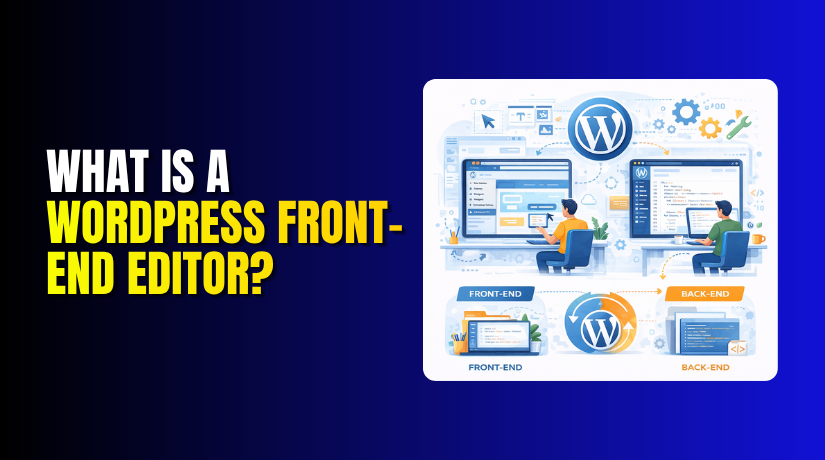
A WordPress front-end editor is a tool that lets you edit website content and layout directly on the visible page. Instead of making changes only inside the classic admin area, you can work on the page while seeing the design in real time.
This means you can click on text, sections, columns, images, buttons, or blocks and edit them visually. You do not need to imagine how the page will look after saving. You can see the design while you build it.
A front-end editor is very useful for users who want more visual control. It is especially helpful for beginners, business owners, marketers, and designers who do not want to rely fully on custom code.
Many popular page builders in WordPress use front-end editing. These tools make website building more practical because they reduce guesswork and show live changes as you work.
How a WordPress Front-End Editor Works
A front-end editor works by loading the page builder tools on the live editing screen. When you open a page for editing, the system displays the current layout and allows you to change elements directly on the page.
For example, you may click a heading and change the text. You may drag a block to a new position. You may add a button, insert an image, or adjust spacing between sections. The editor shows these changes visually before publishing them.
In many cases, the tool adds side panels or setting boxes. These let you control colors, fonts, padding, alignment, backgrounds, and responsive behavior. You still manage the content through WordPress, but the editing experience feels more visual and direct.
This method is different from the older editing style where users typed content into a field and previewed the result later. A front-end editor cuts down this extra step.
Why Many Users Like Front-End Editing in WordPress
Many WordPress users prefer front-end editing because it feels easier and faster. They do not need to switch between edit mode and preview mode again and again. They can see the page structure while building it.
This saves time during design work. It also reduces mistakes. If a heading looks too large or a button seems out of place, the user can notice it quickly. This is much better than making changes blindly in the dashboard.
Front-end editing also helps beginners feel more confident. It looks more like working inside a design tool than working inside a technical admin panel. This can make website building less stressful.
Another reason is flexibility. Front-end editors often include ready-made sections, templates, and drag-and-drop controls. This allows users to create modern page designs without strong coding knowledge.
Common Features of a WordPress Front-End Editor
Most WordPress front-end editors offer similar core features, even though each tool has its own design and controls.
Real-Time Editing
This is one of the biggest benefits. You can see changes while making them. If you update text, colors, or layout, the screen reflects it immediately.
Drag-and-Drop Design
Many front-end editors allow you to move blocks or sections by dragging them into place. This makes page building simple and visual.
Live Visual Preview
You do not need to guess the final result. The page already looks close to the live version while you edit it.
Easy Layout Changes Without Coding
You can build columns, sections, banners, and call-to-action areas using visual tools instead of manual code.
These features make front-end editors popular for landing pages, business websites, portfolio pages, service pages, and custom blog layouts.
Popular WordPress Front-End Editors
Several tools offer front-end editing in WordPress. Some are page builders, while others are block-based systems with visual editing features.
Elementor
Elementor is one of the most popular front-end editors in WordPress. It offers drag-and-drop controls, live editing, templates, and many design options. Beginners often like it because the interface is clear and visual.
Beaver Builder
Beaver Builder is another trusted option. It is known for stability, clean design controls, and a user-friendly editing experience. Many developers also like it for client projects.
Divi Builder
Divi provides visual page building with strong design flexibility. It includes many layout tools and ready-made design modules. It is often used for websites that need custom visual styling.
Gutenberg Visual Editing Experience


Gutenberg is the default WordPress block editor. It is mainly used in the back-end, but its block-based editing gives a more visual content-building experience than older editors. In some themes and setups, it supports a more design-focused workflow.
Each editor has strengths and limits. The right choice depends on your website goals, budget, and comfort level.
What Is the WordPress Back-End?
The WordPress back-end is the admin area where you manage your full website. It usually begins after logging in through the WordPress admin URL. This dashboard is where most site control happens.
From the back-end, you can create blog posts, build pages, upload media, install themes, activate plugins, manage comments, update settings, and control users. It is the main control panel of your website.
The back-end is also where website maintenance happens. You update WordPress core files, check plugin notices, change menus, adjust permalinks, and monitor general site health.
Without the back-end, it would be very hard to manage a WordPress website properly. Even if you use a front-end editor, the back-end remains an important part of the system.
What You Can Do in the WordPress Back-End
The WordPress back-end handles many important tasks that power the website.
Create and Manage Content
You can write blog posts, create pages, save drafts, schedule publishing, and edit existing content.
Install Themes and Plugins
You can control the website design with themes and add functions through plugins. This is one of WordPress’s biggest strengths.
Change Website Settings
The back-end allows you to change general settings, reading settings, writing settings, discussion settings, and permalink structure.
Manage Users, Menus, and Media
You can add users, assign roles, build menus, upload images, and organize media files from the dashboard.
These tasks show why WordPress is not only about design. It is also about control, structure, and website management.
How the WordPress Back-End Controls the Front-End
The front-end and back-end are deeply connected. What you do in the dashboard affects what visitors see on the live site. If you change a page title, it updates on the front-end. If you install a new theme, the visible website design changes. If you add a plugin, the front-end may gain new features.
This connection is one of WordPress’s greatest strengths. You manage the website from one system, and the results appear on the public side.
Even front-end editors depend on the back-end to some degree. They are built inside WordPress and use its structure, permissions, content system, and settings. So while front-end editors feel visual, they still rely on back-end support.
Difference Between the WordPress Front-End and Back-End
The difference becomes easy when you look at user roles and purpose.
The front-end is for visitors. It shows the final website. People read content, browse products, click links, and submit forms there.
The back-end is for management. It is where admins and editors control the site. It includes tools, settings, and editing systems.
Another difference is experience. The front-end focuses on presentation and user interaction. The back-end focuses on administration and content control.
Still, both sides must work together. A good back-end setup supports a better front-end experience. A well-designed front-end reflects smart back-end management.
Why WordPress Is Both a Front-End and Back-End Platform
WordPress is both because it does not stop at one layer. It gives you the tools to manage content behind the scenes and also delivers that content beautifully on the live website.
This makes WordPress flexible for beginners and professionals. A small business owner can use it to update pages. A blogger can publish articles. A store owner can manage products. A developer can build custom features. In every case, WordPress handles both the control side and the display side.
That is why it is more accurate to call WordPress a complete content management system rather than only a front-end or back-end tool.
How Front-End Editors Connect With the WordPress Back-End
A front-end editor is not separate from WordPress. It works as part of the WordPress ecosystem. It uses WordPress pages, posts, templates, settings, and permissions. You may edit visually on the front-end, but the content still belongs to your WordPress website structure.
This means front-end editors make editing easier, but they do not replace the back-end completely. You still need the dashboard for updates, plugin settings, user roles, SEO tools, security settings, and many other tasks.
In simple words, front-end editors improve the editing experience, while the back-end remains the control center.
When You Should Use a Front-End Editor in WordPress
A front-end editor is a good choice when you want visual control and faster page design. It is useful for landing pages, service pages, homepages, and custom layouts. It is also helpful when you want to build pages without writing code.
However, not every website needs a heavy page builder. Some simple blogs work well with the default block editor. Some developers prefer custom theme coding for speed and structure.
The best choice depends on your goals. If you want flexibility and ease, a front-end editor can help a lot. If you need a lightweight setup, the default tools may be enough.
Common Mistakes Beginners Make About Front-End and Back-End
Many beginners think the front-end is the whole website. Others think the dashboard is the only important part. Both ideas are incomplete.
Some users also assume that a front-end editor removes the need for the WordPress back-end. That is not true. The back-end still controls key website functions.
Another common mistake is choosing a page builder without checking performance, compatibility, and long-term maintenance needs. A tool may look easy at first but create issues later if used without planning.
Understanding how both sides work together helps you avoid these problems.
Conclusion
A WordPress front-end editor is a visual tool that lets you edit pages directly on the visible website layout. It helps users build and adjust pages more easily, often with drag-and-drop controls and live previews. This makes website editing faster and more beginner-friendly.
At the same time, WordPress itself is not only a front-end or only a back-end platform. It is both. The back-end gives you the dashboard and management tools. The front-end displays the final website to visitors. Together, they form a complete system.
Once you understand this connection, WordPress becomes much easier to use. You can choose the right editor, manage your site more confidently, and build better pages with fewer mistakes. That is the real value of knowing how WordPress front-end and back-end work together.
Frequently Asked Questions
What is the difference between front-end and back-end editing in WordPress?
Front-end editing allows you to make changes directly on the live page as visitors see it, while back-end editing is done through the WordPress admin dashboard (wp-admin). Front-end editors provide a more visual, WYSIWYG experience.
Is the Gutenberg editor a front-end or back-end editor?
Gutenberg (the WordPress Block Editor) is primarily a back-end editor that runs in the wp-admin area. However, it provides a visual preview that closely resembles the front-end appearance of your content.
Which front-end editors are best for WordPress?
Popular front-end editors for WordPress include Elementor, Beaver Builder, Divi Builder, and Brizy. These page builders allow visual drag-and-drop editing directly on the live page preview.
References and Resources
Related Articles