Amazon for WooCommerce Plugin Integration with WooCommerce Store
Table of Contents
- Introduction to WooCommerce & Amazon Integration
- Overview of Amazon for WooCommerce Plugin
- Key Benefits of Using This Plugin
- Key Features & Functionalities
- Advanced Selling Strategies
- Setup & Pricing
- Who Should Use This Plugin?
- Conclusion
Introduction to WooCommerce & Amazon Integration
Sales and visibility are increased by selling on several platforms. Amazon is the world’s largest eCommerce marketplace. WooCommerce powers millions of online stores. Integrating both helps sellers expand their reach.
WooCommerce store owners often face inventory and order management challenges. Manually updating stock and prices is time-consuming. Managing orders separately on both platforms creates delays. A seamless connection between WooCommerce and Amazon solves these issues.
Overview of Amazon for WooCommerce Plugin
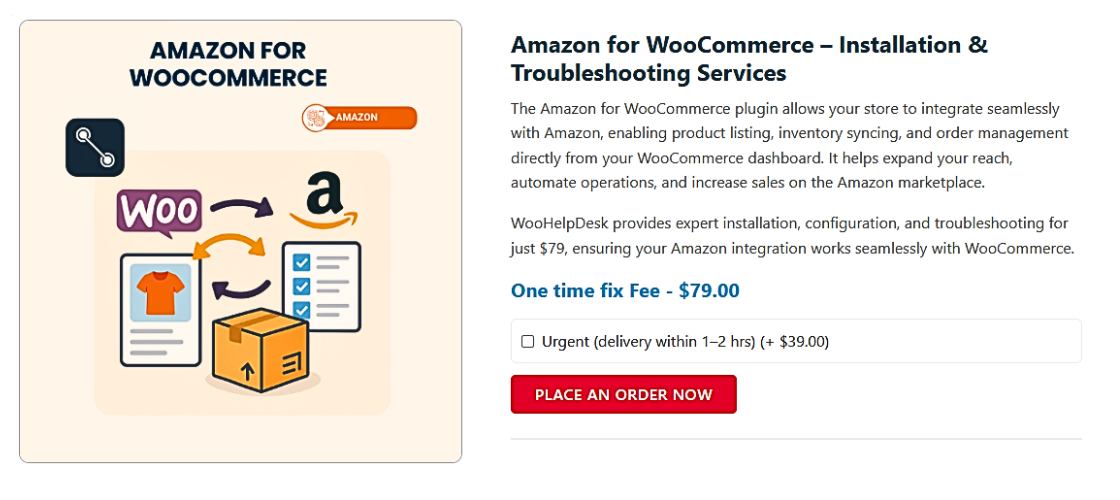
Amazon for WooCommerce is a plugin by CedCommerce. It allows sellers to sync WooCommerce with Amazon. Order processing, inventory updates, and product listings are all automated by this integration.
Manual updates are no longer necessary thanks to the plugin. It ensures accurate stock levels across platforms. Orders placed on Amazon appear in WooCommerce automatically. This helps streamline operations and saves time.
Key Benefits of Using This Plugin
- Easy Product Listing – Upload products from WooCommerce to Amazon in bulk.
- Automated Inventory Sync – Prevent overselling by keeping stock updated.
- Centralized Order Management – View and manage Amazon orders within WooCommerce.
- Pricing Synchronization – Adjust WooCommerce prices based on Amazon listings.
- FBA Integration – Fulfill WooCommerce orders using Amazon’s logistics.
Requirements for Using the Plugin
To use this plugin, you need an Amazon Professional Seller account. A seven-day free trial is offered. After that, you must choose a monthly or yearly plan.
WooCommerce store owners selling physical products benefit most from this integration. It simplifies selling across both platforms without manual effort.
Key Features & Functionalities
-
WooCommerce Amazon Integration
Amazon and WooCommerce stores are connected using the Amazon for WooCommerce plugin. Sellers can handle everything from a single dashboard thanks to it. No platform switching is required.
This integration supports multiple Amazon Seller Accounts across different regions. You can manage listings for Amazon US, UK, Canada, and more. This feature is helpful for global sellers.
The plugin also ensures that your WooCommerce store stays synced. Any updates in stock, pricing, or orders reflect in real time. This eliminates the need for manual adjustments.
-
Amazon Product Sync with WooCommerce
Manually listing products on Amazon takes time. This plugin automates the process. It enables WooCommerce to upload products in bulk to Amazon.
An Amazon Standard Identification Number (ASIN) is given to every product. This guarantees precise product mapping. You can use ASIN to find a product that already exists on Amazon.
Sellers can also map WooCommerce categories to Amazon categories. This helps maintain the correct product classification. Category mapping ensures listings appear in the right Amazon search results.
-
WooCommerce Amazon Inventory Management
Keeping track of stock on two platforms is difficult. This plugin syncs inventory in real time. When a product sells on Amazon, stock updates in WooCommerce.
This avoids stock-related mistakes and overselling. Inventory will not need to be updated by hand. The plugin automatically adjusts stock levels.
It also supports SKU-based inventory linking. If a product has the same SKU on both platforms, it syncs automatically. This ensures smooth inventory management.
-
Amazon Order Fulfillment in WooCommerce
Managing orders across two platforms can be confusing. The plugin imports Amazon orders into WooCommerce. All orders are seen and manageable from a single location.
Order status updates automatically. When an order ships, tracking information syncs to WooCommerce. This makes it easier to track deliveries.
For sellers using Fulfillment by Amazon (FBA), the plugin supports direct fulfillment. Amazon handles packing and shipping, while WooCommerce syncs order updates.
-
WooCommerce Amazon Listing Tool
Making product listings that are optimized is crucial for visibility. This plugin includes an Amazon Listing Tool. It helps format product details correctly for Amazon’s marketplace.
Sellers can create custom listing templates. These templates help apply consistent product information. Templates also speed up bulk uploads.
The tool also supports Amazon feed tracking. If a product listing fails, the plugin shows the reason. This helps fix errors quickly and ensures smooth uploads.
-
WooCommerce Amazon Pricing Sync
Keeping competitive pricing on Amazon is important. This plugin syncs WooCommerce pricing with Amazon. You can choose fixed or percentage-based pricing adjustments.
For example, if Amazon lowers a product price, your WooCommerce price adjusts. This ensures pricing remains competitive across both platforms.
Price updates happen in real time. Any change in WooCommerce reflects on Amazon automatically. This prevents pricing mismatches and improves sales consistency.
-
Amazon Reviews for WooCommerce Plugin
Sales and search rankings are impacted by customer reviews. This plugin syncs Amazon reviews with WooCommerce. Displaying Amazon reviews can improve product credibility.
Sellers can choose which reviews to import. Positive reviews help increase conversions. Updated reviews also enhance WooCommerce SEO.
Amazon reviews appear on WooCommerce product pages. This helps customers make informed decisions. Good reviews increase buyer trust and boost store sales.
Advanced Selling Strategies
-
WooCommerce Amazon FBA Integration
Sellers can utilize Amazon’s logistics through Fulfillment by Amazon (FBA). Amazon stores, packs, and ships orders for you. This reduces workload and speeds up deliveries.
The Amazon for WooCommerce plugin supports FBA integration. When an order is placed in WooCommerce, Amazon fulfills it. This is helpful for sellers managing large inventories.
The plugin also automates stock updates. If Amazon’s inventory changes, WooCommerce updates automatically. This prevents overselling and stock discrepancies.
Sellers using FBA get Amazon’s Prime badge, which increases sales. Amazon handles customer service and returns, making selling easier.
-
WooCommerce Amazon Dropshipping
Dropshipping is a low-risk way to sell online. Inventory is not kept by sellers. Rather, they buy goods from vendors and deliver them straight to clients.
You can import Amazon products into WooCommerce by using this plugin. Customers buy from your WooCommerce store. You then place the order on Amazon for fulfillment.


The plugin ensures pricing and inventory updates. If a product goes out of stock on Amazon, it is removed from WooCommerce. This prevents customers from ordering unavailable items.
WooCommerce Amazon dropshipping helps sellers offer a wide range of products. For people who wish to begin selling with little financial outlay, it’s a fantastic choice.
-
Amazon MCF WooCommerce Integration
Multi-Channel Fulfillment (MCF) allows Amazon to fulfill orders from other platforms. You can sell on WooCommerce while Amazon handles storage and shipping.
The plugin automatically syncs WooCommerce orders to Amazon’s MCF system. After that, Amazon selects, packages, and sends the item to the buyer.
For merchants that want quick delivery without having to pay for a warehouse, this is perfect. It also improves the customer experience with Amazon’s trusted shipping network.
With Amazon MCF, you can sell on multiple platforms while using one fulfillment center. This makes managing orders easier and reduces shipping errors.
-
Multichannel Selling with WooCommerce and Amazon
Selling on multiple platforms increases reach and revenue. The plugin supports multichannel selling across WooCommerce, Amazon, eBay, and Walmart.
Products sync automatically across platforms. Inventory updates prevent overselling. Orders from all marketplaces appear in one WooCommerce dashboard.
This simplifies business operations and improves efficiency. You don’t have to manage different platforms separately. Everything is controlled from WooCommerce.
Multichannel selling allows store owners to scale their businesses. It also helps sellers reach more customers without extra effort.
Setup & Pricing
-
Installation & Setup
Setting up the Amazon for WooCommerce plugin is simple. Follow these steps to integrate your store with Amazon.
Step 1: Download & Install the Plugin
- Visit the WooCommerce Marketplace and search for Amazon for WooCommerce.
- Click Free Download and log into your WooCommerce account.
- The plugin will be downloaded in a compressed ZIP format.
Step 2: Upload & Activate the Plugin
- Access your WordPress admin panel.
- Navigate to Plugins, select Add New, then choose Upload Plugin.
- Choose the ZIP file and press the Install Now button.
- After installation, select Activate to turn on the plugin.
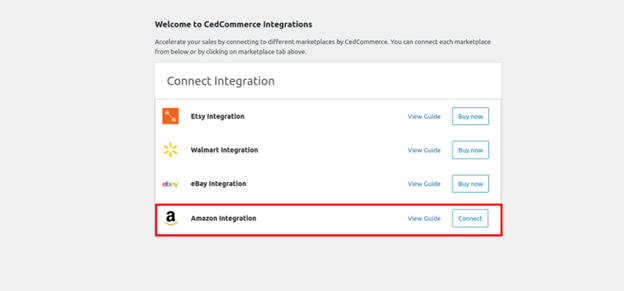
Step 3: Connect Your Amazon Seller Account
- Navigate to WooCommerce > Amazon Integration in your dashboard.
- Click Connect to Amazon to begin setup.
- Enter your Amazon Seller Central credentials and sign in.

- Grant permission to CedCommerce to access your account data.
Step 4: Configure Global Settings
- Set product listing preferences (pricing, inventory rules, and ASIN mapping).
- Choose automatic stock and price updates to keep WooCommerce and Amazon in sync.
- Configure order settings to import Amazon orders into WooCommerce.
Step 5: Sync Your Products
- Click Upload Products to bulk-sync WooCommerce listings to Amazon.
- Use ASIN mapping to match existing Amazon products.
- Review and update product titles, descriptions, and categories.
Step 6: Manage Orders & Inventory
- All Amazon orders will appear in the WooCommerce Orders tab.
- Track order status and fulfillment details in one dashboard.
- Inventory updates automatically to prevent overselling.
Once setup is complete, the plugin runs in the background. All updates sync between WooCommerce and Amazon automatically.
-
Pricing & Subscription Options
The Amazon for WooCommerce plugin provides a free 7-day trial period. After the trial, sellers must choose a monthly or yearly plan.
Pricing Plans:
- Monthly Plan – Ideal for short-term use.
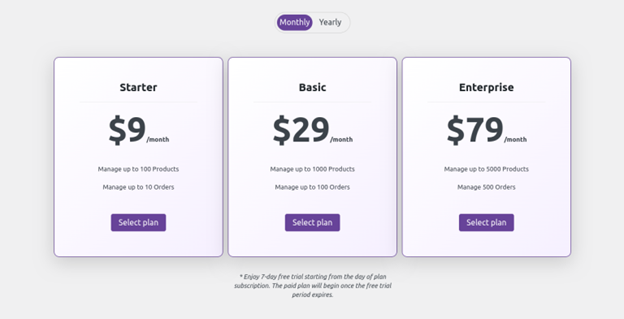
- Yearly Plan – Provides cost savings over the monthly subscription plan.

The exact pricing varies based on features and sales volume. Visit the WooCommerce Marketplace for updated pricing details.
Who Should Use This Plugin?
For owners of WooCommerce stores that sell on Amazon, this plugin is ideal. Order processing, inventory control, and product synchronizing are all automated by it.
Best for:
- Retailers managing inventory on both WooCommerce and Amazon.
- Dropshippers who want to list Amazon products in WooCommerce.
- FBA sellers who use Amazon for fulfillment.
- Multichannel sellers expanding to eBay, Walmart, and Etsy.
This plugin saves time, reduces manual work, and boosts efficiency. It helps sellers grow without managing separate platforms manually.
Conclusion
One effective tool for merchants is the Amazon for WooCommerce plugin. It helps sync inventory, manage orders, and automate fulfillment. With real-time updates, it prevents overselling and pricing errors.
There are just a few steps involved in the setup process. Once connected, WooCommerce and Amazon stay in sync automatically. This plugin is ideal for retailers, drop shippers, and FBA sellers.
It becomes simpler and more effective to sell on several platforms. It saves time and boosts sales without extra manual work. If you want to expand on Amazon, this plugin is a must-have.



