Salient Theme for WordPress: How to Install and Get Started?
Table of Contents
- Introduction
- What is Salient in WordPress?
- What are the key features, pros, Pros and Cons of the Salient Theme?
- How to Add the Salient Theme to WordPress?
- Final Verdict
Introduction
You have a vision for your website. You want it to look professional, modern, and visually striking. But you also want it to launch quickly without months of development.
The Salient theme has been one of the most popular WordPress themes on ThemeForest for over a decade. It consistently maintains a near-perfect 4.8 out of 5 rating based on thousands of reviews. This longevity speaks volumes about its quality and reliability.
Salient is a multipurpose theme designed to create visually appealing, modern websites without requiring advanced programming knowledge. It simplifies the design process for online stores, corporate websites, portfolios, and landing pages.
The theme solves a fundamental problem that every website owner faces: the dreaded “blank canvas” syndrome. Instead of starting from zero, you get professionally designed templates that you can import and customize in minutes.
This guide walks you through everything you need to know about Salient. You will learn what the theme offers, its key features and limitations, and most importantly—how to install it and get your first site running.
By the end, you will have a fully functional Salient website ready for customization.
What is Salient in WordPress?
Salient is a premium, multipurpose WordPress theme developed by ThemeNectar and sold on ThemeForest. It has been on the market since 2013 and consistently ranks among the top-selling themes, currently holding the 11th position on ThemeForest.
At its heart, Salient is a design-forward theme that emphasizes visual presentation and creative flexibility. It combines a large library of professionally designed demos with a customized page builder, enabling users to create complex layouts visually.
The theme is built for designers, agencies, freelancers, and business owners who want pixel-perfect presentation without building everything from scratch. It’s particularly strong for creative portfolios, WooCommerce stores, and corporate sites that need to project a professional image.
- Total Sales: Over 167,000+
- Average Rating: 4.8/5 based on 5,700+ ratings
- Demo Layouts: 285+ importable website demos
- Price: $60 (standard ThemeForest single-site license)
Salient addresses several common challenges in website building:
- The “Blank Canvas” Problem: Starting from scratch is intimidating and time-consuming. Salient provides fully designed website structures that you can import and tweak, saving hours or days of work.
- Design Consistency: Maintaining professional design standards across a website requires expertise. Salient’s pre-built templates ensure every page looks cohesive and polished.
- Technical Complexity: You don’t need to know code. The visual builder and theme options panel let you customize everything through intuitive interfaces.
- Scalability: As your site grows, Salient helps maintain organization. It’s ideal for projects with large catalogs, allowing better structuring of product pages, categories, and related content.
What are the key features, pros, Pros and Cons of the Salient Theme?
Understanding Salient’s features helps you decide if it matches your project needs.
Key Features of Salient Theme
- 285+ Importable Demo Layouts:
- Salient offers hundreds of professionally designed demo websites covering virtually every industry.
- You can import any demo with one click and replace the placeholder content with your own.
- Demos include corporate sites, creative portfolios, eCommerce stores, blogs, photography sites, and landing pages.
- Customized WPBakery Page Builder:
- Salient ships with a heavily customized version of the WPBakery Page Builder (formerly Visual Composer).
- The builder includes over 65 custom elements that go well beyond the standard offering, including sliders, video players, interactive content blocks, and animated text.
- You can switch between front-end and back-end editing, making it accessible for beginners and powerful for advanced users.
- Nectar Slider:
- This standout feature creates visually compelling slideshows for showcasing key content.
- It includes smooth parallax effects, unlimited slider instances, and excellent animation controls.
- Extensive WooCommerce Integration:
- Salient is highly suitable for building online stores.
- It includes multiple product and single product page layouts, AJAX shopping cart functionality, quick views, and smart filtering options.
- Newer versions include gallery-style product images and scrollable image features for better product presentation.
- Comprehensive Theme Options Panel:
- The Salient options panel gives you centralized control over typography, colors, spacing, headers, menus, blog layouts, footers, and more.
- You can tweak virtually every aspect of your site without touching CSS or PHP.
- Salient Studio Templates:
- Beyond full website demos, Salient Studio provides access to hundreds of individual section templates.
- You can mix, match, and customize these sections on any page, offering ultimate design flexibility.
- Global Sections & Hooks:
- Create sections that appear across your entire site, ensuring consistent branding and messaging.
- The integrated hook system lets you place content in strategic locations (like near footers or after headers) without manual placement on every page.
- Responsive Design:
- Salient automatically adjusts to different screen sizes, ensuring your content displays perfectly across smartphones, tablets, and desktops.
- The theme includes touch-optimized navigation elements and appropriately sized interactive components.
- Performance Optimization Features:
- The theme includes lazy loading for images, which ensures other elements load faster even if high-resolution images are present.
- Developers claim Google PageSpeed scores of 97% are achievable with proper configuration.
- Portfolio Capabilities:
- Salient excels at portfolio websites with countless layout options for full-width, column-based, and individual portfolio pages.
- It’s ideal for photographers, designers, and creative professionals.
- Header Layouts & Builder:
- Choose from a wide variety of pre-designed header menus with one click.
- The header builder allows further customizations to match your brand identity.
Pros of Salient Theme
- Beautiful, Modern Design:
- Salient’s demos and templates are visually striking and professionally crafted.
- The design-forward approach helps your site stand out from competitors.
- Extensive Template Library:
- With over 285 demo layouts and hundreds of section templates, you can launch a professional site quickly.
- Highly Customizable:
- The deep styling options give you control over typography, colors, and layouts without coding.
- The global sections feature ensures design consistency across your entire site.
- Excellent WooCommerce Support:
- For e-commerce projects, Salient offers advanced product layouts and features that enhance the shopping experience.
- Solid Performance Foundation:
- The theme includes lazy loading and other optimization features to help achieve good speed scores.
- With proper hosting and optimization, Salient can be quite fast.
- Responsive Across Devices:
- Layouts adapt smoothly to desktop, tablet, and mobile screens, ensuring a consistent user experience.
- Regular Updates & Long-Term Support:
- Salient has been actively maintained since 2013, with recent updates addressing security and compatibility.
- The theme’s longevity demonstrates reliability.
- Strong User Satisfaction:
- The 4.8/5 rating based on thousands of reviews indicates consistent user satisfaction.
- Powerful Visual Page Builder:
- The customized WPBakery builder with 65+ elements gives you extensive design flexibility without technical expertise.
- SEO-Ready Foundation:
- Valid HTML5 and clean semantic structure help search engines crawl and understand your content.
Cons of Salient Theme
- Heavy Feature Set Can Slow Sites:
- Salient’s rich feature set and animations require careful optimization.
- Without proper configuration, good hosting, and image compression, sites can load slowly.
- The theme is not ideal for users seeking an ultra-lightweight, minimalist foundation.
- Reliance on WPBakery Builder:
- Salient’s editor is built around a customized version of WPBakery.
- If you prefer Elementor or other builders, you may experience friction or limited compatibility.
- Some theme elements depend on Salient’s integrated editor.
- Single-Site Licensing:
- Salient uses the standard ThemeForest licensing model, which requires a separate license for each website.
- For agencies or freelancers building multiple sites, costs can add up quickly.
- This makes it less economical than themes like Astra or Divi that offer unlimited site licenses.
- Limited Support Window:
- The standard license includes support for six months, with extension available for an additional fee.
- Steep Learning Curve for Some:
- While demos make setup easy, the extensive options and settings can overwhelm beginners.
- Some users find navigating the numerous settings challenging.
- Potential Friction with Elementor:
- While some users mix builders, full compatibility with Elementor is not guaranteed.
- You may need to stick with the theme’s custom builder for certain layout elements.
- Demo Count Not Market-Leading:
- With 285+ demos, Salient offers a solid library but fewer than some competitors.
- However, as reviewers note, one quality demo is usually enough.
- Licensing Costs for Multiple Sites:
- For users managing multiple websites, Salient’s per-site licensing becomes expensive compared to unlimited-license alternatives.
How to Add the Salient Theme to WordPress?
Follow this comprehensive step-by-step guide to purchase, install, and configure the Salient theme.
Prerequisites
Before starting, ensure you have:
- A self-hosted WordPress website (WordPress.org)
- Administrator access to your WordPress dashboard
- A valid purchase of Salient from ThemeForest ($60)
- FTP access (optional but recommended as backup)
- Good hosting with adequate PHP resources
Step 1: Purchase and Download Salient
ThemeForest Website → Salient Item Page → Purchase → Downloads
- Go to themeforest.net and search for “Salient” or visit the official item page
- Verify the current price (typically around $60)
- Click the “Add to Cart” button
- Complete the checkout process
- After purchase, navigate to your ThemeForest downloads section
- Find Salient in your purchased items list
- Click the “Download” button
- Choose the “Installable WordPress Theme Only” option (saves as a .zip file)
- Save the salient.zip file to your computer
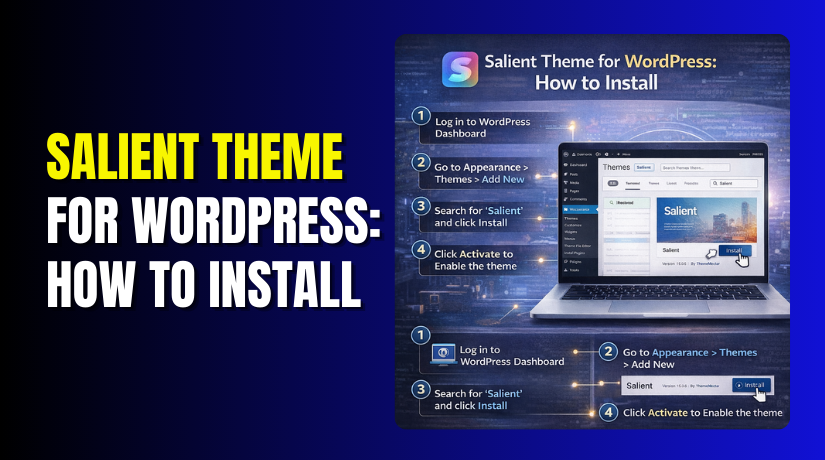
Step 2: Install the Salient Theme via WordPress Admin
WordPress Dashboard → Appearance → Themes → Add New → Upload Theme
- Log in to your WordPress admin dashboard
- In the left menu, hover over “Appearance” and click “Themes”
- Click the “Add New” button at the top of the page
- Click the “Upload Theme” button
- Click “Choose File” and select the salient.zip file you downloaded
- Click “Install Now”
- Wait for the installation to complete
- Click “Activate” to make Salient your active theme
Alternative Method (via FTP):
- Unzip the salient.zip file on your computer
- Using an FTP client (like FileZilla), connect to your hosting server
- Navigate to /wp-content/themes/
- Upload the extracted “salient” folder to this directory
- Return to WordPress Dashboard → Appearance → Themes
- Find Salient in your themes list and click “Activate”
Step 3: Install Required Plugins
WordPress Dashboard → Appearance → Install Plugins
After activation, Salient will prompt you to install required plugins:
- In your WordPress dashboard, look for a notification or go to “Appearance” → “Install Plugins”
- You will see a list of recommended plugins including:
- Salient Core (required for theme functionality)
- Salient WPBakery Page Builder (the customized page builder)
- Salient Portfolio (for portfolio features)
- Salient Nectar Slider (for the Nectar Slider)
- WooCommerce (optional, for e-commerce sites)
- Check the boxes for all plugins you want to install
- Select “Install” from the bulk actions dropdown
- Click “Apply”
- After installation, return to the same screen
- Select “Activate” from the bulk actions dropdown for the installed plugins
- Click “Apply”
Step 4: Enter Your Purchase Code
WordPress Dashboard → Salient Options → Salient Theme License
To receive theme updates and access full functionality:
- Go to “Salient Options” in your WordPress left menu
- Click on “Salient Theme License”
- Return to your ThemeForest account
- Go to your downloads section
- Click “Download” and select “License Certificate”
- Open the certificate file to find your purchase code
- Copy the purchase code
- Paste it into the license field in WordPress
- Click “Activate”
- You should see confirmation that your license is active
Step 5: Configure Basic Theme Settings
WordPress Dashboard → Salient Options → General Settings
Before importing a demo, configure basic settings:
- Go to “Salient Options” → “General Settings”
- Responsive Columns: Set your preferred default (usually enabled)
- Column Spacing: Choose spacing between columns (minimum 30px)
- Theme Skin: Choose light or dark default styling
- Click “Save Changes” at the bottom
Salient Options → Typography
- Logo Font: If using text logo, adjust font family and size
- Navigation Font: Set font for menu items
- Body Font: Choose your main content font
- Headings Font: Set font for H1-H6
- Adjust sizes, weights, and line heights as desired
- Click “Save Changes”
Step 6: Import a Demo Website
Salient Options → Demo Importer


This is the most exciting step—importing a fully designed website:
- Go to “Salient Options” → “Demo Importer”
- Browse the available demo layouts (285+ options)
- Preview demos that match your industry:
- For business sites: “Harbor,” “Corporate,” “Signal”
- For eCommerce: “eCommerce Ultimate,” “eCommerce Robust”
- For portfolios: “Layered,” “Quantum,” “Freelance Portfolio”
- For blogs: “Mag,” “Blog Dark,” “Blog Ultimate”
- Click on a demo to view details
- When you’ve chosen, hover over the demo and click “Import”
Important Import Options:
- Import Demo Content: Imports pages, posts, and sample content
- Import Theme Options: Changes your Salient settings to match the demo
- Import Revolution Sliders: Imports slider content (if applicable)
For New Sites: Select all options to get a complete starting point.
For Existing Sites: If you already have content, be careful. Importing demo content may duplicate pages. You can choose to import only theme options to update your design without adding new content.
- Click “Import”
- The import process may take a few minutes
- Do not close the browser window during import
- When complete, you’ll see a success message
Step 7: Customize Your Imported Demo
WordPress Dashboard → Pages → Edit with WPBakery
Now replace demo content with your own:
Edit Pages:
- Go to “Pages” → “All Pages”
- Find the homepage and click “Edit”
- Click “Edit with WPBakery” to access the visual builder
- Hover over text elements and click to edit
- Replace placeholder text with your own content
- Click on images to upload your own photos
- Rearrange elements by dragging them
- Use the builder’s settings to adjust colors, fonts, and spacing
Configure Menus:
- Go to “Appearance” → “Menus”
- Edit the imported menu structure
- Add your own pages
- Remove demo links
- Set menu locations (primary menu, footer menu)
- Click “Save Menu”
Set Homepage Display:
- Go to “Settings” → “Reading”
- Under “Your homepage displays,” select “A static page”
- Choose your imported homepage from the dropdown
- Choose your blog page if applicable
- Click “Save Changes”
Configure Header:
- Go to “Salient Options” → “Header Navigation”
- Adjust “Logo Height” for image logos
- Choose header style (regular, transparent, etc.)
- For transparent headers on specific pages, edit the page and use the “Header Navigation” metabox to enable “Force Transparency On Navigation”
Step 8: Set Up WooCommerce (For Stores)
WordPress Dashboard → WooCommerce → Settings
If you’re building an online store:
- Install and activate the WooCommerce plugin (if not already done)
- Go through the WooCommerce setup wizard
- Configure shipping zones and payment methods
- Go to “Salient Options” → “WooCommerce”
- Configure product layouts, AJAX cart settings, and quick view options
- Add your products
Step 9: Configure Performance Optimization
Salient Options → Performance & Plugins → Lazy Load Options
To ensure your site loads quickly:
- Go to “Salient Options” → “Performance & Plugins”
- Enable “Lazy Load Images”
- Enable CSS and JS file minification if available
- Consider using a caching plugin (like WP Rocket or W3 Total Cache)
- Optimize images before uploading (compress to reduce file size)
- Use a CDN for better global performance
Step 10: Final Testing
Your Website → Frontend
Before launching, test thoroughly:
- View your site in incognito/private browser mode
- Test on desktop, tablet, and mobile devices
- Click all links to ensure they work
- Test contact forms
- Verify checkout process (for stores)
- Check for any missing images or broken elements
- Run Google PageSpeed Insights and GTmetrix to check performance
- Make adjustments based on test results
Final Verdict
Salient is a mature, feature-rich WordPress theme that has proven its value over more than a decade of active development. With over 167,000 sales and a 4.8/5 rating, it has earned its reputation as one of the most reliable premium themes available. It solves the “blank canvas” problem effectively, letting you launch professional sites quickly without coding.
The 285+ demo layouts cover virtually every industry, and the deep customization options give you control without touching code. For single websites where design quality matters most, Salient delivers exceptional value at its $60 price point.
Choose Salient if you want a design-forward theme with extensive demo layouts and don’t mind investing time in learning its options. It excels for creative portfolios, WooCommerce stores, and corporate sites where visual presentation matters.
Be aware that Salient requires a separate license for each website, making it less economical for multi-site operations compared to unlimited-license alternatives. With proper hosting and optimization, Salient can achieve excellent performance scores. Your professional website awaits with this trusted, time-tested theme.
Have questions before starting with WooCommerce & WordPress? Get support here at WooHelpDesk.