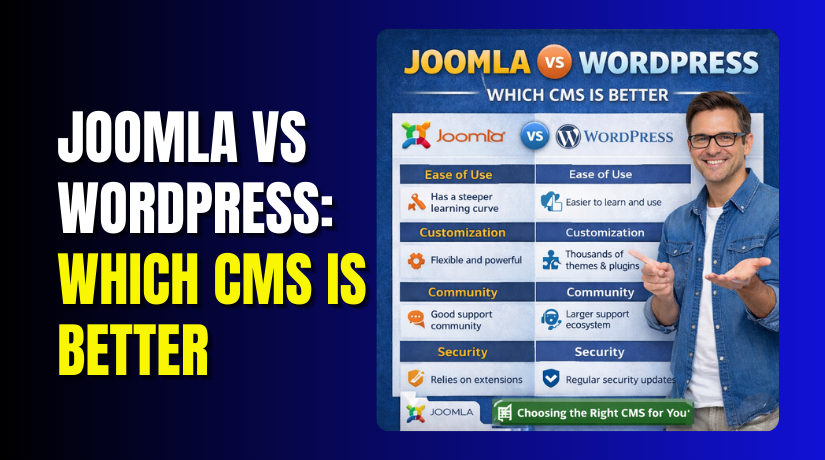
Joomla vs WordPress: Which CMS Is Better
Table of Contents
- Joomla vs WordPress in 2026 and the best pick for most websites
- What “better CMS” means for real websites
- Ease of use in daily work and the learning curve
- Ease of use in real work, beyond the first setup
- Design and website building options
- SEO and content marketing readiness for growth
- Performance and hosting flexibility
- eCommerce: what matters for online selling
- Pros and cons Snapshot
- Security, updates, and long term maintenance
- Pricing and total cost
- Which one should you choose
- Conclusion
- FAQs
Joomla vs WordPress in 2026 and the best pick for most websites
If you ask Joomla vs WordPress in 2026, WordPress wins for most users. It is easier to run daily. It is faster to build with. It also has a bigger plugin and theme ecosystem. For most small businesses, WordPress reduces setup time and support costs. That is why many owners ask, is WordPress better than Joomla, and usually choose WordPress.
What “better CMS” means for real websites
A “better” CMS is not about features on paper. It is about daily work. It is also about long-term cost and support. When people compare WordPress vs Joomla, they should check these points first.
- Time to launch matters for marketing and faster results.
- Content editing speed affects blogs, landing pages, and updates.
- SEO readiness helps pages rank and earn steady traffic.
- Extension quality impacts site stability and fewer conflicts.
- Hiring support matters when you need help quickly.
- Total cost matters more than the CMS being free.
For many users, WordPress has a bigger talent pool. It also has more step-by-step guides for common tasks. This lowers risk for non-technical teams. It also helps agencies deliver faster.
Ease of use in daily work and the learning curve
Ease of use is the biggest deal for most owners. Many searches include Joomla vs WordPress ease of use for this reason. WordPress is usually easier for beginners. The admin area feels simpler and more familiar. Adding pages and posts is also more direct.
With WordPress, you can publish content with fewer steps. You can also edit layouts using the block editor. Many users avoid heavy coding for basic pages. This helps teams move faster with fewer mistakes.
Here is what most beginners notice first.
- Content creation feels quicker inside the WordPress editor.
- Menus and widgets feel simpler for common site changes.
- Themes are easier to test and swap during early setup.
- Plugins are easier to add for forms, SEO, and backups.
Ease of use in real work, beyond the first setup
The real test starts after the website goes live. You will add pages often. You will update images, menus, and product details. You may also manage users and roles for your team. That is where many people compare WordPress vs Joomla again.
WordPress keeps common tasks in simple screens. You can find Posts, Pages, Media, and Appearance quickly. You can also search plugins and install them from the dashboard. This saves time when you need a new feature fast.
Joomla can feel more complex for daily site owners. It offers strong structure and controls. But the admin area can feel heavy for beginners. Many settings are grouped in ways that need practice. That can slow down small teams.
Editing content and layouts without friction
WordPress helps you edit pages with fewer steps. The block editor supports headings, images, columns, and buttons. You can also reuse patterns for faster page creation. Many themes also provide ready sections for home pages. This reduces design work for business sites.
Joomla supports content and templates well. Yet editing layouts often needs more template knowledge. You may rely more on developer help for design changes. That is not ideal for fast marketing updates.
Managing users, roles, and permissions
Joomla is known for detailed permissions. This can help large teams. But it can also add setup time. WordPress roles are simpler for most sites. You can still add advanced control with plugins. This makes WordPress flexible for both small and growing teams.
Design and website building options
Design options matter because they affect launch speed. They also impact cost and future edits. A good CMS should support modern layouts easily. It should also support clean mobile design.
Theme choices and ready-made layouts
WordPress offers a massive theme ecosystem. You can find themes for almost any industry. Many themes come with starter templates and demo pages. You can import a demo and replace the content fast. This is helpful for service sites and local businesses.
Joomla has templates too, but the variety feels smaller. You may also need more setup work for a polished look. Finding a perfect template can take longer. Custom work may also cost more.
Visual building tools and flexibility
WordPress supports block editing out of the box. Many builders also exist for advanced design needs. You can build landing pages without touching code. You can also create reusable sections for consistent branding. This helps teams keep design clean across pages.
Joomla can support modern layouts as well. But the common workflow may involve more template changes. Many users feel the learning curve is higher. That can impact speed during redesign projects.
Custom design for agencies and developers
If you need full control, WordPress still works well. Developers can build custom themes and blocks. They can also build custom plugins for unique features. Agencies often choose WordPress for client work. The handoff to clients is easier after launch.
Joomla can also handle custom builds. It can be very strong for structured content. Yet it often needs a more technical admin approach. Many clients may still prefer WordPress for daily edits.
SEO and content marketing readiness for growth
A CMS should help you publish content that ranks. It should also help you keep pages organized. This matters more in 2026 because competition is higher. When people compare Joomla vs WordPress, SEO workflow becomes a big factor.
WordPress is built for content publishing. Posts, categories, tags, and archives are easy to manage. The editor also helps you format content cleanly. This improves readability for users and search engines. WordPress also has strong SEO plugins that guide your setup. These tools help with titles, meta descriptions, and schema basics.
Joomla supports SEO features too. You can control URLs and metadata. But many users find the workflow less friendly. It may take more steps to reach similar results. It can also feel harder to train a team. For many USA businesses, time matters more than control.
Clean URL structure and basic SEO setup
Both platforms can create SEO-friendly URLs. WordPress makes it simple with permalink settings. You can pick a clean structure and move on. Joomla can also create clean URLs, but setup can feel more technical. That difference impacts beginners the most.
Blogging and publishing speed
WordPress is designed for frequent posting. You can draft, schedule, and update posts quickly. You can also manage authors and editorial workflows. This helps agencies and marketing teams publish faster. It also helps small business owners keep the site fresh.
Joomla can run blogs, but it is not the default comfort zone. Many users spend more time setting things up. They may also use extra extensions for blog features. This adds more moving parts to maintain.
Internal linking and on-page SEO workflow
Internal linking is key for SEO growth. WordPress makes it easy to link pages while writing. Many editors and plugins suggest related content. You can also build topic clusters with categories and tags. This supports long-term ranking goals.
Joomla can do internal linking well. Yet the content workflow can feel slower for teams. Many owners want the easiest path to consistent publishing.
SEO tools, analytics, and marketing stack support
In 2026, websites rely on many tools. These include analytics, forms, email marketing, and CRM. WordPress has wide support for these integrations. Many plugins connect with common USA services quickly. This reduces developer work for marketing setups.
Joomla also supports integrations. But the ecosystem can feel smaller in choices. You may spend more time comparing extensions. You may also face higher setup costs for custom needs.
Quick checks for content growth readiness
Use these quick checks to judge your CMS choice today. Each check shows what to test and why.
- Create a blog post in Admin editor and publish fast.
- Edit a page section and confirm mobile layout stays clean.
- Set SEO title and meta in editor and preview results.
- Add a contact form and confirm delivery and spam control.
- Connect analytics and confirm tracking works across pages.
- Assign author roles and confirm access stays limited.
Performance and hosting flexibility
Speed affects rankings and conversions. Hosting flexibility also affects costs. Many USA businesses use shared hosting first. They upgrade later when traffic grows. In that journey, WordPress usually feels easier to optimize.
WordPress offers many proven caching options. You can use plugin caching or host caching. You can also add a CDN and image compression easily. Most themes also support modern performance practices. With the right setup, WordPress loads fast and stays stable.
Joomla can be fast too with good hosting and tuning. But the average user may need more technical help. Many owners want simple tools that work reliably. That is why WordPress often wins in real world performance planning.
eCommerce: what matters for online selling
For many businesses, the CMS choice becomes a selling choice. You may start with a service site today. You may add products later for extra revenue. That is why people search Joomla vs WordPress for eCommerce so often.
WordPress has WooCommerce, which powers many online stores. It supports physical products, digital downloads, and subscriptions. It also supports coupons, taxes, and shipping options. Most store owners can manage it without custom coding. This makes WordPress the practical choice for most stores.
Joomla can also run eCommerce using extensions. Some extensions are strong and flexible. But the overall store ecosystem feels smaller and less common. Many owners spend more time selecting the right tools. They also spend more time finding skilled support.


Store setup and day-to-day management
WooCommerce setup is guided and beginner friendly. You can add products quickly and set prices easily. You can manage stock, orders, and customer emails from one place. You can also add payment gateways with trusted plugins. This helps stores launch faster and sell sooner.
Joomla store setups can work well with the right extension. But the setup path varies by extension choice. Each extension has its own settings and style. That can create more learning and maintenance effort.
Payments, taxes, and shipping for stores
In the USA, payment and tax needs can change by state. Shipping rules can also get complex fast. WordPress and WooCommerce have wide support for these needs. You can integrate popular payment options quickly. You can also add shipping tools and label systems.
Joomla can also support payments and shipping tools. But the choices are often fewer. You may also need more testing to get the same flow. This is a common reason store owners choose WordPress.
Extending your store as you grow
A store rarely stays simple for long. You may need product variations and bundles. You may need subscriptions, memberships, or booking features. You may also need B2B pricing or wholesale tools. WordPress handles these upgrades well with add-ons.
This is where many people ask is WordPress better than Joomla for business growth. WordPress often wins because it offers more ready options. It also offers more developers who know WooCommerce. That reduces cost and reduces project risk.
Quick checks for choosing the right store platform
Use these quick checks to evaluate store readiness fast.
- Add a test product in WooCommerce and publish it quickly.
- Add a payment gateway in settings and run a test charge.
- Set a shipping zone and confirm rate rules apply correctly.
- Apply a coupon at checkout and confirm discount works.
- Create an order email and confirm the buyer receives it.
- Add a checkout field plugin and confirm it saves data.
Performance and hosting flexibility, finished notes
Speed matters even more for online stores. Slow checkout pages can hurt sales. WordPress has many paths to improve speed. You can use host caching and a CDN. You can optimize images and reduce heavy scripts. You can also choose lightweight themes for better performance.
Joomla performance can also be strong with good hosting. But WordPress has more proven store speed guides. It also has more support tools for common issues. That helps store owners keep pages fast and stable.
Pros and cons Snapshot
This is a short and practical summary for decision making. It helps readers who want a quick view. It also supports WordPress vs Joomla pros and cons searches naturally.
WordPress strengths for 2026 websites
- Faster website building with flexible themes and builders.
- Strong blogging and SEO workflow for steady traffic growth.
- WooCommerce makes online selling easier for most store owners.
- Huge support ecosystem for plugins, fixes, and hiring experts.
WordPress trade-offs to know
- Too many plugins can cause conflicts if chosen poorly.
- Updates need routine checks, backups, and safe testing habits.
Joomla strengths for some structured projects
- Strong control options for content structure and permissions.
- Good for teams that want strict admin level management.
Joomla trade-offs to consider
- Learning curve can feel higher for small business teams.
- Smaller ecosystem can mean more time finding solutions.
Security, updates, and long term maintenance
Security is not only about the CMS brand. It is about habits. Updates, backups, and safe plugin choices matter most. Still, the daily maintenance experience can differ. This matters when you compare Joomla vs WordPress for business use.
WordPress releases frequent updates for core and plugins. This is good for security and compatibility. It also means you must follow a routine update process. Most owners handle this with backups and staging. Many managed hosts also help with updates and monitoring.
Joomla also updates and fixes security issues regularly. But the extension ecosystem is smaller and less uniform. Some sites depend on fewer, larger extensions. If one key extension breaks, the impact can feel bigger. This is why many owners want a wider support ecosystem.
A simple update routine that reduces risk
Use this routine no matter which CMS you pick. It keeps the site safer and stable.
- Back up files and database before every major update.
- Update plugins or extensions one by one, not all together.
- Test key pages, forms, and checkout after updates.
- Keep only trusted add-ons with active development history.
- Remove unused plugins or extensions to reduce attack surface.
Pricing and total cost
Both platforms are free to install. The real cost is everything around it. Hosting, design, add-ons, and support create the budget. Many readers compare Joomla vs WordPress pricing for this reason.
WordPress often has lower total cost for small businesses. Themes are widely available at many price points. Many plugins have free versions for basic needs. Hiring WordPress help is also easier in the market. That often lowers hourly cost and speeds up delivery.
Joomla can be cost effective for some projects. But you may spend more on setup and custom work. You may also face fewer local experts in some areas. That can increase support cost when issues happen.
Which one should you choose
If your goal is simple management and faster growth, pick WordPress. If your team is technical and wants strict structure, Joomla can work. For most business sites, the answer to is WordPress better than Joomla is yes. The reason is not hype. The reason is workflow, ecosystem, and hiring ease.
Choose WordPress if you want these outcomes.
- Faster site launch with less technical setup.
- Easier content publishing for marketing teams.
- Strong online selling path with WooCommerce options.
- Wider plugin choices for SEO and conversions.
- Easier support hiring in the market.
Choose Joomla if your project needs these outcomes.
- Very detailed permission rules from the start.
- A more structured admin approach for complex content.
- A team that can handle template and extension work.
Conclusion
For most websites in 2026, WordPress is the better pick. It is easier to manage daily. It is easier to extend safely. It is also easier to scale from content to sales. If you are still deciding between WordPress vs Joomla, focus on your daily work needs. If you want help with setup or migration, WooHelpDesk can guide you.
FAQs
1) Which CMS is better for small business websites in 2026
For most small businesses, WordPress is the better choice in 2026. It is easier to update, publish, and manage pages daily. You also get more theme and plugin choices for common needs. Support is easier to find in the USA. This reduces time, cost, and risk for most owners.
2) Which platform is easier for non technical users
Most non technical users find WordPress easier to learn and use. The dashboard feels simple and focused on daily tasks. The editor is also easy for writing and page updates. Joomla can feel more complex at first. It often needs more training for smooth daily management and confident edits.
3) Which is safer if I do not update often
No CMS is safe if you skip updates for long periods. Still, WordPress often has more support tools and guides. Many hosts also offer WordPress security features and monitoring. Joomla can also be secure with good habits. The safest approach is scheduled updates, backups, and removing unused add-ons.
4) Which CMS is better for blogging and SEO work
WordPress is usually better for blogging and SEO work in 2026. It is built around content publishing and organization. You can manage categories, tags, and internal links easily. SEO plugins also help guide on-page improvements. Joomla supports SEO too, but the workflow can feel slower for teams.
5) Which is better if I plan to sell online later
If you may sell online later, WordPress is the safer choice. WooCommerce lets you start small and expand later. You can add payments, shipping, and coupons with trusted tools. You can also add memberships or subscriptions when needed. Joomla can sell online too, but choices and support can be narrower.
6) Can I migrate from Joomla to WordPress easily
Yes, migration is possible, but planning is important. You must map content, menus, and URLs carefully. You should also review images, categories, and redirects before launch. Some tools can help move content faster. For complex sites, expert help avoids traffic loss and broken pages after migration.



