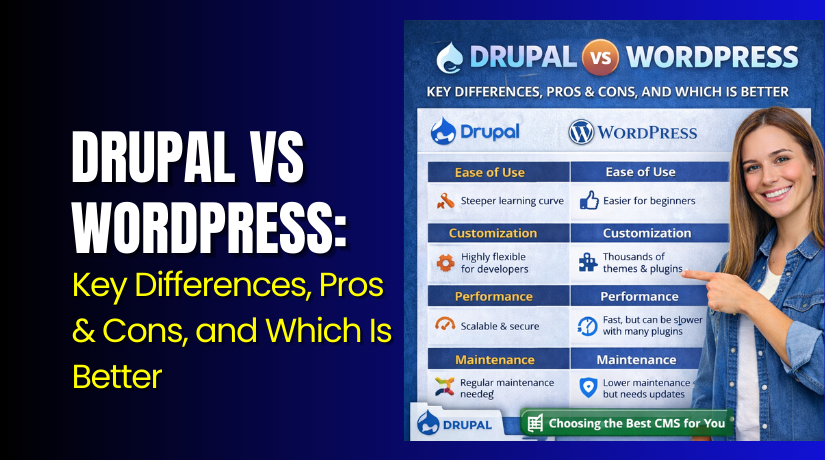
Drupal vs WordPress: Key Differences, Pros & Cons, and Which Is Better
Table of Contents
- Introduction: Why This Comparison Matters
- Quick Summary: The Real Difference in One Minute
- Core Differences: Content Structure and Flexibility
- Key Differences That Impact Real Sites
- Ease of Use and Learning Curve
- Typical Use Cases: When Each Platform Wins
- Which Is Better for Your Website? A Simple Decision Framework
- Conclusion
Introduction: Why This Comparison Matters
Choosing a CMS feels simple until your site starts growing. You may begin with a basic website and blog. Later, you may need more control and structure. You may add pages, categories, and new site sections. You may also add more users and team workflows. That is why Drupal vs WordPress becomes an important question. The right choice saves time, money, and stress later. The wrong choice can slow your content and sales plans.
Most people compare these two platforms for clear reasons. They want faster publishing and easy edits. They also want better control and stable site management. Some need advanced content organization and strong user roles. Others need a simple dashboard and quick design options. The difference between Drupal and WordPress is not only technical. It also impacts daily work for your team. It changes how you add content and manage features.
This guide focuses on real business needs in the USA. It helps bloggers, small businesses, and growing brands. It also helps teams planning larger content websites. You will learn how each platform works in real life. You will also see what fits your goals and skill level.
Here is what we will cover in this comparison.
- Key platform differences that affect your website daily.
- What each system is best used for today.
- How to choose based on your content and team.
Quick Summary: The Real Difference in One Minute
Both platforms can build strong websites. Yet, their strengths are different in practice. WordPress is built for fast publishing and easy site growth. Drupal is built for deep content structure and stronger controls. If you ask WordPress vs Drupal which is better, it depends on your needs. A marketing site needs speed and simplicity. A complex content site needs better structure and control.
Choose WordPress when you want these benefits.
- You want quick setup and simple daily content editing.
- You need many plugins, themes, and design options.
- You prefer easier tools with less technical setup.
Choose Drupal when you want these benefits.
- You need complex content types and strict content structure.
- You need stronger roles, permissions, and publishing workflows.
- You plan large content growth with stable long-term structure.
Many people still ask, is Drupal still used today. Yes, it is used by teams needing strict control. It is also used where content relationships get complex. WordPress is more common for general websites and blogs. That also drives Drupal vs WordPress popularity in many markets. Still, popularity is not the only factor that matters. Your use case should decide the platform.
Core Differences: Content Structure and Flexibility
Content structure is where Drupal and WordPress feel very different. WordPress starts with simple content types by default. You get posts, pages, categories, and tags. You can publish fast and manage content easily. For many business websites, that is enough. You can also add custom fields using plugins. You can create custom post types for advanced content. Yet, this often depends on plugin choices and setup quality.
Drupal is designed around structured content from the start. You can build content types with many fields quickly. You can define what each field accepts and how it displays. You can also connect content items with relationships. This is a major difference between Drupal and WordPress for content-heavy sites. Drupal makes structured content feel like a built-in feature. WordPress can do it too, but often needs extra tools.
So, what is Drupal used for in real projects. It is often used for content systems needing rules and structure. It works well for websites with many content templates. It also helps when editors need strict publishing steps. These are common Drupal use cases for bigger teams and organizations.
Drupal content structure helps in these situations.
- A university site with departments, staff pages, and programs.
- A directory site with listings, filters, and location data.
- A large knowledge base with linked articles and categories.
- A portal site with many editors and approval workflows.
WordPress content flexibility shines in other situations.
- A service business site needing pages and lead forms.
- A blog focused on publishing speed and SEO content.
- A small ecommerce store that needs fast setup.
- A brand site that needs design changes often.
Many beginners ask, Drupal vs WordPress for beginners is which choice. WordPress usually feels easier at first. Drupal can feel more complex during setup and structure planning. That is why people also ask, is Drupal harder than WordPress. For most beginners, the answer is yes. Drupal asks you to plan content models carefully. WordPress lets you start fast and adjust later.
Key Differences That Impact Real Sites
User Roles and Permissions
User access control matters once your team starts growing. A solo site owner may not notice this early. But teams need clear rules for safe publishing. This is a big part of the difference between Drupal and WordPress. Both platforms support roles, but the depth is different.
WordPress keeps roles simple and easy to manage. You get common roles like Administrator and Editor. You also get Author, Contributor, and Subscriber by default. Each role has a clear set of permissions. This makes WordPress friendly for small teams. It also reduces setup time during launch.
WordPress roles work well in these cases.
- One business owner and one blog writer.
- A small team posting weekly content and updates.
- A store manager editing products and basic pages.
- A marketing team sharing posts and landing pages.
Drupal is designed for deeper permission control by default. You can create custom roles for exact needs. You can also control access by content type and action. You can even control access by workflow stage. This makes Drupal strong for large teams and strict processes. Many organizations choose Drupal for this reason.
Drupal permissions help in these cases.
- Many editors working on different site sections.
- Legal or compliance review before publishing content.
- Multi-department websites with separate content owners.
- Member portals with restricted pages and user actions.
If you ask what is Drupal used for in team environments, this is a key answer. It supports stronger control for complex operations. This is one reason is Drupal still used remains a common question. It is still used where control and structure are required.
Customization Approach
Customization is where site building styles start to separate. WordPress is plugin and theme driven for most users. You can pick a theme and change design quickly. You can add features using plugins in minutes. This is why WordPress feels faster for many projects. It is also why beginners often start with WordPress first.
With WordPress, customization usually follows this path.
- Select a theme that matches your brand style.
- Add plugins for forms, SEO, security, and speed.
- Use a page builder if you need visual editing.
- Add custom code only when required.
This approach supports quick results and faster testing. It is great for marketing websites and small stores. It also helps for content teams who publish often. For many users, WordPress is the easiest to grow with.
Drupal uses modules and configuration-first site building. You can still use themes, but the build style differs. Drupal often starts with planning and content modeling. Developers set up content types, views, and permissions early. This creates stable site behavior across many pages.
Drupal customization often follows this path.
- Plan content types, fields, and display patterns first.
- Build listing pages using views and filters.
- Add modules for features and workflow controls.
- Apply theming after structure is stable.
This is why people ask, is Drupal harder than WordPress. Drupal often needs more planning and setup time. It can feel less simple for first-time users. Yet, it can feel cleaner for complex builds later.
This is also where Drupal use cases become clear. Drupal is often chosen for large content libraries and portals. WordPress is often chosen for faster publishing and design flexibility. The Drupal vs WordPress choice depends on build goals and team skills.
Update and Maintenance Style
Updates matter because they affect security and site stability. Both platforms require updates for safe long-term use. Still, how updates feel can be different in practice. This also affects WordPress vs Drupal which is better for your business.
WordPress updates are common and often very simple. Core updates can be one click in most cases. Many plugins also update with one click. Themes update in a similar way. This makes WordPress easier for non-technical owners. Yet, plugin updates can sometimes cause conflicts. That risk rises when you use many plugins.
WordPress maintenance is smoother when you follow basic habits.
- Use fewer plugins and keep them well selected.
- Update in a staging site before updating live.
- Keep backups ready before major updates.
- Remove unused plugins and themes regularly.
Drupal updates can feel more controlled and structured. Drupal sites often rely on fewer add-ons than WordPress sites. Many Drupal builds focus on stability and planned changes. Updates still matter, but workflows are often more managed. Teams may test updates before pushing them live. This is common in professional Drupal environments.
Drupal maintenance often works best with these habits.
- Keep modules limited to trusted and needed features.
- Follow a planned update cycle with testing steps.
- Use a staging setup for safe change checks.
- Track changes and permissions carefully across users.
Many people compare market share when deciding platforms. They search for Drupal vs WordPress popularity to judge trust. Popularity can matter for plugin choices and support options. But maintenance needs should also guide your decision. A simple site may not need heavy workflows. A complex site benefits from stronger controls and planning.
Ease of Use and Learning Curve
Ease of use means different things for different users. For some, it means quick page edits. For others, it means safe publishing with clear controls. Many readers ask Drupal vs WordPress for beginners for this reason. Beginners usually want simple steps and fewer setup decisions. They want a clean dashboard and quick design changes.
WordPress is built for fast and simple content work. You can install it quickly on most hosting plans. The dashboard feels familiar and easy to learn. Adding posts and pages is very simple for most users. You can also manage media and menus without coding. This is why WordPress fits many first-time site owners.
WordPress feels easier because it supports quick actions.
- Add a page, publish it, and update it anytime.
- Install a theme and change the site look fast.
- Add plugins for forms, SEO, and simple features.
- Use visual tools for layout changes without code.
Drupal can also feel user-friendly after proper setup. Yet, the setup phase can feel more complex. Drupal asks you to plan content types and fields early. It also asks you to think about user permissions and workflows. This is why people often ask, is Drupal harder than WordPress. For many beginners, Drupal has a steeper learning curve.
Drupal becomes easier when the site is built well. Editors then follow clear publishing patterns. They see structured fields and defined page layouts. They also avoid messy content formatting across pages. In large teams, this can feel smoother than WordPress. It reduces confusion and makes content more consistent.
Drupal can feel easier for teams in these situations.
- Many editors create content using the same templates.
- Content needs strict rules for accuracy and layout.
- Publishing needs reviews and approval steps.
- Pages must stay consistent across many site sections.
So, beginner friendliness depends on your goal and support. WordPress is easier for fast start and basic growth. Drupal is easier once structure and workflows are set. That is a key part of the difference between Drupal and WordPress. One is simple upfront, the other becomes strong with planning.
Typical Use Cases: When Each Platform Wins
Use cases matter more than platform opinions online. Many searches focus on speed and popularity. Yet, your website goals should guide your choice. When people ask WordPress vs Drupal which is better, the best answer is practical. Choose based on content needs, team size, and site complexity.


When WordPress Is Usually the Better Fit
WordPress is a great fit for most small and mid-size websites. It supports fast publishing and marketing growth. It also supports easy design changes and quick testing. This is why WordPress is common in the USA market.
WordPress works best for these use cases.
- Small business websites for local services and leads.
- Blogs and content marketing sites publishing weekly posts.
- Basic ecommerce stores using common selling features.
- Portfolio and brand sites needing flexible design updates.
- Landing page systems for ads and email campaigns.
WordPress also supports faster setup for non-technical owners. You can start with a ready theme and essential plugins. You can add features over time as you grow. This suits businesses that want results fast. It also helps when budget and time are limited.
When Drupal Is Usually the Better Fit
Drupal is best when content becomes complex and connected. It is built for structured content and strong governance. It also supports deep permissions and workflows. That is why many teams still rely on it today. So yes, is Drupal still used has a clear answer. It is still used where structure and control are required.
Drupal works best for these use cases.
- Large content libraries with filters, tags, and relationships.
- Government or education style websites with strict workflows.
- Portals with many editors and role-based publishing rules.
- Multi-site systems with shared templates and content models.
- Directory sites with listings, profiles, and structured data.
If you ask what is Drupal used for, think of structured systems. Think of content that must follow rules and patterns. Think of large teams that need safe publishing controls. These are common Drupal use cases that Drupal handles well.
People also compare popularity when choosing platforms. They look up Drupal vs WordPress popularity before deciding. WordPress is more common for general websites and blogs. Drupal is less common but strong in specific areas. Popularity can help with community support and add-on choices. Still, use cases should remain your main decision driver.
Pros and Cons: Balanced and Honest
A clean comparison needs both strengths and limits. Your best choice depends on your real website needs. This section covers Drupal vs WordPress pros and cons in a simple way. Use it to match your goals with the right platform.
WordPress Pros
WordPress is built for fast publishing and easy site growth. It works well for most business websites in the USA. It also has a huge theme and plugin ecosystem.
Main benefits of WordPress include:
- Easy dashboard for daily work and quick content updates.
- Large plugin library for features and marketing tools.
- Many themes for fast design changes without development help.
- Strong blogging and SEO workflow for regular content publishing.
- Lower setup time for small teams and solo site owners.
WordPress Cons
WordPress can become messy with too many add-ons installed. Your site quality depends on plugin choices and maintenance habits. Some sites slow down due to poor setup.
Common WordPress limits include:
- Plugin conflicts can break features after updates sometimes.
- Too many plugins can reduce speed and stability.
- Advanced permissions often need extra plugins or custom work.
- Custom complex content can feel harder without careful planning.
- Security depends on updates, backups, and good admin habits.
Drupal Pros
Drupal is strong when content needs structure and strict control. It supports deep permissions and stable content systems at scale. It is built for teams that need governance and workflows.
Main benefits of Drupal include:
- Powerful content types, fields, and structured content modeling.
- Strong user roles and detailed permission controls by default.
- Good fit for large websites with many editors and sections.
- Stable systems for complex content relationships and workflows.
- Better consistency for templates and repeatable content patterns.
Drupal Cons
Drupal often needs more planning and setup time early. Many builds need developer support for best results. That is why many ask, is Drupal harder than WordPress.
Common Drupal limits include:
- Steeper learning curve for beginners and small teams.
- More setup time before the site feels easy to manage.
- Fewer plug-and-play design tools for quick layout changes.
- Higher cost for custom work and ongoing development support.
- Some features require careful configuration to avoid complexity.
This is the real difference between Drupal and WordPress in daily work. WordPress helps you start fast and publish easily. Drupal helps you build structured systems with strict control.
Which Is Better for Your Website? A Simple Decision Framework
Now let’s answer the main question in a practical way. Many people search Drupal vs WordPress and still feel confused. That confusion happens when they ignore use cases and team needs. If you ask WordPress vs Drupal which is better, use these checks.
Choose Based on Website Type
Your site type should guide your platform choice first. Some site types need speed and content volume. Others need structure and strict access rules.
Choose WordPress if you are building these site types:
- Small business sites focused on leads and service pages.
- Blogs and content marketing sites with frequent posting.
- Basic ecommerce sites with standard product needs.
- Brand sites needing quick design updates and landing pages.
Choose Drupal if you are building these site types:
- Large websites with many content types and page templates.
- Portal sites with restricted content and role-based access.
- Directory sites with listings, filters, and structured fields.
- Multi-department sites needing approvals and publishing workflows.
This also explains what is Drupal used for in many cases. It is used for structured, rule-based content systems. These are common Drupal use cases for larger organizations.
Choose Based on Your Team and Budget
Your team size changes what “easy” really means. A solo owner needs simple publishing and fast updates. A large team needs roles, control, and safer workflows.
WordPress is best when your team looks like this:
- One owner or a small team with limited technical help.
- A marketing team that needs fast publishing and testing.
- A budget that favors quick setup over custom builds.
Drupal is best when your team looks like this:
- Multiple editors with separate responsibilities and rules.
- A team that needs approvals and strict publishing control.
- A budget that supports planned development and maintenance.
If you are a first-time website owner, consider learning curve. Many ask Drupal vs WordPress for beginners for good reason. WordPress is usually easier for beginners and small teams. Drupal can be a better fit with developer support.
Choose Based on Long-Term Growth
Think about your next two years, not only launch day. Will your content grow into hundreds of pages? Will you add many editors and content categories? Will you need strict access rules and workflows?
WordPress fits growth when:
- You mainly grow content through posts, pages, and marketing.
- You can manage plugins and keep updates consistent.
- You want faster changes and experiments over strict structure.
Drupal fits growth when:
- Your content needs structured fields and strong consistency.
- Your site needs governance across departments and teams.
- You want stable structure as content volume increases.
People often compare trends and ask, is Drupal still used today. Yes, it is used by teams that need structure and control. WordPress remains more common for general websites. That often drives Drupal vs WordPress popularity in search results. But your business needs should matter more than popularity.
Conclusion
The best platform depends on how you publish and manage content. WordPress is best for fast setup and easy daily publishing. Drupal is best for structured content and deep access control. If you want quick results, WordPress is usually the better choice. If you need strict control, Drupal can be a stronger fit.
If you want help choosing or planning your next steps, WooHelpDesk can help. We can review your site goals and recommend the best platform. We can also help with migration, setup, and long-term site support.



