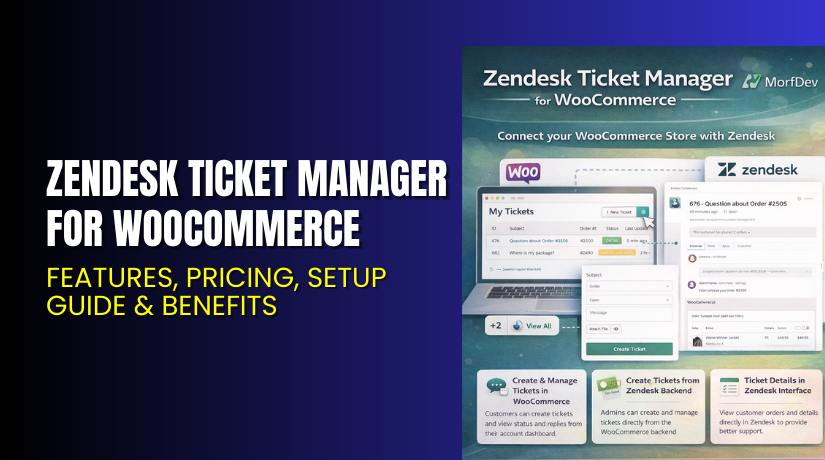
Zendesk Ticket Manager for WooCommerce – Features, Pricing, Setup Guide & Benefits
Table of Contents
- Introduction
- What is Zendesk Ticket Manager for WooCommerce?
- Features of Zendesk Ticket Manager for WooCommerce
- How to Install and Configure Zendesk Ticket Manager for WooCommerce
- Zendesk Ticket Manager for WooCommerce – Pricing & Plans
- My Experience with Zendesk Ticket Manager for WooCommerce
- Who Should Use This Plugin?
- Final Verdict
- FAQ
Introduction
Running a WooCommerce store means managing products, orders, customers, and support requests every day. Many store owners struggle to handle customer messages because they come from different places. Some messages come by email, some from forms, and some from social channels. This creates confusion and delays your support response. Slow support also reduces trust and can lower your sales.
Most WooCommerce stores face this problem as they grow. They need a simple way to manage support tickets inside their store. They want a tool that connects customer orders with customer issues in one place. They also need a support system that tracks every message clearly and keeps the customer updated.
Zendesk Ticket Manager for WooCommerce solves these problems. It helps store owners manage all support tickets from inside Zendesk while linking them with WooCommerce orders. It gives customers a simple way to submit tickets and get fast replies.
In this article, we’ll explore Zendesk Ticket Manager for WooCommerce, its features, setup steps, pricing, pros and cons, and best use cases.
If you ever need help installing or troubleshooting any plugin or extension, you can try our Installation & Troubleshooting Services.
What is Zendesk Ticket Manager for WooCommerce?
Zendesk Ticket Manager for WooCommerce is a support integration plugin that connects your WooCommerce store with your Zendesk account. The plugin creates a smooth workflow between your online store and your Zendesk help desk system. Customers can create tickets directly from their account page, and support agents can view order details inside Zendesk.
This plugin is designed to make customer support simple, fast, and organized. It helps you track every issue that comes from your store. The tickets are synced with Zendesk so your team can reply quickly. You do not need to switch between multiple tools.
The plugin is developed by WooCommerce / Automattic, ensuring high-quality coding and stable updates. It is available only as a premium plugin on WooCommerce Marketplace.
Official Plugin Page:
Support Page:
Features of Zendesk Ticket Manager for WooCommerce
| Feature | Description | Why It Matters |
| Order-linked ticket creation | Customers can create tickets linked to their WooCommerce orders. | Helps store owners understand issue context fast. |
| View ticket history in My Account | Customers can see all open and solved tickets easily. | Reduces repeated questions and improves user experience. |
| Agent access to order details in Zendesk | Support agents view order info inside Zendesk without logging to WordPress. | Saves time and improves accuracy. |
| Automatic ticket sync | The plugin syncs all changes from WooCommerce to Zendesk. | Ensures smooth communication flow. |
| Custom ticket fields | Allows store owners to collect more customer details. | Helps your support team solve issues faster. |
How to Install and Configure Zendesk Ticket Manager for WooCommerce
- Download the plugin from the official WooCommerce purchase page.
- Go to WordPress Dashboard → Plugins → Add New → Upload Plugin.
- Upload the ZIP file and click Install Now.
- Click Activate Plugin after installation.
- Open WooCommerce → Settings → Integration → Zendesk.
- Add your Zendesk Subdomain, API Token, and Agent Email.
- Save your settings and test the connection.
- Open a customer account and create a test ticket to confirm everything works.
👉If you face any setup, configuration, or compatibility issues, you can try our Installation & Troubleshooting Services.
Zendesk Ticket Manager for WooCommerce – Pricing & Plans
| Monthly | Annually |
| $8.25 | $99 |
Subscription includes
|
Subscription includes
|
Buy Zendesk Ticket Manager for WooCommerce Now
Purchase Here → Buy Zendesk Ticket Manager for WooCommerce Premium Now
👉 Your purchase supports the developer team and helps me create more guides like this.
My Experience with Zendesk Ticket Manager for WooCommerce
After testing this plugin on a real WooCommerce store, here is what I found:


Pros
- Very easy setup and configuration.
- Stable performance with no speed issues.
- Smooth ticket creation from the My Account page.
- Order details inside Zendesk are clear and well-arranged.
- Works well with most modern WooCommerce themes.
- Fast and helpful support from WooCommerce.
Cons
- No free version.
- Requires an active Zendesk subscription.
- Limited styling options for the ticket section.
- Some advanced use cases need Zendesk add-ons.
Who Should Use This Plugin?
This plugin is ideal for:
- WooCommerce store owners who want fast support management.
- Stores with many customer service requests.
- Agencies handling multiple client stores.
- Businesses use Zendesk for support operations.
- Beginners who want an easy ticket system without coding.
Useful Resources
- Official Plugin Page
- Official Plugin Support Page
- Developer Documentation
- WooHelpDesk Installation & Troubleshooting Services
Final Verdict
Zendesk Ticket Manager for WooCommerce is a powerful plugin for stores that want a clean and organized support system. It links tickets with orders and keeps all messages in one place. If you want a reliable, well-built, and professional support workflow, this plugin is a great choice.
Use the link below to unlock its full features:
👉 Buy Zendesk Ticket Manager for WooCommerce Premium Now
Need help installing or fixing it? Try our Installation & Troubleshooting Services.
FAQ
Q1. Is Zendesk Ticket Manager for WooCommerce compatible with all WooCommerce themes?
Yes, it works with most standard WooCommerce themes. Always test before going live.
Q2. Can I use both free and premium versions?
No free version exists, so you only install the premium version.
Q3. How do I get support?
You can contact the official team through the Plugin Support Page.



