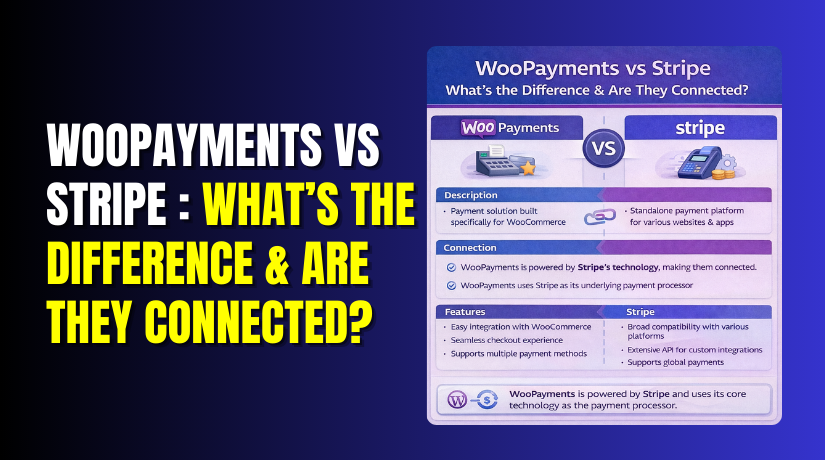
WooPayments vs Stripe: What’s the Difference & Are They Connected?
Table of Contents
- Introduction
- What Is WooPayments in WooCommerce and How It Works
- What Is Stripe for WooCommerce and How the Stripe Payment Gateway Works
- Is WooPayments the Same as Stripe or Does It Use Stripe?
- WooPayments vs Stripe for WooCommerce: What’s the Real Difference?
- Which One Should You Choose WooPayments or Stripe?
- Conclusion
Introduction
Choosing the right WooCommerce payment gateway affects your sales every day. Customers want a fast checkout with trusted options. Store owners want fewer failed payments and fewer disputes. That is why people compare WooPayments vs Stripe so often. Many users think these tools are identical. Others ask, Is WooPayments Stripe or just another plugin. The truth is simple, but the details matter. Your choice impacts setup time, payout flow, and daily management.
It can also affect support experience during urgent issues. In this guide, you will learn the real connection. You will also understand the WooPayments and Stripe difference clearly. If you run a small store, you need simplicity. If you plan to scale, you need flexibility. Either way, you should pick with confidence. This post is written for beginners and growing stores. It is also useful for global sellers using multiple methods. We will keep everything clear and practical. We will focus on what matters in real store life.
What Is WooPayments in WooCommerce and How It Works
WooPayments is a payment solution made for WooCommerce stores. It lets you accept card payments from your checkout. You can manage payments from your WordPress dashboard easily. That means fewer tools and fewer extra logins. Many store owners like this simple workflow. You can view transactions inside WooCommerce orders quickly. You can also process refunds without leaving your admin panel. Payout status is also visible in the same place. This saves time during daily order management.
WooPayments is built to feel native for WooCommerce users. You usually set it up in a guided way. The steps focus on fast onboarding and basic settings. Most stores can go live without complex configurations. You can enable common card payments for customers. Depending on your location, wallet options may be available too. The checkout experience stays clean and familiar. That helps customers trust the payment step more.
WooPayments also helps with basic payment operations. You can track deposits and payout schedules in one view. You can handle disputes from the same dashboard in many cases. You can also check payment trends with simple reporting. For many store owners, this is enough to run smoothly. If you want less complexity, WooPayments is attractive. It is especially helpful for first-time WooCommerce store launches.
Even if you compare it with the Stripe payment gateway, the goal differs. WooPayments focuses on easy WooCommerce-first management. Stripe often gives deeper controls through its own dashboard. We will cover the connection and differences later. For now, remember this key point. WooPayments is a WooCommerce-focused way to take payments. It keeps payment tasks close to orders and customers. That is why many beginners choose WooPayments first. It reduces setup stress and keeps things simple.
What Is Stripe for WooCommerce and How the Stripe Payment Gateway Works
The Stripe payment gateway is a popular way to accept online payments. When people say WooCommerce Stripe, they usually mean Stripe connected through a plugin. This setup lets your WooCommerce store take card payments at checkout. It can also support extra payment methods in many regions. Stripe works as a payment processor behind the scenes. You create or connect a Stripe account for your business. Then you link it with WooCommerce using the Stripe plugin.
After that, customers pay at your store, and Stripe processes the payment. You can still see orders inside WooCommerce like normal. But many payment controls live in Stripe’s own dashboard. That includes deeper payment reports and risk checks. You can also manage advanced payment settings from there. Stripe is often chosen by growing stores that need more control. It is also common for stores selling in multiple countries. Many store owners like how flexible Stripe can be. If you want a strong, widely used option, WooCommerce payment gateway setups often start with Stripe.
Is WooPayments the Same as Stripe or Does It Use Stripe?
No, WooPayments is not the same product as Stripe. WooPayments is a WooCommerce-focused payment solution inside WordPress. Stripe is a larger payment platform that powers many payment tools. In many cases, WooPayments uses Stripe’s payment infrastructure in the background. That is why people confuse WooPayments vs Stripe so easily. The checkout experience can look similar for customers. But the admin experience can feel very different for store owners.
With WooPayments, you manage most things inside WooCommerce. With Stripe, you often manage more inside Stripe’s dashboard. This is the real WooPayments and Stripe difference in daily use. They can be connected, but they are not identical. Think of it like this: WooPayments is the WooCommerce-focused layer.
Stripe is the processing engine behind many payment flows. Another common question is whether you should run both together. In most stores, you should choose one primary gateway. Using both for the same card payments can create confusion. It can also make troubleshooting harder during checkout issues.
If you want simple management, WooPayments can feel easier. If you want deeper controls, Stripe can feel stronger. In the next part, we will list clear differences point by point. That section will make the choice much easier.
WooPayments vs Stripe for WooCommerce: What’s the Real Difference?
WooPayments
When you compare WooPayments vs Stripe, start with WooPayments strengths. WooPayments is designed to feel native inside WooCommerce. It focuses on simple management for store owners. This makes it easier for new sellers to start quickly. Below are clear points that show the WooPayments and Stripe difference. Each point explains how WooPayments behave in real use.
1) WooPayments Is Built for WooCommerce-First Setup
WooPayments is made to work inside WooCommerce from day one. You do not feel like you are adding an outside system. Most settings appear where you already manage your store. This helps beginners move faster with fewer mistakes.
2) You Manage Payments Inside Your WordPress Dashboard
With WooPayments, you handle payments inside your WooCommerce admin area. You do not need to live inside another dashboard daily. This is helpful when you manage orders, refunds, and customers together. It keeps your workflow tight and simple.
3) Onboarding Feels Guided and Beginner Friendly
WooPayments setup usually follows a guided onboarding flow. It asks for business details and connects your store quickly. The steps feel simpler than many external gateway setups. This is useful for first-time store launches.
4) Refunds Are Easy to Process from the Order Screen
Refunds can be handled from within WooCommerce in many cases. You can open an order and process a refund quickly. This saves time and reduces back-and-forth steps. It also helps support teams work faster.
5) Disputes and Chargebacks Are More Visible in WooCommerce
Many stores like seeing disputes in the same admin space. You can review dispute notices without switching platforms often. This can make urgent payment issues less stressful. It also helps you respond faster to customer claims.
6) Payout Tracking Is Simple and Easy to Understand
WooPayments shows payouts in a store-focused way inside WooCommerce. You can check payout status without digging through complex reports. For small teams, this is a big benefit. It keeps finance checks quick and clear.
7) Reporting Is Designed for Store Owners, Not Analysts
WooPayments reporting is usually simpler and more readable. It focuses on store needs like payments and payout totals. It does not feel like a full finance platform. That makes it easier for non-technical users.
8) It Feels Like One Dashboard for Orders and Payments
Many store owners want one place to manage everything. WooPayments supports that goal by staying inside WooCommerce. It reduces the need for multiple logins and tabs. This can improve speed during busy order days.
9) It Can Reduce Setup Stress for New Stores
New stores often struggle with too many setup decisions. WooPayments cuts down choices and keeps defaults simpler. This helps you launch payments faster and start selling sooner. It can be a smoother first step.
10) It Keeps Payment Tasks Close to WooCommerce Order Data
WooPayments connects payment actions closely with order management. When you open an order, the payment context is right there. This helps when customers ask about payments and refunds. You can respond quickly without switching tools.
11) It Offers Fewer Advanced Controls Than Stripe in Some Cases
This is an important WooPayments vs Stripe difference. WooPayments often keeps advanced settings more limited. That can be good for simplicity, but not for every store. Power users may want deeper controls later.


12) Availability Can Be Limited by Country and Business Type
WooPayments is not available everywhere in the same way. Your country and business category can affect eligibility. This is why store owners must check availability early. If you are not eligible, you may need Stripe instead.
Stripe
Now let’s flip the comparison in WooPayments vs Stripe clearly. Stripe works as a powerful payment platform for many stores. Many users call it the Stripe payment gateway for WooCommerce. Most stores connect it using a WooCommerce Stripe plugin. Below are Stripe’s key points, explained in simple words.
1) Stripe Is a Full Payment Platform, Not Just WooCommerce Focused
Stripe is built for many platforms, not only WooCommerce. It supports complex payment needs across different business models. This makes it strong for scaling and expansion plans.
2) You Get a Dedicated Stripe Dashboard With Deeper Controls
Stripe offers a separate dashboard with detailed payment tools. You can view transactions, customers, and logs with more depth. This is helpful when you need stronger control and visibility.
3) Stripe Often Works in More Countries Than WooPayments
Availability is a major WooPayments and Stripe difference for many users. Stripe is widely supported across many regions and markets. This matters if your store serves international customers regularly.
4) Stripe Can Support More Payment Methods in Many Regions
Stripe can offer more payment methods based on your country. This may include local payment options and wallet choices. It helps you match how customers prefer to pay online.
5) Stripe Gives More Flexibility for Checkout Customization
Stripe provides more options to adjust payment behaviors and flows. You can fine-tune settings based on your store’s needs. This suits advanced stores that want more control options.
6) Stripe Is Often Better for Multi-Currency Selling
Many international stores need multi-currency selling and settlement options. Stripe can handle multi-currency flows in many supported regions. This can improve conversions for global customer audiences.
7) Stripe Offers Strong Fraud and Risk Management Tools
Stripe includes tools to reduce fraud and risky transactions. These tools can help protect your store from suspicious payments. It can be useful for high-volume and high-risk niches.
8) Stripe Works Well With Advanced Billing and Payment Models
Stripe is often chosen for subscriptions and complex billing setups. Many plugins and systems work well with Stripe’s billing capabilities. This helps stores with recurring payments and upgrades.
9) Stripe Is Developer Friendly for Custom Integrations
Stripe has strong APIs and developer tools for custom builds. This matters for stores needing special checkout or custom workflows. It helps developers build stable payment logic for unique needs.
10) Stripe Can Feel More Complex for Beginners
Stripe offers many options, which can confuse new store owners. You may need extra time to configure everything correctly. This is why WooPayments may feel easier for beginners.
11) Support May Involve Both Plugin and Stripe Account Steps
Some issues need checking both WooCommerce and Stripe dashboards. This can slow troubleshooting during urgent checkout problems. For support help, teams like WooHelpDesk and 24x7wpsupport can assist.
12) Stripe Can Be the Better Choice When WooPayments Is Not Eligible
If WooPayments is unavailable in your region, Stripe becomes the path. Many stores start with Stripe because it supports their country. This is a practical reason many choose Stripe first.
Which One Should You Choose WooPayments or Stripe?
Choosing between WooPayments vs Stripe depends on your store goals. Start with how you want to manage payments daily. If you want everything inside WooCommerce, pick WooPayments. It keeps payments, refunds, and payouts in your dashboard. It suits small stores that want a simple payment flow. It also helps when you want fewer settings to manage. If your store is new, WooPayments feels easier to launch. It is a strong WooCommerce payment gateway for beginners.
Choose the Stripe payment gateway if you need more flexibility. Stripe works well for growing and global selling stores. It is a good choice when you need more control options. It can also fit stores using many payment methods. If you sell across countries, Stripe may suit better. It is also useful when WooPayments is not available. Many stores use WooCommerce Stripe to connect Stripe with WooCommerce. This setup gives you WooCommerce checkout with Stripe processing.
If you still wonder, Is WooPayments Stripe, remember this point. WooPayments is not Stripe, but it can use Stripe systems. That is why the tools feel connected for many users. The difference is mainly about management and control style. WooPayments keeps things inside WooCommerce with fewer options. Stripe gives a separate dashboard with deeper controls. This is the practical WooPayments and Stripe difference in real life.
If your priority is speed, choose WooPayments first. If your priority is control, choose Stripe from day one. If you plan to scale in six months, Stripe can help. If you want fewer moving parts now, WooPayments is safer. Pick the tool that matches your workflow and comfort level. This will reduce payment stress and improve checkout performance.
Conclusion
The real WooPayments vs Stripe decision comes down to simplicity versus control. WooPayments is designed for WooCommerce users who want a smooth setup. It keeps payments, refunds, and payouts inside your WordPress dashboard. That makes it easier for beginners and small stores. The Stripe payment gateway gives more flexibility and deeper controls. It is often better for scaling stores and global selling needs. Many users ask, Is WooPayments Stripe. WooPayments is not Stripe, but it can use Stripe systems in the background. That is why the tools feel connected, yet work differently. The main WooPayments and Stripe difference is how you manage payments daily. Choose WooPayments for an easier, WooCommerce-first workflow. Choose Stripe if you want more options and long-term flexibility.
Need help setting up the best WooCommerce payment gateway for your store? Contact WooHelpDesk to configure WooPayments or WooCommerce Stripe, fix checkout errors, reduce payment failures, and improve conversions fast.