WooCommerce Product Designer Plugins Explained: Everything You Need to Know
Table of Contents
- Introduction
- What Is a Product Designer Plugin in WooCommerce?
- What Are the Real Uses of a Product Designer Plugin in WooCommerce
- Pros and Cons of Using a WooCommerce Product Designer Plugin
- How a WooCommerce Product Designer Plugin Works (Step by Step)
- How to Choose the Right WooCommerce Product Designer Plugin
- Conclusion
Introduction
Shoppers want products that match their style and identity today. They expect custom names, colors, and small design choices online. This is why personalization often sells better than standard options. WooCommerce stores compete hard, so uniqueness builds trust quickly today. A product designer plugin for WooCommerce makes customization simple onsite. It lets customers design before checkout, without long email threads. That saves time for buyers and store teams each day. It also reduces wrong orders caused by unclear requests later. Print shops, merch sellers, and gift stores benefit the most. If you sell custom items, this guide helps you choose.
What Is a Product Designer Plugin in WooCommerce?
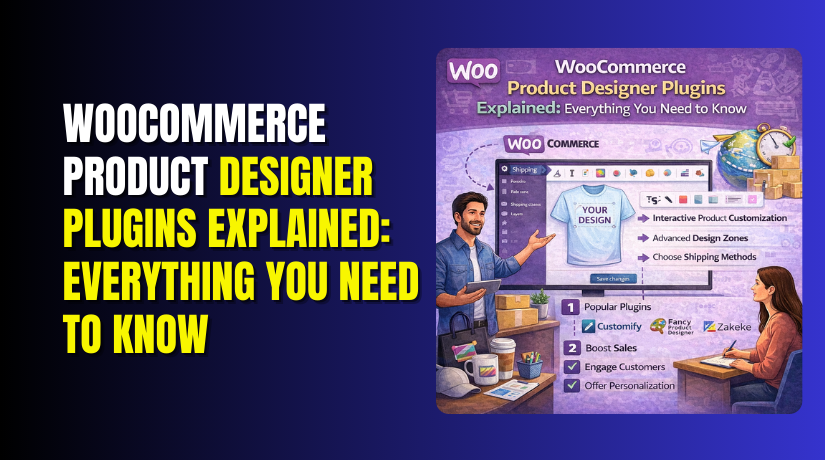
A WooCommerce product designer adds a live editor on product pages. It works like a small studio inside your online store. Many sellers call it a WooCommerce product design tool today. A WooCommerce custom product designer plugin shows a design canvas. Customers add text, images, and shapes directly on that canvas. They move items, resize them, and rotate them with controls. The plugin saves the final design with the order automatically. This is more powerful than basic add-ons like dropdown fields. Think of it as a product customization plugin WooCommerce buyers use. It keeps the design process fast, clear, and user friendly.
What Are the Real Uses of a Product Designer Plugin in WooCommerce
A product designer plugin for WooCommerce turns products into custom experiences. It helps shoppers design items before they place an order. This improves trust because customers see their final result clearly. A WooCommerce product designer also reduces support chats and order confusion.
Apparel and Merchandise Customization for Online Selling
A WooCommerce product customizer works great for shirts and hoodies. Customers add names, numbers, and slogans on the product page. They upload logos and place them on chest areas easily. The WooCommerce product design tool shows size and placement clearly. This helps sports teams and events order matching outfits faster. A product customization plugin WooCommerce stores use can increase cart value.
Print Shops Using Web-to-Print Orders With Ready Files
Print shops need clean files, not messy customer messages every time. A WooCommerce custom product designer plugin helps customers design cards online. Buyers edit text, upload logos, and choose layouts quickly. The product designer for WooCommerce store can export print-ready files. This supports business cards, flyers, stickers, posters, and menus too. It speeds up production and reduces delays caused by missing details.
Personalized Gifts and Photo Products That Sell Fast
Gift buyers love adding photos, names, and short messages. A WooCommerce product designer helps them create mugs and cushions. They can upload images and adjust them inside the editor. The product designer plugin for WooCommerce also supports custom phone cases. Customers preview designs and feel confident before paying at checkout. This lowers return requests because the buyer approves the design.
Business Branding Orders for B2B Customers and Teams
Many companies order branded items for staff and marketing needs. A WooCommerce product designer lets buyers place logos correctly every time. They can design caps, folders, stationery, and welcome kits easily. The WooCommerce product design tool keeps designs matched to each order. This helps agencies order in bulk without repeated design calls. A product customization plugin WooCommerce stores offer can win repeat clients.
Labels, Packaging, and Small Brand Custom Product Work
Small brands often need custom labels for bottles, jars, and boxes. A WooCommerce product customizer lets them add text and barcodes. They can choose colors and align designs within safe print areas. The WooCommerce custom product designer plugin helps avoid cut-off prints. This is useful for candles, food jars, skincare, and local products. It also supports tags, wrappers, and small packaging inserts.
Made-to-Order Products With Extra Pricing for Custom Changes
Some stores charge more for extra sides, colors, or premium designs. A product designer for a WooCommerce store can add pricing rules. Customers see the final price while making changes in real time. The WooCommerce product designer can charge for front and back printing. It can also charge for extra colors or high detail designs. This protects profit while keeping the buying process smooth.
Pros and Cons of Using a WooCommerce Product Designer Plugin
A product designer plugin for WooCommerce can boost sales quickly. It also changes how your store handles custom orders daily. You should know both benefits and limits before choosing any tool.
Pros of Using a WooCommerce Product Designer


- A product designer plugin for WooCommerce boosts trust with live previews.
- Customers confirm designs early, so wrong orders drop fast.
- A WooCommerce product designer reduces long email threads and delays.
- A WooCommerce product customizer increases conversions on custom product pages.
- Buyers pay more when personalization feels simple and clear.
- A product customization plugin WooCommerce supports upsells for premium options.
- You can charge extra for sides, colors, and templates.
- A WooCommerce product design tool saves time with auto order files.
- Designs attach to orders, so production starts without confusion.
- A WooCommerce custom product designer plugin improves workflow for busy teams.
Cons of Using a WooCommerce Product Designer Plugin
- A WooCommerce product designer can slow pages on weak hosting.
- Heavy editors load more scripts, fonts, and preview files.
- A product designer for a WooCommerce store needs careful speed testing.
- Setup takes time for print areas, templates, and design rules.
- Some buyers get confused using a new WooCommerce product customizer.
- Support tickets may rise for sizing and alignment questions.
- A product customization plugin WooCommerce can increase storage use quickly.
- Design exports can be large with higher order volume.
- Plugin conflicts may happen with caching, minify, or themes.
- A WooCommerce product design tool may break if scripts load wrong.
How a WooCommerce Product Designer Plugin Works (Step by Step)
Step 1: Admin Sets Up the WooCommerce Product Design Tool
- Install the plugin and enable it on selected products.
- Set print areas, safe zones, and product views clearly.
- Add fonts, clipart, and templates for faster customer designs.
- Set rules for image size, colors, and design limits.
Step 2: Customer Designs Using the WooCommerce Product Customizer
- Customers open the editor on the product page instantly.
- They add text, pick fonts, and choose colors quickly.
- They upload images and place logos with easy controls.
- The WooCommerce product designer shows changes in live preview.
Step 3: Customer Previews and Confirms the Final Design
- Customers review spelling, placement, and colors before buying.
- Proof confirmation reduces disputes and avoids rework later.
Step 4: Customer Adds to Cart and Completes Checkout Normally
- The design saves with the product inside the cart.
- Checkout stays normal, with design details linked to orders.
Step 5: Store Receives Design Preview and Export Files
- Admin sees the design preview inside WooCommerce order details.
- The WooCommerce custom product designer plugin generates export files automatically.
Step 6: Production and Fulfillment Becomes Faster and Accurate
- Your team downloads files and starts production right away.
- Final output matches the customer approved design during checkout.
How to Choose the Right WooCommerce Product Designer Plugin
Choosing the right product designer plugin for WooCommerce needs clear checks. You should match features, speed, and export needs first. Use the points below to avoid wrong plugin decisions later.
Match the WooCommerce Product Designer With Your Store Type
- Choose a simple editor if you sell basic custom name items.
- Choose advanced templates if you run a print shop store.
- Choose multi-side editing for front and back printing products.
- Choose a 3D tool only for complex, premium product previews.
- Choose mobile-friendly editing if most shoppers buy from phones.
- Choose a plugin built for your product range and order flow.
Check Must-Have Features in a WooCommerce Product Customizer
- The editor should support drag, resize, rotate, and align tools.
- The WooCommerce product design tool should offer clear live previews.
- The plugin should support image upload with size warning alerts.
- The plugin should support text editing with font controls.
- The plugin should support curved text for badges and round logos.
- Templates should be easy to add and edit for beginners.
- Clipart and icons should load fast inside the design editor.
- Layers should work smoothly for text on top of images.
- Multi-view support should exist for front, back, and inside.
- Export files should be easy to download from each order.
Choose Pricing Features That Protect Profit in Custom Orders
- Check if the plugin supports extra charges for more sides.
- Check if it supports extra charges for more colors.
- Check if it supports extra charges for premium templates.
- Check if it supports extra charges for special text effects.
- Check if it supports pricing by size or print area.
- Check if the cart shows added costs clearly before checkout.
- A product customization plugin WooCommerce should prevent hidden losses.
Confirm Compatibility and Speed for a Smooth WooCommerce Store
- Check theme support to avoid layout breaks on product pages.
- Check builder support if you use Elementor or similar tools.
- Check caching support so the editor loads without blank screens.
- Check minify support because script merging can break editors.
- Check server needs if the editor uses heavy preview files.
- Check load speed on mobile for better conversion rates.
- A good WooCommerce custom product designer plugin should stay stable.
Test Before You Buy Any WooCommerce Product Designer Plugin
- Create one test product and enable the editor quickly.
- Upload a logo and test resizing and alignment controls.
- Add text, change fonts, and test curved text options.
- Test front and back views if your products need both.
- Place a test order and open the order design preview.
- Download export files and confirm print quality looks correct.
- Test with caching enabled to spot loading issues early.
- Test checkout flow to confirm designs stay linked to cart.
- Test on phone and desktop for a smooth buyer experience.
- Choose the product designer for WooCommerce store that passes tests.
Conclusion
A product designer plugin for WooCommerce helps customers personalize products easily. It adds a clean editor directly on your product pages. Buyers can add text, upload images, and preview designs instantly. This improves trust and reduces order mistakes after checkout. A good WooCommerce product designer also saves your team time daily. You get design previews and export files with each order. The best results come from choosing the right plugin carefully. Focus on speed, export quality, mobile use, and pricing rules. Always test the editor before you commit to any tool.
If you want expert help with setup and smooth performance, contact WooHelpDesk. WooHelpDesk can recommend the best plugin for your store needs. WooHelpDesk can configure print areas, templates, and pricing rules correctly. WooHelpDesk can also fix theme conflicts and improve editor loading speed.