
WooCommerce Memberships: Everything You Need to Know Before Getting Started
Table of Contents
- What are WooCommerce Memberships?
- How Does WooCommerce Memberships Work?
- Restricting Content, Products, and Pages
- Memberships Based on Product Purchases or Manual Assignment
- Membership Duration and Expiration Rules
- WooCommerce Memberships Features
- Installing & Setting Up WooCommerce Memberships
- WooCommerce Memberships Integration with Other Plugins
- WooCommerce Memberships Pricing
- WooCommerce Memberships Reviews & User Feedback
- Common WooCommerce Memberships Issues & Fixes
- Conclusion
What are WooCommerce Memberships?
WooCommerce Memberships is a plugin that helps store owners manage memberships. It allows businesses to restrict content, products, and services to members only. With this plugin, you can create exclusive areas for loyal customers.
Unlike simple content restriction plugins, WooCommerce Memberships provides a complete system. You can sell memberships as standalone products or bundle them with other purchases. This helps businesses build a subscription-based revenue model.
The plugin works well for online courses, digital content, and VIP shopping clubs. Service-based businesses can also use it to provide premium customer access. It integrates smoothly with WooCommerce, making management simple and efficient.
How Does WooCommerce Memberships Work?
WooCommerce Memberships works by assigning access based on specific rules. Store owners can decide who can view content, products, and discounts. Memberships can be linked to product purchases or assigned manually.
When a user buys a membership, they gain access to restricted content. This could be exclusive blog posts, online courses, or hidden products. Store owners can also control how and when content is available.
The plugin allows three types of membership access:
- Lifetime Memberships – Members get permanent access after a one-time purchase.
- Fixed-Term Memberships – Access lasts for a specific period, such as a year.
- Recurring Memberships – Memberships renew automatically when combined with WooCommerce Subscriptions.
Restricting Content, Products, and Pages
WooCommerce Memberships lets store owners control visibility across their website. They can restrict:
- Blog posts and pages – Keep premium content exclusive to members.
- WooCommerce products – Hide or restrict product purchases to members.
- Custom post types – Restrict access to portfolios, FAQs, or other custom content.
Store owners can either fully restrict content or allow public viewing but restrict purchases. This means visitors can see a product but must become members to buy it.
Memberships Based on Product Purchases or Manual Assignment
There are multiple ways to grant membership access:
- Sell memberships as a product – Customers purchase access directly like any other item.
- Include membership with product purchases – Buying a specific product grants access.
- Manually assign memberships – Admins can invite users to an exclusive membership.
Manual assignments work well for VIP customers, partners, or corporate clients.
Membership Duration and Expiration Rules
Store owners can set different membership durations:
- Lifetime memberships – Members never lose access.
- Fixed-term memberships – Access expires after a set period, such as one year.
- Subscription-based memberships – Requires WooCommerce Subscriptions for auto-renewals.
When a membership expires, owners can choose what happens next:
- Immediate expiration – Members lose access instantly.
- Grace period – Gives extra time before membership expires.
- Manual renewal option – Members must repurchase to regain access.
WooCommerce Memberships allows complete control over these settings.
WooCommerce Memberships Features
1. Membership Plans & Assigning Access
WooCommerce Memberships allows store owners to create multiple membership plans. Each plan defines who gets access, for how long, and to what. Memberships can be linked to products, granted manually, or given as part of a purchase.
Creating a Membership Plan
To create a membership plan, follow these steps:
- Go to WooCommerce → Memberships → Membership Plans.
- Click Add Membership Plan and name it.
- Set the membership length (lifetime, fixed-term, or subscription-based).
- Choose who gets access (customers, specific roles, or manual assignments).
- Define content restriction rules and membership perks.
After creating a plan, store owners can link it to products or manually assign it.
Ways to Assign Memberships
There are three primary ways to assign memberships:
1. Sell Memberships as Standalone Products
-
- Users buy membership directly like any other product.
- Membership is activated immediately after purchase.
2. Include Memberships with Product Purchases
-
- Buying a specific product grants membership access.
- Example: Purchasing an online course includes access to exclusive content.
3. Manually Assign Memberships
-
- Store owners can grant memberships without a purchase.
- Ideal for VIP access, beta testers, or corporate clients.
2. Content Restriction & Dripping
WooCommerce Memberships provides full control over content access. Store owners can restrict:
- Pages, blog posts, and custom post types.
- Specific products or entire product categories.
- Sections of a website, including downloads and resources.
Full vs. Partial Content Restriction
- Full Restriction – Only members can view restricted content.
- Partial Restriction – Content is visible, but key parts are hidden.
Example: A blog post teaser is visible, but full content requires membership.
Dripping Content Over Time
Drip content means members receive access gradually. Store owners can schedule when content unlocks. This prevents users from accessing everything at once.
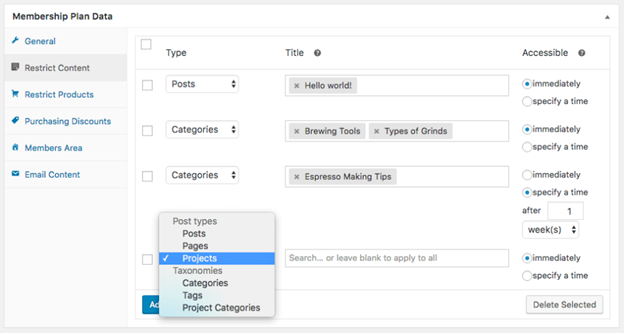
Example:
- Week 1: Member gets access to Lesson 1.
- Week 2: Lesson 2 unlocks automatically.
- Week 3: Lesson 3 unlocks.
Drip schedules can be based on days, weeks, months, or years.
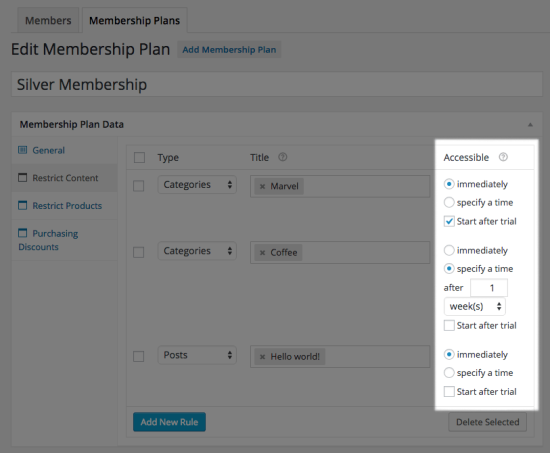
Benefits of Dripping Content:
- Keeps users engaged over time.
- Encourages long-term membership retention.
- Works well for courses, training programs, and exclusive content.
3. Member Perks & Exclusive Benefits
WooCommerce Memberships helps businesses offer special perks to members. These perks encourage sign-ups and customer loyalty.
Member-Only Discounts
- Store owners can give fixed or percentage-based discounts.
- Discounts apply to specific products, categories, or the entire store.
- Example: Members get 10% off all products.
Exclusive Shopping & Early Access
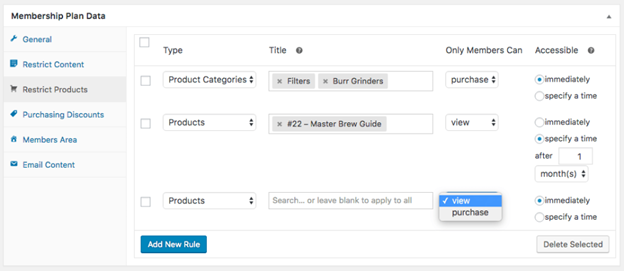
- Create members-only products that non-members cannot buy.
- Restrict exclusive sales, pre-orders, or early product launches.
- Example: VIP members get early access to Black Friday deals.
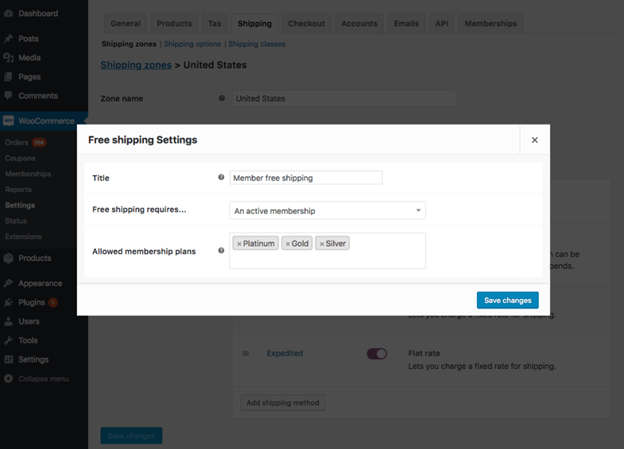
Free Shipping for Members
- Offer free shipping only for members.
- Works well for subscription-based memberships.
- Example: Amazon Prime-style free shipping for loyal customers.
4. WooCommerce Membership Area
The Member Area is where users manage their memberships. It provides a clear overview of their benefits and access.
What Members Can See in the Member Area
- Membership Details – Active plans, start dates, and expiration dates.
- Restricted Content – A list of pages, posts, and products they can access.
- Member-Only Discounts – Exclusive offers and perks available.
- Upcoming Access – Content that will unlock in the future.
How Store Owners Can Customize the Membership Area
- Choose which sections to display for members.
- Add custom messages to welcome new members.
- Display renewal reminders and upgrade options
Installing & Setting Up WooCommerce Memberships
Setting up WooCommerce Memberships is simple. Store owners can install and configure it within minutes. The plugin integrates directly with WooCommerce.
How to Install WooCommerce Memberships
1. Purchase & Download the Plugin


- Visit the WooCommerce website and buy WooCommerce Memberships.
- Download the plugin ZIP file from your account.
2. Upload & Activate the Plugin
- Go to WordPress Dashboard → Plugins → Add New.
- Click Upload Plugin and select the ZIP file.
- Click Install Now, then Activate the plugin.
3. Configure Basic Settings
- Navigate to WooCommerce → Settings → Memberships.
- Adjust general settings, including membership expirations and content access.
Once activated, the plugin is ready to create membership plans.
Creating a Membership Plan
- Go to WooCommerce → Memberships → Membership Plans.
- Click Add Membership Plan and enter a plan name.
- Set membership length (lifetime, fixed-term, or subscription-based).
- Choose who gets access (product purchases or manual assignments).
- Configure content restriction rules and dripping schedules.
- Save the plan and assign it to products or users.
The membership plan is now active, and users can start joining.
WooCommerce Memberships Integration with Other Plugins
WooCommerce Memberships works well with other plugins. Integrations extend its functionality and improve the user experience.
WooCommerce Subscriptions
WooCommerce Subscriptions allows store owners to sell recurring memberships. It automates billing, renewals, and cancellations.
Key Benefits of WooCommerce Subscriptions Integration
- Charge monthly, yearly, or custom billing cycles.
- Offer free trials before charging members.
- Allow members to pause, cancel, or switch membership plans.
- Automate renewal reminders and expiration notices.
Teams for WooCommerce Memberships
This integration allows businesses to sell memberships to groups or companies. It is ideal for corporate training, team-based services, and family subscriptions.
How Teams for WooCommerce Memberships Works
- A company buys a group membership for multiple users.
- The team manager assigns access to employees or members.
- Teams can upgrade or expand their membership as needed.
MailChimp for WooCommerce Memberships
This integration helps store owners send emails and newsletters to members. It automates member communications and improves engagement.
Features of MailChimp Integration
- Send automated welcome emails when users join.
- Create exclusive email campaigns for members.
- Sync member data with MailChimp for targeted marketing.
Other Third-Party Integrations
WooCommerce Memberships also supports additional plugins:
- WooCommerce Social Login – Allows members to log in with Facebook or Google.
- Advanced Coupons for WooCommerce – Restricts coupon use to members only.
- Gifting for WooCommerce Subscriptions – Allows users to buy and gift memberships.
WooCommerce Memberships Pricing
WooCommerce Memberships is a premium plugin available on the WooCommerce marketplace. It is a one-time purchase with yearly renewals for updates and support.
How Much Does WooCommerce Memberships Cost?
- The annual cost for WooCommerce Memberships is $199 per year.
- This price includes support, updates, and new features.
Are There Additional Costs?
WooCommerce Memberships works as a standalone plugin. However, some features need extra plugins.
- WooCommerce Subscriptions ($239/year) – Required for recurring billing.
- Teams for WooCommerce Memberships ($129/year) – Adds group membership functionality.
- MailChimp for Memberships (Free & Paid Plans) – Useful for email automation.
Businesses should consider total costs when planning their membership system.
WooCommerce Memberships Reviews & User Feedback
WooCommerce Memberships is a popular plugin with positive reviews. It is praised for flexibility, ease of use, and deep WooCommerce integration.
Pros of WooCommerce Memberships
- Seamless Integration – Works directly with WooCommerce without complex setup.
- Multiple Membership Options – Supports lifetime, fixed-term, and subscription-based memberships.
- Content Dripping – Allows store owners to release content gradually.
- Exclusive Perks – Enables discounts, free shipping, and member-only products.
- Scalability – Works for small businesses, online courses, and large stores.
Cons of WooCommerce Memberships
- No Built-in Recurring Payments – Requires WooCommerce Subscriptions for auto-renewals.
- Higher Cost for Full Features – Adding integrations increases expenses.
- Limited Built-in Reporting – Store owners may need extra analytics plugins.
Who Should Use WooCommerce Memberships?
- E-learning platforms – To sell courses with content dripping.
- E-commerce stores – To offer exclusive member discounts and products.
- Service businesses – To provide VIP access or membership-based services.
- Subscription-based businesses – To create recurring revenue models.
WooCommerce Memberships Support & Troubleshooting
WooCommerce Memberships is a reliable plugin, but issues may arise. Store owners can fix common problems with simple troubleshooting steps.
Where to Get WooCommerce Memberships Support?
- WooCommerce Help Desk – Official support for purchased users.
- WooCommerce Documentation – Guides and tutorials for setup and troubleshooting.
- Community Forums – Discussions and solutions from other WooCommerce users.
- Developer Support – For advanced customization and coding-related issues.
Common WooCommerce Memberships Issues & Fixes
1. Memberships Not Assigning Properly
- Ensure the correct product is linked to the membership plan.
- Check if manual assignments are enabled in settings.
- Confirm that the order status is marked as completed.
2. Content Restriction Not Working
- Verify that the restriction rules are set correctly.
- Avoid using caching plugins that may interfere with content control.
- Check if permalink settings are using anything other than “Plain”.
3. Emails Not Sending to Members
- Go to WooCommerce → Settings → Emails and enable membership emails.
- Make sure the email templates are not disabled.
- Use an SMTP plugin if WooCommerce emails are not delivering.
4. Members Unable to Renew Their Memberships
- Ensure that expired members can still purchase the membership product.
- If using WooCommerce Subscriptions, verify renewal settings.
- Check if the product is set to “Purchasable” for non-members.
5. Membership Expiration Issues
- Review membership expiration settings in WooCommerce Memberships.
- Enable manual renewal options if members need to extend access.
- If using fixed-term memberships, confirm the expiration period is correct.
Best Practices for Avoiding Issues
- Keep WooCommerce and all plugins updated.
- Test new settings on a staging site before applying changes.
- Regularly check WooCommerce logs for errors.
- Use reliable hosting to prevent performance issues.
Conclusion
WooCommerce Memberships is a powerful tool for creating membership-based stores. It allows store owners to restrict content, sell memberships, and offer exclusive perks.
Is WooCommerce Memberships the Right Choice?
WooCommerce Memberships is best suited for:
- E-learning websites – Selling courses and premium content.
- E-commerce stores – Offering member-only discounts and products.
- Subscription-based services – Running VIP programs or exclusive access clubs.
- Corporate and team-based memberships – Using Teams for WooCommerce Memberships.
What Makes WooCommerce Memberships Stand Out?
- Seamless integration with WooCommerce.
- Flexible membership options (one-time, fixed-term, or recurring).
- Content dripping to release content over time.
- Exclusive discounts and free shipping for members.
WooCommerce Memberships is a feature-rich plugin for membership sites. It works best for WooCommerce-based businesses looking to offer premium content, services, or discounts.
For recurring payments, store owners should also use WooCommerce Subscriptions. If running team-based memberships, the Teams for WooCommerce Memberships add-on is useful.
Store owners looking for an all-in-one WooCommerce membership solution will find WooCommerce Memberships a valuable investment.
Still facing issues? WooHelpDesk will help you resolve them quickly. Need expert guidance? WooHelpDesk is always ready to assist you.



