WooCommerce Explained: What It Is, How It Works, and What It Costs
Table of Contents
- Introduction
- What is WooCommerce and How Does it Work?
- What kind of company is WooCommerce?
- What is the difference between WordPress and WooCommerce?
- How Much Does WooCommerce Cost to Use Overall?
- Conclusion
Introduction
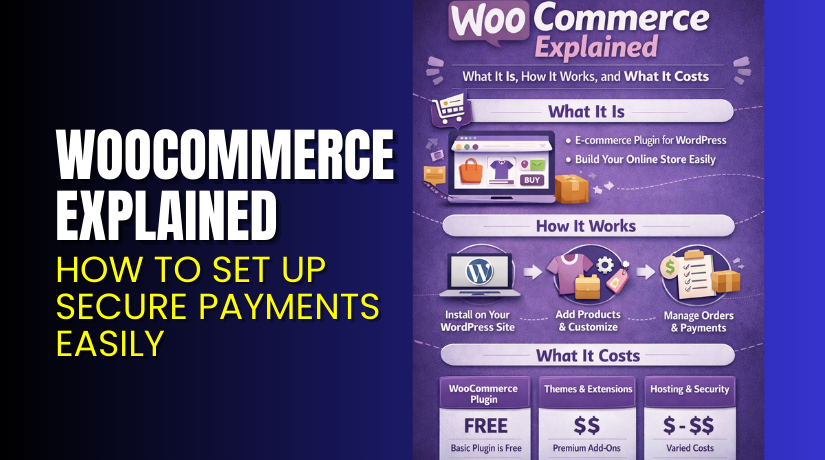
WooCommerce helps you sell online using your WordPress website today. It turns a normal site into a full online store. You can sell products, take payments, and manage orders easily. Many small businesses choose WooCommerce because it stays flexible. This guide explains WooCommerce in simple, clear steps. You will learn how it works and what it costs.
What is WooCommerce and How Does it Work?
What is WooCommerce?
What is WooCommerce? WooCommerce is an ecommerce plugin for WordPress sites. It adds store tools to your existing WordPress dashboard quickly. You can list products, set prices, and control stock levels. You can sell physical items, digital files, or service-based products. WooCommerce also supports product options like size and color. Many people call it the most common WordPress ecommerce plugin.
How WooCommerce Works With WordPress
WooCommerce works like a store engine inside your WordPress website. WordPress runs your website pages, posts, and media files. WooCommerce adds ecommerce tools inside the same WordPress dashboard. You do not need a separate platform to run the store. Everything stays in one place for easier control.
Here is how WooCommerce connects with WordPress in real use:


- It installs like a normal WordPress plugin. You add it from Plugins, then activate it. After activation, it starts adding store options in the admin menu. This feels familiar if you already use WordPress.
- It creates key store pages automatically. WooCommerce generates pages like Shop, Cart, Checkout, and My Account. These pages work like normal WordPress pages in the backend. You can edit content, design, and layout using your theme.
- It adds product features as a new content type. In WordPress, you create posts and pages. WooCommerce adds “Products” as a new section in the dashboard. Each product works like a special post with extra fields. You can add price, stock, images, and product options.
- It uses WordPress themes to control the store design. Your WordPress theme controls the overall site look. WooCommerce follows the same theme styling for a matching design. Many themes also include WooCommerce templates for shop pages. This makes product pages look clean and professional.
- It stores data in the same WordPress database. WordPress already stores content in the database. WooCommerce stores products, orders, customers, and settings there too. This keeps your website and store connected in one system.
- It uses WordPress user accounts for customer logins. WordPress has user roles and login features. WooCommerce uses that same system for customer accounts. Customers can register, log in, and see their order history. This happens through the My Account page.
- It connects payments using WordPress plugin settings. Payment gateways are added using WooCommerce settings and extensions. You connect Stripe, PayPal, or other gateways from the dashboard. WooCommerce then shows payment options during checkout. Payments are processed and orders are saved automatically.
- It manages the full order flow inside WordPress. When a customer buys something, WooCommerce creates an order record. You can see the order in WooCommerce → Orders. You can update order status like Processing or Completed. You can also add notes, refunds, and tracking details.
- It sends emails using WordPress email system. WooCommerce emails are handled through WordPress mail settings. Customers get order confirmation and status update emails. Store owners also get new order notification emails. You can customize email templates if needed.
- It supports extra features through extensions. WordPress works well with plugins, and WooCommerce does too. You can add subscriptions, bookings, and memberships using extensions. You can also add shipping rules, tax tools, and automation plugins. This is how you scale your WooCommerce store.
In short, WordPress gives the website base and content control. WooCommerce adds the store tools and selling features on top. They work together inside the same dashboard and same system. This is why WooCommerce is easy for WordPress users.
What kind of company is WooCommerce?
WooCommerce is also the name behind the WooCommerce product. It is built around open source, so many developers contribute. That open model keeps WooCommerce flexible for many store types. The WooCommerce ecosystem includes themes, extensions, and service partners. Many store owners use WooCommerce with paid add-ons for growth. You can get help through guides, community forums, and support teams. Some features are supported through paid extensions and their providers. This mix lets you start small and expand when needed.
What is the difference between WordPress and WooCommerce?
- WordPress is a website platform. It helps you build your complete website. You can create pages, write blogs, and upload images. You can also control menus, users, and site design.
- WooCommerce is an online store tool. It is a plugin that runs inside WordPress. It adds ecommerce features to your WordPress website. You can add products, set prices, and manage stock.
- They have different main jobs. WordPress manages your content and site structure. WooCommerce manages selling, orders, and customer checkout.
- WordPress can work alone without WooCommerce. You can run a blog, portfolio, or business site. You only need WooCommerce if you want ecommerce features.
- WooCommerce cannot work without WordPress. It needs WordPress to install and run. It uses the same admin dashboard and user system.
- The store flow is handled by WooCommerce. It creates cart and checkout pages automatically. It connects payment gateways and saves order details. It also supports shipping and tax settings.
- The setup process is different for both. WordPress setup focuses on theme, pages, and plugins. WooCommerce setup focuses on store details, payments, shipping, and products.
- Think of it like this example. WordPress is the building where your business runs. WooCommerce is the shop system inside that building. Together, they make a complete online store.
How Much Does WooCommerce Cost to Use Overall?
WooCommerce is free to install and run as a core plugin. Your total cost depends on hosting, domain, payment fees, and paid extensions. If you want a hosted bundle that includes store features, WordPress.com lists a Commerce plan with multiple billing options.
Conclusion
WooCommerce is a simple way to sell online with WordPress today. It works by adding products, cart, and checkout to WordPress. You manage store settings, orders, and customers from one dashboard. The difference between WordPress and WooCommerce is clear and simple. WordPress builds the site, while WooCommerce powers the store features. The WooCommerce plugin is free, but running a store costs money. Your total WooCommerce cost depends on hosting, themes, and extensions. Start with the basics, then grow features as your store grows.