WooCommerce Delivery Options at Checkout: Complete Guide to Available Shipping Methods
Table of Contents
- Introduction
- Why Delivery Options Matter at Checkout in WooCommerce
- What are the Delivery Options at Checkout in WooCommerce (Default)
- Advanced Delivery Options Using Plugins When Default WooCommerce Isn’t Enough
- Best Practices to Make Delivery Options Clear and Conversion-Friendly
- Conclusion
Introduction
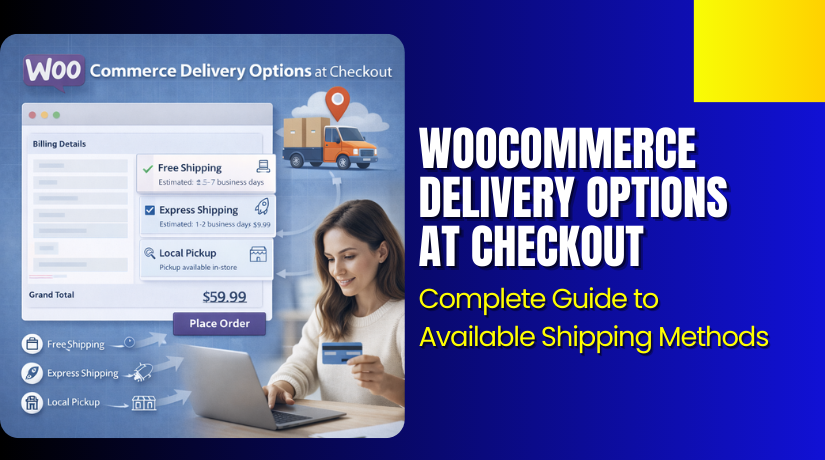
Delivery choices can decide if a customer completes the order. When shoppers reach checkout, they want a clear delivery speed and cost. In WooCommerce, these choices show as WooCommerce delivery options at checkout. Many store owners call them WooCommerce shipping options or delivery methods. Both terms point to the same checkout experience for buyers. If options look confusing, customers often leave without paying. Clear delivery choices reduce doubt and build quick trust. They also help customers pick the best cost and speed.
Your store can show one option or many options. These options are powered by WooCommerce shipping methods. The most common examples are flat rate, free shipping, and local pickup. These methods appear inside the WooCommerce checkout shipping section. What customers see depends on their address and your setup. That setup is controlled by WooCommerce shipping settings in the admin area. If zones or rules are missing, options may not show. If rules are wrong, the wrong option may appear.
This guide will help you understand delivery options clearly. You will learn how WooCommerce decides what shows at checkout. You will also learn why delivery choices matter for sales. We will cover default options like WooCommerce flat rate shipping in simple terms. After that, we will explore advanced options using plugins. We will also share best practices to keep checkout clean. You will finish with a clear plan to improve delivery choices.
Why Delivery Options Matter at Checkout in WooCommerce
Clear Delivery Choices Reduce Cart Abandonment
When customers see confusing delivery choices, they often stop. Clear WooCommerce delivery options at checkout remove that confusion fast. Buyers can pick the right option without thinking too much. This keeps the checkout flow smooth and predictable. It also reduces last-minute doubts about delivery cost. A clean delivery section helps customers finish payment confidently.
Transparent Shipping Costs Build Instant Trust
Many users leave when shipping costs appear suddenly at checkout. Clear WooCommerce checkout shipping costs build trust before payment. Customers feel safe when they see the total cost early. This helps first-time buyers trust your store more. It also reduces chargeback risk and refund requests later. Trust grows when shipping feels honest and easy.
Multiple Shipping Speeds Serve More Customer Needs
Some buyers want the cheapest option for saving money. Other buyers want fast delivery even with higher cost. With multiple WooCommerce shipping options, you serve both types. You can show standard and express shipping together. This gives customers control over price and speed. More control often means more completed orders.
Correct Shipping Rules Prevent Wrong Options Showing
Wrong rules can show delivery methods in unsupported locations. Strong WooCommerce shipping settings stop this issue early. Zones and rules decide which options appear for addresses. This keeps delivery promises accurate and realistic. It also prevents order cancellations due to wrong shipping choices. Accurate rules create a better shopping experience.
Better Shipping Options Can Increase Average Order Value
Free shipping rules can push customers to add more items. Many buyers add products to unlock free delivery. This makes WooCommerce shipping methods a smart sales tool. You can set free shipping for a minimum cart value. You can also combine free shipping with paid options. This can improve your revenue per order over time.
Flat Rate Shipping Helps Keep Checkout Simple
Some stores need fixed pricing for stable shipping costs. WooCommerce flat rate shipping makes pricing clear and easy. Customers understand one simple rate without confusion. It also helps you protect margins on common orders. Flat rate works well for small and medium items. It keeps checkout clean and reduces decision fatigue.
Clear Delivery Options Reduce Support Requests After Purchase
Customers often contact support about delivery timing and cost. Clear delivery choices reduce these questions a lot. WooCommerce shipping options shown clearly prevent wrong expectations. Customers remember what they selected at checkout easily. This lowers complaints about delays or cost surprises. Your support team saves time and effort.
What are the Delivery Options at Checkout in WooCommerce (Default)
WooCommerce gives you strong default delivery choices at checkout. These are the main WooCommerce shipping methods most stores use. You can set them using WooCommerce shipping settings in the admin. The goal is simple and clear WooCommerce checkout shipping for buyers. When set right, customers see correct WooCommerce delivery options at checkout.
Flat Rate Shipping Setup for Fixed and Simple Delivery Pricing
WooCommerce flat rate shipping works best for predictable shipping costs. It shows one fixed fee for a shipping zone. You can also charge per item using flat rate rules. You can add fees for heavy products using shipping classes. This option keeps WooCommerce shipping options easy to understand. Customers like fixed prices because there are no surprises later.
Free Shipping Setup That Helps Increase Order Value
Free shipping is great when you want larger carts. You can enable it with a minimum order amount. You can also enable it using a special coupon code. Many stores combine free shipping with flat rate options. WooCommerce shows free shipping only when rules match. This makes WooCommerce delivery options at checkout feel more rewarding.
Local Pickup Setup for Click and Collect Stores
Local pickup is ideal for local stores and quick collection. Customers choose pickup instead of paying shipping charges. Add clear pickup notes so customers know the pickup process. You can set the pickup cost as free or charge a small fee. This option reduces shipping work and saves delivery costs. It also keeps WooCommerce checkout shipping clean and fast.
Showing Multiple Options Together in a Clean Checkout
You can show standard and express choices in one zone. You can also show free shipping when the cart qualifies. WooCommerce will list methods based on your zone setup. The order of methods affects what buyers pick first. Keep names short so customers understand them quickly. This improves WooCommerce shipping options without extra design work.
Advanced Delivery Options Using Plugins When Default WooCommerce Isn’t Enough
Some stores need more control than default shipping features. Plugins can expand WooCommerce shipping methods in powerful ways. They can add schedule tools and rule-based delivery fees. Use plugins when your delivery plan has many conditions. Always test changes to avoid breaking WooCommerce checkout shipping.


Add Delivery Date Selection for Scheduled Delivery Workflows
A delivery date picker helps customers plan their delivery day. You can block weekends and set holiday blackout dates. You can also add handling days before delivery becomes available. This prevents customers choosing dates you cannot fulfill. It makes WooCommerce delivery options at checkout more reliable.
Add Delivery Time Slots for Better Local Delivery Control
Time slots help local delivery stores manage daily capacity. You can limit orders per slot to avoid overload. You can offer different slots for different delivery areas. Customers love clear slot choices during checkout steps. This makes delivery feel planned and professional.
Add ZIP or Distance Based Local Delivery Rules
Some stores deliver only within certain ZIP or pincode areas. Plugins can hide delivery outside your service area. They can also add fees based on distance from the store. This protects margins and reduces failed delivery attempts. It also improves the accuracy of WooCommerce shipping options.
Add Table Rate Shipping Rules for Complex Pricing
Table rate shipping supports pricing based on many cart rules. You can charge by weight, quantity, cart total, or category. You can set different rates for heavy and fragile items. This is helpful when flat pricing causes loss. It keeps WooCommerce shipping settings aligned with real costs.
Best Practices to Make Delivery Options Clear and Conversion-Friendly
Use short and clear delivery names customers understand
Customers decide fast when names are easy to read. Use labels like Standard Shipping, Express Shipping, or Local Pickup. Avoid internal terms like Zone 1 Rate or Shipping Method A. Clear names reduce confusion and help customers choose quickly. This makes checkout feel smooth and reliable for first-time buyers.
Show only the delivery options that actually matter
Too many choices create doubt and slow down decisions. Keep the list limited to the best two or three options. For most stores, Standard, Express, and Free over a limit works well. Fewer choices reduce cart drop-offs and speed up checkout completion.
Make shipping cost visible and easy to compare
Customers want to understand the total cost without effort. Show the price clearly next to each delivery option. If a method is free, say “Free Shipping” instead of “0”. Clear cost display builds trust and prevents surprises on the payment step.
Add simple delivery time expectations near each option
Customers care about when the order will arrive. Add short lines like “Delivered in 3–5 business days” when possible. If you cannot promise exact dates, use safe ranges. This reduces refund requests and improves customer satisfaction after purchase.
Keep free shipping rules simple and predictable
Free shipping is powerful but must trigger correctly. Use one clear rule like “Free shipping over ₹X” or “Free shipping over $X”. Avoid too many conditions that confuse shoppers. Simple rules also help you test faster and reduce setup mistakes.
Use shipping zones to prevent wrong options showing
Shipping zones control which methods appear for each location. Make sure every target area is covered by a zone. Add a fallback zone if you sell to many regions. When zones are correct, customers see only valid delivery options at checkout.
Set shipping classes for heavy or special products
Some products cost more to ship than others. Use shipping classes for heavy, fragile, or oversized items. This prevents losses from one flat price for every item. It also keeps delivery choices accurate when carts include mixed products.
Test checkout with real customer scenarios before going live
Always test with different shipping addresses and cart totals. Test with free shipping limits, heavy items, and sale items. Also test on mobile devices for layout and clarity. Testing helps you catch missing methods and wrong costs early.
Conclusion
Delivery options at checkout play a big role in final sales. Customers want clear choices, fair costs, and simple delivery timing. When your shipping zones and methods are set correctly, checkout feels smooth. Flat rate, free shipping, and local pickup cover most store needs. If your store needs more control, plugins can add dates, time slots, and smart rules. The key is keeping options clean, readable, and easy to trust. Test every change like a real customer before going live.
Want help fixing shipping options that are missing or incorrect? Visit WooHelpDesk for step-by-step guides on WooCommerce checkout shipping, zones, rates, and delivery rules. You will find practical fixes that you can apply fast. Keep your checkout simple, reduce cart drop-offs, and increase sales with WooHelpDesk.