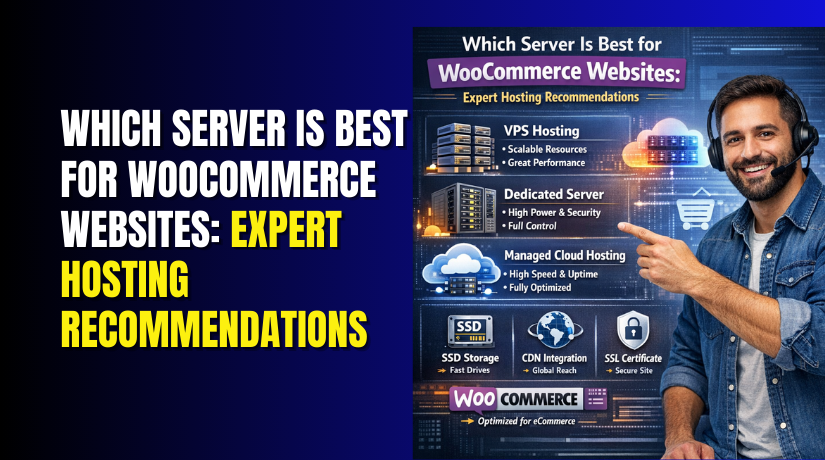
Which Server Is Best for WooCommerce Websites: Expert Hosting Recommendations
Table of Contents
- Introduction
- What a Server Really Means for WooCommerce Store
- What Makes a Server “Best” for WooCommerce and Why Does It Matters?
- Minimum Server Requirements for WooCommerce Stores by Store Size
- Which Server Is Best for WooCommerce? (Complete Guide)
- Features to Look for in WooCommerce Hosting Plans Before You Buy
- How to Choose the Best Server for Your Store Using Simple Rules
- Conclusion
Introduction
Choosing the best server for WooCommerce is a serious business decision. Your server controls how fast pages load for shoppers. It also controls how smooth the checkout feels daily. A slow store loses buyers before they complete payment. A stable store builds trust and increases repeat orders. That is why the WooCommerce hosting server matters so much. Many store owners focus only on themes and plugins. They forget the server is the real performance foundation.
This guide helps you choose the best hosting server for WooCommerce. It explains what a server does for your store. It also explains what to check before buying hosting. You will learn why resources matter for WooCommerce stores. You will also learn why server type changes performance. Later, we will compare VPS, cloud, and dedicated options. We will also cover WooCommerce server requirements by store size.
What a Server Really Means for WooCommerce Store
A server is the computer that runs your WooCommerce store. It stores your website files and loads them for visitors. It also runs code that powers your shop features. When someone opens your product page, the server responds. When someone adds to cart, the server updates data quickly. When someone pays, the server completes the order process.
A WooCommerce hosting server does more than show pages. It also runs WordPress and WooCommerce behind the scenes. It runs PHP code that creates dynamic pages for users. It connects to a database that stores products and orders. It uses memory to keep things fast during busy moments. It uses CPU power to handle many requests together. It uses storage speed to fetch images and data quickly.
Server vs Hosting Plan vs Data Center: Quick Clarity for Beginners
Many people mix up server terms while buying hosting. Hosting is the service that gives you server access. A hosting plan is the package that sets your limits. The server is the machine running your store online. A data center is the physical building holding servers. Your plan decides how much CPU and RAM you get. Your server location affects speed for your target buyers.
This is why “best hosting” is not always “best server.” Some hosts sell plans with tight hidden limits. You may get a cheap plan but slow performance. Another plan may cost more but run much faster. The best server for WooCommerce is the one with stable resources. It should also have a setup tuned for ecommerce use. It should keep the store fast during traffic spikes.
What Makes a Server “Best” for WooCommerce and Why Does It Matters?
A store can look great but still run slow. The real speed depends on the server power. The best server for WooCommerce keeps pages fast and stable. It also keeps checkout smooth during busy traffic hours. Use the points below as your server quality checklist.
Fast CPU and enough RAM for PHP and database load
WooCommerce runs many PHP tasks for each shopper action. Add to cart runs code and updates data quickly. Checkout runs more code and checks many rules. Coupons, taxes, and shipping add extra PHP work too. A strong CPU keeps these actions quick and smooth. Enough RAM keeps PHP and the database from slowing. Low RAM causes more swapping and longer response times. This is why CPU and RAM are core WooCommerce server requirements.
NVMe or SSD storage for faster product and cart queries
Your database reads and writes data all day long. Product pages fetch prices, stock, and variation details. Cart and checkout also read and write session data. Slow disks make these queries feel heavy and delayed. NVMe is usually faster than normal SSD storage. Faster storage improves admin speed and product edit time. It also reduces cart delays during peak traffic hours. Storage speed is a key part of any WooCommerce hosting server.
Server-level caching plus object cache support like Redis
Caching reduces repeated work for the same page views. It helps category pages and product pages load faster. But WooCommerce needs smart cache rules for carts. A good host provides server-level cache tuned for WooCommerce. Object caching stores common database results in memory. Redis is a popular option for this job. With Redis, many queries return faster with less load. This setup is common on WooCommerce VPS hosting plans. It is also common on a WooCommerce cloud server setup.
Uptime, stability, and the ability to handle traffic spikes
Speed is useless if the store goes down often. Uptime keeps your store open for buyers every hour. Stability helps during sales and ad traffic spikes. A good server handles more users without timing out. It keeps checkout stable even with many buyers online. Look for clear resource limits and honest plan details. Avoid plans with vague “unlimited” claims and hidden caps. A strong best hosting server for WooCommerce will show scaling options.
Strong security, daily backups, and WooCommerce-friendly support
WooCommerce stores hold customer and order information daily. Security helps prevent hacks and payment page issues. Look for firewall protection and malware scanning support. Daily backups help you recover fast after mistakes. Easy restore matters more than only having backups. Support should understand WooCommerce errors and checkout issues. Good support reduces downtime and lost orders quickly. This support quality is what separates a strong host. It also protects your revenue during urgent problems.
Minimum Server Requirements for WooCommerce Stores by Store Size
There is no one perfect number for every store. Your theme, plugins, and traffic change your real needs. Still, you can start with safe baseline targets. These baselines cover common stores with normal plugin use. Use them as planning numbers for better buying decisions. These are practical WooCommerce server requirements for most store owners.
Basic Store Requirements for Small Catalogs and Low Traffic
This fits new stores with limited products and low daily visits. It also fits stores with simple shipping and few plugins. Aim for at least 1 to 2 CPU cores. Aim for at least 2GB to 4GB RAM. Choose SSD storage, and prefer NVMe if possible. Start with 20GB to 40GB storage for files. Add more if you use many images and videos. Use a simple caching system with correct WooCommerce rules. Enable backups daily with easy one-click restore options.
Growing Store Requirements for Regular Orders and More Plugins
This fits stores with steady visitors and frequent daily orders. It also fits stores using builders, filters, and more plugins. Aim for at least 2 CPU cores, or 3 for safety. Aim for at least 4GB RAM, and 6GB is better. Choose NVMe storage for faster database and admin work. Plan 40GB to 80GB storage for store growth. Use object cache support like Redis for faster queries. Use a CDN to speed up images for buyers. This is where WooCommerce VPS hosting becomes very useful.
High-Traffic Store Requirements for Heavy Checkout and Sales Spikes
This fits stores running ads and handling sudden traffic spikes. It also fits large catalogs and many variations per product. Aim for 4 CPU cores or more for smooth processing. Aim for 8GB RAM or more for better stability. Use NVMe storage and keep database performance strong. Plan 100GB storage if you have large media files. Add Redis object cache and strong server-level caching. Use monitoring and alerts to catch load issues fast. Choose easy scaling options to add resources quickly. A WooCommerce cloud server works well for sudden demand. A dedicated server for WooCommerce fits when traffic stays high.
Which Server Is Best for WooCommerce? (Complete Guide)
The best server for WooCommerce depends on your store needs. Some stores need simple speed with low maintenance. Some stores need control for custom tuning and growth. Some stores need scaling for traffic spikes and ads. That is why you must match the server type to your store. Below are the most common best-fit options for many stores.
#1 Managed WooCommerce Server
A managed WooCommerce hosting server is built for store speed and stability. It comes with server tuning, security, and WooCommerce-ready caching. This option is often the best hosting server for WooCommerce for most store owners.
Features
- WooCommerce-ready caching rules that protect cart and checkout pages safely.
- Daily backups with quick restore options for fast recovery anytime.
- Built-in security tools like firewall rules and malware checks included.
- Staging site support for safe updates before going live.
- Support team trained for WooCommerce issues and checkout errors quickly.
Pros
- Fast store speed without needing deep server skills at all.
- Stable checkout performance during normal traffic and busy sale times.
- Simple upgrades when traffic grows and orders increase steadily.
- Less risk from updates due to testing and backups built-in.
- Saves time by handling server tasks and core tuning daily.
Cons
- Costs more than basic shared hosting plans for small stores.
- Plans often limit visitors, storage, or advanced server access levels.
- Some hosts restrict custom rules for caching and server changes.
- Extra add-ons can raise costs for emails or premium backups.
- Not ideal for users needing full control over every setting.
Best for: Best for store owners who want speed, safety, and less maintenance.
#2 WooCommerce VPS Hosting
A VPS gives you dedicated resources for your WooCommerce store. It runs faster than shared hosting because resources are reserved. It can meet higher WooCommerce server requirements for growing stores.
Features
- Dedicated CPU and RAM for steady WooCommerce performance under load.
- Full control to tune PHP, database, and caching settings easily.
- Supports Redis object cache for faster queries and smoother browsing.
- Better isolation from other sites compared to shared hosting plans.
- Easy upgrades by adding RAM or CPU when needed.
Pros


- Handles more products, plugins, and orders with stable response times.
- Great choice when shared hosting starts slowing checkout often.
- Lets you optimize for speed using your preferred server stack.
- Fits stores needing custom rules for cache and security setups.
- Strong value compared to a dedicated server for WooCommerce later.
Cons
- Needs server management skills or a paid admin support plan.
- Wrong settings can make performance worse than expected quickly.
- Security becomes your job if the host offers limited help.
- Backups and monitoring may cost extra on many VPS plans.
- Support teams may not help with WooCommerce issues deeply.
Best for: Best for growing stores needing control, speed, and scaling.
#3 WooCommerce Cloud Server
A WooCommerce cloud server uses flexible resources in a cloud setup. It can scale during big traffic spikes and sale events. It works well when store demand changes week to week.
Features
- Quick scaling to handle spikes without crashing or slowing down.
- High uptime due to cloud setup with strong redundancy options.
- Works well with load balancing for heavy traffic periods.
- Easy CDN support for faster images and global store reach.
- Flexible resource use based on store demand and traffic needs.
Pros
- Great for sales events where traffic jumps within minutes.
- Reliable performance when shoppers hit checkout at the same time.
- Pay for resources you use instead of fixed large servers.
- Good option for stores serving buyers across multiple regions.
- Scales better than VPS when demand changes very fast.
Cons
- Costs can rise fast if usage is not tracked daily.
- Setup can feel complex for beginners without strong guidance.
- Billing terms can confuse new store owners during growth.
- Needs tuning for WooCommerce caching and database performance.
- Support quality depends on the provider and service plan chosen.
Best for: Best for stores running ads, launches, or seasonal spikes often.
#4 Dedicated Server for WooCommerce
A dedicated server gives the whole machine only to you. It offers strong performance for heavy traffic and large catalogs. It meets advanced WooCommerce server requirements with full control.
Features
- Full server resources reserved for one store only always.
- Complete control over caching, PHP, and database tuning.
- Handles large catalogs, heavy queries, and complex checkout flows.
- Custom security rules and server hardening options supported.
- Supports advanced monitoring, logging, and performance fine-tuning tools.
Pros
- Best raw performance potential for heavy WooCommerce stores always.
- No noisy neighbors affecting speed during peak traffic times.
- Perfect for custom stack needs and strict security rules.
- Great for high order volume with stable checkout performance.
- Ideal when you outgrow VPS and cloud limits.
Cons
- Higher cost than every other WooCommerce hosting server option.
- Requires expert server management for speed and security tasks.
- Scaling up needs planning and may cause downtime risks.
- Backups, monitoring, and updates are your responsibility mostly.
- Overkill for small stores with normal daily traffic.
Best for: Best for enterprise stores with high orders and constant traffic.
#5 Shared Hosting Server
Shared hosting means many websites share the same server resources. It can work for very small stores with low traffic. It is rarely the best server for WooCommerce long-term growth.
Features
- Low-cost plans with simple setup and quick WordPress installs.
- Shared CPU and RAM across many websites on one server.
- Basic control panel access for emails and site management.
- Limited caching features depending on the hosting provider plan.
- Suitable for small catalogs and early stage learning stores.
Pros
- Cheapest way to start a small WooCommerce store quickly.
- Easy for beginners who want minimal setup steps.
- Works for low traffic stores with few plugins installed.
- Often includes SSL and basic backups in entry plans.
- Good for staging ideas before moving to better hosting.
Cons
- Checkout can slow down when other sites use resources.
- Limited WooCommerce server requirements support for growing stores.
- Less stable during traffic spikes and sales campaigns often.
- Weak performance for heavy plugins, filters, and variations.
- Not a best hosting server for WooCommerce serious growth.
Best for: Best for testing stores with few products and low traffic.
Features to Look for in WooCommerce Hosting Plans Before You Buy
Choosing server type is only half the decision. You must also check plan features and limits carefully. These features protect speed, stability, and store revenue daily. Use this checklist for any WooCommerce hosting server plan.
- NVMe storage and fair CPU limits for consistent store speed.
- Enough RAM to meet your real WooCommerce server requirements.
- Server-level caching tuned for WooCommerce cart and checkout pages.
- Redis support for object cache and faster database query results.
- Free SSL with auto renewal for safe payments and trust.
- Daily backups with one-click restore for fast recovery anytime.
- Staging site for testing updates without breaking live checkout.
- Firewall and malware scanning for better store security daily.
- Data center location close to your buyers for faster loads.
- Clear upgrade path without migration pain when you grow.
- Helpful support that understands WooCommerce performance and checkout errors.
How to Choose the Best Server for Your Store Using Simple Rules
You should choose based on traffic, orders, and plugin load. You should also consider how much control you want daily. If you choose wrong, upgrades become stressful and expensive later. Use the rules below to pick the best server for WooCommerce.
If You Are Starting New and Want Low Risk
Choose managed hosting if the budget allows consistent store growth. It gives speed, backups, and support without server work. It is often the best hosting server for WooCommerce beginners.
If You Have Steady Orders and Many Plugins Installed
Choose WooCommerce VPS hosting for dedicated resources and control. It handles heavier stores better than shared hosting plans. It also supports Redis and advanced caching setups well.
If You Run Ads and Expect Traffic Spikes Often
Choose a WooCommerce cloud server for flexible scaling during spikes. It performs well when traffic jumps quickly during campaigns. It also supports global reach with CDN integration easily.
If You Need Full Control and Constant High Performance
Choose a dedicated server for WooCommerce with expert management help. It suits large catalogs and heavy checkout activity always. It also supports strict security rules and custom stacks.
If You Are Still Testing the Idea with Few Products
Shared hosting can work for short-term testing only. Move early when orders and traffic begin increasing steadily. Otherwise performance issues will hurt sales and trust quickly.
Conclusion
For most stores, managed WooCommerce hosting is the best balance. It gives speed, safety, and support without complex work. It also meets common WooCommerce server requirements for growing stores. For stores needing control, WooCommerce VPS hosting is a strong upgrade. It gives dedicated resources and better tuning options for speed. For stores with spikes, a WooCommerce cloud server is often best. It scales fast and keeps checkout stable during busy sales periods. For enterprise stores, a dedicated server for WooCommerce fits best. It delivers maximum power and control when traffic stays high daily.
If you want help choosing and setting up the right server, contact WooHelpDesk. We can review your store load, recommend the best option, and optimize it. We can also help with migration, caching, security, and checkout speed fixes.