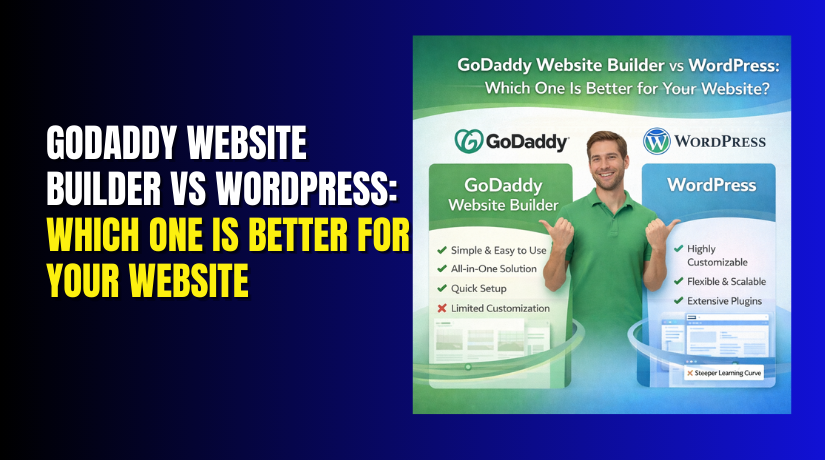
GoDaddy Website Builder vs WordPress: Which One Is Better for Your Website?
Table of Contents
- Introduction
- What Each Platform Really Is
- Ease of Use: Which Is Better for Beginners?
- Pricing Comparison: Real-World Cost Over 12 Months
- Performance, Security, and Maintenance
- Ecommerce: GoDaddy Website Builder Ecommerce vs WordPress WooCommerce
- Limitations and Deal-Breakers You Must Know
- Best Choice by Use Case
- Final Verdict and Recommendation
Introduction
Picking the right platform saves time, money, and stress. Many USA business owners want fast setup and easy edits. Others want full control and long-term growth options. That is why godaddy website builder vs wordpress is a common search today. Both tools can create a modern website quickly. But they work in very different ways. Your best choice depends on your goals and budget. It also depends on how much control you need later. This guide helps you choose with clear and simple details. By the end, you will know godaddy vs wordpress which is better for you.
Quick Summary: The Short Answer for Most Users
If you want a simple site, GoDaddy can be enough. If you want more control, WordPress often wins long term. Here is a quick way to decide today.
- Choose GoDaddy if you want a quick site launch.
- Choose GoDaddy if you hate updates and tech tasks.
- Choose WordPress if you want more design flexibility.
- Choose WordPress if you plan long-term content growth.
- Choose WordPress if you want advanced plugins and tools.
This is the key difference in wordpress vs godaddy website builder. GoDaddy is built for speed and simplicity. WordPress is built for control and scaling over time. For many new users, wordpress vs godaddy for beginners depends on comfort level. If you prefer guided steps, GoDaddy feels easier. If you want learning with rewards, WordPress feels stronger.
What Each Platform Really Is
GoDaddy Website Builder in simple terms
GoDaddy Website Builder is an all-in-one hosted platform. You create pages using a visual editor and templates. Hosting, security, and updates are handled for you. You usually pay one monthly plan and publish fast. It is best for simple business sites and basic pages. Many users choose it for quick results and low effort.
WordPress in simple terms
WordPress is a flexible platform with many setup choices. Most businesses use self-hosted WordPress with a hosting provider. You pick a theme, then add plugins for features. You control design, SEO tools, and site structure easily. This is why people compare wordpress vs godaddy website builder often. WordPress fits blogs, service sites, and growing stores very well. It also supports advanced features when your needs change later.
Ease of Use: Which Is Better for Beginners?
Ease of use matters when you are building alone. Many USA users want a clean setup without stress. That is where wordpress vs godaddy for beginners becomes important. Both platforms can feel simple at the start. But the work you do later can change things.
Setup Speed and Launch Time
GoDaddy Website Builder is built for quick setup and launch. You can choose a template and start editing fast. Hosting and SSL are usually included in the plan. You also get guided steps during the first setup. This is a big reason people compare godaddy website builder vs wordpress. WordPress setup can be fast, but it has more steps. You must pick hosting, install WordPress, and choose a theme. Many hosts provide one-click WordPress install now. Still, you may spend more time in first setup.
GoDaddy setup feels faster because it includes:
- Hosting, SSL, and basic settings in one place
- Guided site creation steps for new users
- Quick publish options with fewer technical choices
WordPress setup takes longer because you decide:
- Hosting plan and site resources
- Theme design and layout structure
- Plugins for forms, SEO, and security
Editor Experience: Drag-and-Drop vs WordPress Blocks
GoDaddy uses a drag-and-drop style editor for page building. You move sections, add text, and insert images easily. It is simple and feels controlled for beginners. WordPress uses a block editor with rows and content blocks. You add headings, buttons, images, and columns using blocks. It feels easy after some practice and repetition.
In wordpress vs godaddy website builder, the editor difference is key. GoDaddy feels less confusing on day one. WordPress feels more flexible after you learn blocks.
Learning Curve: What Takes Time in WordPress?
WordPress takes time because of choices and options. You learn themes, plugins, menus, and basic settings. You also learn how updates and backups work. This learning gives you more control later. GoDaddy has fewer moving parts, so learning is lighter. But fewer options can limit your next steps.
Support and Help Experience
GoDaddy offers platform support for builder-related issues. Since it is one system, support feels direct and simple. WordPress support depends on your hosting and plugins. You may contact hosting support for server issues. You may contact plugin teams for feature issues. This is normal in WordPress and improves control. Still, some beginners prefer one support team.
So, godaddy vs wordpress which is better for ease of use? GoDaddy is easier for quick and simple websites. WordPress is better if you want growth and control.
Pricing Comparison: Real-World Cost Over 12 Months
Price is not just the monthly plan you see first. You should look at total cost for one year. This is where godaddy website builder pricing vs wordpress matters most. Both options can fit small budgets in the USA. But the cost structure works in different ways.
What GoDaddy Website Builder Pricing Usually Includes
GoDaddy Website Builder often bundles key items in one plan. You pay one monthly price and keep things simple. Most users like this because it feels predictable. You do not need extra setup for hosting and SSL.
GoDaddy plans usually include these basics:
- Website hosting inside the builder plan
- SSL security for secure browsing
- A built-in editor and templates
- Basic support from one provider
If you need extra features, you may upgrade your plan. Ecommerce, advanced tools, and extra storage may cost more. So the starting price can rise as your site grows.
What WordPress Pricing Usually Includes
WordPress itself is free to use as software. But your website still has running costs each year. You pay for hosting, domain, and optional premium tools. The good part is you choose what you need. You can start small and add upgrades later.
WordPress costs often include:
- Domain name registration each year
- Web hosting plan, monthly or yearly
- A theme, free or premium, based on needs
- Plugins, free or premium, based on features
This is why godaddy website builder pricing vs wordpress is not a simple match. WordPress can be cheaper for basic sites with free tools. WordPress can also cost more with premium add-ons.
Cost Scenarios for Common Website Types
Here is how most users spend in real situations.
Personal site or portfolio
- GoDaddy can be one simple plan with quick setup.
- WordPress can be low-cost with basic hosting options.
Small business site
- GoDaddy is easy when you want fewer moving parts.
- WordPress is better when you need custom forms and pages.
Online store
- GoDaddy needs an ecommerce plan for selling online.
- WordPress adds store power using WooCommerce and plugins.
Hidden Costs and Renewals You Should Watch
Renewals can change your total cost after one year. Some plans increase after the first discount period ends. Paid themes, paid plugins, and paid apps can add cost too. Ecommerce tools may also add fees over time.
In wordpress vs godaddy website builder, WordPress feels flexible for budget control. GoDaddy feels simple but can rise with add-on needs. The best choice depends on your site size and growth plan.
Design and Customization: How Much Control Do You Need?
Design matters because it shapes trust and first impressions. Both platforms offer templates to start building quickly. But the level of control is not the same. This is where godaddy website builder limitations can appear for growing sites.


Templates in GoDaddy Website Builder
GoDaddy gives ready templates and pre-made page sections. You can change colors, fonts, and basic layouts easily. You can also add gallery blocks, contact sections, and buttons. This is great for simple business sites and quick launches. But deep layout control is limited compared to WordPress. Some custom design needs may not be possible without workarounds.
Common GoDaddy design limits include:
- Fewer layout controls for complex page sections
- Limited theme-level design changes across all pages
- Fewer advanced design tools for unique brand styling
Themes and Page Design in WordPress
WordPress supports thousands of themes and design tools. You can pick a simple theme or a full page builder setup. You can also customize menus, headers, footers, and templates. This control helps you match your brand style closely. It is a key reason many users prefer wordpress vs godaddy website builder.
WordPress design advantages often include:
- More theme choices for any niche and business type
- Better control over page layouts and reusable templates
- Easy design upgrades without rebuilding the whole site
Switching Designs Later
Changing a GoDaddy template can be limiting for large sites. You may need to rebuild sections to match a new style. WordPress makes redesign easier with theme switching options. You still need testing, but tools give more control. If you expect future changes, WordPress can feel safer.
SEO: GoDaddy Website Builder SEO vs WordPress SEO
SEO helps people find your site on Google in the USA. Both platforms can support basic SEO needs well. But advanced control can change your results over time. This is why GoDaddy website builder SEO vs WordPress SEO matters.
SEO Basics Both Platforms Can Handle
Both platforms allow key SEO tasks that help ranking:
- Page titles and descriptions for search snippets
- Heading structure for better page clarity
- Image alt text for accessibility and image search
- Mobile-friendly layouts for user experience
Where WordPress Often Wins for SEO Growth
WordPress gives more control over technical SEO settings. You can add SEO plugins for deeper optimization work. You can manage redirects, schema, and advanced metadata easily. Blogging is also smoother and more scalable in WordPress. That is a big reason many compare GoDaddy website builder SEO vs WordPress SEO.
GoDaddy can still work for local and simple sites. But WordPress fits better for long-term SEO growth.
Performance, Security, and Maintenance
A good website must load fast and stay safe. It should also be easy to keep updated. This is where godaddy website builder vs wordpress feels very different. GoDaddy runs inside a managed system with fewer moving parts. WordPress runs on hosting you choose, with tools you control.
Performance: Speed and Core Stability
GoDaddy Website Builder performance is mostly handled for you. The platform manages caching, updates, and core settings. You can still improve speed with clean images and fewer sections. But you have limited deep performance control. This is one of the practical godaddy website builder limitations for advanced sites.
WordPress performance depends on your hosting and setup choices. With good hosting, WordPress can load very fast. You can also add speed tools like caching and image compression. You can control code, plugins, and page structure for better results. This flexibility is a big plus in wordpress vs godaddy website builder.
Security: Keeping Your Site Safe
GoDaddy handles many security tasks behind the scenes. You do not manage core updates and server protection. That reduces risk for beginners and small businesses. WordPress security is strong, but it needs good habits. You should update WordPress, themes, and plugins on time. You should also use backups and login protection.
Helpful WordPress security basics include:
- Use strong passwords and two-step login options
- Update plugins and themes as soon as updates appear
- Keep daily or weekly backups, based on your site size
- Use a security plugin for extra protection
Maintenance: How Much Work Will You Do?
GoDaddy needs less maintenance because it is managed. You mainly update content, images, and pages. WordPress needs routine care, but it becomes easy with a process. Many site owners set a weekly routine for updates and backups. If you want less work, GoDaddy feels simpler. If you want control, WordPress feels better.
Ecommerce: GoDaddy Website Builder Ecommerce vs WordPress WooCommerce
Online selling changes the platform choice quickly for many users. You need payments, shipping, tax, and product control. This is why godaddy website builder ecommerce vs wordpress woocommerce is a key comparison.
GoDaddy Ecommerce: Best for Simple Stores
GoDaddy ecommerce works well for small product catalogs. You can add products, set prices, and start selling fast. It is good for simple stores with basic needs. It may feel limited for advanced selling workflows.
WordPress Ecommerce with WooCommerce: Best for Growth
WordPress can run advanced stores using WooCommerce. It supports product variations, custom checkout options, and many extensions. You can connect marketing tools, shipping services, and reporting add-ons. This flexibility is why many choose WordPress for ecommerce.
Key WooCommerce strengths often include:
- Better control over checkout and payment options
- More shipping and tax tools for USA store needs
- More room to scale catalog, content, and SEO pages
So, godaddy website builder ecommerce vs wordpress woocommerce depends on your store plans. GoDaddy is fine for simple selling and quick setup. WordPress with WooCommerce is stronger for growth and control.
Limitations and Deal-Breakers You Must Know
Every platform has limits, even if it looks perfect today. The biggest concern with GoDaddy is long-term flexibility. Many users hit godaddy website builder limitations when their site starts growing. You may want advanced layouts, custom features, or deeper SEO control. Those needs can be harder to meet inside a closed builder.
Common deal-breakers for GoDaddy users include:
- Limited advanced customization for unique business workflows
- Fewer app-style add-ons compared to WordPress plugins
- Harder site moves when you want a full rebuild later
WordPress also has limits, but they are different. WordPress needs basic maintenance and updates to stay safe. You must choose a good host and avoid too many plugins. Still, WordPress gives more control as your needs change.
Best Choice by Use Case
The right pick depends on your website purpose and future plans. Use these quick cases to decide faster.
- Local service business site with basic pages: GoDaddy works well.
- Portfolio or simple brochure site: GoDaddy can be enough.
- Blog and content growth plan: WordPress is the stronger option.
- Online store with growth goals: WooCommerce on WordPress fits best.
- Custom features, SEO scaling, and integrations: WordPress is better.
This is why wordpress vs godaddy website builder is not one-size-fits-all. It depends on control, growth, and feature needs. If you want low setup work, GoDaddy is easier. If you want long-term freedom, WordPress is stronger.
Final Verdict and Recommendation
So, godaddy vs wordpress which is better for most USA users? Choose GoDaddy if you need a fast, simple website. Choose WordPress if you want control, growth, and stronger options. In most cases, WordPress wins for serious business websites. It supports scaling without hitting early platform limits.
Need expert help with WordPress setup, speed, SEO, or WooCommerce? Contact WooHelpDesk for reliable website support and fixes.