What Programming Languages are used in WordPress Development?
Table of Contents
- Introduction: Why WordPress Uses Multiple Languages
- Quick Overview: WordPress Development Languages at a Glance
- WordPress Core: What Language Is WordPress Written In?
- Is WordPress Built With PHP?
- What Happens When Someone Visits a WordPress Page?
- Why WordPress Needs a Database and MySQL
- How Core Languages Work Together in WordPress
- Do You Need to Know PHP for WordPress Development?
- What Languages Do You Need for WordPress Development?
- When You Do Not Need Deep Coding Skills
- Theme Development: What Language Are WordPress Themes Written In?
- WordPress Theme Development Languages and Their Role
- How Themes Use PHP Templates in Real Projects
- Plugin Development: What Language Are WordPress Plugins Written In?
- How Plugins Add Features Without Changing Core Files
- Plugin Examples and Where Languages Fit in Real Use
- How Plugins Store Data and Work With the Database
- Best Practices for Clean Plugin Development
- Conclusion
Introduction: Why WordPress Uses Multiple Languages
WordPress powers websites, stores, blogs, and online shops worldwide. It works because different tools handle different jobs. That is why the programming languages used in WordPress are not limited to one. Some languages run on the server. Other languages run inside the browser. Together, they create fast pages, clean designs, and smooth actions. You may only see a page on screen. But many parts work behind the scenes. WordPress loads data, builds layouts, and shows content quickly. Each step needs the right language for the task. This mix also helps developers build features faster. It supports themes, plugins, and modern website tools. It also supports simple edits for beginners. You can start small and grow your skills over time. That is why learning WordPress development languages feels easier than many platforms. You learn what you need, then move to the next layer. Your goal decides the learning path. If you want design, focus on frontend languages. If you want features, focus on server languages. If you want modern apps, learn JavaScript deeply.
Here is why WordPress uses more than one language:
- One language handles server logic and page building.
- One language controls structure and content layout.
- One language manages design, spacing, and responsiveness.
- One language adds clicks, sliders, and live updates.
- One system stores posts, pages, users, and settings.
Quick Overview: WordPress Development Languages at a Glance
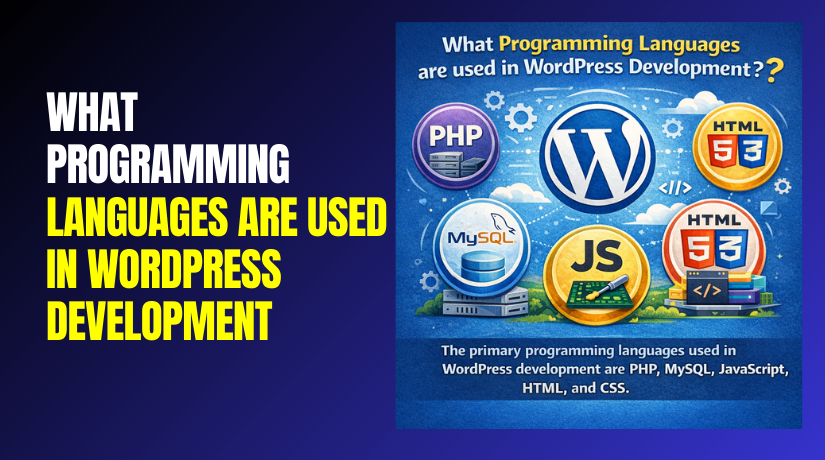
Many beginners ask about languages used in WordPress development. The answer is simple when you view it by role. WordPress runs on a web server and returns a web page. That page loads in a browser on phones and laptops. So WordPress needs both backend and frontend languages. Backend languages build and process content on the server. Frontend languages display and control what users see. This is the core idea behind WordPress development languages.
Here is the language stack you will use most often:
- PHP: Runs WordPress core, themes, and most plugin logic.
- HTML: Builds page structure inside theme template files.
- CSS: Styles layouts, fonts, colors, and mobile design.
- JavaScript: Adds interactivity and powers modern editor tools.
- MySQL: Stores WordPress content inside the database system.
This overview helps you plan your learning in a smart way. You do not need everything on day one. Learn the languages based on your WordPress goal.
WordPress Core: What Language Is WordPress Written In?
Many beginners ask, what language is WordPress written in. The short answer is simple and clear. WordPress core is written mainly in PHP. PHP runs on the server and builds pages. It connects your site to the database safely. It also powers login, settings, and admin features. When you open a WordPress page, PHP starts working first. It loads the right files and checks site settings. Then it pulls the needed content from the database. Finally, it prepares the page output for the browser. This is why people also ask, what coding language does WordPress use. The main coding language is PHP, plus supporting web languages. Those supporting languages help display and enhance the page.
Is WordPress Built With PHP?
Yes, is WordPress built with PHP is a valid question. WordPress depends on PHP to run its core features. Your hosting server runs PHP for every request. That includes loading posts, pages, and product details. It also includes running plugin and theme code. Without PHP, WordPress cannot build dynamic pages. It would not know what content to show. It would also fail to manage user actions. Actions include logins, form submits, and saving settings.
PHP in WordPress handles many jobs, such as:
- Loading the WordPress core files and system settings.
- Running theme templates to build page layouts.
- Executing plugin features like forms and checkout steps.
- Managing user roles, permissions, and security checks.
- Processing data before it is shown to visitors.
What Happens When Someone Visits a WordPress Page?
Understanding this flow makes WordPress development feel easier. The server receives a request from the visitor’s browser. WordPress then follows a clean step process behind the scenes. Each step helps WordPress create a working page fast.
Here is the basic page loading flow:
- The web server receives the request for a URL.
- PHP starts WordPress and loads core system files.
- WordPress loads active plugins and checks their functions.
- WordPress loads the active theme and its template files.
- WordPress asks the database for the right content.
- WordPress builds HTML output and sends it to browsers.
This flow explains why PHP matters so much. It acts like the engine of WordPress pages. It decides what to load and what to show. It also decides how data should be handled.
Why WordPress Needs a Database and MySQL
WordPress stores most content in a database. That includes posts, pages, and menu settings. It also stores users, roles, and plugin settings. Most WordPress sites use MySQL databases on hosting. MySQL is the database system storing your data. SQL is the language used to talk to MySQL. Many users never write SQL directly in WordPress. WordPress provides safe functions for most database tasks. Still, it helps to understand basic database ideas. It improves debugging and performance planning.
Common WordPress data stored in MySQL includes:
- Blog posts, pages, and custom post types.
- WooCommerce orders, products, and customer details.
- Comments, form entries, and plugin configuration values.
- User accounts, roles, and permission settings.
How Core Languages Work Together in WordPress
Even though PHP is the main language, it is not alone. WordPress outputs pages that browsers can read. Browsers understand HTML, CSS, and JavaScript. WordPress uses PHP to generate HTML structure. It uses CSS for styling and layout control. It uses JavaScript for clicks, menus, and dynamic features. This is why languages used in WordPress development include several options. It is also why WordPress development languages depends on your goal. If you work on core logic, focus on PHP. If you work on design, focus on HTML and CSS. If you work on modern features, focus on JavaScript.
Do You Need to Know PHP for WordPress Development?
Many people ask, do you need to know PHP for WordPress. The best answer depends on what you want to build. If you only manage content, PHP is not required. If you customize design lightly, PHP may not be needed. But for real development work, PHP becomes very important. WordPress core runs on PHP and server logic. Themes use PHP templates to render pages correctly. Plugins also rely on PHP for most features. So, if you want full control, learn PHP basics. It helps you understand how WordPress actually works. It also makes debugging issues much faster and safer.
PHP is most useful when you want to do these tasks:
- Build custom plugins with settings and new admin pages.
- Create custom themes and template parts for unique layouts.
- Add custom functions using hooks, filters, and shortcodes.
- Change WooCommerce logic like cart rules and pricing steps.
- Fix errors caused by themes or plugins on the server.
If your goal matches these tasks, PHP is required. You do not need expert level skills on day one. You only need enough to read and edit safely. Then you can grow your skills over time.
What Languages Do You Need for WordPress Development?
People also search what languages do you need for WordPress development. WordPress uses a mix of backend and frontend tools. You choose the languages based on your work type. A site designer needs different skills than a plugin builder. A headless WordPress developer needs stronger JavaScript skills. A WooCommerce developer needs PHP and WordPress hooks knowledge.
Here is a simple way to match skills to goals:
- Theme building: PHP, HTML, CSS, and basic JavaScript.
- Plugin building: PHP first, then JavaScript for richer admin screens.
- Speed and fixes: PHP, database basics, and caching knowledge.
- Headless builds: JavaScript, REST API, and JSON understanding.
This is why WordPress development languages is not one fixed list. It changes based on your project needs and timeline.
When You Do Not Need Deep Coding Skills
Many WordPress users are not full developers. They still build strong websites with simple tools. This is a great option for small businesses in the USA. You can use themes, page builders, and block patterns. You can also use plugins for most common features. This approach works well for blogs and service websites. It also works for simple online stores. In these cases, PHP knowledge is helpful but not required.
You may not need deep coding for these tasks:
- Changing colors, fonts, and spacing using theme settings.
- Building pages with the block editor and reusable blocks.
- Adding forms, SEO tools, and security plugins quickly.
- Setting up WooCommerce products and payment options.
- Using prebuilt templates for home and service pages.
Still, learning small coding basics can help a lot. HTML and CSS help you style pages better. JavaScript helps you understand interactive features. PHP helps you solve theme and plugin conflicts. When you mix these skills, you become more confident. You also fix problems without waiting for support.
Theme Development: What Language Are WordPress Themes Written In?
Many site owners ask, what language are WordPress themes written in. A WordPress theme uses more than one language together. The theme controls how your site looks and feels. It decides layout, colors, spacing, and page structure. It also controls how posts and pages appear. Most themes use PHP to build pages on the server. They also use HTML to structure each section clearly. CSS styles the design and makes it responsive. JavaScript adds interactive behavior on the frontend. This mix is the base of WordPress theme development languages.
A theme is not only about design and colors. It also controls how content is placed and loaded. It decides where menus show and how headers work. It decides how blog posts show on archive pages. It also controls widgets, sidebars, and footer sections. Because themes touch many areas, multiple languages are needed.
Here is how each language helps a WordPress theme:
- PHP pulls content and runs template logic.
- HTML builds sections like header, content, and footer.
- CSS styles typography, spacing, and mobile layouts.
- JavaScript adds dropdown menus, sliders, and dynamic actions.
WordPress Theme Development Languages and Their Role
When people talk about WordPress theme development languages, they usually mean the full theme stack. A theme uses PHP templates to create different page types. It uses HTML markup inside those templates for structure. It uses CSS to keep the design consistent. It uses JavaScript to improve user experience. This is why themes are built with mixed web tools. It also explains why a theme can be customized in many ways.


A modern theme may also support the block editor deeply. It may include block styles and layout settings. It may also add patterns for quick page building. Even then, the base languages remain the same. You still need PHP for server-side template control. You still need CSS for clean design and spacing.
Common Theme Files and What Each Language Does
Themes include a set of files that work together. Each file has a purpose and a role. Knowing these files helps you edit themes safely. It also helps you debug layout or design issues faster.
Here are common theme files you will see often:
- css stores theme styles and basic theme details.
- php adds theme features and custom functions.
- php shows the header and top navigation area.
- php shows the footer and closing page elements.
- php acts as the fallback template for many views.
- php controls how a single post page displays.
- php controls how a standard page displays content.
- php controls category, tag, and archive page layouts.
Each file often mixes PHP and HTML together. PHP decides what content loads and where. HTML creates the visual structure for that content. Then CSS styles the output for a polished look. JavaScript adds extra actions when needed.
How Themes Use PHP Templates in Real Projects
Theme templates help WordPress show the right design. WordPress selects templates using a clear order system. That system picks the best matching template file. For example, posts use single templates by default. Pages use page templates by default. Archives use archive templates for grouped content. This is why PHP template files matter so much. They control layout rules with simple logic.
Common template tasks inside themes include:
- Displaying the post title, author name, and publish date.
- Showing featured images with correct size and placement.
- Printing content, excerpts, and custom fields cleanly.
- Loading menus, widgets, and sidebar content safely.
- Adding schema, meta tags, and responsive markup where needed.
When you understand these basics, theme work feels easier. You can create layouts that match your brand goals. You can also fix display issues with more confidence.
Plugin Development: What Language Are WordPress Plugins Written In?
Many users ask, what language are WordPress plugins written in. Most WordPress plugins are written mainly in PHP. PHP lets plugins run on the server with WordPress core. Plugins use PHP to add features and change behavior. They can add new menus in the admin area. They can also add tools, forms, and custom settings. Plugins can even change how WooCommerce works. This is why PHP is the main plugin language. It connects directly with WordPress hooks and functions.
Plugins also use other languages when needed. Many plugins include HTML to display admin screens. They use CSS to style those screens and elements. They use JavaScript for interactive tools and live updates. This is common in modern dashboards and form builders. Some plugins also use the REST API for integrations. That often adds more JavaScript work on the frontend. Still, PHP remains the core plugin language for logic.
How Plugins Add Features Without Changing Core Files
A plugin should never edit WordPress core files directly. WordPress updates would remove those changes quickly. Instead, plugins extend WordPress in a safe way. They use hooks, actions, and filters to connect features. This is a key reason plugins are powerful and flexible. You can add new features without breaking core updates.
Here are common plugin jobs handled through PHP:
- Creating custom post types for services, events, or products.
- Adding shortcodes for buttons, forms, and custom layouts.
- Building admin settings pages with saved options and fields.
- Running scheduled tasks like cleanup or email sending.
- Adding security checks and validation for user input.
Plugin Examples and Where Languages Fit in Real Use
Plugins can range from small to very complex systems. Some plugins only add one feature, like a shortcode. Other plugins build full systems, like bookings or memberships. The language mix depends on what the plugin needs. A simple plugin may only use PHP. A complex plugin may use PHP, JavaScript, HTML, and CSS. A modern plugin may also use REST calls for data.
Here is how languages typically fit inside plugin work:
- PHP handles logic, settings, database actions, and security.
- HTML prints admin forms, tables, and field layouts.
- CSS styles admin pages and user-facing elements.
- JavaScript adds live search, filters, and dynamic form behavior.
For example, a checkout field plugin uses PHP heavily. It adds fields, saves data, and validates inputs safely. It may also use JavaScript to show fields conditionally. A slider plugin may use JavaScript for motion and effects. It still uses PHP to create settings and output markup. A CRM plugin may use REST requests and JSON responses. It may show live data inside the WordPress dashboard.
How Plugins Store Data and Work With the Database
Plugins often store settings and custom data. WordPress provides easy ways to store most data safely. Many plugins save options using built-in WordPress functions. Some plugins create custom database tables for large data. That happens with orders, bookings, or form entries. Still, good plugins avoid unsafe direct queries. They rely on WordPress database helpers and safe methods.
Common plugin data stored by WordPress includes:
- Plugin settings, keys, and feature toggles.
- Custom content like testimonials, reviews, or service items.
- User meta like preferences and saved checkout fields.
- Logs for errors, events, and security activities.
Best Practices for Clean Plugin Development
Good plugin development focuses on safety and stability. It should also focus on performance and updates. A clean plugin avoids conflicts with other plugins. It also avoids loading heavy scripts everywhere. It loads scripts only where needed. This keeps the site fast and smooth.
Quick best practices for plugin work:
- Use hooks instead of editing core files.
- Validate and sanitize every user input properly.
- Load scripts only on required pages and screens.
- Keep settings simple and easy for site owners.
- Test with updates to avoid breaking changes.
JavaScript in Modern WordPress: Gutenberg and REST-Based Builds
JavaScript has become more important in modern WordPress development. WordPress now offers richer editing and faster user actions. The block editor, also called Gutenberg, relies on JavaScript heavily. It gives users drag and drop style content building. It also supports reusable blocks and custom block layouts. Developers use JavaScript to create custom blocks for clients. These blocks can show dynamic content with better control. This is where WordPress REST API JavaScript becomes very useful.
The WordPress REST API lets sites share and receive data. It sends data in JSON format for apps and services. Developers use JavaScript to fetch posts and display them live. This approach supports headless WordPress and modern frontends. It also helps when building apps with React or Vue. A REST setup can power mobile apps and custom dashboards. It can also power fast landing pages and search tools.
Here are common places JavaScript is used in WordPress today:
- Building Gutenberg blocks with custom controls and previews.
- Creating interactive menus, popups, sliders, and filters.
- Loading posts or products without full page reloads.
- Improving admin screens with live search and dynamic forms.
- Connecting third-party services using REST API requests.
Conclusion
WordPress uses a mix of tools for different tasks. Core work relies mainly on PHP and database support. Theme work mixes PHP, HTML, CSS, and JavaScript together. Plugin work uses PHP first, then JavaScript when needed. REST builds increase JavaScript use in modern projects. Choose WordPress development languages based on your goals and work. If you need help with themes or plugins, WooHelpDesk can help.