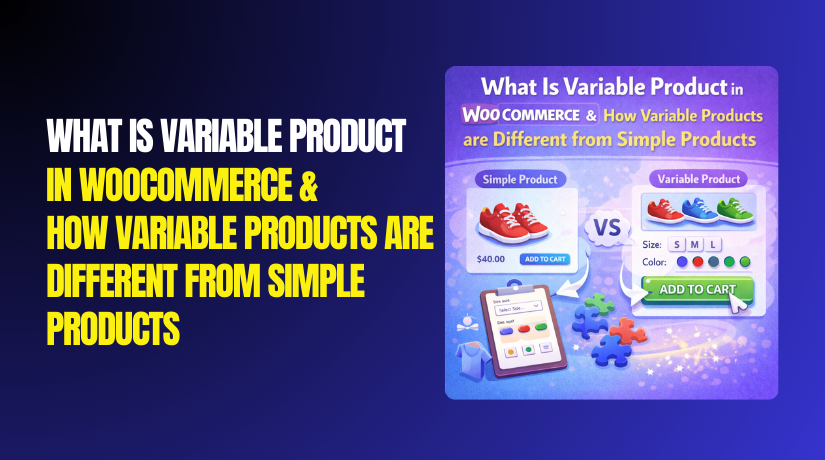
What Is Variable Product in WooCommerce & How Variable Products are Different from Simple Products?
Table of Contents
- Introduction
- Why does product type choice matter in WooCommerce?
- What is a Variable Product in WooCommerce?
- When should you use WooCommerce variable products?
- What is an Example of Variable Product in WooCommerce?
- What Are The Key Features of Variable Product in WooCommerce?
- What is a Simple Product in WooCommerce?
- When to use WooCommerce simple products?
- What is an Example of a Simple Product in WooCommerce?
- What Are Key Features of Simple Product in WooCommerce?
- What is the Difference Between Variable Product and Simple Product in WooCommerce?
- Final Verdict
Introduction
WooCommerce offers multiple product types for different selling needs. Choosing the right type improves pricing, inventory, and checkout flow. This WooCommerce product types guide focuses on variable and simple products. A WooCommerce variable product supports options like size, color, and style. A simple product stays fixed with one price and one SKU.
Understanding WooCommerce variable vs simple products helps you avoid setup errors. It also helps you build better product pages and higher conversions. Many stores use both types in the same catalog. The best choice depends on how many choices a buyer needs.
This guide explains definitions, examples, and key features clearly. It also explains how variations change stock, price, and shipping rules. You will learn where variable products work best for scaling. You will also learn where simple products keep management easy.
Why does product type choice matter in WooCommerce?
Product type controls how WooCommerce stores product data internally. It impacts how buyers select options on product pages. It impacts how stock reduces and how SKUs are managed. It impacts how shipping classes and weights are applied. It impacts how ads and feeds export product details. It impacts how reporting tracks sales by option or item. If you choose the wrong type, refunds and confusion increase quickly. Correct type improves clarity, trust, and purchase confidence.
- Better Buyer Experience And Clear Options
The correct type shows the right selectors and pricing behavior. It prevents buyers from guessing sizes and colors incorrectly. - Cleaner Inventory Tracking And SKU Control
The right type reduces stock mistakes and overselling issues. It also improves warehouse picking and fulfillment accuracy. - Improved SEO And Better Product Page Structure
Good structure supports search intent and product comparisons better. It also supports clearer descriptions and variation information. - Faster Catalog Management For Large Stores
Correct setup reduces edits and reduces repeated product creation. It helps you scale your catalog without messy duplication.
What is a Variable Product in WooCommerce?
A WooCommerce variable product is one product with many selectable options. These options are called WooCommerce product variations in WooCommerce.
Variable products are perfect for products with real option differences. They reduce duplicate product listings and keep the catalog cleaner. They also help customers compare options on one page. WooCommerce manages variations using attributes and variation rules. You create attributes, then generate variations from those attributes. You can also create variations manually for full control. This setup supports flexible selling without building many separate products.
- One Product With Multiple Option Combinations
Options live under one listing for a cleaner store catalog. Buyers see all choices without opening multiple pages. - Each Variation Can Have Unique Price And Stock
This supports accurate inventory for each option combination. It also supports premium pricing for special variations. - Variation Level SKU, Image, And Weight Support
You can track SKUs for each option for fulfillment accuracy. Images can change when buyers change the selected option. - Buyer Must Select Options Before Adding To Cart
Selection reduces wrong orders and reduces returns. It also creates a clear purchase flow for option based products.
When should you use WooCommerce variable products?
Use variable products when buyers expect choices on one product page. Use them when stock differs by size, color, or pack. Use them when pricing differs across option combinations. Use them when images differ for each option selection. Use them when shipping weight differs by option. Use them when SKU tracking is needed for each option. Avoid variable products when there are no true product choices. Avoid them when the options are only custom notes. For custom notes, use product add-ons instead of variations.
- Apparel, Shoes, And Fashion Items
Sizes and colors are expected by buyers in fashion categories. Variations keep all size choices under one page listing. - Packs, Bundles, And Quantity Based Variants
Pack sizes often need separate SKUs and separate pricing. Variations keep pack options easy for selection and purchase. - Products With Material Or Finish Choices
Finish choices affect price and sometimes photos as well. Variations allow image switching and accurate option display. - Items With Different Weights Or Dimensions By Option
Weight based shipping needs variation level weight values. This avoids wrong shipping rates and wrong label generation.
What is an Example of Variable Product in WooCommerce?
A simple way to understand is through real WooCommerce variable product examples. Imagine you sell a t-shirt in three sizes and two colors. The sizes are Small, Medium, and Large for the same t-shirt. The colors are Black and White for the same t-shirt. One product page can show size and color dropdowns. Each size and color combo is a variation with its own details.
You can set the Medium Black price slightly higher if needed. You can set stock for Large White separately from Large Black. You can show a Black image when Black is selected. This creates a smoother buying experience and fewer wrong orders.
Another example is a coffee pack with 250g and 500g options. Price and weight change, so variations fit perfectly.
Another example is a phone case with model options and color options. Buyers choose the model first, then choose the color next. That flow reduces refunds because model mismatch is common.
- T-Shirt With Size And Color Options
Size and color create multiple combinations under one product. Stock and images can change based on chosen combination. - Coffee Pack With 250g And 500g Options
Weight affects shipping and price needs separate values. Variations handle both values cleanly on one page. - Phone Case With Model And Color Options
Model selection ensures correct fit and reduces returns. Variation level images help buyers confirm their chosen model. - Subscription Box With Monthly Themes And Pack Sizes
Themes and pack sizes can alter price and availability. Variations keep choice simple while preserving accurate stock.
What Are The Key Features of Variable Product in WooCommerce?
Variable products include several core features that simple products lack. These features help manage complex catalogs with fewer product pages. They also support better inventory control across multiple options. They also improve customer selection experience on one product page.
Each feature below supports a different store requirement. Use them carefully to avoid too many variations per product. Too many variations can slow editing and confuse buyers. Keep attributes meaningful and reduce unnecessary combinations. Use only variations that you can stock and fulfill reliably.


1. Attributes And Variation Generation Tools
- Attributes define your options like Size, Color, and Material.
Attributes create the option framework for WooCommerce product variations. - Global attributes keep options consistent across many products.
Consistency improves filtering, search, and catalog management accuracy. - Variation generation creates combinations in one click.
It saves time and reduces manual setup mistakes significantly. - You can generate all combinations or selected combinations only.
This helps you avoid unwanted variations and reduce store clutter.
2. Variation Level Pricing, Sales, And Scheduled Discounts
- Each variation can have a unique regular price.
Pricing can match option value like larger sizes costing more. - Each variation can have a unique sale price.
You can discount only specific options to clear stock. - Scheduled sales work per variation for planned promotions.
Scheduling helps you run campaigns without manual daily updates. - Price changes show instantly after selection on product pages.
This improves clarity and reduces checkout surprise issues.
3. Variation Level Inventory And Backorder Control
- Stock is tracked separately for every variation.
This prevents overselling when only one option is available. - You can enable backorders for specific variations only.
This supports popular sizes while stopping weak options safely. - Low stock alerts work at variation level for better planning.
Better alerts improve restocking and reduce lost sales quickly. - Out of stock variations can be hidden or shown as unavailable.
This controls buyer experience and reduces frustration during browsing.
4. Variation Level SKU And Barcode Friendly Structure
- Each variation can have its own SKU value.
Unique SKUs improve tracking and reduce fulfillment errors. - Barcodes can be mapped to variation SKUs for scanning workflows.
Scanning supports faster packing and fewer wrong shipments. - Variation SKU helps reports show which option sells best.
Better reporting helps restock the right combinations faster. - Warehouse teams can pick the correct option using SKU labels.
This reduces returns caused by wrong size or color shipments.
5. Variation Level Shipping Data And Weight Differences
- Each variation can have its own weight and dimensions.
Accurate weight improves shipping rates and label accuracy. - Shipping class can be used for special handling items.
Shipping classes support bulky and fragile option pricing needs. - Different options can trigger different shipping costs correctly.
This prevents undercharging and protects your profit margins. - Fulfillment becomes easier when packing size matches variation data.
Correct data reduces courier issues and delivery delays.
6. Variation Images And Option Based Photo Switching
- Each variation can have its own image or gallery image.
Image switching improves trust and reduces wrong option orders. - Color variations benefit most from image switching.
Buyers want to confirm the exact color before buying. - Style variations can show unique features and details clearly.
Clear visuals reduce questions and increase add to cart clicks. - Better images improve conversion and reduce returns.
Buyers feel confident when what they see matches delivery.
7. Default Variation Selection And Preselected Options
- You can set default attributes like Color Black or Size Medium.
Defaults reduce clicks and speed up shopping decisions. - Defaults guide buyers toward best sellers and popular options.
This improves conversion and supports stock planning strategy. - Default selections reduce confusion on mobile screens.
Mobile users prefer fewer steps and clearer starting options. - You still allow buyers to change options anytime.
Flexibility keeps choice open while improving first impression.
8. Variation Visibility Controls And Out Of Stock Handling
- You can hide out of stock variations to keep pages clean.
Clean pages reduce frustration and increase purchase focus. - You can show out of stock variations to inform availability.
Visibility helps buyers plan and reduces surprise later. - You can disable specific variations without deleting the product.
This helps seasonal options and limited edition items management. - You can control variation visibility to reduce dead end clicks.
Better visibility rules improve browsing flow and reduce exits.
What is a Simple Product in WooCommerce?
A simple product in WooCommerce is a product that has only one option and no variations. It is the most basic product type and does not require customers to make any selection beyond adding it to the cart. Simple products are ideal for products that come in one size, color, or style.
For example, a book, a single color t-shirt, or a digital download would all be classified as simple products. Simple products make up the majority of products sold online, as many items don’t require different variations or attributes.
- One SKU, One Price
Simple products have a single price and one SKU. They are easy to manage, making them ideal for straightforward products. - No Attributes or Variations
Simple products do not offer customization options like size or color. - Quick Setup and Management
You can add a simple product in minutes without needing to define variations, attributes, or complex settings.
When to use WooCommerce simple products?
Simple products work best when the item you sell has no need for variations. If your product comes in only one option (such as a specific book, gadget, or digital download), the simple product is the most efficient choice. Use this option when the product does not vary by size, color, material, or any other attribute.
- Books, Digital Downloads, and Single-Color Apparel
These are great examples of products that require no variations. - Single-Item Purchases (e.g., One SKU)
For any product that comes with just one version and no options. - Products that don’t require inventory tracking by size or color
Simple products are perfect for items where only one unit is sold or tracked.
What is an Example of a Simple Product in WooCommerce?
An example of a simple product in WooCommerce could be something like a digital eBook. This product would have one format, one price, and no variations. Similarly, you could have a single-color t-shirt in just one size, or a small piece of furniture that only comes in one style. There is no need for variations like color or size, making it a perfect candidate for being a simple product.
- An eBook Download
A digital product that comes in one format, one price. - Single-Color T-Shirt
A product with no need for size or color options. - A Single-Item Purchase Like a USB Drive
A product with only one variation and one SKU. - A DVD or CD
A physical product that comes with only one option.
What Are Key Features of Simple Product in WooCommerce?
WooCommerce simple products are designed to be easy to manage with minimal configuration. Since they don’t have variations or attributes, their setup is straightforward. Here are the key features:
1. Single Price and SKU
- Simple products have a single price and SKU, making them incredibly easy to track and manage. This is ideal for straightforward products like books, gadgets, or single-color items.
- You only need to set one price, and there’s no need for managing multiple variations or price tiers.
- With only one SKU, you can easily keep track of stock levels without worrying about different variations or combinations.
- This reduces the chances of errors and makes inventory management simpler.
2. No Variations
- Simple products do not offer variations such as size, color, or material. There is no need for customers to select options before adding the product to the cart.
- This makes the shopping process faster and more straightforward for both the customer and the store owner.
- By eliminating variations, you streamline the shopping experience.
- The absence of multiple selection options simplifies the inventory management process and reduces the number of products you need to manage.
3. No Complex Attributes
- Unlike variable products, simple products do not require you to set up attributes like color, size, or other custom options.
- There is no need to configure multiple combinations for each product.
- Without attributes, you avoid the complexity of setting up and managing multiple combinations of each product.
- This simplifies product creation and reduces the chances of errors when handling your inventory.
4. Digital and Physical Product Types
- Simple products can either be physical items or digital downloads.
- For physical products, you can set shipping costs and manage inventory.
- For digital products, you can set up automatic download links after purchase.
- This versatility allows you to sell both tangible goods and digital products (e.g., eBooks, software, music).
- You can apply different settings for physical products (like shipping) and digital products (like automatic file delivery).
5. Easy Inventory and Shipping Management
- Since simple products don’t have variations or attributes, managing inventory is much easier.
- You only need to track one stock level and handle one type of shipping (for physical products).
- The simpler the product, the easier it is to keep track of stock levels, update inventory, and handle shipping logistics.
- This makes simple products ideal for businesses with a smaller catalog or straightforward offerings.
What is the Difference Between Variable Product and Simple Product in WooCommerce?
The difference between variable and simple products in WooCommerce revolves around the complexity and customization options of the product. Simple products are ideal for items that don’t have options or require customization.
They offer one price, one SKU, and a straightforward purchase experience. On the other hand, variable products provide flexibility, allowing customers to choose options like size, color, and style. Each variation can have its own price, stock, and SKU, making them perfect for products that require customization or come in different versions.
| Feature | Simple Product | Variable Product |
| Definition | A product with no variations or options for customization. | A product with multiple options (e.g., size, color) and variations. |
| Price and SKU | One price and one SKU for the entire product. | Each variation can have its own price, SKU, and stock. |
| Customization Options | No customization or options for the customer. | Allows customers to select options like size, color, etc. |
| Attributes | No attributes required. | Requires attributes (e.g., size, color) to define variations. |
| Stock Management | One stock quantity for the whole product. | Stock is managed per variation. |
| Product Types | Best for single-type products (e.g., eBooks, gadgets). | Best for products with multiple choices (e.g., clothing, electronics). |
| Setup Complexity | Simple to set up with minimal configuration. | Requires setup for each variation, including attributes and prices. |
| Example | Digital products, books, single-style t-shirts. | T-shirts with different sizes and colors, shoes with multiple sizes. |
| Price Flexibility | Same price for all customers, no options. | Price can vary for each combination of attributes. |
| Shipping | Same shipping rules for the product. | Shipping may differ for each variation based on weight or size. |
| Images | One image for the entire product. | Different images can be assigned for each variation (e.g., color or style). |
Final Verdict
Both WooCommerce variable products and simple products have their place in online stores. Simple products work best for items that do not need options like color or size, such as books, digital downloads, or single-style apparel. They are quick to set up and easy to manage.
Variable products, however, are ideal for items that require multiple choices like size, color, material, or style. They give customers the ability to personalize their orders, but they require more setup and management.
When setting up your WooCommerce store, carefully consider the type of product you’re selling and whether variations are necessary. If you’re unsure, start with simple products and expand to variable products as your catalog grows. By understanding the differences, you can choose the best product type for your business needs.
Have questions before starting with WooCommerce & WordPress? Get support here at WooHelpDesk.