What Is a Dedicated Server in WordPress? Meaning, Cost, and When You Need It
Table of Contents
- Introduction
- Dedicated Server Explained in Simple Terms for WordPress Website Owners
- How Dedicated Server Hosting Works for WordPress Websites
- Dedicated Server vs Shared, VPS, and Cloud Hosting for WordPress
- Key Benefits of Using a Dedicated Server for WordPress and WooCommerce
- Dedicated Server Hosting Cost for WordPress: What You Pay For
- When You Need a Dedicated Server for WordPress (Clear Signals)
- How to Choose the Right Dedicated Server for WordPress
- FAQ: Dedicated WordPress Hosting Questions People Ask
- Final Verdict
Introduction
Your hosting decides how fast your WordPress site feels daily. It also affects uptime, security, and your visitor trust. When your site grows, weak hosting becomes a real limit. Pages load slower, forms fail, and customers leave quickly. That is why people ask, what is a dedicated server in WordPress. A dedicated server can give you stable speed and full control. It is often the next step after shared hosting struggles. This guide is written for USA-focused sites needing better performance. It is helpful for blogs, businesses, and WooCommerce store owners. You will learn meaning, basics, and what to expect next.
Dedicated Server Explained in Simple Terms for WordPress Website Owners
What “Dedicated” Really Means in Hosting
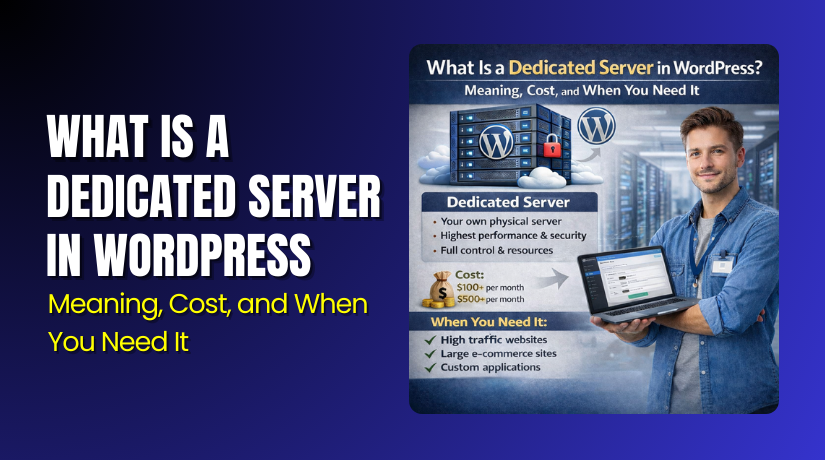
“Dedicated” means one physical server is reserved for you alone. No other websites share the same CPU, RAM, or storage. So your site performance does not depend on strangers. This is different from shared hosting, where many sites compete. It is also different from VPS, which is shared hardware. With a dedicated server, resources stay available when you need them. This helps during traffic spikes and busy work hours.
Dedicated Server Meaning in the WordPress Context
The dedicated server meaning WordPresS users care about is simple. Your WordPress files, database, and traffic run on one machine. WordPress needs server resources every time a page loads. It uses PHP to build pages and MySQL for stored data. More plugins and visitors increase these resource needs fast. Dedicated hosting helps because your resources are not split. If you wonder what is dedicated hosting WordPress owners choose, think control. You can tune caching, PHP settings, and security rules better. You can also handle bigger media libraries and heavy page builders. Many call this dedicated server hosting for WordPress, for good reason. For WooCommerce stores, this matters during cart and checkout peaks.
WordPress mainly depends on these server resources:
- CPU power for page building and background tasks
- RAM for faster processing and fewer slowdowns
- NVMe or SSD storage for quick file and database reads
- Database performance for products, users, and orders
- Network bandwidth for images, scripts, and API calls
Dedicated Server vs “High-End Shared Hosting” Confusion
Some shared plans look powerful in marketing and sales pages. But shared hosting still has limits behind the scenes. Hosts may limit CPU, RAM, or database usage quietly. So one busy neighbor can still slow your site down. This is why results feel random on shared environments. Dedicated hosting removes that noisy neighbor problem completely. It also makes performance easier to predict and manage.
These signs often mean shared hosting is reaching its ceiling:
- Your admin dashboard feels slow during normal work
- Pages load fine, then suddenly slow at peak times
- You see 500 errors or timeouts more often
- Checkout or form submissions fail under higher traffic
- The host warns about resource limits or “fair use”
If you see these issues, do not panic or rush. First, confirm the real limit with basic checks. Still, a dedicated server is often the cleanest upgrade path. It gives predictable resources and fewer surprise slowdowns.
How Dedicated Server Hosting Works for WordPress Websites
Dedicated server hosting for WordPress means your site runs on one server. That server is reserved only for your business. You get full access to server resources and settings. This helps you tune performance for your exact needs. It also helps you keep security rules more strict.
On a dedicated server, you control the core setup. You can choose the operating system and web server. You can also tune PHP settings for faster processing. You can set rules for firewalls and login protection. You can add advanced caching for better page load speed.
A common WordPress server stack looks like this:
- Linux OS for stability and broad hosting support
- Nginx or Apache to serve pages and handle requests
- PHP and PHP-FPM to run WordPress code faster
- MySQL or MariaDB to store posts, users, and settings
- Server caching to reduce load and speed up pages
You will also choose between managed and unmanaged service. Managed hosting includes server care by the provider team. They handle updates, monitoring, and many security tasks. Unmanaged hosting gives you the server with fewer extras. You handle setup, updates, and fixes on your own.
Choose managed if you want fewer technical responsibilities. Choose unmanaged if you have strong server skills in-house.
Dedicated Server vs Shared, VPS, and Cloud Hosting for WordPress
Choosing hosting is about control, cost, and performance needs. Each option fits a different stage of growth. Knowing the difference avoids wasted money and bad upgrades.
Shared Hosting
Shared hosting places many websites on one server together. Everyone shares the same CPU, RAM, and storage limits. It works for small sites with low traffic patterns. It is also the cheapest option for new projects.
But shared hosting can slow down without warning. A busy neighbor can use too many resources quickly. This can affect your speed and even cause errors.
Common shared hosting limits include:
- CPU and RAM caps that trigger slowdowns
- Lower database power during traffic spikes
- Strong limits on background tasks and cron jobs
- Less control over server caching and firewall rules
VPS Hosting
A VPS is a virtual server on shared hardware. You get a reserved slice of CPU and RAM. It is more stable than shared hosting in many cases. It also gives more control over settings and software.
Still, VPS hardware is shared with other VPS users. If the main machine is under strain, you can feel it. VPS is a strong mid-step for growing WordPress sites.
VPS often works well when you need:
- Better speed than shared hosting offers
- More control over PHP and caching
- A moderate budget with steady traffic patterns
Cloud Server Hosting
Cloud hosting spreads your site across a server network. It can scale resources when traffic increases quickly. Many cloud plans use flexible billing based on usage. This is useful for seasonal spikes and marketing campaigns.
Cloud is great when traffic is not steady each week. It is also useful when you need fast scaling options. But cloud pricing can rise if usage grows fast.
Where Dedicated Fits Best
A dedicated server fits best for steady heavy workloads. It gives stable speed and consistent resource access. It also offers the most control for custom needs.
Dedicated server hosting for WordPress is a strong choice when:
- Your site has heavy daily traffic and steady growth
- Your plugins and database queries run large and frequent
- You need stricter security and better site isolation
- You want predictable speed during peak shopping hours
Key Benefits of Using a Dedicated Server for WordPress and WooCommerce
A dedicated server gives your WordPress site stable resources daily. It also gives more control over speed and security settings. This matters more as traffic and content keep increasing. If your site earns money, stability becomes even more important. Many store owners choose a dedicated server for WooCommerce for this reason.
Performance That Stays Stable Under Load
Speed feels good when your traffic stays low and steady. Problems start when visitors increase at the same time. Shared and VPS plans can slow during busy periods. A dedicated server helps because no one shares your resources. Your CPU and RAM stay ready for real user requests. This keeps page speed more stable during high demand.
A dedicated server helps performance in many daily situations:
- Heavy traffic from Google, ads, or social media campaigns
- More product views during sales, holidays, or flash discounts
- Large image libraries and video embeds on blog pages
- Big page builder layouts with many scripts and style files
- Many plugins running background tasks and scheduled jobs
WordPress also runs tasks behind the scenes all the time. These tasks include backups, caching rebuilds, and database cleanups. If your server is weak, these tasks can slow the whole site. A dedicated server keeps these tasks smoother and faster.
Stronger Security and Better Isolation
Security is not only about plugins and passwords. It also depends on server isolation and access controls. On shared hosting, many sites run on the same machine. If a neighbor site is hacked, risk can spread faster. Even with good hosting rules, shared environments carry more exposure.
A dedicated server reduces this shared risk by design. You are not sharing the same server space with strangers. You also get better control over firewall rules and security hardening.
With a dedicated server, you can improve security in practical ways:
- Configure stricter firewall rules for admin and login pages
- Block risky countries or suspicious bots if needed
- Add advanced malware scanning and file monitoring
- Set custom rules for rate limiting and brute force attempts
- Run isolated services with tighter access permissions
For stores, this stronger isolation can protect customer activity. It also supports better monitoring for payment-related threats.
Full Control for Custom Needs
Some WordPress sites need more than basic hosting tools. They may use custom code, custom cron jobs, or special APIs. They may also need stricter server settings for performance. Dedicated hosting helps because you can tune the environment as needed.
You can control key items that many cheaper plans restrict:
- PHP versions and memory limits for heavy plugins
- Server caching levels for faster repeated page loads
- Database settings for better query performance
- SSL and security headers for stronger browser protection
- Server logs for faster troubleshooting and audits
This control is helpful when you want reliable results. It is also helpful when you work with developers regularly.
Why WooCommerce Stores Often Benefit More
WooCommerce uses more server power than a simple blog. Every cart and checkout action runs many database queries. Product filters, variations, and shipping rules add more load. Payment gateways also add API calls and extra processing steps.
This is why many store owners choose a dedicated server for WooCommerce earlier. A store needs stable speed during checkout and payment steps. If checkout lags, customers leave and never return. Even a small delay can reduce conversions over time.
A dedicated server helps WooCommerce stores in key areas:
- Faster cart updates and fewer “session” related issues
- More stable checkout during high traffic campaigns
- Better product search speed with large catalogs
- Smoother admin work for orders, refunds, and inventory updates
- Faster database performance for customers and order history
If your store runs memberships or subscriptions, the load grows more. Logged-in users create constant database activity and sessions. Dedicated resources can keep the experience smooth for everyone.
Dedicated Server Hosting Cost for WordPress: What You Pay For
Many site owners upgrade when speed and stability become urgent. The next big question is always pricing and value. People search for dedicated server hosting cost WordPress because costs vary a lot. The WordPress dedicated server price depends on hardware, support, and security. It also depends on how much management you want included. If you plan well, you can avoid overpaying and stress.
What Impacts the Price the Most
A dedicated server is a full physical machine for your site. So price is mainly based on the machine power and features. Stronger hardware costs more, but it also handles more load. For most WordPress sites, RAM and storage speed matter a lot. CPU power matters more when you have heavy traffic or large stores.
Here are the biggest cost factors that shape your monthly bill:
- CPU and core count for page building and heavy requests
- RAM size for caching, faster processing, and fewer slowdowns
- Storage type like NVMe, SSD, or older HDD drives
- Storage size for media, backups, and staging copies
- Bandwidth and network quality for fast delivery to USA visitors
- DDoS protection to reduce downtime from attacks
- Backup system with daily copies and quick restore options
- Security add-ons like malware scans and firewall features
Server location can also change pricing. Many USA sites prefer a USA data center. That keeps latency lower for local visitors and shoppers. Better network routing can improve user experience during peak hours.
Managed vs Unmanaged Pricing Differences
A big part of pricing is support and management level. Unmanaged servers are cheaper because you do the work. Managed servers cost more because the provider handles key tasks. This choice affects both cost and daily workload.


Managed dedicated hosting usually includes:
- Server setup, configuration, and performance tuning help
- OS and server stack updates for security and stability
- Monitoring for uptime, load, and unusual activity
- Basic security hardening and firewall setup support
- Support help when the server has issues or warnings
Unmanaged dedicated hosting usually means:
- You install and maintain the server stack yourself
- You handle updates, backups, and security rules
- You troubleshoot errors and performance problems alone
- You manage monitoring tools and alert systems
If you are not a server expert, unmanaged can feel risky. You may save money, but lose time during issues. Managed plans cost more, but reduce day-to-day stress. Many WordPress site owners choose managed for peace of mind.
Realistic Budget Planning Without Getting Trapped
Pricing pages often look simple, but real costs can hide. A low monthly price may miss key features you will need. For WordPress, backups, security, and support are not optional. If you skip these, one issue can cost more later. That is why planning is important before you buy.
When planning your dedicated server hosting cost WordPress, budget for these items:
- Migration or setup fees if the provider charges extra
- Paid control panel tools if you want easier server management
- Extra backups if you need offsite and longer retention
- Security services like WAF, scans, and monitoring
- Performance tools like premium caching or CDN setups
Also plan based on your real website behavior, not hope. Traffic may grow after SEO improves or ads launch. WooCommerce stores often add new plugins and features over time. That increases load on the database and server resources. So picking the cheapest server can cause another upgrade soon.
A simple way to avoid wrong sizing is to review your usage first. Check current CPU and RAM usage during peak traffic. Review database size and daily order volume if you sell products. Look at error logs for timeouts and memory warnings. Then choose a server that gives room for growth.
Here are practical tips to budget smartly and avoid regret:
- Start with enough RAM for caching and plugins to run smoothly
- Choose NVMe storage if your store database is growing fast
- Pay for strong backups and restore features from day one
- Pick managed hosting if you lack server maintenance skills
- Avoid “too cheap” offers that limit support and security
The WordPress dedicated server price is not only about hardware. It is also about the full package that protects your site. A well-priced plan usually includes the basics that keep WordPress stable. It should support growth without constant emergencies.
When You Need a Dedicated Server for WordPress (Clear Signals)
A dedicated server is not required for every WordPress site. Many small sites run fine on shared or VPS plans. But growth creates new pressure on speed and stability. When pressure stays constant, upgrades become necessary. A dedicated server for WooCommerce often becomes important sooner than blogs. That happens because stores run heavier database tasks each minute.
Traffic and Performance Signals
Performance issues usually appear before your site fully crashes. You may notice random slowdowns and error pages at peak times. You may also feel admin pages lag during normal work hours. These signs often mean your hosting resources are limited.
Look for these clear performance signals:
- Pages load slow, even after basic speed improvements
- You see frequent 500 errors or gateway timeouts
- Your host warns about CPU, RAM, or process limits
- Checkout or forms fail when many users visit together
- Your database grows fast and queries become slower
If these problems happen often, shared hosting is likely failing. VPS may help for some sites, but not all. For steady heavy traffic, dedicated hosting brings stable resources.
Business and Compliance Signals
Many business sites need high uptime and strong protection. Downtime can mean lost calls, leads, and sales. For stores, downtime directly means lost revenue each minute. Some businesses also need stronger security controls and access rules.
You may need a dedicated server if you require:
- Higher uptime for paid traffic and constant lead flow
- Better security isolation for customer data and accounts
- More control for firewall rules and login protections
- Cleaner server logs for audits and troubleshooting
- Stable performance during seasonal and holiday sales
A dedicated server gives more control over these needs. It also helps you reduce risk from shared environments.
Site-Type Signals (Who Usually Needs It)
Some WordPress site types use more resources by design. They run more database queries and background tasks daily. They also need faster server response for better user experience.
A dedicated server often fits these site types well:
- Large WooCommerce stores with many products and orders
- Membership sites with many logged-in users and profiles
- LMS websites with lessons, video, quizzes, and progress tracking
- Booking platforms with calendars, slots, and availability checks
- Media-heavy sites with large images, galleries, and uploads
If you run a store, the need can come earlier. A dedicated server for WooCommerce helps cart and checkout stay fast. It also helps reduce random session and payment failures.
How to Choose the Right Dedicated Server for WordPress
Choosing a dedicated server is not only about buying more power. It is about matching resources to real needs and growth. Overspending hurts your budget and profit margins. Underbuying creates another upgrade and migration soon. The best approach is balanced planning with clear requirements.
Start With Your Real Requirements
Before selecting a plan, review your current site behavior. Think about traffic patterns and what causes peak load. Stores should focus on checkout peaks and product browsing hours. Blogs should focus on traffic spikes from Google and social media.
Collect these details before buying:
- Average monthly visits and peak day traffic patterns
- Top pages and plugin features that use heavy resources
- Current database size and how fast it grows monthly
- Checkout activity and order volume for WooCommerce stores
- Any planned upgrades like memberships, LMS, or new catalogs
This planning helps you buy what you truly need today. It also helps you keep space for future growth.
Hardware Checklist That Matters for WordPress
WordPress benefits most from fast storage and enough RAM. CPU matters when traffic is high and pages are dynamic. A good server improves caching and reduces database load delays. For USA users, server location also matters for faster response.
Use this simple checklist when comparing options:
- RAM: Enough to handle caching and plugin load smoothly
- CPU: Strong cores for peak traffic and dynamic pages
- Storage: NVMe preferred for faster database and media access
- Bandwidth: Enough for images, scripts, and product galleries
- Backups: Daily backups with easy restore and longer retention
- Security: DDoS protection and firewall support where possible
- USA location: Lower latency for USA visitors and shoppers
Many site owners also use caching and a CDN. These tools help with global speed and stable delivery. Dedicated hosting still matters for database and server processing load.
Support, Management, and Maintenance Decision
Your results depend on how well the server is managed. If updates and security are ignored, risk rises fast. Many owners choose managed plans to avoid server work. This is common for business sites and WooCommerce stores.
Choose managed hosting if you want:
- Help with setup, security, and performance tuning
- Monitoring and fixes when issues appear
- Regular updates for server software and services
- Less stress during sales and high traffic events
Choose unmanaged hosting only if you have server expertise. You must handle updates, monitoring, and security hardening. If you need outside help in the body, consider WooHelpDesk and 24x7wpsupport. They can support setup, optimization, and troubleshooting tasks.
Migration and Setup Plan Overview
Migration planning prevents downtime and checkout problems. A good migration uses staging and careful testing. This is even more important for stores and membership sites.
A safe migration checklist looks like this:
- Create a full backup before any hosting move
- Build a staging copy on the new server first
- Test pages, forms, and login flows carefully
- For stores, test cart, checkout, and payment gateways
- Switch DNS during low-traffic hours if possible
- Keep the old hosting active for a short safety window
This process reduces risk and keeps users happy during the move. If you are upgrading, dedicated hosting should feel like a stability upgrade.
FAQ: Dedicated WordPress Hosting Questions People Ask
1) Is a dedicated server faster than VPS for WordPress?
In many cases, yes, it can be faster and more stable. A dedicated server has full physical resources reserved for you. VPS shares hardware, even when resources look reserved. If your load is heavy and steady, dedicated often wins.
2) Can a small WordPress blog need dedicated hosting?
Most small blogs do not need dedicated hosting at first. A good shared or VPS plan often works fine. But if traffic is very high and steady, it can help. It is better to upgrade when clear performance issues appear.
3) Do I need technical skills to run a dedicated server?
That depends on whether your server is managed or unmanaged. Managed servers need fewer technical skills from you. Unmanaged servers require server setup, updates, and security skills. Many owners pick managed to stay focused on business work.
4) What is the difference between dedicated and cloud hosting?
Dedicated hosting is one physical machine reserved for your site. Cloud hosting uses a network of servers and can scale more easily. Cloud can work well for traffic spikes and flexible usage needs. Dedicated is best for steady heavy workloads and full control.
5) Does WooCommerce checkout need a dedicated server?
Not always, but it often helps as stores grow. Checkout uses many database calls and session handling. Slow servers can cause failed payments and lost orders. A dedicated server for WooCommerce can keep checkout stable under load.
6) How do I estimate dedicated server size for WordPress growth?
Start by reviewing peak traffic and current resource usage first. Consider plugin load, database size, and daily order volume. Choose RAM and NVMe storage that fit your growth plans. Also leave room for seasonal spikes and feature upgrades.
Final Verdict
Dedicated hosting is worth it when your site needs stable speed daily. It also helps when your business depends on uptime and security. If you see constant slowdowns and resource warnings, upgrade is smart. For store owners, dedicated hosting can protect sales and checkout speed. If you need help choosing or setting up the right server, contact WooHelpDesk for expert WordPress and WooCommerce support.