Top Plugins to Speed Up WordPress Websites (Complete Performance Guide)
Table of Contents
- Introduction
- What Is a Speed Up Plugin for WordPress?
- When a Speed Plugin Is Enough and When It Is Not
- Features You Should See in Any Good Speed Plugin
- Reasons That Make a WordPress Site Slow and Hurt Real Page Speed
- List Of Best Plugins to Speed Up WordPress (Detailed Guide)
- How to Choose the Right Speed Plugin For Your Website
- Conclusion
Introduction
A fast site keeps visitors happy and engaged. A slow site makes people leave quickly. Speed also affects your search rankings and leads. If pages load late, users lose trust fast. That is why speed should be a top priority. The good news is this can be fixed. In many cases, one best plugin to speed up WordPress helps a lot. You just need the right setup and the right approach. This guide will help you choose wisely and avoid mistakes. You will learn what a speed plugin does and why sites slow down. You will also understand how to improve WordPress loading speed safely.
What Is a Speed Up Plugin for WordPress?
A speed up plugin is a tool that reduces load time. It improves how your site serves pages to visitors. Many people call it a WordPress speed optimization plugin. It can add caching and reduce heavy file loading. It can also optimize scripts, styles, and media loading. This helps you speed up WordPress website pages without code changes. A good WordPress performance plugin can improve Core Web Vitals too. It often boosts real user speed, not only scores.
Most speed plugins focus on caching first. Caching saves a ready-to-use page version for visitors. This means WordPress does less work on every visit. That is why a WordPress caching plugin is so powerful. Many users also call it the best WordPress cache plugin. Some plugins also minify files and delay scripts. Some can lazy load images and videos for faster pages. Together, these features help a lot with a WordPress page speed plugin setup.
When a Speed Plugin Is Enough and When It Is Not
A speed plugin is enough for many normal websites. It works great for blogs and business sites. It can also help small WooCommerce stores with safe rules. If your hosting is decent, results can be strong. You can often improve WordPress loading speed in one day. You may only need one solid WordPress performance plugin with caching.
But a plugin cannot fix bad hosting limits. If your server is slow, caching helps less. If your theme is very heavy, you need theme cleanup. If images are huge, you must optimize media too. If many scripts load, you must reduce them first. In these cases, a plugin is only one step. You still use a WordPress speed optimization plugin, but you also fix the root cause. That is how you truly speed up WordPress website performance for every page.
Features You Should See in Any Good Speed Plugin
Not every tool will speed up your site the same way. The right WordPress performance plugin should give safe gains fast. It should also stay stable after theme or plugin updates. These features help you improve WordPress loading speed without breaking pages. Use this checklist before picking the best plugin to speed up WordPress.
Easy Setup With Safe Defaults for Most Website Owners
A good plugin should work well after a simple setup. It should offer safe settings for new users. It should not force many technical steps first. Clear labels help you avoid wrong settings. This matters when you want to speed up WordPress website quickly.
Strong Caching Options That Actually Reduce Server Work
Caching is the core of real speed improvement. A solid WordPress caching plugin creates faster page delivery. It should support page cache for desktop and mobile visitors. It should also offer browser cache for repeat visits. This is what makes a tool feel like the best WordPress cache plugin.
Cache Preload and Smart Purge for Fresh and Fast Pages
Cache preload builds cached pages before users visit them. This helps your site stay fast all day. Smart purge clears cache only when needed. It should purge after post updates and theme changes. This keeps content fresh and avoids old page versions.
CSS and JavaScript Optimization That Does Not Break Layouts
A quality WordPress page speed plugin should reduce file size. It should minify CSS and JavaScript safely. It should support defer and delay for heavy JavaScript. It should also avoid breaking sliders, forms, and menus. Always test each option after enabling it.
Remove Unused CSS and Load Only What Each Page Needs
Unused CSS can slow down every page load. Some plugins can remove or limit unused CSS. This can improve LCP and overall load time. It also reduces the work on mobile browsers. This is a strong feature in a WordPress speed optimization plugin.
Image and Media Features That Reduce Page Weight Fast
Images are often the biggest reason for slow pages. The plugin should support lazy load for images. It should lazy load iframes and video embeds too. WebP support is a big plus for faster loading. These tools help you improve WordPress loading speed quickly.
Optional Database Cleanup That Stays Safe and Simple
Database cleanup is helpful, but it is not always needed. The plugin should clean revisions and junk data safely. It should remove expired transients without touching needed records. It should let you run cleanup on your schedule. Avoid aggressive cleanup settings on busy sites.
CDN and Cloudflare Support for Faster Global Delivery
CDN support helps static files load from nearby servers. Cloudflare support helps with cache purge and rules. The plugin should make CDN setup easy and clear. It should also avoid double caching problems. This helps if your visitors come from many locations.
WooCommerce Compatibility With Smart Exclusions for Store Pages
Caching must not break carts and checkout pages. The plugin should exclude cart, checkout, and my-account pages. It should not cache pages for logged-in customers. It should also respect dynamic prices and stock updates. This is key for any store using WooCommerce.
Clear Controls, Debug Tools, and One-Click Rollback Options
You should be able to clear the cache in one click. The plugin should show what features are enabled. A debug mode helps you find conflicts fast. Import and export settings help when you move servers. This makes tuning safer and less stressful.
Reasons That Make a WordPress Site Slow and Hurt Real Page Speed
Many site owners install a plugin and expect magic. The truth is different for most websites. You must find what is slowing the site first. Then your WordPress speed optimization plugin works much better. These are the most common reasons that reduce speed and scores. Fixing them helps you speed up WordPress website performance fast.
Slow Hosting or Low Server Resources Make Every Page Respond Late
Your server controls how fast pages start loading. If CPU and RAM are low, pages respond slowly. This increases TTFB and hurts user experience. Shared hosting often limits resources during peak traffic. Old PHP versions also slow down processing time. Even the best plugin to speed up WordPress cannot fully fix this. Better hosting makes any WordPress performance plugin work better.
Heavy Theme or Page Builder Adds Too Many Files and Scripts
Some themes load extra CSS and JavaScript on every page. Many page builders add large libraries and extra layout scripts. This increases page size and blocks the first paint. More requests mean slower loading on mobile networks. A lighter theme reduces load time right away. Then your WordPress page speed plugin can deliver bigger gains.
Large Images and Unoptimized Media Increase Page Weight Too Much
Big images are a top reason for slow WordPress sites. Many images are uploaded without resizing or compression. This makes pages heavy and slow to render. Without WebP, browsers download larger image files. Without lazy load, pages load all images at once. This makes it hard to improve WordPress loading speed. A good media setup plus a WordPress caching plugin helps a lot.
Too Many Plugins or Poor Plugin Quality Creates Extra Load
Each plugin can add scripts, styles, and database queries. Some plugins run tasks on every page view. Some create slow queries and heavy admin calls. Many plugins also duplicate the same features. This causes conflicts and slows the site more. Removing unused plugins often gives instant speed gains. After that, a WordPress performance plugin works more smoothly.
Too Many External Scripts Slow Down Pages Even if Hosting Is Good
External scripts come from ads, pixels, chats, and analytics tools. Each script adds requests and blocks page rendering. Some scripts load from slow third-party servers. This can delay interaction and hurt user experience. Even caching cannot speed up third-party servers. You should reduce scripts and load them smartly. This is where delay JS features help a WordPress page speed plugin.
Missing Caching and CDN Setup Forces WordPress to Work Every Time
Without caching, WordPress builds each page for each visitor. That means PHP runs again and again for the same content. Database calls happen for every visit and slow pages down. This is why caching gives the biggest speed jump. A strong WordPress caching plugin saves ready pages for visitors. Many people choose the best WordPress cache plugin for this reason. Adding a CDN also helps deliver static files faster.
Bloated Database and Heavy Autoload Data Can Slow Queries
Over time, the database collects junk and extra records. Post revisions, transients, and old tables build up slowly. Some plugins store large data in autoloaded options. This loads on every request and slows down responses. Database cleanup can help when done carefully. It should be safe and not remove needed records. This improves stability for your WordPress speed optimization plugin results.
List Of Best Plugins to Speed Up WordPress (Detailed Guide)
Choosing the right tool can feel confusing at first. Many plugins promise speed, but results vary by setup. A strong WordPress speed optimization plugin should improve real loading time. It should also stay stable after updates and content changes. Below are trusted options that can speed up WordPress website performance. Each one can help improve WordPress loading speed in a safe way.
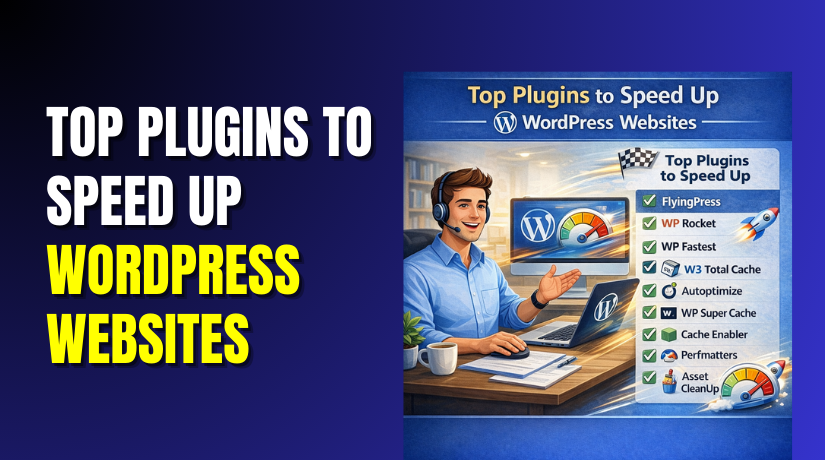
#1 WP Rocket
WP Rocket is a premium tool built for fast results. It helps cache pages and reduce repeated server work. It also adds file optimization for cleaner front end loading. Many users pick it as the best plugin to speed up WordPress. It works well on most hosts and popular themes. It can also improve Core Web Vitals with safe settings.
Features
- Page caching for faster repeat visits across most site pages.
- Cache preload to keep pages warm for new visitors.
- Delay JavaScript execution to reduce heavy load during startup.
- Minify CSS and JS to reduce file size quickly.
- Lazy load images and iframes to speed first view.
Pros
- Very easy setup with safe defaults for most users.
- Strong caching that often boosts scores and real speed.
- Works well with most themes, builders, and common plugins.
- Helpful options for WooCommerce exclusions and dynamic pages.
- Clean dashboard with clear labels and quick cache controls.
Cons
- It is paid, so free users may need other tools.
- Some JS delay settings may break sliders or popups.
- File combine can cause issues on certain complex themes.
- Advanced tuning still needs testing on each key page.
- No built in CDN, but it supports CDN connections.
Download Link: WP Rocket
#2 LiteSpeed
LiteSpeed Cache is a powerful all in one performance tool. It works best when your server uses LiteSpeed Web Server. It provides strong caching and many tuning options in one place. It can act as a full WordPress caching plugin plus optimizer. It also supports image tools and CDN links with settings. With correct setup, it can greatly improve load time.
Features
- Server level caching that can reduce TTFB on many pages.
- Object cache support for faster database reads on busy sites.
- CSS and JS minify options with safe on off toggles.
- Image optimization and lazy load tools for faster media loading.
- QUIC.cloud integration for CDN and extra performance services.
Pros
- Free plugin with strong features when hosting supports it.
- Great for improving Core Web Vitals with proper settings.
- Works well for high traffic sites using LiteSpeed servers.
- Many controls for caching rules and smart cache purge.
- Can replace several plugins with one unified setup.
Cons
- Best results need LiteSpeed hosting, not all hosts provide it.
- Too many options can confuse beginners during first setup.
- Wrong settings may cause layout or script loading problems.
- Image optimization may require extra service steps for some sites.
- Needs careful WooCommerce exclusions to avoid cart caching issues.
Download Link: LiteSpeed
#3 FlyingPress
FlyingPress is built to improve real page speed and user feel. It focuses on Core Web Vitals with clean and modern options. It includes caching plus smart CSS and JavaScript tuning features. Many site owners use it as a focused WordPress performance plugin. It also supports lazy loading and bloat control settings. With good hosting, it can speed up most content pages.
Features
- Page caching with easy setup and automatic cache warmup.
- Remove unused CSS options for lighter pages and faster paint.
- Delay JavaScript execution to reduce first load blocking.
- Lazy load images, iframes, and videos for lighter pages.
- Font and preconnect controls to reduce render delays.
Pros


- Strong results for Core Web Vitals on many modern themes.
- Easy dashboard with clear options and fewer confusing settings.
- Great match for content sites and landing pages with media.
- Safe WooCommerce exclusions for cart, checkout, and account pages.
- Works nicely with popular CDN setups and cache purge rules.
Cons
- Paid plugin, so budgets may prefer free alternatives.
- Some unused CSS settings may need testing for layout safety.
- Delay JS can break third party tools without proper exclusions.
- Not server level cache like LiteSpeed, so hosting still matters.
- Feature depth may be less for users wanting heavy fine tuning.
Download Link: FlyingPress
#4 WP Fastest
WP Fastest Cache is a simple caching plugin with clear controls. It helps generate cached pages and reduces repeated page builds. It is popular for beginners who want quick results. Many use it as a basic WordPress caching plugin setup. It also offers minify options and image lazy loading features. With safe settings, it can improve load time on shared hosting.
Features
- Page caching with simple enable options and quick cache clear.
- Minify HTML and CSS to reduce page and file weight.
- Gzip compression support for smaller transfers over slow networks.
- Browser caching rules to improve repeat visit load speed.
- Exclude pages and users to protect dynamic site areas.
Pros
- Easy for beginners with a simple dashboard layout.
- Good free plan that still improves many basic websites.
- Works on most hosts using Apache or Nginx setups.
- Clear cache tools make updates and testing very easy.
- Helps speed up WordPress website pages with minimal effort.
Cons
- Some advanced options require paid version for full access.
- Combine CSS or JS can break some themes and builders.
- Not as strong as premium tools for Web Vitals tuning.
- Fewer script control tools compared to focused performance plugins.
- Can conflict with host caching if both cache layers fight.
Download Link: WP Fastest
#5 W3 Total Cache
W3 Total Cache is built for advanced control and complex sites. It supports page caching, object caching, and browser caching together. It also includes minify settings and CDN connections for static files. Many developers use it as a deep WordPress performance plugin. It can speed up large sites when configured carefully. It is best when you can test settings page by page.
Features
- Page cache options with flexible rules and fine exclusions.
- Object cache support for faster database reads under load.
- Browser cache settings to improve repeat visitor page speed.
- Minify CSS and JS with control over combine and order.
- CDN support for media and static file delivery.
Pros
- Very flexible for complex sites with unique caching needs.
- Strong support for object caching and database heavy websites.
- Works well with CDNs and advanced server configurations.
- Free plugin with many features available without payment.
- Can help improve WordPress loading speed on high traffic sites.
Cons
- Setup can feel hard for beginners without clear guidance.
- Wrong cache settings can break pages or show old content.
- Minify settings often need careful testing to avoid conflicts.
- Too many options can slow troubleshooting during plugin conflicts.
- Interface feels dated compared to modern speed plugin dashboards.
Download Link: W3 Total Cache
#6 Autoptimize
Autoptimize focuses on front end optimization rather than full caching. It helps reduce CSS and JavaScript size and load impact. Many users pair it with a separate best WordPress cache plugin. It can also help with lazy loading and extra speed options. It is a great add on when caching is already handled. Used carefully, it can improve Web Vitals and loading feel.
Features
- Minify and optimize CSS and JavaScript for smaller payloads.
- Aggregate files when needed for fewer requests on pages.
- Inline and defer options to reduce render blocking scripts.
- Lazy load images and manage extra performance related settings.
- Connect with CDN for faster file delivery on global traffic.
Pros
- Works well with many caching plugins as a clean partner.
- Strong file optimization tools with easy on off toggles.
- Helpful for fixing render blocking issues on many themes.
- Free plugin with good results when setup is tested.
- Can support a WordPress page speed plugin strategy very well.
Cons
- It is not a full WordPress caching plugin by itself.
- Combine settings can break layouts if order changes badly.
- Needs testing on forms, sliders, and menus after enabling options.
- Some advanced features require extra steps or add ons.
- Can overlap with other optimizers and cause duplicate settings.
Download Link: Autoptimize
#7 WP Super
WP Super Cache is a free caching plugin made for simple needs. It generates static HTML files and serves them to visitors. This reduces server work and speeds up most public pages. Many people use it as their first WordPress caching plugin. It is stable and works well for blogs and small sites. With proper rules, it can help speed up WordPress website pages easily.
Features
- Static page caching to reduce PHP processing on repeat visits.
- Cache preload mode to build cache for posts and pages.
- CDN support options for serving static files faster worldwide.
- Garbage collection settings for cleaning old cache files safely.
- Exclude rules for pages and users where caching is unsafe.
Pros
- Free and stable plugin backed by a well known team.
- Easy setup for basic caching without too many extra tools.
- Good for blogs and content sites with mostly static pages.
- Helps improve WordPress loading speed quickly with minimal tuning.
- Works fine with many hosts and common WordPress setups.
Cons
- Interface is basic and may feel old for new users.
- Limited file optimization compared to premium performance plugins.
- Not as strong for Web Vitals tuning without extra tools.
- Needs careful exclusions for WooCommerce carts and checkout pages.
- Some advanced caching needs require different plugins or setups.
Download Link: WP Super
#8 Cache Enabler
Cache Enabler is a simple and lightweight caching plugin. It focuses on fast page cache without too many extra features. It is great for sites that want minimal overhead. Many pair it with an optimizer for scripts and styles. It can be a solid choice when you want less complexity. It still helps speed up WordPress website pages with stable caching.
Features
- Page caching with fast static HTML file delivery.
- Cache expiry rules to refresh content on a schedule.
- Manual cache clear tools for quick updates and testing.
- WebP image support with correct server and image setup.
- Simple settings that avoid heavy complexity for beginners.
Pros
- Lightweight plugin that keeps the dashboard clean and simple.
- Easy to set up and maintain for small websites.
- Works well with separate optimizers like Autoptimize for files.
- Helps improve WordPress loading speed without many risky toggles.
- Great for blogs and brochure sites with mostly static content.
Cons
- Not an all in one WordPress performance plugin solution.
- Fewer advanced cache rules than large caching suites provide.
- No deep script control tools for heavy third party scripts.
- Best results often need a separate image optimization plugin.
- WooCommerce needs careful exclusions for dynamic pages and cart.
Download Link: Cache Enabler
#9 Perfmatters
Perfmatters focuses on removing extra load from your pages. It helps disable unused features and control script loading. Many people use it with a caching plugin for best results. It is a smart tool for heavy themes and page builders. It can also help with lazy load and database cleanup options. Used correctly, it makes a WordPress speed optimization plugin setup stronger.
Features
- Script manager to disable CSS and JS on specific pages.
- Disable unused WordPress features that add extra requests.
- Lazy load images and videos to reduce first view weight.
- Database cleanup to remove junk and reduce stored clutter.
- Preload and DNS options to improve external file loading speed.
Pros
- Excellent for removing bloat that caching alone cannot fix.
- Works well with any best WordPress cache plugin setup.
- Helps improve WordPress loading speed for builder heavy websites.
- Simple dashboard with clear switches and safe default options.
- Great control for third party scripts like chat and tracking.
Cons
- Paid plugin, so some users may prefer free script tools.
- Script manager needs careful testing to avoid missing page features.
- Not a full WordPress caching plugin, so you still need caching.
- Some settings can confuse beginners without a testing routine.
- Too much disabling may break features if done too quickly.
Download Link: Perfmatters
#10 Asset CleanUp
Asset CleanUp helps unload scripts and styles where they are not needed. This reduces requests and page weight on many pages. It is useful for themes that load everything everywhere. Many use it to reduce builder and plugin bloat. It works best when paired with a caching plugin. With careful use, it can help speed up WordPress website performance strongly.
Features
- Unload CSS and JS files per page for cleaner loading.
- Disable scripts for logged in users during testing and tuning.
- Manage plugin assets to stop unused files from loading globally.
- Minify CSS and JS options for lighter file sizes.
- Test mode to try changes without affecting all visitors.
Pros
- Great for fixing slow pages caused by extra plugin assets.
- Works well with a WordPress caching plugin and CDN setup.
- Helps improve WordPress loading speed without changing the theme.
- Offers test mode for safer changes and fewer site risks.
- Useful for WooCommerce stores with many plugin assets loading.
Cons
- Needs time to test pages and avoid breaking key features.
- Beginners may feel unsure when choosing which files to unload.
- Not a full best WordPress cache plugin replacement by itself.
- Aggressive unloading can break checkout, popups, or form scripts.
- Some features require paid version for full automation benefits.
Download Link: Asset CleanUp
How to Choose the Right Speed Plugin For Your Website
Check Your Hosting Type Before You Pick Any Plugin
Your hosting stack decides which plugin will work best. If your host uses LiteSpeed, LiteSpeed Cache is the best fit. On Apache or Nginx, WP Rocket or WP Fastest Cache often works better. This step avoids wrong plugin choices and wasted setup time. It also helps you improve WordPress loading speed faster.
Decide If You Need an All In One Plugin or a Plugin Stack
Some tools handle caching and optimization in one place. Others work best as a combo with two plugins. If you want simple setup, choose one all in one WordPress performance plugin. If you want more control, use caching plus a file optimizer plugin. This approach can speed up WordPress website performance without conflicts.
Choose One Main WordPress Caching Plugin Only
Never install two full caching plugins at the same time. They can fight each other and create random cache issues. Pick one strong WordPress caching plugin and configure it well. This keeps cache purge clean and pages stay updated. It also helps you get stable results like the best WordPress cache plugin.
Pick Based on Your Biggest Speed Problem First
If TTFB is high, you need strong caching and better hosting. If images are heavy, you need lazy load and WebP support. If scripts are heavy, you need delay JS or script control tools. If pages are bloated, reduce theme and plugin load first. Solving the main problem helps any WordPress page speed plugin work better.
Make Sure WooCommerce Pages Stay Safe and Dynamic
Online stores have dynamic pages that should not be cached. Your plugin must exclude cart, checkout, and my-account pages. It should also avoid caching pages for logged-in users. This keeps pricing, stock, and coupons working correctly. This is a must for any store-focused WordPress speed optimization plugin.
Look for Safe Testing and Rollback Options
A good plugin should let you clear cache quickly. It should also let you disable features without losing settings. Some tools offer safe mode or easy rollback for errors. This makes testing less risky and faster. It keeps your site stable while you speed up WordPress website pages.
Test Results Properly Before You Lock the Settings
Test one page before enabling many extra features. Use PageSpeed Insights and GTmetrix for the same URL. Test in incognito and run the test more than once. Compare LCP, INP, and total load time changes. This proves your best plugin to speed up WordPress choice is working.
Conclusion
The right plugin can make your site feel fast and smooth. Start with caching first, then add safe optimization options. Avoid enabling every toggle without testing key pages. Choose a plugin that matches your hosting and website type. This approach will speed up WordPress website performance with fewer issues. If you want expert help, WooHelpDesk can handle full speed tuning and fixes. WooHelpDesk can also test conflicts and improve real user loading time.