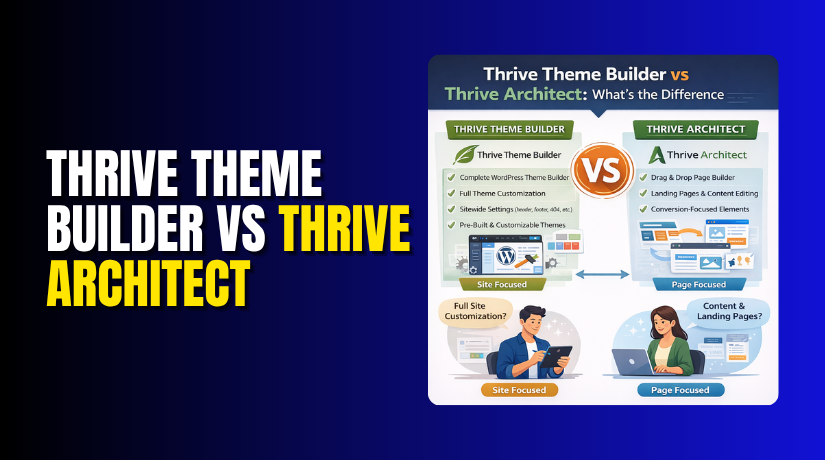
Thrive Theme Builder vs Thrive Architect: What’s the Difference in WordPress?
Table of Contents
- Introduction
- What is Thrive Theme Builder?
- How Does It Work?
- What is Thrive Architect?
- How Does It Work?
- What is the Difference Between Thrive Theme Builder and Thrive Architect?
- Which One Do You Need?
- Final Verdict
Introduction
Building a successful WordPress site requires more than just a pretty design. It demands a system that helps you convert visitors into customers, subscribers, or loyal readers. Thrive Themes has built its reputation on exactly this—tools that combine design flexibility with conversion-focused features.
Two of their flagship products, Thrive Theme Builder and Thrive Architect, often cause confusion. Both help you design your site. Both are powerful. Both come from the same company. Yet they serve fundamentally different roles in your WordPress ecosystem.
Thrive Theme Builder is a complete theme framework that controls your site’s global structure—headers, footers, blog layouts, and overall design consistency. It replaces your WordPress theme entirely, giving you visual control over every aspect of your site’s appearance.
Thrive Architect is a front-end page builder plugin that focuses on individual pages and posts. It lets you craft unique, high-converting content layouts without touching code. It works on top of any WordPress theme, including Thrive Theme Builder.
This guide clarifies the distinction. You’ll learn exactly what each tool does, their key features, strengths, limitations, and how they complement each other. By the end, you’ll know which one—or both—you need for your WordPress project.
What is Thrive Theme Builder?
Thrive Theme Builder is a visual, drag-and-drop theme framework designed to replace your WordPress theme completely. It gives you complete control over your site’s global design elements—headers, footers, sidebars, blog layouts, and template structures—all from a single, intuitive interface.
Thrive Theme Builder treats your entire website as a design project. Instead of hunting through theme files or relying on a theme’s limited options, you build your site visually. The builder focuses on speed, ease of use, and—most importantly—conversion optimization.
Unlike traditional themes that force you to work within a rigid structure, Thrive Theme Builder lets you create any layout you can imagine. It’s designed for business owners, marketers, and entrepreneurs who need complete design freedom without learning code.
How Does It Work?
When you install Thrive Theme Builder, it completely replaces your existing WordPress theme. You then use the visual editor to design:
- Headers – Logo placement, menus, buttons, announcements
- Footers – Columns, widgets, copyright, social links
- Blog templates – Archive pages, single post layouts, category pages
- Page templates – Custom layouts for landing pages, sales pages, contact pages
- Search results – Customized search page designs
- 404 pages – Branded error pages that keep visitors engaged
Everything is built visually with live preview. Changes apply globally, ensuring consistent design across your entire site.
Key Features
- Complete Visual Theme Builder: Design your entire site from scratch without touching code. The interface is built around the concept of “design by drag and drop”.
- Smart Landing Page Templates: Start from dozens of pre-built templates optimized for conversion. Templates for sales pages, webinar registration, lead generation, and more.
- Global Design Controls: Set global colors, fonts, buttons, and spacing that apply throughout your site. Changes update everywhere automatically.
- Conversion-Focused Elements: Built-in elements like countdown timers, testimonials, opt-in forms, and pricing tables are ready to use.
- Lightning-Fast Performance: Thrive Theme Builder is coded for speed. It generates clean code and loads only what’s needed.
- Mobile Responsive: Every design element can be customized for desktop, tablet, and mobile devices.
- SEO Optimized: Clean code, schema markup, and integration with SEO plugins like Yoast ensure search engines love your site.
- Conditional Logic for Templates: Show different headers, footers, or page templates based on user role, page type, or custom conditions.
- Integrated with Thrive Suite: Works seamlessly with Thrive Architect, Thrive Leads, Thrive Quiz Builder, and other Thrive products.
- One-Click Demo Import: Import complete website demos to get started quickly.
Pros of Thrive Theme Builder
- Complete Design Control: You own every pixel of your site’s appearance. No more fighting with theme limitations.
- All-in-One Solution: Handles everything from headers to footers to blog layouts. No need for multiple tools.
- Conversion-Focused by Default: Every design decision is made with conversions in mind. Templates are tested for performance.
- Visual Workflow: See changes in real-time as you design. No more guessing what code will produce.
- Excellent Integration: Works perfectly with other Thrive tools, creating a unified marketing ecosystem.
- One-Time Pricing: Unlike many SaaS tools, Thrive offers lifetime licenses for their products.
- Strong Support Community: Active user groups, detailed documentation, and responsive support.
Cons of Thrive Theme Builder
- Requires a Thrive Membership: To use Thrive Theme Builder, you need a Thrive Suite subscription (starts at $49/quarter or $299/year).
- Steep Learning Curve: The builder is powerful, but mastering its features takes time.
- Not Suitable for Simple Blogs: For basic personal blogs, it may be overkill compared to a free theme.
- Limited Theme Ecosystem: You can’t switch to another theme without losing your builder settings (though you can export designs).
- No Free Version: No trial; you must purchase a test.
What is Thrive Architect?
Thrive Architect is a front-end page builder plugin that focuses on creating individual pages and posts. It works on top of any WordPress theme, including Thrive Theme Builder, giving you pixel-perfect control over your content.


Thrive Architect is built for content creation. While your theme controls the overall site structure, Architect lets you craft unique landing pages, sales pages, blog posts, and content layouts that break free from your theme’s default styling.
The builder is designed for marketers who need to create high-converting pages quickly. Every element—buttons, forms, countdown timers, testimonials—is built with conversion in mind.
How Does It Work?
- Thrive Architect is a plugin that adds a “Launch Thrive Architect” button to your page and post editor.
- When you click it, you enter a front-end visual editor where you can design your page live.
- You start with a blank canvas or choose from hundreds of pre-built templates.
- Then you add elements (text, images, buttons, forms, etc.) and style them visually. The builder uses a drag-and-drop interface with a live preview.
Key Features
- Front-End Visual Editor: Design your pages live. See exactly what visitors will see as you build.
- 400+ Conversion-Focused Templates: Pre-built designs for landing pages, sales funnels, webinar pages, lead magnets, thank you pages, and more.
- 80+ Elements: Extensive library including opt-in forms, countdown timers, testimonials, pricing tables, content reveal, and more.
- Mobile Responsive Controls: Adjust layouts for desktop, tablet, and mobile independently.
- Global Elements: Create once, reuse anywhere. Update once, update everywhere.
- Advanced Animation: Add entrance animations and hover effects without code.
- Content Elements: Advanced text, image, button, and icon options with custom styling.
- E-commerce Integration: WooCommerce elements let you design custom product pages and checkout layouts.
- Lightweight Output: Generates clean HTML and CSS without bloating your site.
- Collaboration Features: Send preview links to clients and get feedback before publishing.
- Undo/Redo: Full history support to revert changes.
Pros of Thrive Architect
- Extremely Versatile: Works with any WordPress theme. You can use it to enhance pages on any site.
- Conversion Optimized: Every template and element is designed to boost conversions. It’s not just a design tool—it’s a marketing tool.
- Fast Page Building: The drag-and-drop interface and pre-built templates make page creation quick.
- No Coding Required: Completely visual. Anyone can build professional pages.
- Regular Updates. Thrive continuously adds new features, templates, and elements.
- Lifetime License Option: Like other Thrive products, Architect can be purchased as part of a lifetime membership.
Cons of Thrive Architect
- Requires Thrive Membership: Architect is part of Thrive Suite, so you need a subscription to use it.
- Can Overwhelm Beginners: The number of elements and options may be intimidating at first.
- Designs Tied to Plugin: If you disable Architect, your custom layouts may break (though content remains).
- Performance Impact if Overused: Heavy use of complex elements can affect page speed if not optimized.
- No Free Version: No trial period; you must purchase to try.
What is the Difference Between Thrive Theme Builder and Thrive Architect?
This table provides a comprehensive comparison based on 2026 data.
| Comparison Factor | Thrive Theme Builder | Thrive Architect | Winner |
| What It Is | WordPress theme framework | Front-end page builder plugin | N/A |
| Primary Role | Controls site-wide structure: headers, footers, templates | Designs individual pages and posts | N/A |
| Scope | Entire website | Individual pages and posts | N/A |
| Replaces Your Theme | Yes, it becomes your theme | No, works with any theme | N/A |
| Visual Editing | Front-end theme builder | Front-end page builder | Tie |
| Pre-Built Templates | 100+ site templates | 400+ page templates | Architect (quantity) |
| Conversion Elements | Yes, built-in | Yes, extensive library | Architect |
| Global Design Controls | Yes (fonts, colors, spacing site-wide) | Yes (per page, but can be global via templates) | Builder |
| Header/Footer Control | Complete visual control | Limited to content area (unless used with custom theme) | Builder |
| Blog Layout Control | Full control over archives, single posts, categories | Can design individual posts, but not global templates | Builder |
| WooCommerce Integration | Custom product pages, shop layouts | Custom product page design (per page) | Tie |
| Ease of Learning | Moderate (site-wide concepts) | Moderate (page-building concepts) | Architect (more straightforward) |
| Mobile Responsiveness | Full device customization | Full device customization | Tie |
| Pricing | Part of Thrive Suite (starts $49/quarter) | Part of Thrive Suite (same) | Tie |
| Lifetime Option | Yes (with Thrive Suite Lifetime) | Yes (with Thrive Suite Lifetime) | Tie |
| Ideal For | Building complete, conversion-optimized sites | Creating high-converting landing pages, sales funnels | Depends on need |
| Can Be Used Without the Other? | Yes, includes page builder features | Yes, works with any theme | Tie |
Which One Do You Need?
- If you want to design your entire site from scratch, including headers, footers, and blog layouts, start with Thrive Theme Builder.
- If you already have a theme you like but want to create custom landing pages, sales funnels, or unique content layouts, start with Thrive Architect.
- For the ultimate conversion-focused WordPress site, use both together.
Final Verdict
Thrive Theme Builder and Thrive Architect are complementary tools designed to work together, but they serve distinct purposes. Your choice depends on whether you need to control your site’s global structure or create individual high-converting pages.
Choose Thrive Theme Builder if you want to completely control your website’s design from the ground up. It replaces your WordPress theme and gives you visual control over headers, footers, blog layouts, and global templates. For marketers, business owners, and anyone who wants a conversion-focused site without coding, Thrive Theme Builder is a powerful all-in-one solution.
Choose Thrive Architect if you already have a theme you like but need to create exceptional landing pages, sales funnels, or content layouts. Architect works on top of any theme and gives you pixel-perfect control over individual pages. Its 400+ conversion-focused templates and 80+ elements make it ideal for creating high-impact pages quickly.
For the ultimate WordPress site, use both. Thrive Theme Builder provides the perfect structural foundation, and Thrive Architect lets you design exceptional content inside it. Together, they form a complete conversion-focused ecosystem that helps you build, market, and grow your business online.
Whichever you choose, both are available through the Thrive Suite membership, which includes a full suite of marketing tools. The lifetime license option is an excellent investment for serious website owners.
Have questions before starting with WooCommerce & WordPress? Get support here at WooHelpDesk.
