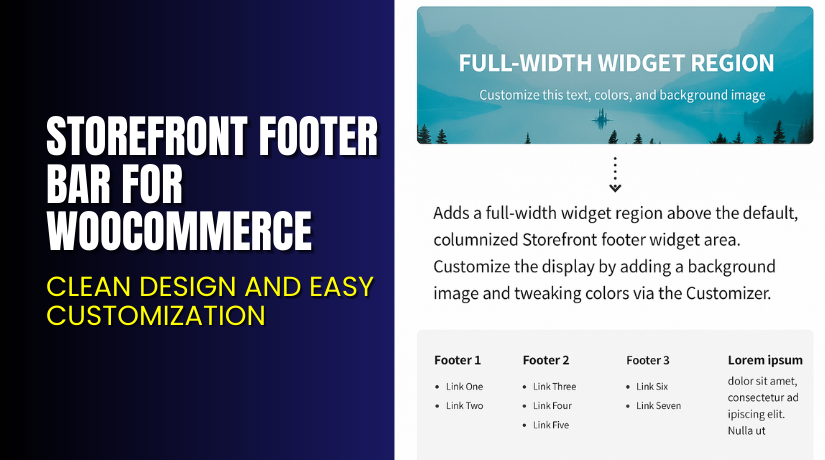
Storefront Footer Bar for WooCommerce – Clean Design and Easy Customization
Table of Contents
- Introduction
- What is Storefront Footer Bar for WooCommerce?
- Features of Storefront Footer Bar for WooCommerce
- How to Install and Configure Storefront Footer Bar for WooCommerce
- Storefront Footer Bar for WooCommerce – Pricing & Plans
- My Experience with Storefront Footer Bar for WooCommerce
- Who Should Use This Plugin?
- Final Verdict
- FAQ Section
Introduction
Running a WooCommerce store needs constant attention and smooth navigation. Store owners want clear sections, better visibility, and simple user paths. Many visitors scroll to the bottom and expect helpful links. They look for account details, quick menus, support links, or current offers. When these items are missing, users feel confused on the site. They leave without taking the next action. This leads to lower engagement and fewer conversions.
Managing many WooCommerce extensions also becomes difficult. Owners want tools that simplify the store, not overload it. Some plugins slow down the site. Others create layout issues or conflict with the theme. Many users worry about design changes that affect the brand’s look. They want a stable and trusted solution that blends well with Stock themes.
Storefront Footer Bar for WooCommerce helps solve these problems. It improves the footer layout and adds useful sections. It gives your store a clean and engaging bottom area.
In this article, we explore Storefront Footer Bar for WooCommerce, its features, installation steps, pricing, pros, cons, and recommended users.
If you ever need help installing or troubleshooting any plugin or extension, please try our Installation & Troubleshooting Services.
What is Storefront Footer Bar for WooCommerce?
Storefront Footer Bar for WooCommerce is an add-on designed for the Storefront theme. The plugin adds a flexible footer bar at the bottom of your website. The footer bar displays widgets, menus, links, offers, and call-to-actions. It gives store owners extra space to guide buyers. The tool keeps things clean and mobile-friendly.
Storefront Footer Bar for WooCommerce is developed by WooCommerce. The team focuses on simple and stable extensions. The plugin keeps the theme layout light and balanced. It loads fast and supports useful customizations. It fits well with WooCommerce-powered stores using the Storefront theme.
The plugin helps owners highlight important information. You can promote offers, display menus, or add service messages. This improves user flow and helps customers reach important pages. The tool works on desktops, tablets, and mobile devices. It blends smoothly with many Storefront child themes.
The plugin is available in a single premium version from WooCommerce.
Official Plugin Page:
Support Page:
Features of Storefront Footer Bar for WooCommerce
| Feature | Description | Why It Matters |
| Custom Footer Widget Area | Add your own widgets inside a dedicated footer space. | Helps store owners highlight links and offers. |
| Storefront Theme Integration | Built specifically for Storefront and child themes. | Ensures perfect compatibility and no design breakage. |
| Mobile-Friendly Footer Bar | The footer layout adjusts across all screen sizes. | Improves navigation and user experience. |
| Easy Styling Options | Customize layout, content, and formatting easily. | Saves time by offering simple design controls. |
| Fast and Lightweight Code | The plugin loads quickly without slowing the site. | Improves performance, SEO, and loading time. |
| Widget-Based Layout | Use WordPress widgets to display any type of content. | Gives full control over the footer structure. |
How to Install and Configure Storefront Footer Bar for WooCommerce
- Download the plugin from the link.
- Go to WordPress Dashboard → Plugins → Add New → Upload Plugin
- Upload the ZIP file and wait for installation.
- Click Activate Plugin once installed.
- Go to Appearance → Widgets and locate the footer bar section.
- Add your desired widgets inside the footer bar area.
- Check the footer on desktop and mobile for alignment.
- Test compatibility with your existing theme and extensions.
👉 If you face any configuration or compatibility issues, you can try our Installation & Troubleshooting Services.
Storefront Footer Bar for WooCommerce – Pricing & Plans
This plugin is free to install on any WooCommerce website. You do not need to pay anything to start using it. The setup takes only a few minutes with no extra steps. Store owners can test all features without any upfront cost. It gives you full access to basic tools without restrictions.
Buy Storefront Footer Bar for WooCommerce Now
Purchase Here → Buy Storefront Footer Bar Premium Now
💡 Your purchase supports the development team and helps me create more tutorials like this.


My Experience with Storefront Footer Bar for WooCommerce
After testing Storefront Footer Bar on a live WooCommerce store, here is what I found:
Pros
- Very easy to set up and configure.
- Works perfectly with the Storefront theme.
- Does not slow down the website.
- Widget-based layout offers good content control.
- Clean design keeps the footer simple and useful.
- Responsive behavior works great on mobile devices.
- Good documentation and strong support from WooCommerce.
Cons
- Works only with the Storefront theme.
- Limited customization without coding.
- No built-in advanced styling panel.
- Not ideal for users wanting heavy design layouts.
- Premium-only solution with no free version.
Who Should Use This Plugin?
The plugin is ideal for:
- WooCommerce store owners wanting a clean footer layout
- Storefront theme users need better footer navigation
- Agencies managing multiple WordPress clients
- Beginners who want simple setup options
- Businesses highlighting offers or key service links
- Website owners are improving mobile footer visibility
Useful Resources
- Official Plugin Page
- Official Plugin Support Page
- Developer Documentation
- WooHelpDesk Installation & Troubleshooting Services
Final Verdict
Storefront Footer Bar for WooCommerce is a smart choice for Storefront theme users. The plugin offers a clean and simple footer section. It helps highlight key pages, offers, and navigation links. It does not slow down your website. It loads fast, stays stable, and works well with most extensions. If you want a smooth footer design without complex tools, this plugin is worth trying.
Use the link below to get started and unlock premium features today.
👉 Buy Storefront Footer Bar Premium Now
💡 Need help installing or fixing it? Try our Installation & Troubleshooting Services.
FAQ Section
Q1. Is Storefront Footer Bar for WooCommerce compatible with all WooCommerce themes?
Yes, it works with the Storefront theme and child themes. Always test before going live.
Q2. Can I use both free and premium versions?
The plugin has only a premium version. You install it directly.
Q3. How do I get support?
You can contact the official WooCommerce team using their support page.



