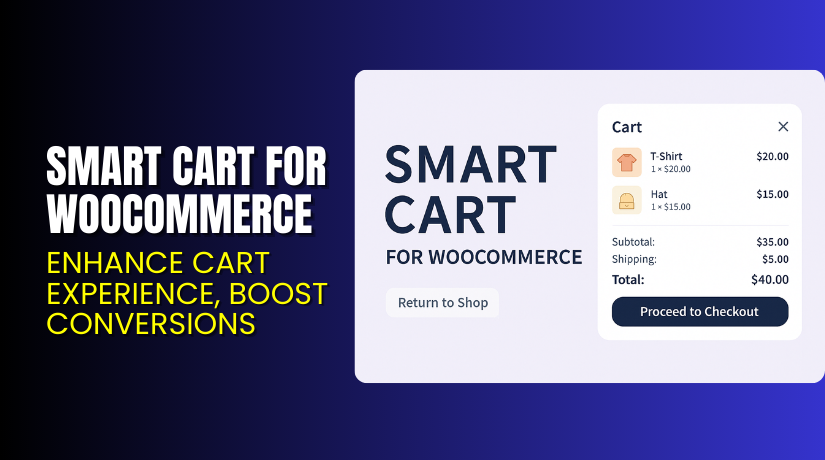
Smart Cart for WooCommerce – Enhance Cart Experience, Boost Conversions
Table of Contents
- Introduction
- What is Smart Cart for WooCommerce?
- Key Features of Smart Cart for WooCommerce
- How to Install and Configure Smart Cart
- Pricing & Plans
- My Experience with Smart Cart for WooCommerce
- Who Should Use Smart Cart?
- Final Verdict
- FAQ
Introduction
Running a WooCommerce store means making the checkout process smooth and fast. Many store owners struggle with cart abandonment. This often happens when the cart or checkout feels slow or complicated.
A smart cart system helps solve this issue. It allows users to view their cart items, totals, shipping, and checkout options in one place. A well-designed cart keeps users focused and improves conversion rates.
Smart Cart for WooCommerce is a plugin that upgrades the default cart experience. It helps customers see all cart details without extra steps. It’s fast, modern, and matches your website’s style.
In this article, we will explore what Smart Cart does, its features, pricing, installation steps, pros, cons, and who it’s best for. We’ll also share the official documentation and support links.
If you need help installing or fixing the plugin, check out our Smart Cart Installation & Troubleshooting Services.
What is Smart Cart for WooCommerce?
Smart Cart for WooCommerce is a dynamic cart plugin developed by WP1. It is designed to simplify the shopping experience for your customers.
The plugin displays a full cart summary, including:
- Cart items
- Subtotal
- Shipping cost
- Total price
- Checkout button
Everything appears in a stylish pop-up cart interface. It reduces the number of clicks needed to complete a purchase.
When the cart is empty, it shows a clean message with a “Return to Shop” link. This helps guide users back to your product listings.
You can also match the cart style to your website using built-in color settings.
Plugin Page: Smart Cart for WooCommerce
Official Documentation: Smart Cart Plugin Documentation
Support Contact: WooCommerce Contact Page
Key Features of Smart Cart for WooCommerce
| Feature | Description | Why It Matters |
| Cart Summary Popup | Displays products, subtotal, shipping, and total in one popup | Speeds up checkout and reduces abandonment |
| Proceed to Checkout Button | One-click checkout button inside cart popup | Encourages faster purchases |
| Return to Shop Button | Shows on empty cart page | Keeps users browsing instead of leaving |
| Style Customization | Change primary and secondary colors to match site design | Keeps your branding consistent |
| Button Text Options | Edit checkout and cart button texts | Offers flexibility in messaging |
| Left or Right Cart Position | Choose where the cart appears | Adapts to different layouts |
| Show/Hide Thumbnails | Toggle product images in cart | Helps reduce visual clutter if needed |
| RTL Support | Works with right-to-left languages | Ideal for global stores |
These features help reduce friction in the buying process, which increases overall conversions.
How to Install and Configure Smart Cart
Setting up Smart Cart is easy and takes just a few steps.
Installation Steps:
- Purchase and download the plugin from the WooCommerce Smart Cart page.
- Go to your WordPress dashboard.
- Click on Plugins → Add New → Upload Plugin.
- Upload the ZIP file, install, and activate the plugin.
- After activation, go to Smart Cart Settings in your admin panel.
- Choose the popup position (left or right).
- Set your primary and secondary colors to match your theme.
- Toggle product thumbnails and configure button texts.
- Save your settings and test the cart on your site.
You don’t need to edit code or modify templates. It works out of the box.
Need expert help? Use our Smart Cart Plugin Setup Services.
Pricing & Plans
The Smart Cart plugin offers a single, affordable pricing plan.
| Plan | Price | Includes |
| 1-Year Plan | $29 | Full features + 1 year of updates and customer support |
- Annual Cost: $29
- Monthly Equivalent: $2.42 (billed yearly)
- Money-Back Guarantee: 30 days
- Free Version: Not available
- Discounts: Up to 40% during promotional sales
It’s one of the most cost-effective cart enhancement plugins in the market.
You can buy Smart Cart for WooCommerce here.
Buy Smart Cart for WooCommerce Now
Want to speed up your WooCommerce checkout and reduce friction?
Purchase Smart Cart for WooCommerce and improve your store’s cart experience today.
If you need help setting it up, visit our Smart Cart Installation Services.
My Experience with Smart Cart for WooCommerce
We tested Smart Cart on a live WooCommerce site. Here’s what we discovered:


Pros:
- Very easy to install and use
- Clean cart design with checkout summary
- Works well with modern WooCommerce themes
- Customizable to match store branding
- Useful for stores with simple cart needs
- Lightweight and does not affect site speed
- Offers a return-to-shop link on empty cart pages
- Customers see totals without going to the cart page
Cons:
- Lacks advanced cart analytics or reports
- No multi-step checkout or upsell features
- No free trial or demo on WooCommerce site
- Limited documentation for custom integrations
- One review mentioned lack of initial guidance
Despite some limitations, the plugin works well for most store owners. It simplifies checkout and looks good on all devices.
Who Should Use Smart Cart?
Smart Cart is ideal for:
- Store owners looking to speed up the checkout process
- WooCommerce shops that want a modern cart layout
- Beginners who want a plug-and-play cart upgrade
- Sellers who want to reduce cart abandonment
- Designers who need cart color and text customization
- Stores using global or RTL-supported languages
- Anyone wanting a lightweight cart plugin without bloat
This plugin is especially useful during high-traffic events like sales or holidays.
Useful Resources
- Buy Smart Cart Plugin
- Read Smart Cart Documentation
- Contact WooCommerce Support
- Smart Cart Setup & Troubleshooting Help
Use these links for purchasing, support, or technical assistance.
Final Verdict
Smart Cart for WooCommerce is a simple yet powerful plugin. It improves the user’s shopping experience by reducing steps in the checkout flow. Customers can see their cart items and proceed to checkout faster.
It doesn’t add unnecessary features. Instead, it focuses on clean design, flexibility, and ease of use. For only $29 a year, it offers great value.
If you want to give your cart a modern upgrade, this is a smart choice.
Buy Smart Cart Now and install it in minutes.
Need professional help? Use our WooHelpDesk Plugin Support Services.
FAQ
Q1. Is Smart Cart compatible with all WooCommerce themes?
Yes. It works with most standard WooCommerce themes. Always test first.
Q2. Can I change the colors of the cart pop-up?
Yes. You can set primary and secondary colors to match your brand.
Q3. Does it support RTL languages?
Yes. It includes RTL support for right-to-left websites.
Q4. Is there a free version of the plugin?
No. It is only available as a premium plugin for $29 per year.
Q5. Can I edit the button text?
Yes. You can change the text for both checkout and cart buttons.
Q6. What happens when the cart is empty?
A return-to-shop link appears, guiding users back to your products.
Q7. How do I get help with installation?
Use our Smart Cart Installation Services for expert assistance.



