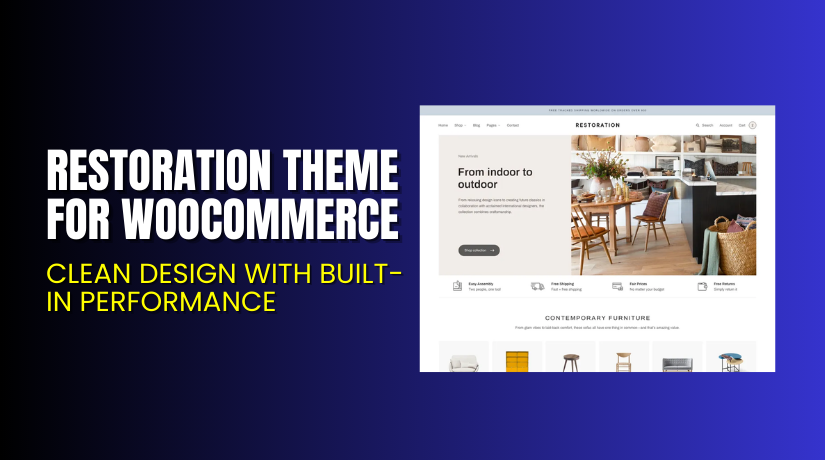
Restoration Theme for WooCommerce – Clean Design with Built-in Performance
Introduction
Running an online store demands both style and performance. Many WooCommerce themes promise flexibility but fail in real use. Slow loading, poor mobile design, and hard setups are common issues.
Restoration Theme from Fuel Themes solves these problems. It’s designed for eCommerce with WooCommerce support built-in. It delivers a clean layout, fast performance, and easy customization.
This article covers everything you need to know about the Restoration Theme. You’ll learn what it offers, how to install it, key features, pricing, pros, cons, and where to get help if needed.
If you need help with setup, check our Restoration Theme Installation & Troubleshooting Services.
What is Restoration Theme?
Restoration is a modern WooCommerce theme focused on performance and design. It’s developed by Fuel Themes and works out of the box with Gutenberg.
This theme is fully responsive, meaning it adjusts to every screen size. It supports all default WooCommerce functions. With one-click demo content, anyone can launch a store quickly.
It includes advanced theme customization options. You can change fonts, colors, and layout styles without writing any code. The theme also supports retina displays and loads fast on all devices.
Whether you sell digital services, hardware, or physical products, this theme provides a clean layout with powerful eCommerce features.
Official Theme Page: Restoration Theme by Fuel Themes
Documentation: View Restoration Theme Documentation
Support Contact: Contact Fuel Themes
Key Features of Restoration Theme
| Feature | Description | Why It Matters |
| WooCommerce Support | Built to work with all WooCommerce features | Turns WordPress into a complete store |
| Gutenberg Editor Ready | Use WordPress blocks to build product and landing pages | Clean, fast, and plugin-free content creation |
| One-Click Demo Import | Quickly import demo pages, layouts, and content | Saves hours of setup work |
| Responsive Design | Optimized for desktops, tablets, and phones | Better experience for all types of users |
| Theme Customizer Panel | Adjust fonts, colors, and layouts easily | No coding needed to make brand-specific changes |
| Retina Display Support | Looks sharp on high-resolution screens like iPhone and Mac | Delivers a premium visual experience |
| SEO Friendly | Optimized structure and supports all major SEO plugins | Helps improve visibility on search engines |
| Social Media Integration | Display share buttons and social elements | Increases engagement and social proof |
| Translation Ready | Includes .po/.mo files and plugin support for localization | Create multilingual stores with ease |
How to Install and Configure Restoration Theme
Setting up the Restoration Theme is quick and beginner-friendly. Follow these steps:
- Buy the theme from the Restoration Theme page.
- Download the ZIP file after completing your purchase.
- Log in to your WordPress dashboard and go to Appearance → Themes → Add New → Upload Theme.
- Upload the ZIP file and click Install Now.
- Click Activate to make the theme live.
- Open the Theme Options panel to begin customizing.
- Use One-Click Demo Import to add sample content and layout.
- Check the frontend on all screen sizes for mobile readiness.
Need professional help? Use our Restoration Theme Installation & Troubleshooting Services.
Pricing & Plans
The Restoration Theme is available through a simple pricing model:
| Plan | Price (USD) | Includes |
| 1-Year Plan | $99 | Full access, updates, and support for one year |
| 2-Year Plan | $158.40 (Save 20%) | All features, updates, and support for two years |
Monthly Equivalent: $8.25/month billed annually (for the 1-year plan).
Note: There is no free version. This is a premium-only WooCommerce theme.
Buy Restoration Theme Now
If you’re ready to upgrade your store’s design and performance:
Buy Now → Get the Restoration Theme
Your purchase helps support development and allows us to provide quality reviews and guides.


My Experience with Restoration Theme
We tested Restoration Theme on a live WooCommerce setup. It was used to create a minimal store selling handcrafted goods. Here’s what we experienced:
Pros
- Installation was smooth and fast
- Theme looks modern and professional
- Works great on all devices and screen sizes
- Customization was easy using Theme Options
- Gutenberg blocks worked flawlessly
- Demo import helped launch the store in 15 minutes
Cons
- Lacks multiple homepage layout styles
- Doesn’t support Elementor or WPBakery
- No free trial available
Overall, the Restoration Theme is ideal if you want a clean design with minimal setup.
Who Should Use This Theme?
Restoration is a good fit for:
- Store owners selling home goods, crafts, or furniture
- WordPress users who prefer Gutenberg editor
- Agencies building WooCommerce stores for clients
- New store owners who want to launch quickly
- Anyone looking for a modern theme without extra plugins
Not suitable for blogs or non-eCommerce websites.
Useful Resources
- Official Theme Page – Restoration
- Official Documentation
- Contact the Developers
- Restoration Theme Setup & Help Services
Final Verdict
Restoration is a smart choice for anyone looking to build a reliable WooCommerce store. It combines clean visuals with fast performance and ease of use. With demo content import and Gutenberg compatibility, beginners can launch stores fast.
It’s not bloated with unnecessary features, which makes it faster than multipurpose themes. For businesses in home décor, repair, or handmade goods, it’s an ideal match.
Buy the Restoration Theme Now at Fuel Themes. Need help? Try our Installation & Troubleshooting Services.
FAQ
Q1. Is the Restoration Theme compatible with all WooCommerce plugins?
Yes. It works with all standard WooCommerce features and tools.
Q2. Does it support Elementor or other page builders?
No. It’s built for the native WordPress block editor (Gutenberg).
Q3. Can I customize the theme without coding?
Yes. The Theme Options panel makes customization simple and visual.
Q4. Does the theme include demo content?
Yes. You can import full demo layouts with one click.
Q5. How can I contact support?
Use the official contact form provided by Fuel Themes.
