How to Setup “Registration & Login with Mobile Phone Number for WooCommerce” for Easy OTP Login
Table of Contents
- Introduction
- Why WooCommerce Stores Need Phone Login
- Real-World Use Cases
- Boost Security with WooCommerce 2FA Login
- Choose the Right SMS Provider
- Key Features of the Plugin
- Step-by-Step Setup Process
- Who Should Use This Plugin?
- Business Benefits at a Glance
- Final Tips for Store Owners
- Conclusion
Introduction
Today, most users prefer logging in with their mobile phone. It’s faster, easier, and more secure than using an email and password. For WooCommerce store owners, this trend creates an opportunity to improve both user experience and security.
The Registration & Login with Mobile Phone Number for WooCommerce plugin solves this perfectly. Customers can register or log in with just their mobile number. No need to remember passwords or email logins.
This plugin uses OTP verification to confirm user identity. The user’s phone receives the OTP. Once entered, the user is logged in instantly. This process is simple for customers and secure for your store.
Why WooCommerce Stores Need Phone Login
Many users shop on mobile. Entering a phone number is easier on small screens. Also, some users may not want to share their email address. Others may forget passwords often. This plugin offers a smooth solution in all these cases.
Benefits include:
- Quick login without passwords
- No need for email at login
- Reduced spam and fake accounts
- Secure access with one-time password
- Faster checkout when login is required
Real-World Use Cases
This plugin is perfect for:
- Mobile-first stores focused on fast checkouts
- Subscription or membership-based WooCommerce shops
- Stores targeting users who prefer phone-based logins
- US-based retailers that want to reduce account fraud
Boost Security with WooCommerce 2FA Login
Security is a top concern in eCommerce. This plugin adds two-factor authentication using OTP. Without access to a phone, someone cannot log in, even if they are able to guess the user’s email.
With this:
- Brute force login attempts fail
- Customers feel safe sharing their details
- You lower the risk of account takeovers
Choose the Right SMS Provider
The plugin supports three trusted OTP services:
- Firebase (great for developers or app-connected stores)
- Twilio (popular in the US for reliable SMS delivery)
- MSG91 (ideal for stores with users in multiple countries)
The one that best suits your audience can be chosen.
Key Features of the Plugin
There are several helpful features in the WooCommerce plugin Registration & Login with Mobile Phone Number. It improves how users log in and helps store owners create a secure, fast, and mobile-friendly login flow. Let’s explore each feature in detail.
Login with OTP (One-Time Password)
Customers can log in by entering just their phone number. They receive an SMS containing a one-time password (OTP). They safely log in with this code.
- No need to remember passwords
- No username or email required
- Login is completed in seconds
This helps make the login process smooth and frustration-free, especially on mobile devices.
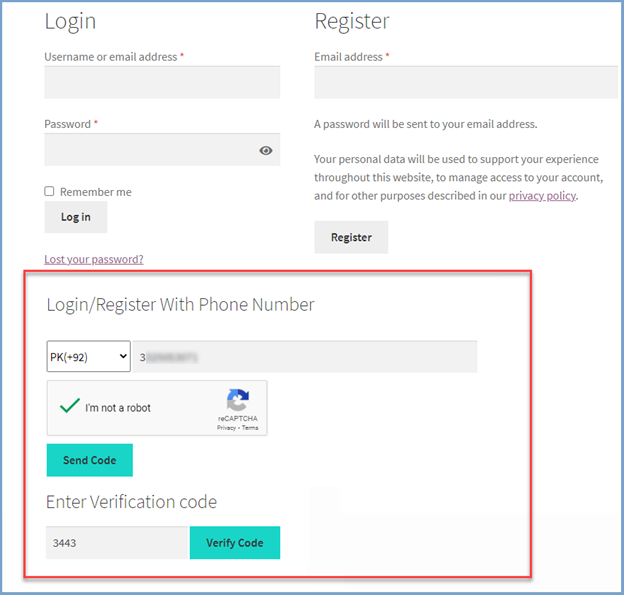
Registration with Mobile Number
New users can register using only their mobile phone number. They only need to provide their email address to create their account after OTP verification. This keeps the signup process short and easy.
- Fewer steps in registration
- Helps boost new user sign-ups
- Great for mobile-first users
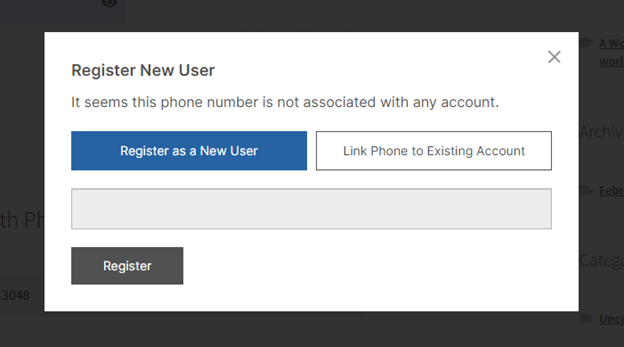
Two Login Options for Existing Users
The plugin offers two login methods for users who already have an account:
- Login with OTP
- Login with a password (optional setting)
The plugin options allow you to select the technique you wish to offer.
Link Phone Number to Existing Account
Customers can connect their mobile number to an existing account. After verifying OTP, they can link the phone number to their WooCommerce profile. This helps returning users log in with just their phone next time.
Replace Default WooCommerce Login Form
You can use the plugin to conceal WooCommerce’s built-in login form. This gives users a cleaner, more focused login experience.
- Focuses only on mobile login
- Less confusion at the login page
- Cleaner design for users
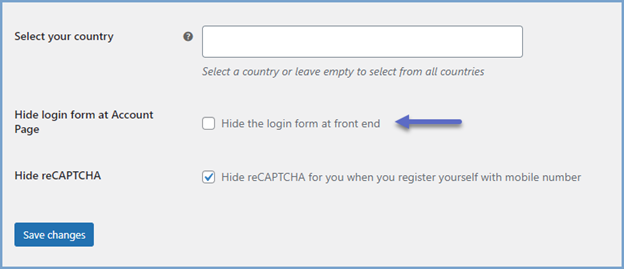
Country Restriction Option
You can allow mobile login only for specific countries. This is helpful for US-based stores that only want to offer login to American customers.
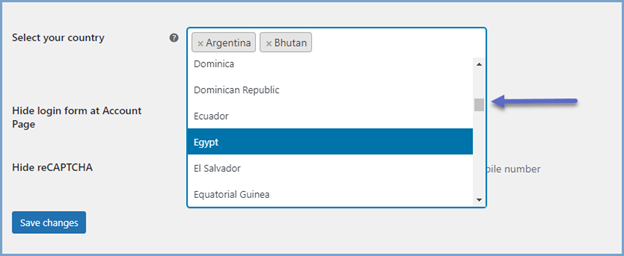
WooCommerce Force Login Before Checkout
Enable a feature that forces users to log in before checking out. This ensures accurate customer details and avoids fake or guest checkouts.
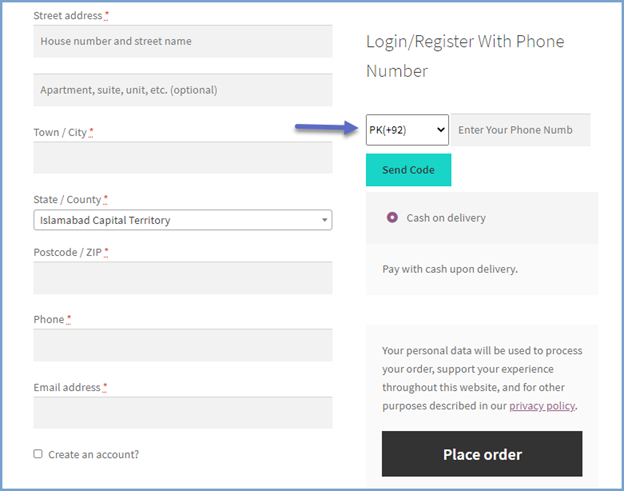
Fully Mobile Responsive
The entire login flow is optimized for mobile. From the input form to the OTP verification, everything works smoothly on phones and tablets.
Shortcode Support
Using a shortcode, you may position the login form wherever on your website. You now have more control over the location and method of login.
Step-by-Step Setup Process
Setting up the plugin is easy if you follow the right steps. In this section, we’ll show you how to install and configure everything. All users, including those without any technical knowledge, can utilize this guide.
Let’s begin.
Step 1: Install the Plugin
To start, download the plugin from your WooCommerce account.
- Go to your WordPress admin dashboard.
- Click on Plugins > Add New.
- Upload the .zip file you downloaded.
- Click Install Now, then Activate the plugin.
Once activated, you’ll see a new tab in your WooCommerce settings called “Login with Phone.”
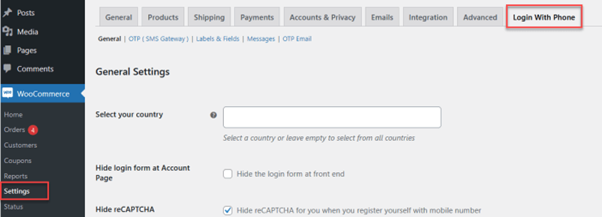
Step 2: General Settings Configuration
Go to WooCommerce > Settings > Login with Phone > General Tab.
This is where you manage the plugin’s functionality.
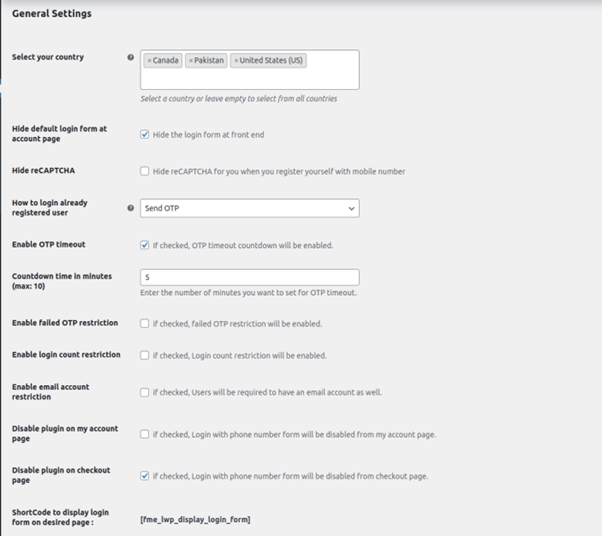
Key settings include:


- Country Selection:
Select which countries can use phone login. Leave it blank to allow all. For US-based stores, choose “United States” only. - Hide Default Login Form:
Check this box to remove the default WooCommerce login form. - Choose Login Method for Existing Users:
Pick between two options:- Send OTP
- Show Password Field
- Security Settings:
- Enable OTP timeout (adds a countdown timer)
- Enable failed OTP restriction (limits wrong attempts)
- Enable login count restriction (stops spamming)
- Email Account Restriction:
Require users to add an email only the first time. - Shortcode Support:
Use a shortcode to display the login form anywhere you like.
Step 3: Set Up OTP Gateway (SMS Provider)
Now switch to the OTP/SMS Gateway Tab. Choose between Firebase, Twilio, or MSG91.
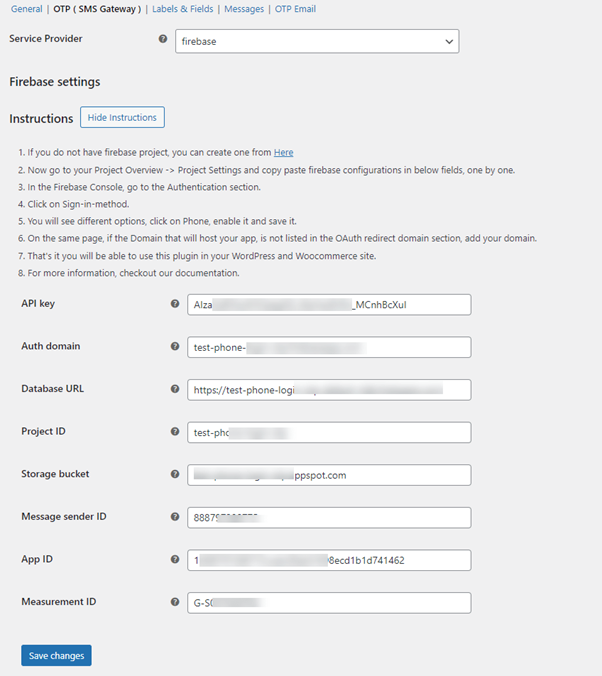
For Firebase:
You’ll need the following details:
- API Key
- Auth Domain
- Project ID
- Storage Bucket
- App ID
- Measurement ID
- Message Sender ID
All of these can be copied from your Firebase account dashboard.
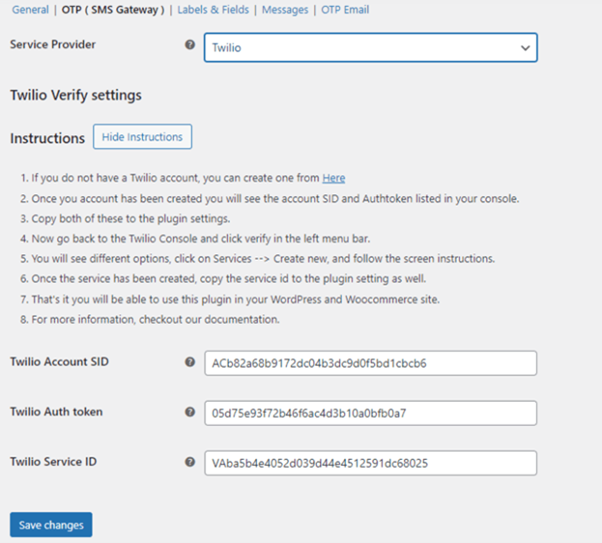
For Twilio:
Enter:
- Account SID
- Auth Token
- Service ID
Twilio is a popular choice for US-based stores due to its reliability.
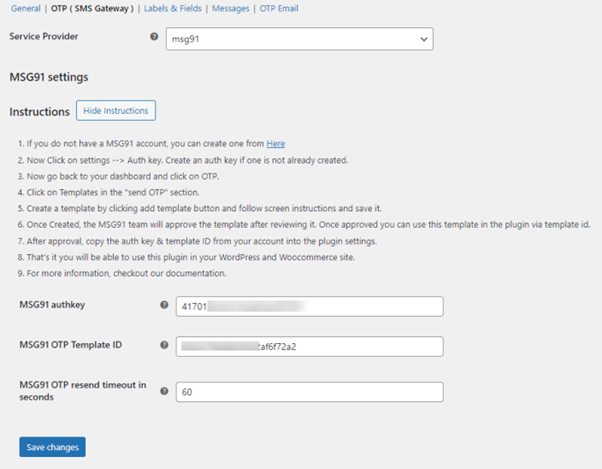
For MSG91:
You’ll need:
- Auth Key
- OTP Template ID
- Resend timeout (in seconds)
Choose the provider that fits your store location and audience.
Step 4: Customize Form Text and Buttons
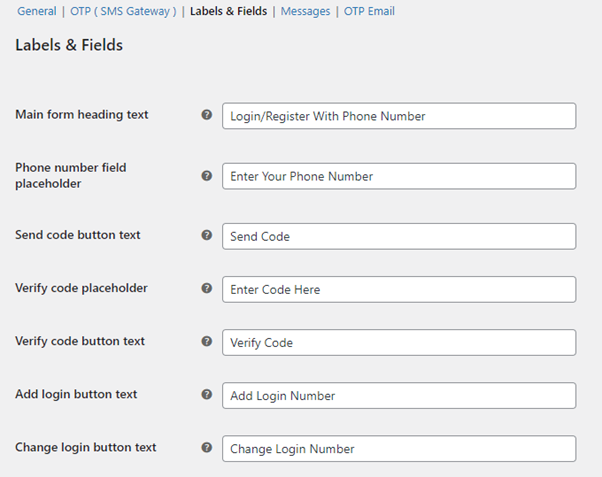
Next, go to the Labels & Fields Tab. You can change the text that users see on the form.
Editable fields include:
- Main heading (e.g., “Login with your phone”)
- Placeholder text (e.g., “Enter your number”)
- Send Code and Verify Code button texts
- Login and Register button labels
You can also set button and hover colors to match your website theme.
Step 5: Set Up System Messages
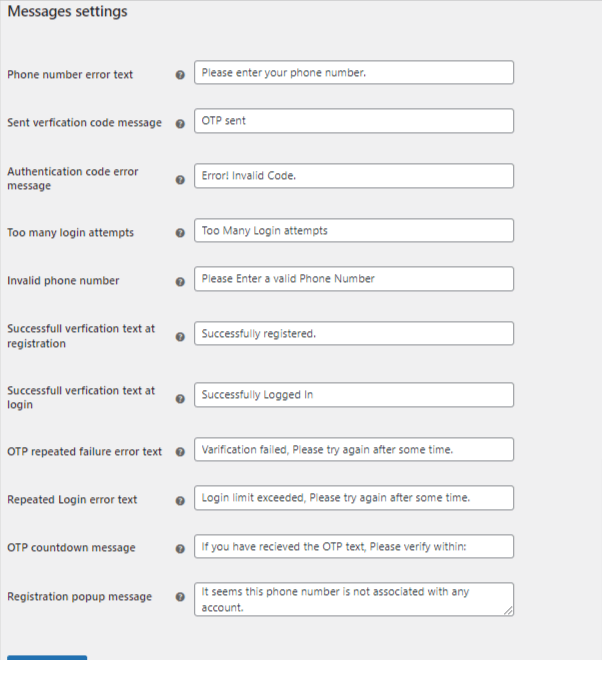
Now visit the Messages Tab. This is where you define what users see during login.
Important messages to set:
- Empty phone number error
- OTP sent confirmation
- Invalid OTP message
- Too many login attempts
- Successful login or registration
- OTP failure and countdown message
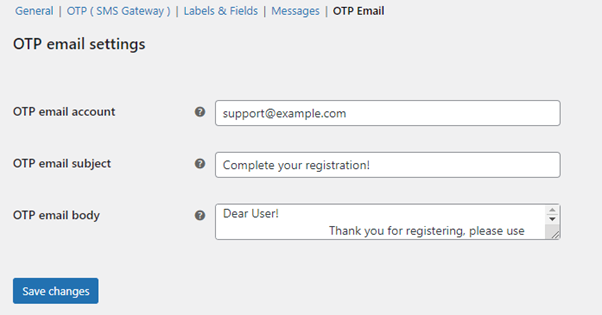
You can also configure the OTP email content here (optional):
- Sender email
- Email subject
- Body of the OTP message
Step 6: Test Everything
Before going live, test the full flow:
- Try registering with a new phone number
- Log in as a returning user using OTP
- Link a phone to an existing account
- Try checkout and confirm login is enforced if enabled
This setup takes just a few minutes but adds big improvements. With this plugin, login becomes faster, safer, and more mobile-friendly.
Who Should Use This Plugin?
Using phone number login is no longer just a nice feature. For modern WooCommerce stores, it’s becoming a must-have. It gives users a faster and easier way to access their account. It also helps store owners improve security and reduce fake registrations.
The Registration & Login with Mobile Phone Number for WooCommerce plugin is a smart choice for any store looking to upgrade its login process. It’s built for both simplicity and power. With just a few settings, your store can offer a smooth mobile login experience.
This plugin works well for many types of WooCommerce stores. Whether you’re just starting or running a high-traffic shop, it adds real value.
Best suited for:
- Stores with a mobile-first audience
- Subscription-based stores needing verified user logins
- Shops that want to reduce spam or fake signups
- USA-based businesses focused on customer trust and data security
- Retailers offering fast checkouts and digital goods
The flexibility to choose from Firebase, Twilio, or MSG91 makes it useful across different regions and industries.
Business Benefits at a Glance
When you use this plugin, you don’t just improve login. You also boost your store’s overall performance.
Key benefits:
- Lower cart abandonment with faster login
- Improved account security with OTP-based WooCommerce 2FA login
- Reduced support tickets related to forgotten passwords
- Increased user trust with verified phone numbers
- Better data collection for marketing and communication
You also get full control over how and where the login form appears on your site. This keeps your design clean and focused.
Final Tips for Store Owners
Before going live, test the login flow from a user’s view. To discover the ideal ratio of speed to security, experiment with different settings.
Twilio is frequently the greatest SMS choice if the majority of your audience is in the US. Keep your messages simple and your login form short. This helps users move quickly without confusion.
Conclusion
Adding mobile number login to your WooCommerce store is a smart move. It improves user experience and makes login fast and secure. It’s easy to administer and set up this plugin. It helps reduce spam and builds trust with real users.
If you have any concerns or need assistance setting it up:
- Reach out to WooHelpDesk
- Call us at +1 888 602 0119 (US & Canada)
We’re here to support your WooCommerce journey every step of the way. Make login easy. Make customers happy. Start with mobile login today.



