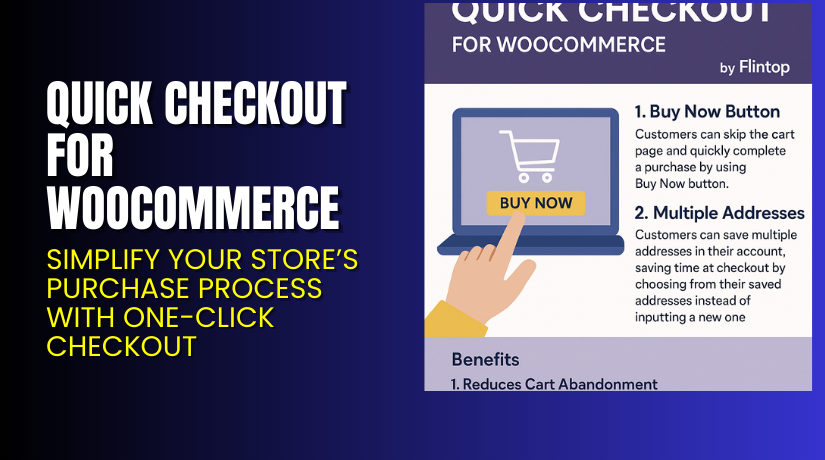
Quick Checkout for WooCommerce – Simplify Your Store’s Purchase Process with One-Click Checkout
Table of Contents
- Introduction
- What is Quick Checkout for WooCommerce?
- Features of Quick Checkout for WooCommerce
- How to Install and Configure Quick Checkout for WooCommerce
- Quick Checkout for WooCommerce – Pricing & Plans
- My Experience with Quick Checkout for WooCommerce
- Who Should Use This Plugin?
- Final Verdict
- FAQ
Introduction
Running a WooCommerce store can be challenging. Many store owners struggle with long checkout pages, abandoned carts, and low conversions. Customers often lose interest when the checkout process takes too much time. A slow or complicated checkout page can easily turn potential buyers away.
The goal of any online store is to make the buying experience quick and smooth. That’s where Quick Checkout for WooCommerce becomes helpful. It simplifies the process by allowing customers to complete their purchase in just a few clicks.
This plugin removes unnecessary steps from the checkout process. It helps you create a faster, single-page checkout that improves the user experience. As a result, it reduces cart abandonment and boosts sales.
In this article, we’ll explore Quick Checkout for WooCommerce, its features, installation steps, pros and cons, pricing plans, and user experience. You’ll learn how this plugin helps improve customer satisfaction and store performance.
👉 If you ever need help installing or troubleshooting any plugin or extension, please try our Installation & Troubleshooting Services.
What is Quick Checkout for WooCommerce?
Quick Checkout for WooCommerce is a plugin designed to simplify your WooCommerce checkout process. It replaces the default multi-step checkout with a fast, one-page checkout layout.
Developed by Flintop, this plugin helps store owners increase conversions and enhance the shopping experience. Customers can fill in details, review orders, and complete payments all on a single page. This means fewer distractions and a faster process.
The plugin is lightweight and optimized for performance. It works seamlessly with most WordPress themes and payment gateways. Whether you sell digital or physical products, this plugin helps ensure smooth and quick transactions.
It comes with both Free and Premium versions. The free version offers basic features, while the premium version unlocks advanced customization options and priority support.
Official Plugin Page: https://flintop.com/product/quick-checkout-for-woocommerce/
Support Page: https://flintop.com/contact/
Features of Quick Checkout for WooCommerce
| Feature | Description | Why It Matters |
| One-Page Checkout | Combines billing, shipping, and payment fields into one page. | Reduces checkout time and boosts conversions. |
| Ajax-Powered Loading | Updates checkout sections without reloading the page. | Improves speed and user experience. |
| Customizable Layout | Allows you to change the field order and design. | Matches your brand style easily. |
| Mobile-Friendly Interface | Optimized layout for all devices. | Ensures easy checkout from mobile or tablet. |
| Compatible with Popular Plugins | Works with major WooCommerce extensions. | Prevents conflicts and ensures flexibility. |
Each feature is designed to create a smooth experience for both the store owner and the customer. The faster checkout process helps reduce abandoned carts and increases customer satisfaction.
How to Install and Configure Quick Checkout for WooCommerce
- Download the plugin from the link.
- Go to your WordPress Dashboard → Plugins → Add New → Upload Plugin.
- Choose the plugin ZIP file and click Install Now.
- Once installed, click Activate Plugin.
- Navigate to WooCommerce → Settings → Quick Checkout to access configuration options.
- Customize layout, enable or disable fields, and test your checkout flow.
- Perform a test purchase to verify everything works properly with your theme and payment gateway.
💡 If you face any configuration or compatibility issues, you can try our Installation & Troubleshooting Services.
Quick Checkout for WooCommerce – Pricing & Plans
| 1 Year Plan | 2 Year Plan |
| $49 | $78.40 |
Subscription includes
|
Subscription includes
|
Buy Quick Checkout for WooCommerce Now


Purchase Here → Buy Quick Checkout Premium Now
💡 Your purchase supports the development team and helps create more quality plugins for WooCommerce users.
My Experience with Quick Checkout for WooCommerce
After testing Quick Checkout for WooCommerce on multiple WordPress sites, it performed consistently well. It installed easily, worked with different payment gateways, and didn’t slow down the website. The plugin greatly simplified the checkout process, reducing the steps customers take to complete a purchase.
Pros
- Easy setup and clean user interface.
- Lightweight and fast performance.
- Compatible with most themes and extensions.
- Excellent documentation and support from the Flintop team.
Cons
- Limited design control in the free version.
- Some premium features may feel basic for advanced developers.
Overall, this plugin delivers a reliable and quick checkout experience without requiring complex settings.
Who Should Use This Plugin?
- WooCommerce store owners who want a faster checkout process.
- Agencies managing multiple WordPress clients need performance-friendly plugins.
- Beginners who want a simple and easy setup process.
- Online shops aim to reduce abandoned carts and improve conversions.
This plugin is perfect for anyone who wants to provide a smoother shopping experience.
Useful Resources
- Official Plugin Page
- Official Plugin Support Page
- Developer Documentation
- WooHelpDesk Installation & Troubleshooting Services
Final Verdict
If you’re looking for a reliable WooCommerce plugin that speeds up your checkout process and improves customer experience, Quick Checkout for WooCommerce is worth trying. It’s stable, lightweight, and integrates smoothly with your existing store setup.
👉 Buy Quick Checkout for WooCommerce Premium Now
💡 Need help installing or fixing it? Try our Installation & Troubleshooting Services.
FAQ
Q1. Is Quick Checkout for WooCommerce compatible with all themes?
Yes, it works well with most standard WooCommerce themes. Always test before going live.
Q2. Can I use both free and premium versions together?
No, you’ll need to deactivate the free version before installing the premium one.
Q3. How do I get support for the plugin?
You can reach the Flintop team through the Official Support Page.



