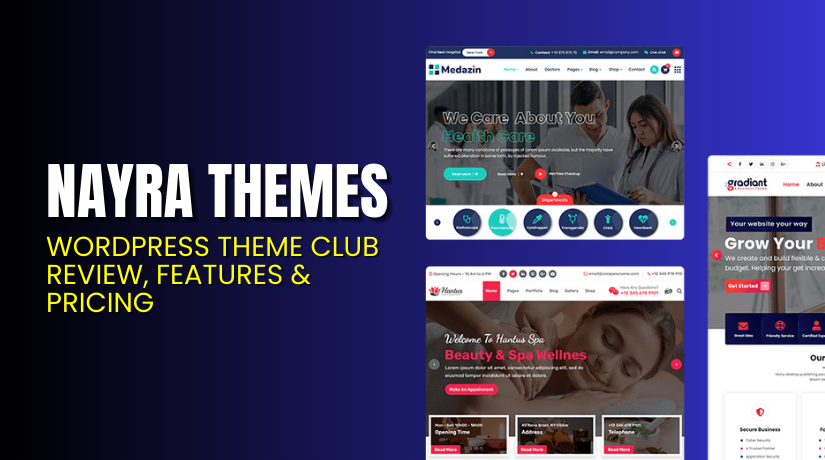
Nayra Themes – WordPress Theme Club Review, Features & Pricing
Table of Contents
- Introduction
- What Is Nayra Themes?
- Key Features of Nayra Themes
- Design Quality & Customization
- Performance, SEO & Technical Standards
- WooCommerce & Plugin Compatibility
- Pricing & Licensing Details
- Support, Documentation & Contact
- Pros & Cons of Nayra Themes
- Who Should Use This Theme Club?
- Theme Club vs Single Theme Purchase
- Final Verdict
- FAQ
Introduction
If you build WordPress sites often, you already know one truth: themes decide the first impression, and the setup time, and even how easy future changes will feel for you. Nayra Themes offers a pricing model that can suit personal site owners, solo freelancers, and small agencies that want a simple way to get premium themes with clear support options.
Instead of buying a theme at random, a theme club style plan helps you control costs, plan updates, and reduce the time you spend comparing feature lists on every new project.
In this review, you will learn what Nayra Themes sell, what each plan includes, what is missing in the lower plans, and how to pick the best option for your real needs.
You will also see the official USD pricing, the refund and payment notes shared on the pricing page, and the support and account points that matter after you purchase.
What Is Nayra Themes?
Nayra Themes sells premium access using multiple plan tiers, where each tier changes the number of sites you can use the theme on, the update period, and whether you get full access to their theme library.
The most important detail is that not every plan is a “theme club” plan in the usual sense, because the first three plans are focused on a single theme purchase style setup. If you only want one theme for one site, the Personal plan can work, but it does not include access to future themes, and it is not positioned as a full library plan.
If you want lifetime updates for a single theme, the Freelancer and Business plans use one-time payments, but they still show “Access to Future Themes” as not included. If you want broad access, the Agency plan is where the model changes, because it includes access to all 50+ themes and includes access to future themes as well.
Nayra Themes lists four main plans on the official pricing page, and each plan is built around a clear use case and a clear payment style for that audience.
Below is a simple summary before we go deeper into details, so you can quickly match the plan to how you actually work.
- Personal: For one site, yearly payment, one theme focus, one year updates and support.
- Freelancer: For one site, one-time payment, lifetime updates and support, still one theme focus.
- Business: For unlimited sites, one-time payment, lifetime updates and support, still one theme focus.
- Agency: For unlimited sites, yearly payment, access to all 50+ themes, access to future themes, plus one year updates and support.
Key Features of Nayra Themes
The pricing grid shows the core features clearly, but it helps to understand what each item means when you are actually building and maintaining WordPress sites.
- 1 Site License vs Unlimited Site License
A one site licenses best when you run a single website, because you only need to activate and use the theme on one domain, and you do not need multi-client reuse. An unlimited site license is built for people who build many sites, because it allows repeated use without buying another license every time you start a new client project.
- 1 Year Support and Updates vs Lifetime Support and Updates
When a plan lists one year support and updates, it means you get help and theme update access during that year, which is useful if you want a yearly budget cycle. When a plan lists lifetime support and updates, it usually means you can keep downloading updates for that product without renewal, which can feel safer for long-term sites.
- One Click Demo Install
One click demo install is useful when you want a ready layout quickly, because you can import sample pages, menus, and basic styling, then replace content with your own. This matters for freelancers and agencies, because demo import can reduce project time and make client previews look polished very early in the process.
- Priority Support and Ticket Support
Priority support often means your requests are handled faster than standard queues, which matters when a client site is stuck during launch week or a marketing campaign. Ticket support is useful because it keeps a record of fixes and replies, and it is easier to track what was asked, what was answered, and what still needs work.
- Refund Policy Window
A refund window gives buyers a way to test fit, but you should still read the refund conditions, because many theme shops require a valid reason, not just a change of mind.
Design Quality & Customization
Design quality is not only about pretty screenshots, because a theme must also keep spacing consistent, keep typography readable, and give you controls that reduce custom code. Nayra Themes positions its products as “high-quality themes,” and most premium theme buyers expect flexible headers, clean blog layouts, widget-ready sections, and layout controls.
Even if you plan to use a page builder, the base theme still matters because it controls global styles, core templates, and how fast you can keep the site looking consistent. If you buy a single theme plan, you should choose your theme carefully because you do not get access to future themes, so switching later could mean a second purchase.
If you choose the Agency plan, you can test multiple themes in the library, then pick the best fit for a client niche without buying again when a design direction changes.
Performance, SEO & Technical Standards
Speed and SEO do not come from the theme alone, but the theme can either support good performance practices or create heavy load through extra scripts and bloated layout parts. A good premium theme should keep code clean, load only what is needed, and avoid forcing too many bundled effects that slow the site on mobile connections.
Your real-world results will also depend on hosting, caching, images, and plugins, but a well-built theme can still reduce the work needed to reach strong scores. If you choose a plan with only one year updates, you should consider how you will handle future compatibility, because WordPress changes often, and updates matter for security.
If your budget allows it, lifetime updates can feel safer, because you can keep your theme compatible over time without worrying about a renewal lapse.
To keep your themes updated, secure, and optimized, try our WordPress Maintenance & Care Services
WooCommerce & Plugin Compatibility
- Many buyers want a theme that works well with WooCommerce, because online stores need clean product pages, stable cart flows, and layouts that do not break under plugin updates.
- Nayra Themes includes business and agency style tiers that fit developers, and those users often build WooCommerce sites, so store compatibility is a key decision point.
- The safest approach is to pick a theme that clearly supports WooCommerce templates, then test product pages, category pages, cart, checkout, and account pages on staging first.
- If you are on a single theme plan, confirm WooCommerce layout support before purchase, because switching themes later can cause layout changes across shop pages.
- If you are on the Agency plan, you can choose a theme from the full library that best matches a store niche and brand style, which reduces the risk of being locked in.
Pricing & Licensing Details
Nayra Themes Pricing Table
| Plan | Price (USD) | Payment Type | License Scope | Updates | Support | Theme Library Access | Access to Future Themes |
| Personal | $39 | Yearly Payment | 1 Site License | 1 Year Theme Updates | 1 Year | Single Theme | No |
| Freelancer | $59 | One Time Payment | 1 Site License | Lifetime Updates | Lifetime | Single Theme | No |
| Business | $99 | One Time Payment | Unlimited Site License | Lifetime Updates | Lifetime | Single Theme | No |
| Agency | $149 | Yearly Payment | Unlimited Site License | 1 Year Theme Updates | 1 Year | Access All 50+ Themes | Yes |
Important Notes


- Full refund within 15 days from the date of purchase for sound reasons from you such as: the theme you purchased is malfunctioning, corrupt or does not work as claimed AND you are getting mediocre support.
For the latest pricing changes, users should always verify details on the official Nayra Themes pricing page.
Support, Documentation & Contact
Nayra Themes lists its support portal on Ticksy, which is a ticket-based support system that usually works well for structured help and tracking follow-ups.
For sales and general questions, they provide a contact page on their site, which is useful when you need account help that is not a theme bug. A good support workflow is important when you are doing client work, because even a small issue can delay launch, and clients care about timelines more than causes.
Ticket support is also useful because you can attach screenshots, login details for staging, and steps to reproduce, which helps support teams reply faster with accurate fixes.
To avoid delays, always include your WordPress version, PHP version, theme name, and a short list of active plugins when opening a support ticket.
Pros & Cons of Nayra Themes
Pros
- The pricing is clear, and the plan differences are easy to compare on one page.
- One-time plans include lifetime updates and lifetime support for a single theme, which can be great for long-term single-site projects.
- Business plan offers unlimited site license with a one-time payment, which can suit developers who reuse one theme style repeatedly.
- Agency plan includes access to all 50+ themes and includes access to future themes, which fits agencies that need variety and faster matching.
- All plans list one click demo install, ticket support, and priority support, which can reduce setup time and reduce support stress.
Cons
- The first three plans do not include access to future themes, so you must choose your theme carefully or accept that switching later may cost more.
- Agency plan is yearly, not lifetime, so long-term agencies should plan renewals if they want ongoing updates and support and continued club style access.
- Buyers who want lifetime library access will not find it here, because the lifetime terms are tied to a single theme, not a full club library.
- The refund FAQ suggests refunds depend on valid reasons, so it is not a “no questions asked” setup for every buyer.
- If you need many themes but also want lifetime updates, you may need to weigh yearly Agency against one-time single-theme plans.
Who Should Use This Theme Club?
- Nayra Themes is a solid fit for WordPress users who want clear pricing, simple plan choices, and a path that matches how they build sites, rather than forcing one bundle on everyone.
- If you run a personal blog, portfolio, or a small local service site and you only need one theme, the Personal plan can work because it supports one site and simple yearly budgeting.
- If you are a freelancer who builds one main brand site and you want long-term stability without renewals, the Freelancer plan can make sense because it offers lifetime updates and support.
- If you build many sites with a consistent look and you prefer repeating a proven theme on multiple client domains, the Business plan can be a strong value because it gives unlimited use.
- If you are an agency or a small studio that needs many design options across industries, the Agency plan is the best match because it includes access to all 50+ themes and future themes.
- This setup is also useful for people who want to test several themes before committing, because library access helps you compare layouts without repeated purchases.
- If you prefer predictable help channels, the Ticksy support portal can suit you well, because tickets make it easier to handle ongoing fixes, follow-ups, and client handovers.
Theme Club vs Single Theme Purchase
- Nayra Themes offers both styles depending on the plan you choose, and understanding this difference is important because it changes how flexible you will be six months from now.
- A single theme purchase style plan works best when you already know the exact theme you want, because you buy once and you build around that theme’s design and layout options.
- The Freelancer and Business plans follow this style, because they offer lifetime support and updates but still focus on a single theme, not a full library that changes over time.
- This can be a smart choice if you reuse the same theme repeatedly, because the learning curve drops, your setup process becomes fast, and clients get a consistent build approach.
- A theme club plan works best when you need variety across projects, because different niches need different layouts, and a library saves you from buying a new theme for every client.
- On Nayra Themes, the Agency plan acts like the theme club option, because it includes access to all 50+ themes and includes access to future themes as new releases arrive.
- The tradeoff is that Agency is a yearly payment model, so you should plan renewals if you want continued updates, support, and ongoing access as the library grows.
- In simple terms, single theme plans favor long-term stability for one design, while the theme club plan favors flexibility and speed when you build different websites often.
Final Verdict
Nayra Themes gives buyers a clear choice between single-theme lifetime plans and a broader theme club style agency plan, which is helpful because it matches different working styles.
If you want long-term updates for one theme and you do not want renewals, the one-time plans are appealing, especially for freelancers or developers who build a repeatable site system.
If you want real theme club value, the Agency plan stands out because it includes access to all 50+ themes and includes access to future themes for ongoing new project options.
Before you buy, decide whether you need variety or stability, and make sure the theme you want fits your site type, especially if you plan to use WooCommerce.
For hassle-free updates and performance management, try our WordPress Maintenance & Care Services.
FAQ
Q1 Do you offer refunds?
Nayra Themes mentions a refund window in the pricing FAQ, and it says refunds are considered within the stated days when there are sound reasons like a theme not working properly.
To stay safe, test the theme quickly after purchase, check demo import, check key pages, and document any issues with screenshots before requesting a refund.
Q2 Which payment gateways do you accept?
The pricing FAQ mentions card payment support, and it lists common card networks and also notes that some users can purchase through PayPal based on their setup.
If your payment fails, try another card or contact support through the contact page to confirm what options are available for your country.
Q3 I can’t login to my account. What should I do?
If you cannot log in, the pricing FAQ suggests resetting your password and checking your email folders, because automated reset emails can land in spam or promotions tabs.
If you still cannot access your account, use the contact page so the team can help you recover access and confirm your purchase details.
Q4 Will I lose my data when I upgrade from free to premium?
The pricing FAQ explains that upgrading from free to premium means you may deactivate and delete the free version and install the premium version from Nayra Themes.
Your content remains in WordPress, but you should still take a full backup first, then test the premium version on staging to avoid layout surprises.
Q5 My subscription expired and I do not wish to renew. What happens?
The pricing FAQ explains that your website can keep working after your subscription ends, but you will not get theme updates and support unless you renew the subscription.
If your site is business critical, plan updates before expiry, or renew so you can stay compatible with WordPress and plugin changes.
Q6 Why was I charged again?
The pricing FAQ explains that Nayra Themes uses an annual support subscription approach for certain purchases, which can lead to renewal charges based on subscription terms.
If you did not expect a renewal, contact support quickly with your order details so they can explain the charge and help you manage your renewal settings.