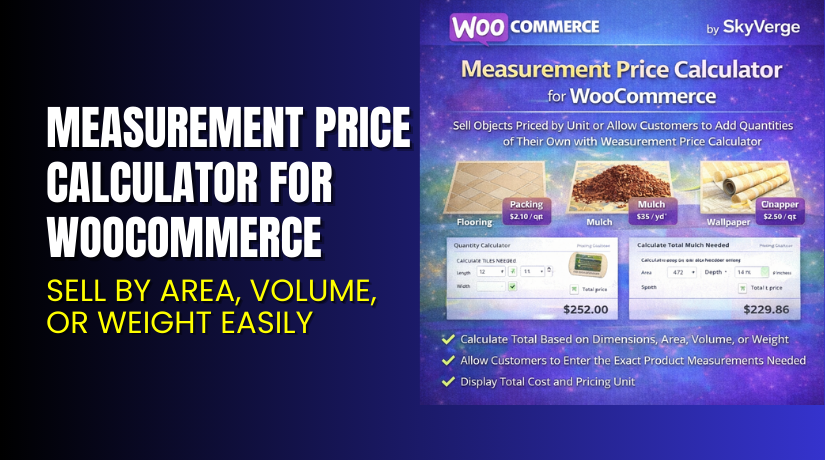
Measurement Price Calculator for WooCommerce – Sell by Area, Volume, or Weight Easily
Table of Contents
- Introduction
- What is Measurement Price Calculator for WooCommerce?
- Key Features of Measurement Price Calculator
- How to Install and Configure Measurement Price Calculator
- Pricing & Plans
- My Experience with Measurement Price Calculator
- Who Should Use This Plugin?
- Final Verdict
- FAQ
Introduction
Running a WooCommerce store with physical goods can get complicated.
If you sell items like tiles, fabric, mulch, or wallpaper, you already know the headache. These products are not sold in regular quantities. You need to calculate price based on area, length, volume, or weight.
Doing that manually creates friction for buyers and errors for you.
This is where Measurement Price Calculator for WooCommerce solves a critical need.
It helps automate complex price calculations for custom-sized items. It adds a powerful calculator directly to your product pages.
In this guide, you’ll learn what this plugin does, how to install it, and why it’s trusted by 6,000+ stores.
You’ll also get a clear view of its pricing, pros & cons, and whether it’s right for your store.
Need help setting up plugins like this? Try our Installation & Troubleshooting Services.
What is Measurement Price Calculator for WooCommerce?
Measurement Price Calculator is a pricing plugin built for WooCommerce stores.
It’s designed for sellers of custom-sized products. This includes tiles, fabric, flooring, mulch, coffee, and many others.
Instead of setting fixed prices, you define unit pricing based on:
- Area (e.g., square feet or meters)
- Volume (e.g., cubic yards)
- Weight (e.g., pounds or kilograms)
- Length (e.g., yards, feet)
- Perimeter or surface area
The plugin supports both pre-defined measurements and user-defined inputs.
For example:
- A tile box that covers 35 sq. ft. can be priced automatically.
- A customer ordering 12 feet of fabric will see price calculated instantly.
The plugin is developed by SkyVerge, a well-known WooCommerce partner. It comes in a paid version only.
It’s a perfect solution for sellers who want to offer flexible, accurate pricing options without coding.
- Official Plugin Page: Measurement Price Calculator by SkyVerge
- Documentation: Plugin Setup Guide
- Support: SkyVerge Support Page
Key Features of Measurement Price Calculator
| Feature | Description | Why It Matters |
| Two Calculator Modes | Supports quantity-based and user-defined input pricing | Handles both fixed size and custom-size product pricing |
| Unit-Based Pricing | Prices set by ft², yd³, lb, etc. | Provides accurate pricing for real-world product measurements |
| Dynamic Shipping Weight | Calculates shipping based on unit weight | Avoids undercharging or overcharging shipping fees |
| Inventory Management by Unit | Tracks stock per foot, yard, etc. | Maintains correct inventory levels for variable-size items |
| Custom Measurement Labels | Rename units and fields per product | Increases clarity for buyers on product pages |
| Price Table Support | Create rules for bulk/volume discounts | Incentivizes customers to buy more with price breaks |
| Variable Product Support | Works with WooCommerce variable products | Offers flexible pricing across variations (like color, size) |
How to Install and Configure Measurement Price Calculator
Setting up the plugin is easy. Here are the steps:
- Purchase the plugin from the official WooCommerce SkyVerge product page.
- Download the plugin ZIP file after purchase.
- Log in to your WordPress Dashboard.
- Go to Plugins → Add New → Upload Plugin.
- Upload the ZIP file and click Install Now.
- After installation, click Activate Plugin.
- Go to WooCommerce → Settings → Products → Measurement.
- Configure default settings and define units like ft, m², or kg.
- Edit your product and add measurement fields under the “Product Data” section.
- Set price per unit, minimum and maximum values, and labels.
- Test your product page to verify calculations and compatibility.
Need help during installation? Try our Installation & Troubleshooting Services.
Pricing & Plans
| Plan | Price | Includes |
| 1-Year Plan | $149 | Plugin license, updates, and support for 1 year |
| 2-Year Plan | $238.40 (Save 20%) | Plugin + updates for 2 years |
- Billed annually
- Includes support and free updates
- 30-day money-back guarantee
Buy Measurement Price Calculator Now
Ready to automate your custom product pricing?
Get the plugin from the official SkyVerge website and install it today.


Buy Here → Get Measurement Price Calculator from SkyVerge
Your purchase helps support SkyVerge’s continued development and lets us create more tutorials.
My Experience with Measurement Price Calculator
I tested this plugin on a live WooCommerce store selling custom-sized fabric.
Pros:
- Easy to install and configure
- Clean user interface on product pages
- Great for product types with flexible measurements
- Saves time for store managers
- Dynamic pricing works instantly
- Inventory by unit is accurate
- Documentation is helpful
Cons:
- No free version available
- Limited styling control without CSS
- Some bugs reported in recent reviews
- Requires some WooCommerce knowledge to configure properly
Overall, the plugin is solid. It performs exactly as promised if set up properly.
Who Should Use This Plugin?
This plugin is ideal for:
- WooCommerce stores selling products based on measurement
- Agencies managing product catalogs with complex pricing
- DIY store owners who need simple configuration and flexibility
You’ll benefit most if your products vary in size, volume, or length.
Useful Resources
- Official Plugin Page – SkyVerge
- Plugin Documentation – Setup & Configuration
- Developer Contact Page – SkyVerge
- Get Installation Help – WooHelpDesk
Final Verdict
If you sell any kind of product that depends on measurement, Measurement Price Calculator is a must-have.
It replaces manual calculations with smart automation. This improves the customer experience and reduces pricing errors.
It’s reliable, well-supported, and actively maintained by SkyVerge.
Get it today from the official developer and simplify your store’s pricing.
Buy Now → Purchase Measurement Price Calculator Plugin
Need help with setup? Try Installation & Troubleshooting Services.
FAQ
Q1. Is Measurement Price Calculator compatible with all WooCommerce themes?
Yes, it works with most modern WooCommerce themes. Always test it on staging first.
Q2. Can I use both 1-year and 2-year licenses together?
No, you’ll need to choose one plan. Both come with full features.
Q3. How do I get technical support for the plugin?
You can contact SkyVerge via their Support Page.



