La Beauté Theme for WooCommerce – Stylish Beauty & Cosmetics Theme with Expert Insights
Table of Contents
- Introduction
- What is La Beauté Theme for WooCommerce?
- Features of La Beauté Theme for WooCommerce
- How to Install and Configure La Beauté Theme
- La Beauté Theme for WooCommerce – Pricing & Plans
- My Experience with La Beauté Theme
- Who Should Use This Theme?
- Final Verdict
- FAQ
Introduction
Running a WooCommerce store is not easy. You must handle products, orders, customers, and design at the same time. Many store owners use several plugins to improve design, layout, or user experience. But too many tools often slow the site and create conflicts. Many beginners also face issues with theme setup. They find it hard to customize pages. They struggle with slow layouts, unclear sections, or low conversions. Some themes look good but load slowly. Some themes break after updates. Some themes do not support WooCommerce deeply. These issues affect sales and user experience.
Most store owners want a clean, fast, and modern design without coding skills. They need a theme that loads fast, works on all devices, and supports beauty or wellness products. This is where La Beauté Theme for WooCommerce helps. It is designed for beauty, salon, spa, makeup, and cosmetic stores.
In this article, we will explore La Beauté Theme, its features, setup steps, pros and cons, pricing, and how it compares to other themes. You will understand if it suits your WooCommerce store.
👉 If you ever need help installing or troubleshooting any theme or plugin, please try our Installation & Troubleshooting Services.
What is La Beauté Theme for WooCommerce?
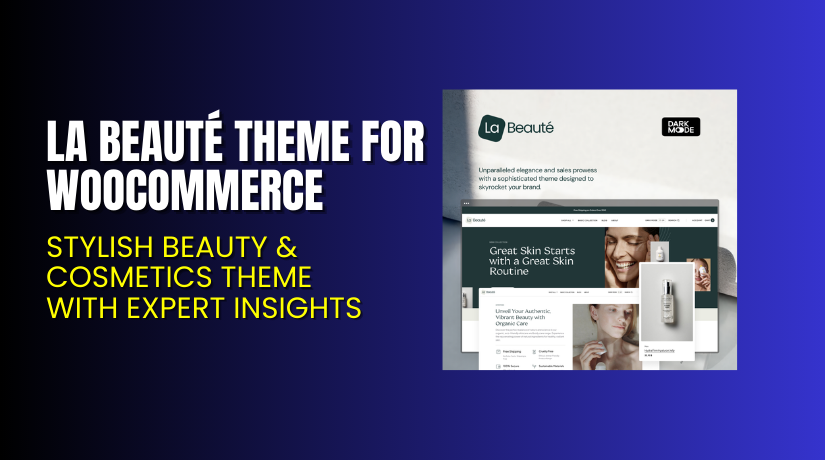
La Beauté Theme for WooCommerce is a premium theme built for beauty, wellness, cosmetic, salon, and skincare stores. It offers modern layouts, clean visuals, and easy customization tools. The theme helps store owners create a stylish shop without coding. Every section is built to highlight products and improve customer trust.
This theme is designed by WooCommerce Marketplace Developers and sold on the official WooCommerce website. It is built with strong code and tested for WooCommerce compatibility. It works smoothly with product pages, checkout pages, and cart flow. You can use it for small shops, studio sites, and full beauty brands.
La Beauté comes with ready templates, header choices, footer layouts, product grids, and strong mobile support. The theme focuses on modern design and fast loading. It gives store owners a professional look in minutes. There is no free version because it is a premium-only theme.
It is one of the best choices for beauty and wellness stores that want a clean and elegant design with easy setup.
Official Plugin Page: https://merchantsbestfriends.com/
Support Page: https://merchantsbestfriends.com/
Features of La Beauté Theme for WooCommerce
| Feature | Description | Why It Matters |
| Beautiful Product Layouts | Offers clean and modern product designs. | Helps store owners display products clearly. |
| Mobile-Friendly Pages | All pages work well on mobile devices. | Improves user experience and increases sales. |
| Fast Loading Templates | Theme is optimized for speed. | Faster sites help improve conversions and SEO. |
| Easy Customizer Options | You can change colors and fonts easily. | Saves time and avoids complex coding tasks. |
| Multiple Homepage Layouts | Offers several starter templates. | Helps store owners launch their shop quickly. |
| WooCommerce Deep Integration | Supports cart, checkout, and product pages fully. | Ensures smooth shopping flow for customers. |
How to Install and Configure La Beauté Theme
Follow these steps:
- Go to WordPress Dashboard → Appearance → Themes → Add New.
- Click Upload Theme and select the downloaded ZIP file.
- Install and activate the theme.
- Go to Appearance → Customize.
- Configure basic settings like logo, fonts, colors, and layout.
- Import demo content if you want a ready design.
- Test the site on mobile and desktop for layout issues.
- Check compatibility with your existing plugins.
💡 If you face any setup or styling issues, you can try our Installation & Troubleshooting Services.
La Beauté Theme for WooCommerce – Pricing & Plans
| Monthly | Annually |
| $8.25 | $99 |
Subscription includes
|
Subscription includes
|
Buy La Beauté Theme Now
Purchase Here → Buy La Beauté Theme


💡 Your purchase supports the development team and helps me create more helpful tutorials.
My Experience with La Beauté Theme
After testing the La Beauté Theme on a beauty and skincare store, here is what I found:
Pros
- Very clean and modern design for beauty stores
- Easy setup with simple customization steps
- Works well with WooCommerce blocks
- Fast loading on mobile devices
- Good support from the WooCommerce marketplace
- Smooth product display layouts
- Helpful demo import system
Cons
- No free version available
- Limited advanced styling options
- Slightly high price for small stores
- Requires good hosting for the best speed
Who Should Use This Theme?
This theme is ideal for:
- Beauty and makeup stores need elegant layouts
- Salon, spa, and wellness websites
- Cosmetic brands and skincare stores
- WooCommerce store owners want a simple setup
- Agencies building sites for beauty clients
- Beginners who want a powerful yet easy theme
Useful Resources
- Official Theme Page
- Official Support Page
- Developer Documentation
- WooHelpDesk Installation & Troubleshooting Services
Final Verdict
If you want a clean, modern, and fast theme for your beauty store, La Beauté Theme for WooCommerce is a great choice. It delivers strong design and smooth shopping flow. It does not slow down your site. It works well on all devices and offers ready layouts for quick launch. It is perfect for beauty, salon, spa, and cosmetic shops.
Use the link below to get started and unlock premium features.
👉 Buy La Beauté Theme Now
💡 Need help installing or fixing it? Try our Installation & Troubleshooting Services.
FAQ
Q1. Is La Beauté Theme compatible with all WooCommerce plugins?
Yes, it works with most standard WooCommerce plugins. Always test before going live.
Q2. Can I use demo templates?
Yes, the theme includes demo layouts for quick setup.
Q3. How do I get support?
You can contact the official team using the WooCommerce Support Page.